

 Zyntra OS
 Zyntra Legal
 Zyntra Real Estate
 Zyntra Hotel
 Zyntra E-commerce
 Zyntra Appointments
 Zyntra Repair
 Zyntra Garage
 Zyntra Concierge
 Zyntra Contracting
 Zyntra Clinic
 Zyntra Dental
 Zyntra School
 Zyntra University
 Zyntra Call Center
 Zyntra OTA
Flowrica
Flowrica watches your business and tells you first
Every morning, without being asked, Flowrica looks through your own records for what looks wrong — and tells the person who can act on it, with the next step ready.
What she watches
Each one measured against your own habits, not a generic rule.
Paying later than usual
An open invoice older than that customer's own usual time to pay. She offers to send a reminder.
Past due with no reminder
An invoice past its due date that nobody has reminded the customer about. She offers to send the reminder.
A quote expires today
A sent quote whose last day is today, told at once. She offers to remind the customer.
Ordering far less than usual
A customer whose orders have slowed far below their own habit. She suggests a call.
Running out of stock
An item that will run out soon at the pace it has been going out — told at once when it is days away. She offers to reorder.
A product's margin dropped
A product earning clearly less in the last month than in the months before, against the cost held on the item. She offers a review.
An expense far above its usual
A new expense far above what its category usually costs your company. She offers a review.
Spending far above its habit
An expense or a vendor bill far above what that vendor usually charges you. She offers a review.
The same amount paid twice
The same amount to the same vendor twice within a few days. She offers a review before it is too late.
In all, she watches 49 things
35 kinds each morning, and 14 more of her own jobs that tell the right person on their own. Each one is on from the start, and each company can switch it off or change its limit.
Over its credit limit
A customer whose open invoices and orders have passed the credit limit you gave them.
Paying later and later
A customer who takes a little longer to pay every month.
Invoiced and not delivered
An invoice whose goods have still not left the warehouse after a few days.
Billed goods not arrived
A supplier's bill for goods that have not all arrived.
Goods received and not billed
Goods you received that no supplier bill covers yet.
A bill that does not match its order
A supplier's bill whose quantities or prices differ from its purchase order.
A purchase order past its delivery date
A purchase order past its delivery date with nothing received, with the contract's late penalty when there is one.
A new customer that may be a duplicate
A customer added this week who looks like one you already have: the same phone, email or tax number.
A new vendor that may be a duplicate
The same check for a new vendor.
A payroll run to check before it is closed
A payroll run, before it is closed, with a salary far from last month or a missing bank account.
An asset due for its service
A machine that has run past its service hours.
Stock about to expire
A lot about to expire, with a discount to offer the customers who bought it.
A project past its deadline
A project past its deadline and not closed.
A blocked task
A task that cannot move because something before it is not done.
A task nobody is assigned to
A task with nobody on it.
A deal past its expected close
A deal whose expected close date has passed.
A deal stuck in its stage
A deal that has sat in the same stage far too long.
A lead going cold
A lead nobody has contacted for a long time.
A contract ended with work still running
A contract that has ended while work under it is still running.
An expense with no receipt
An expense recorded without its receipt.
A billable expense never billed
An expense you can bill to a customer that was never billed.
A ticket nobody is assigned to
A support ticket nobody is handling.
Mail that failed to go out
Emails to your customers that failed to go out.
No backup taken
No backup of your data has been taken.
An asset that cannot depreciate
An asset left out of depreciation because something it needs is missing.
An automation rule that keeps failing
An automation rule that keeps failing.
See it working
Pictures of a made-up company, taken from Zyntra OS itself.
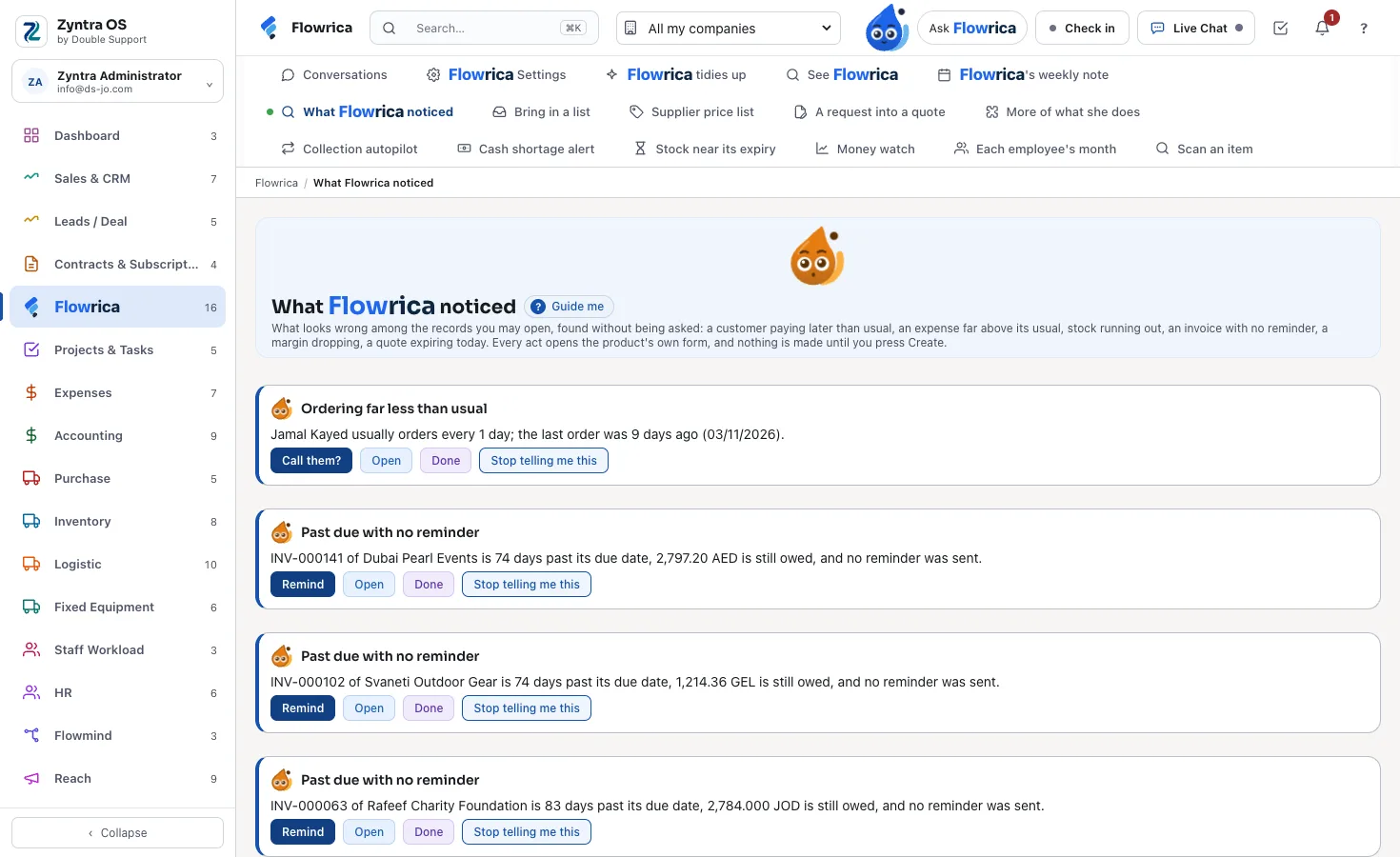
What Flowrica noticed
What looks wrong among the records you may open, each with her next step, Open, Done and «Stop telling me this».
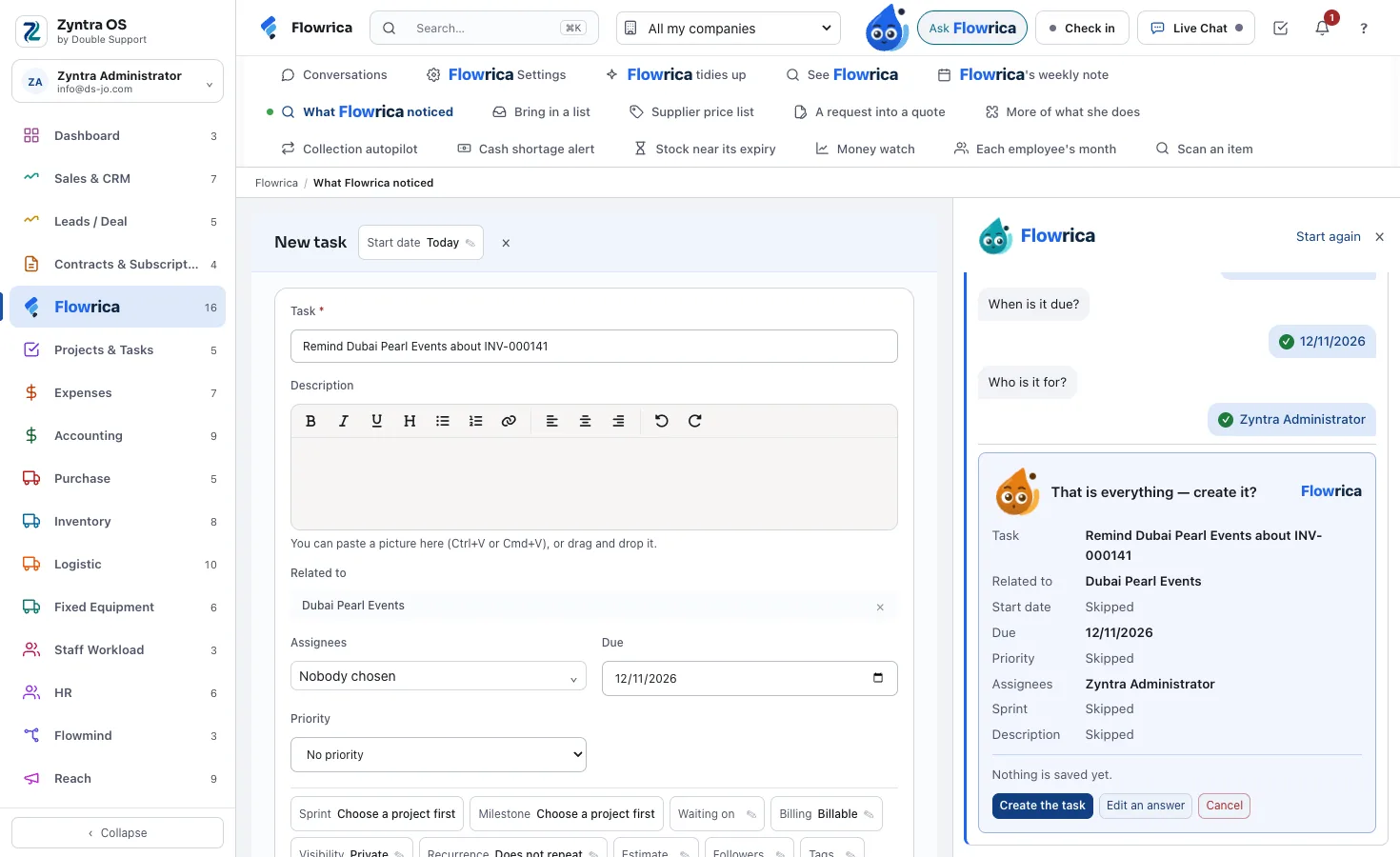
Her next step, ready
The task form filled for you, and her own Create or Cancel — nothing is made until you press Create.
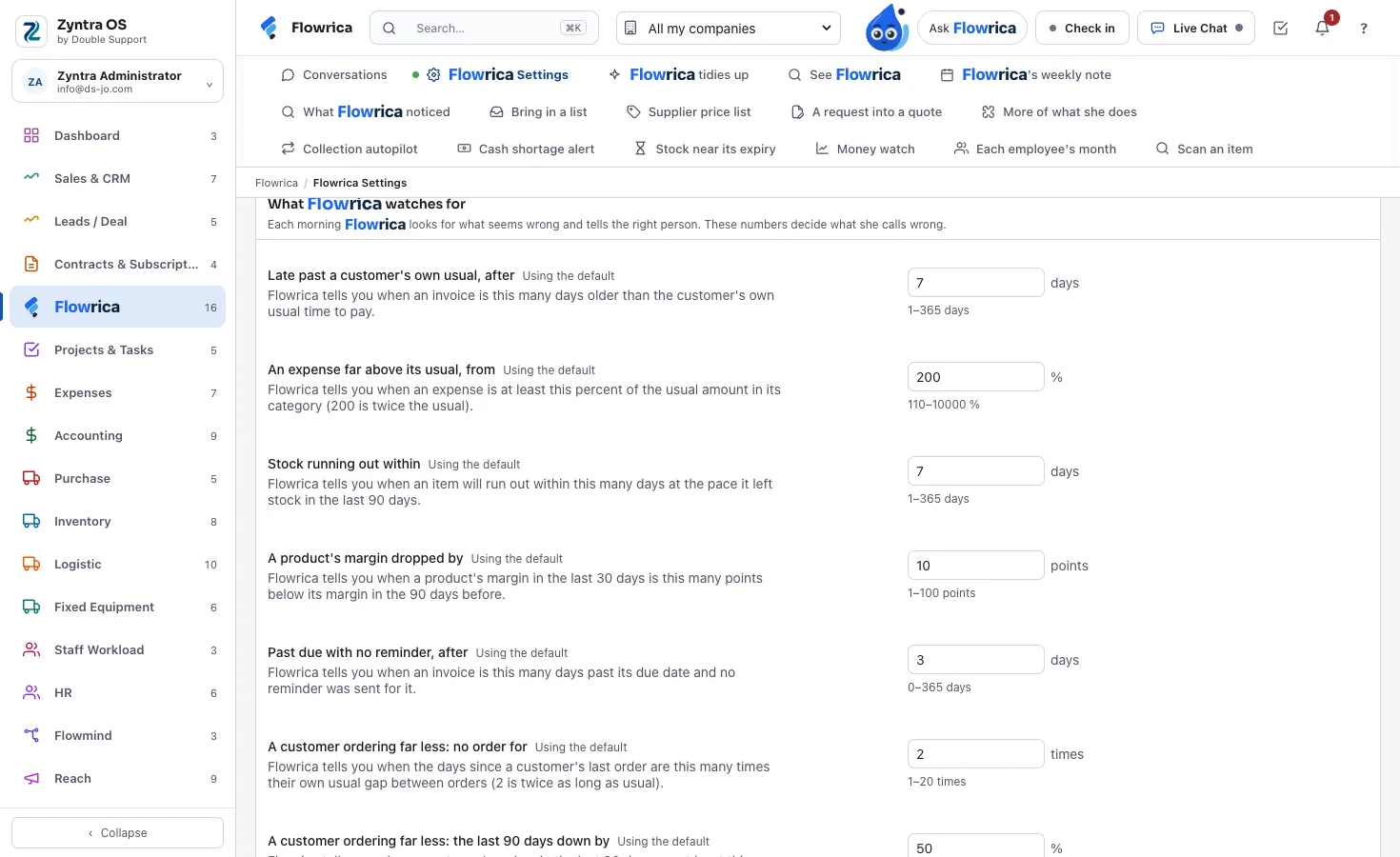
Your company's own limits
Flowrica Settings: how late is late and how high is unusual, each kind with its own number.
Told to the right person, and only to them
She watches the way your own staff would want to be told.
Only what your rights show
Each person is told only about records they can open: a salesperson about their own invoices, the manager about every company's.
One summary a day
The urgent ones ring the bell at once; the rest arrive together as one «Flowrica noticed» a day.
Your own settings
How late is late, and how high is unusual, are your company's own settings. Anyone can say «Stop telling me this».
Nothing leaves
Her watch runs inside Zyntra OS on your own records. It sends nothing to anyone outside, and it changes nothing until you confirm.
Questions about Flowrica's watch
Do I have to set up a rule for each of these?
No. She watches all of them from the start; each company can change how sensitive each one is.
Will my staff be told about records they cannot see?
No. She looks as each person, through their own rights, and reads the record again under their rights when they open it.
Does she act on her own?
No. She suggests the next step — a reminder, a review, a reorder, a call — and it is done only when you press Create.
See what Flowrica would tell you
We show her on your own kind of records.
Talk to us See the prices +962 795 900 124 info@double-support.com