

 Zyntra OS
 Zyntra OTA
Why Zyntra OS
One system for the whole company — more in it than you would expect
Zyntra OS is made by Double Support in Amman. It runs sales, accounting, HR, projects, inventory, logistics and much more behind one sign-in, in Arabic and in English, for one company or several. Below is every part of its menu, what each one really does, and a picture of it working with sample data.
Zyntra OS in numbers
40modules you switch on when you need them
350+screens, every one in Arabic and English
20+report screens
67ready connections, at no extra charge
16payment gateways for your invoices
2+Arabic and English built in · any language through Setup › Translations
26areas Flowrica answers in
800+rights to decide who sees and does what
8,000+automated tests guarding it
1sign-in for all your companies — the software sets no limit on how many
JoFotaraJordan’s national e-invoicing, live
ZATCAready for Saudi e-invoicing
What people do not expect to find
When people compare Zyntra OS with other systems, these are the things they are often surprised are already there:
- Arabic and English on every screen, right to left, each person in their own language — and Arabic invoices and PDFs.
- Any language: Zyntra OS can work in any language. Arabic and English are built in, fully right-to-left. For another language, Setup › Translations gives your team every sentence in one spreadsheet. You fill it in, send it back from the same screen, and we switch your language on.
- Several companies in one Zyntra, switched from the top bar; each company sees only its own records, and a parent sees its companies together.
- Flowrica, the assistant beside every screen: she answers from your records and prepares the work, and you press the button.
- JoFotara built in, and ZATCA-ready: an invoice issued in Zyntra is submitted to Jordan’s National Invoicing System and comes back with its QR code; Saudi invoices are built for ZATCA, ready to send once your company switches it on.
- A portal for your customers — invoices, statements, proposals, contracts to sign, tickets, projects — and one for your vendors.
- Rights on every screen and every record: own, team or everything, checked by the system itself.
- Nothing is deleted: records are archived and can be brought back, and the audit trail cannot be edited by anyone.
- Outlook beside your email: the sender’s records next to the message, and two-way calendar sync.
- Modules you switch on when you need them, without moving to another system.
What you would pay extra for elsewhere — included here
With other systems, these often come as a separate fee, a paid add-on or a partner’s project. In Zyntra OS they are part of it:
- No setup fee. The price you build on the pricing page is the price on our invoice.
- National e-invoicing — JoFotara live, ZATCA-ready — is in the base price, never an add-on.
- Arabic — every screen, every document — is not a language pack.
- The 67 ready connections — payments, messages, email, calendars, shipping, cloud files, imports from your old system, automation and more — at no extra charge; each runs on your own account with the provider.
- The client portal in Zyntra Legal — a law office’s clients follow their cases there, in its price.
- Flowrica is in the base price; Flowrica Advance, which reads papers and drafts words, is an option.
- Several companies in one Zyntra.
- Expenses, projects, tasks, sprints, the calendar, contracts, subscriptions and backups are in the base, not extra modules.
Every module of the menu
Selling, from the first lead to the signed contract
Pictures of a sample company, taken from Zyntra OS itself.
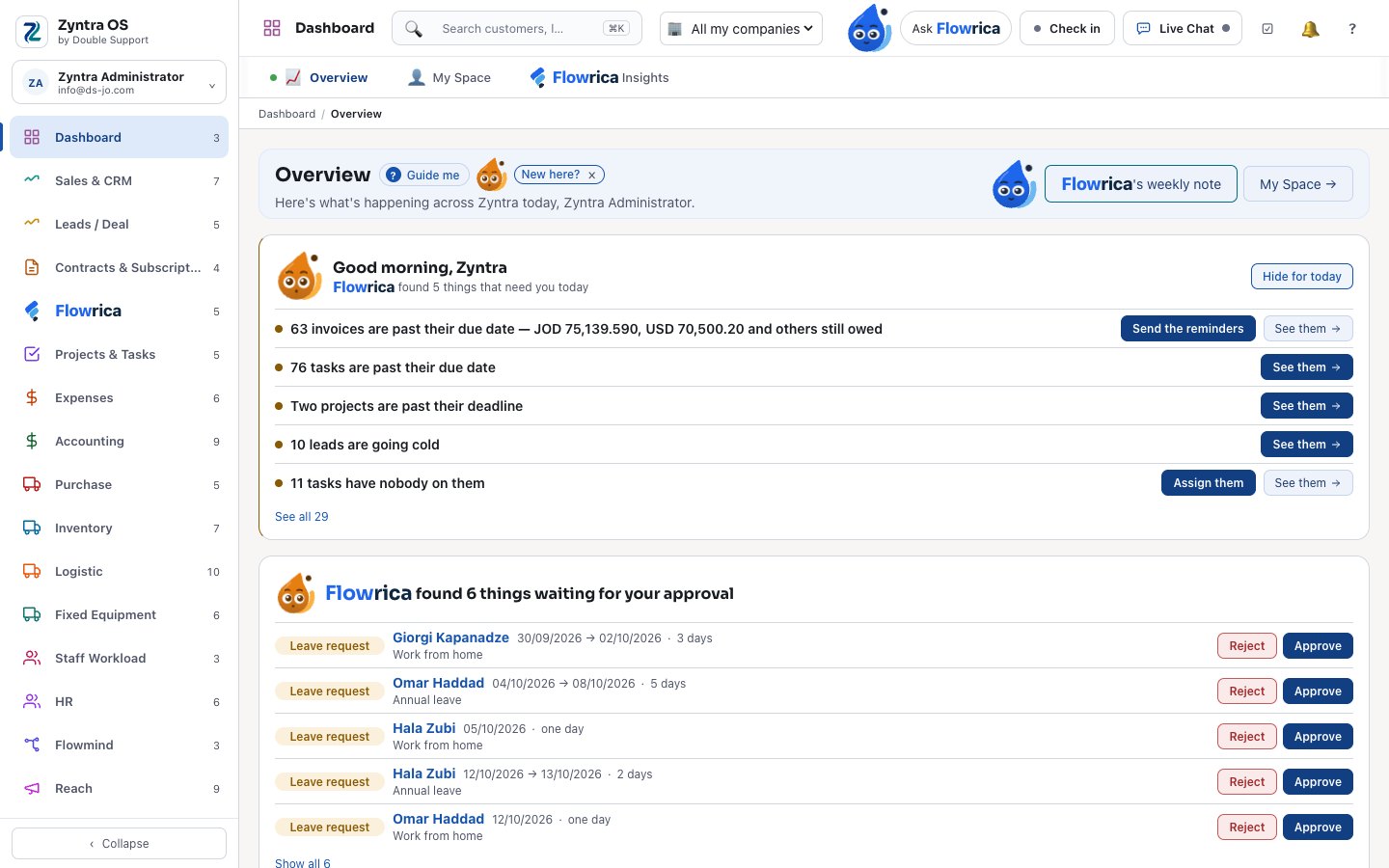
Dashboard
The company at a glance, and each person’s own day in My Space.
- Overview of sales, money and work in one place
- My Space: your tasks, reminders and calendar
- One calendar with tasks, projects, sprints and events as layers, synced both ways with Outlook
- Flowrica Insights: what needs your attention
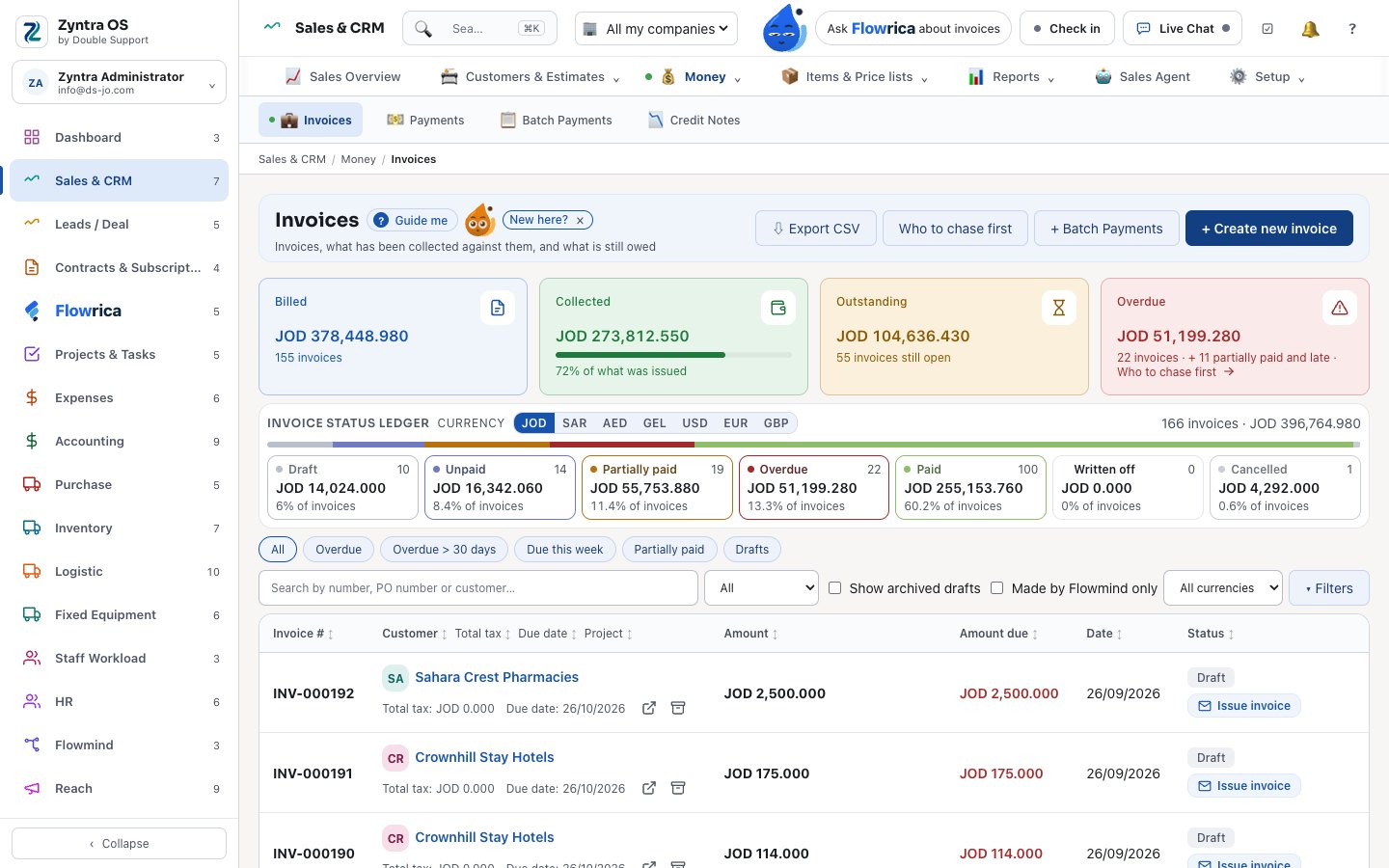
Sales & CRM
Customers, proposals, estimates, sales orders, invoices and payments in one flow.
- Proposals the customer accepts online — and you see when they opened it and read the prices
- Sales orders with credit limits, deposits and partial invoicing
- Recurring invoices, a reminder ladder and online payment
- Customer statements, price lists per customer, and sales agents’ commissions
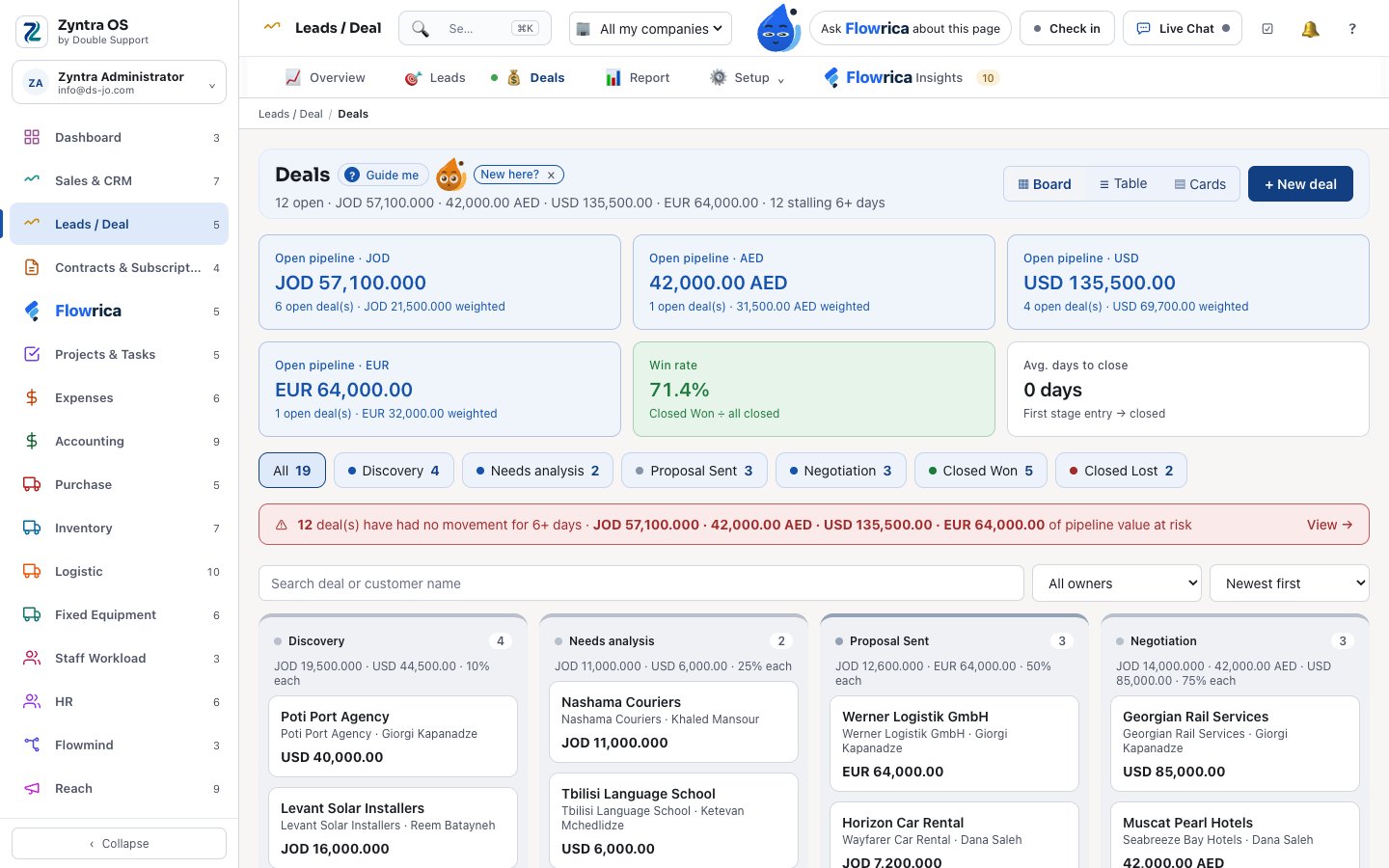
Leads / Deal
From the form on your website to a won deal — and a won deal opens its project.
- Web forms that bring leads in, routed to the right owner
- Lead score, duplicates and follow-up sequences
- A deal board with stages, and the deals that are stalling
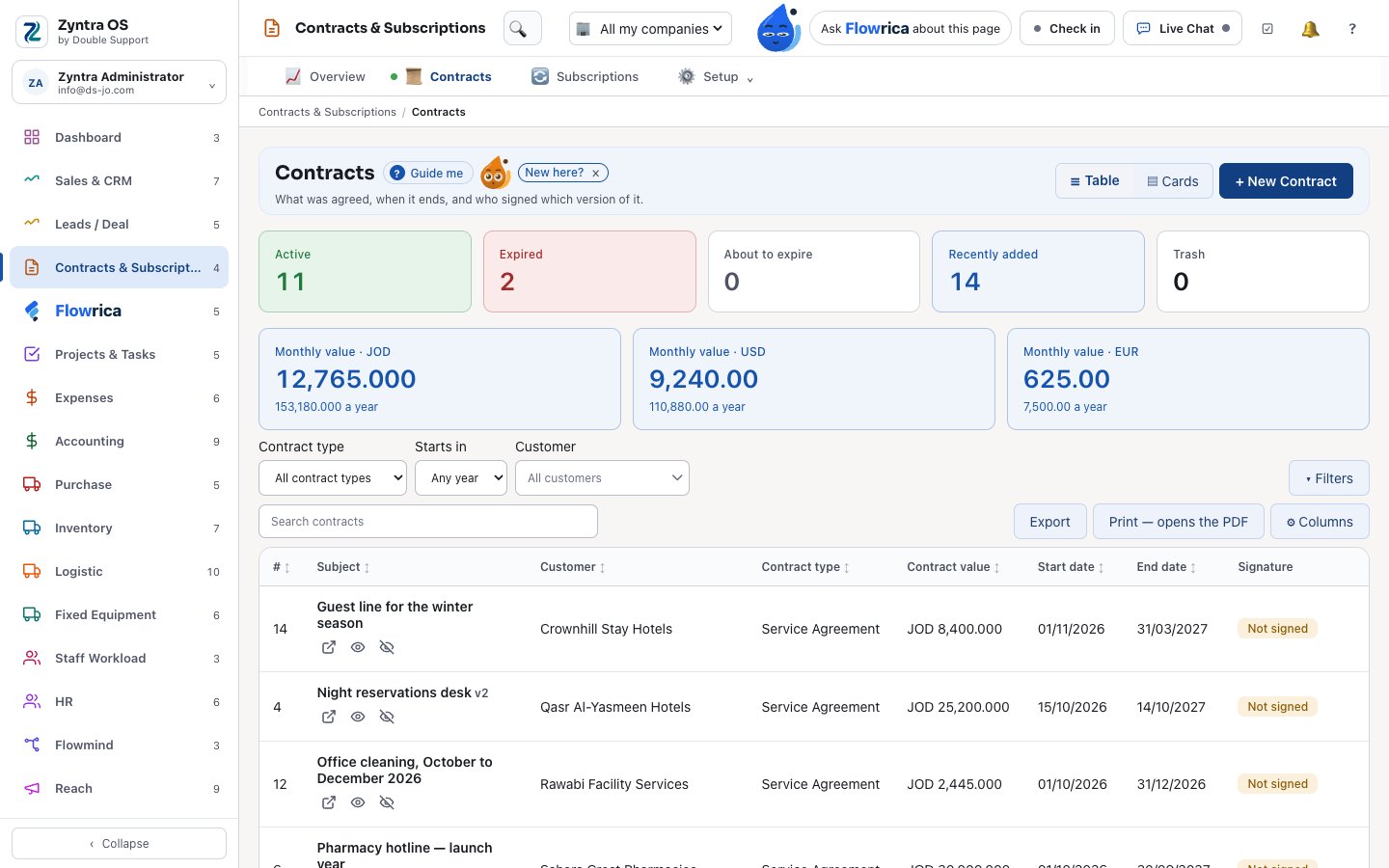
Contracts & Subscriptions
Contracts your customers sign online, and subscriptions that bill themselves.
- Versioned contracts; a signed one is renewed, never edited
- Renewals on their own, with reminders and follow-ups
- Subscriptions with plans, coupons, usage, pause and proration
- Monthly recurring revenue by currency
Flowrica
What Flowrica can do — question by question
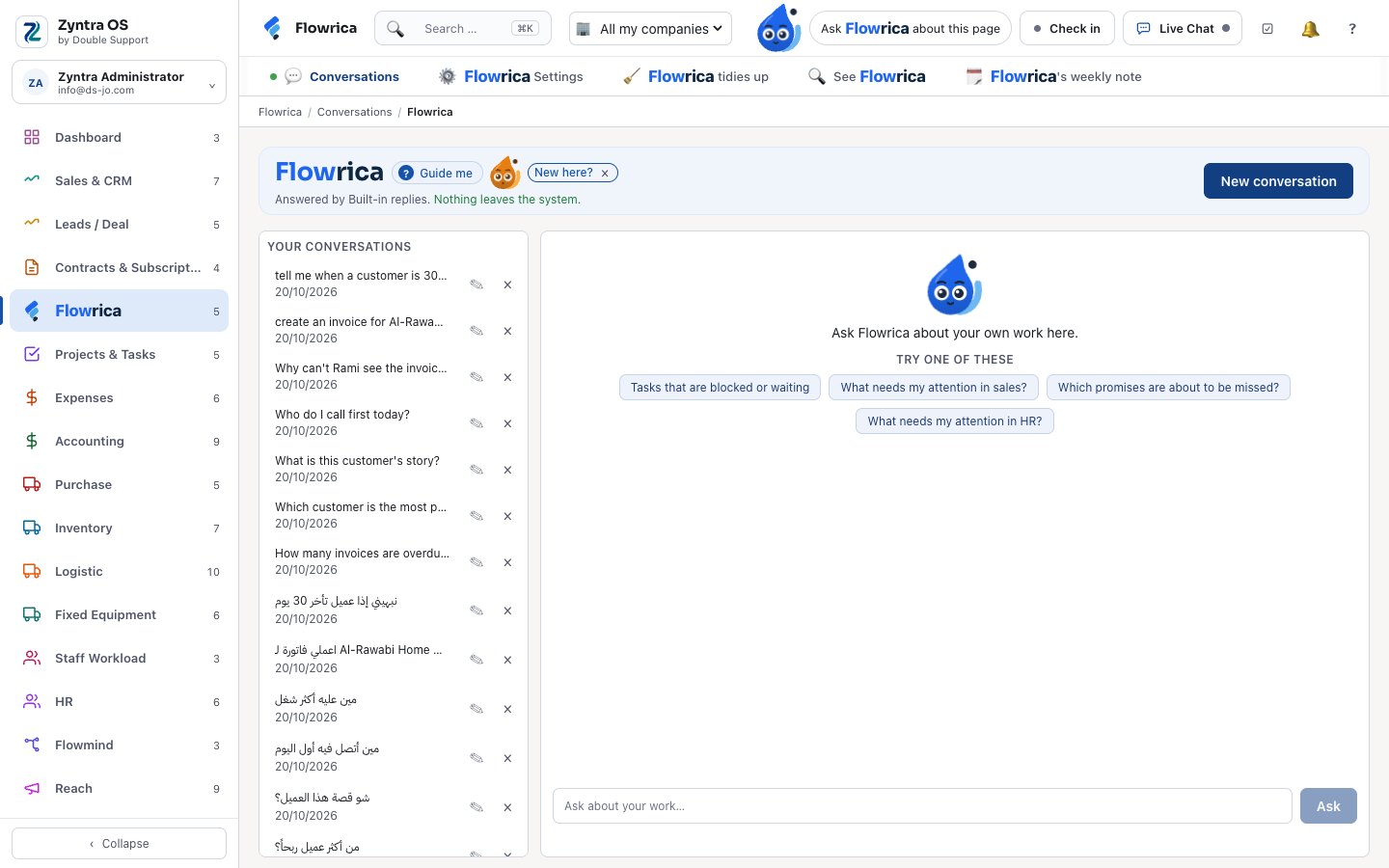
She sits beside every screen of Zyntra OS. She only tells each person what they are allowed to open, shows where every answer came from, and never sends, saves or deletes anything on her own: she prepares, and you press the button.
She answers in Arabic or English, including everyday Jordanian words.
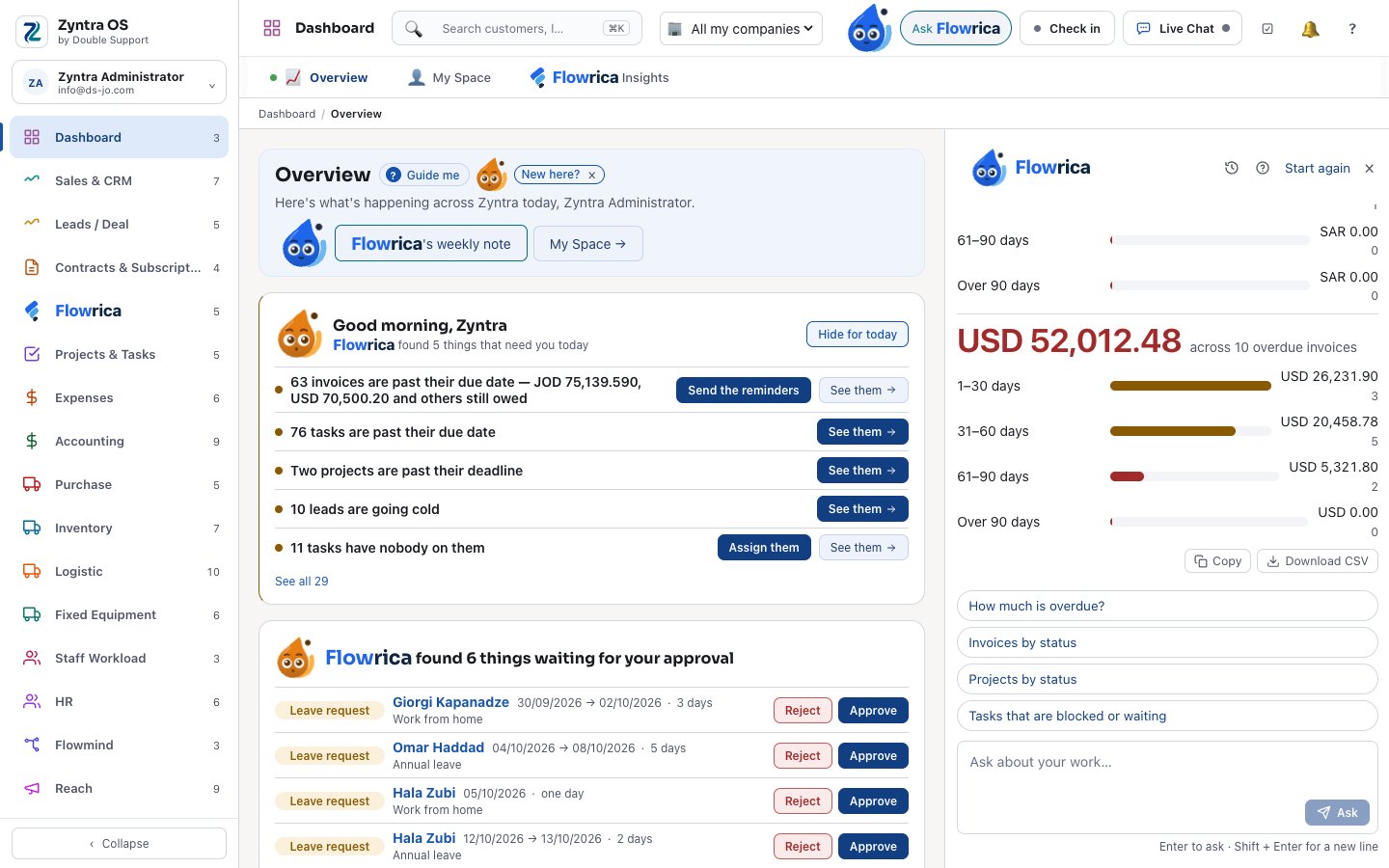
Step 1 of 17
Ask about your own numbers
You ask: “How many invoices are overdue?” She answers with the count and the invoices themselves, each one opening its own page.
- Answers from your records, never from the internet — a question outside the business is politely refused
- “Where did you get this?” shows the records behind every answer
- Amounts in different currencies are never added together
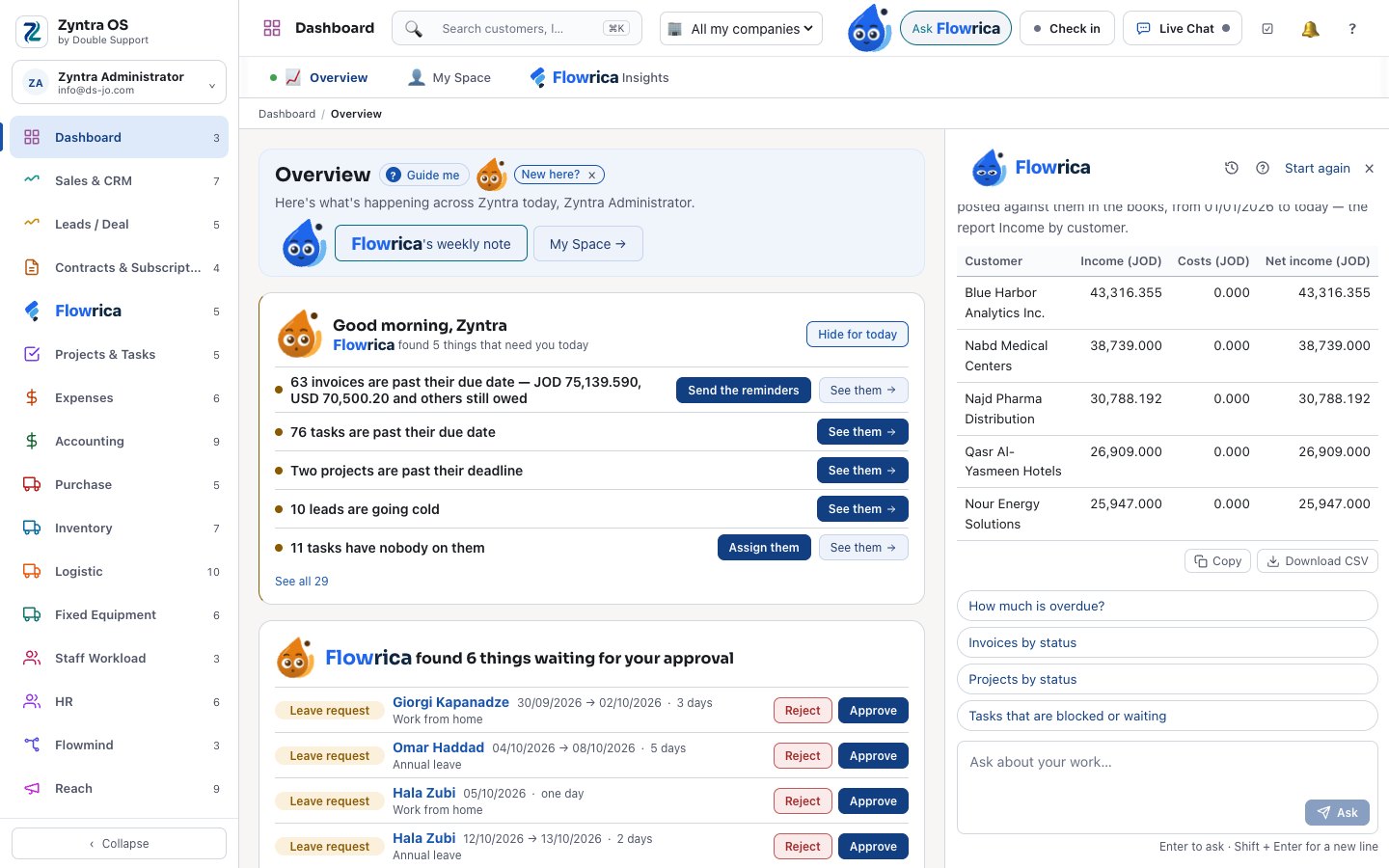
Step 2 of 17
The manager’s questions
You ask: “Which customer is the most profitable?” She answers from the books — each customer’s income, costs and net income — as a table you can copy or download.
- “What do we expect to collect this month?”
- “Show me a breakdown of our service desk workload” opens the right report
- With Flowrica Advance, questions that cross modules: “Customers with running projects and unpaid invoices”
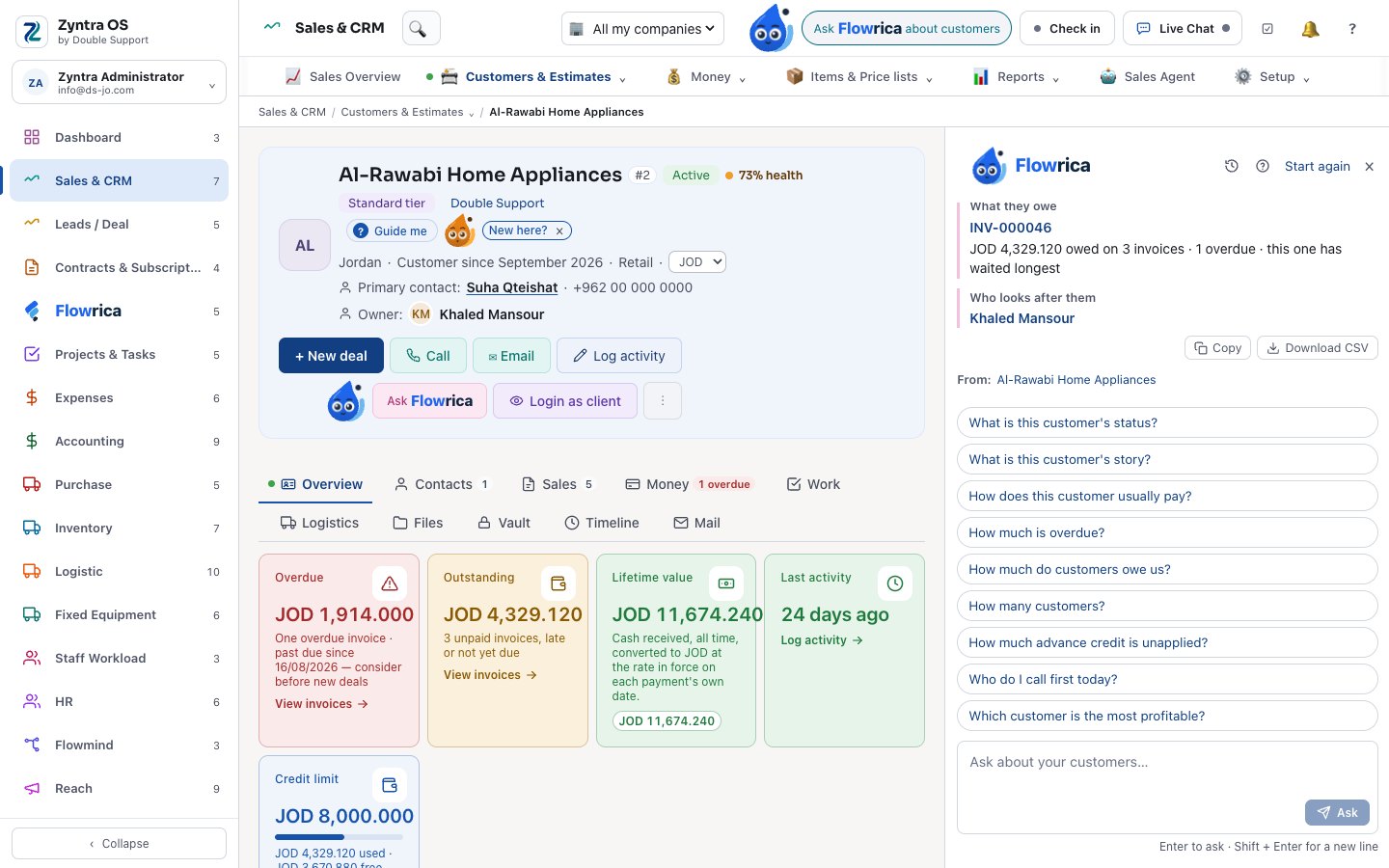
Step 3 of 17
A customer’s story in five lines
On a customer’s page you ask: “What is this customer’s story?” She tells it in about five lines: what they bought, what they owe, how they pay, what is open.
- The same for a deal or a project
- “How does this customer usually pay?”
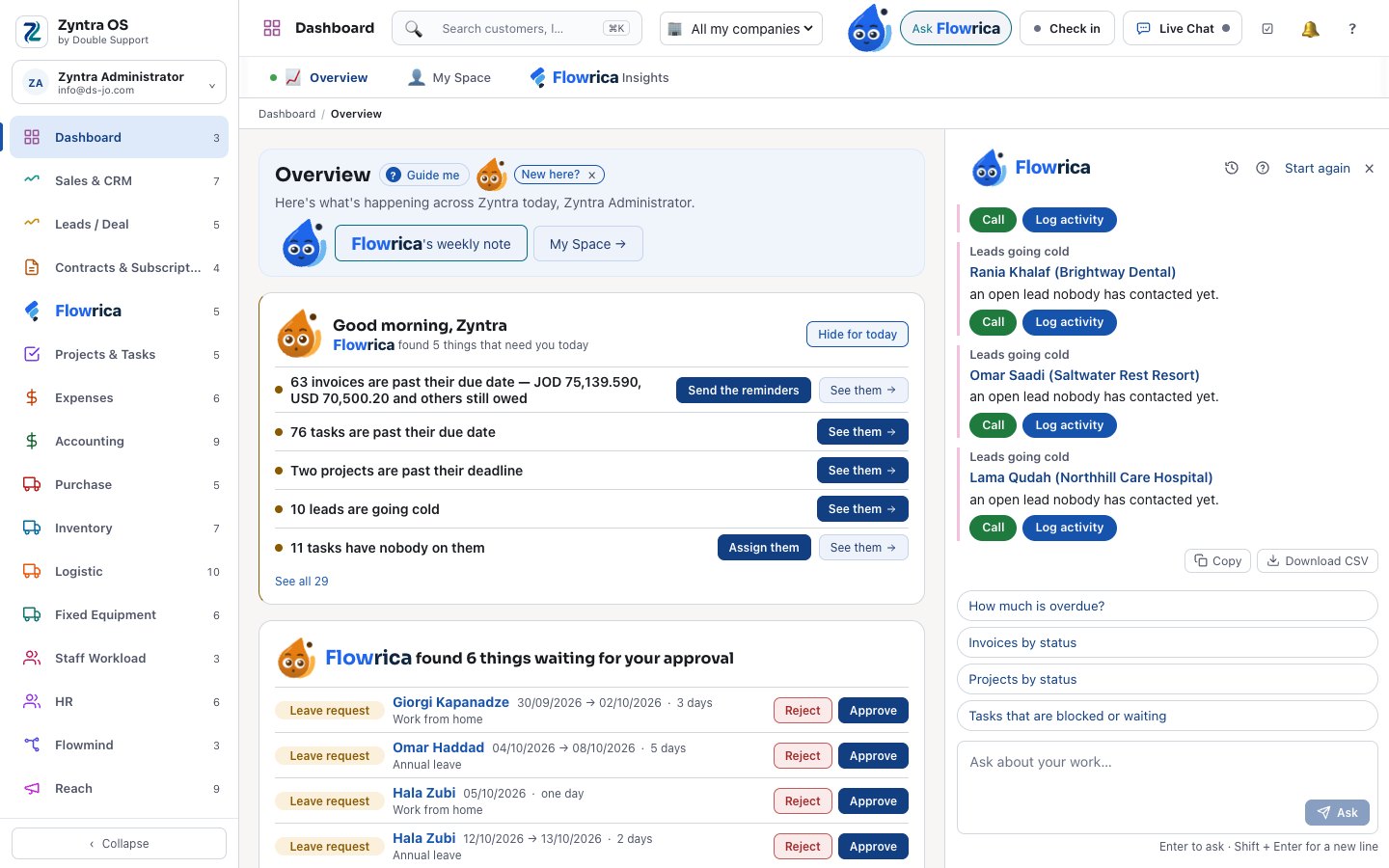
Step 4 of 17
Who to call first, and what next
You ask: “Who do I call first today?” She lists the customers to chase first, and on a deal, what worked in similar deals.
- A morning brief and your approvals on the dashboard
- A weekly note, and Flowrica Insights: “why is this number so?”
- After you save, she suggests the next page — she never acts
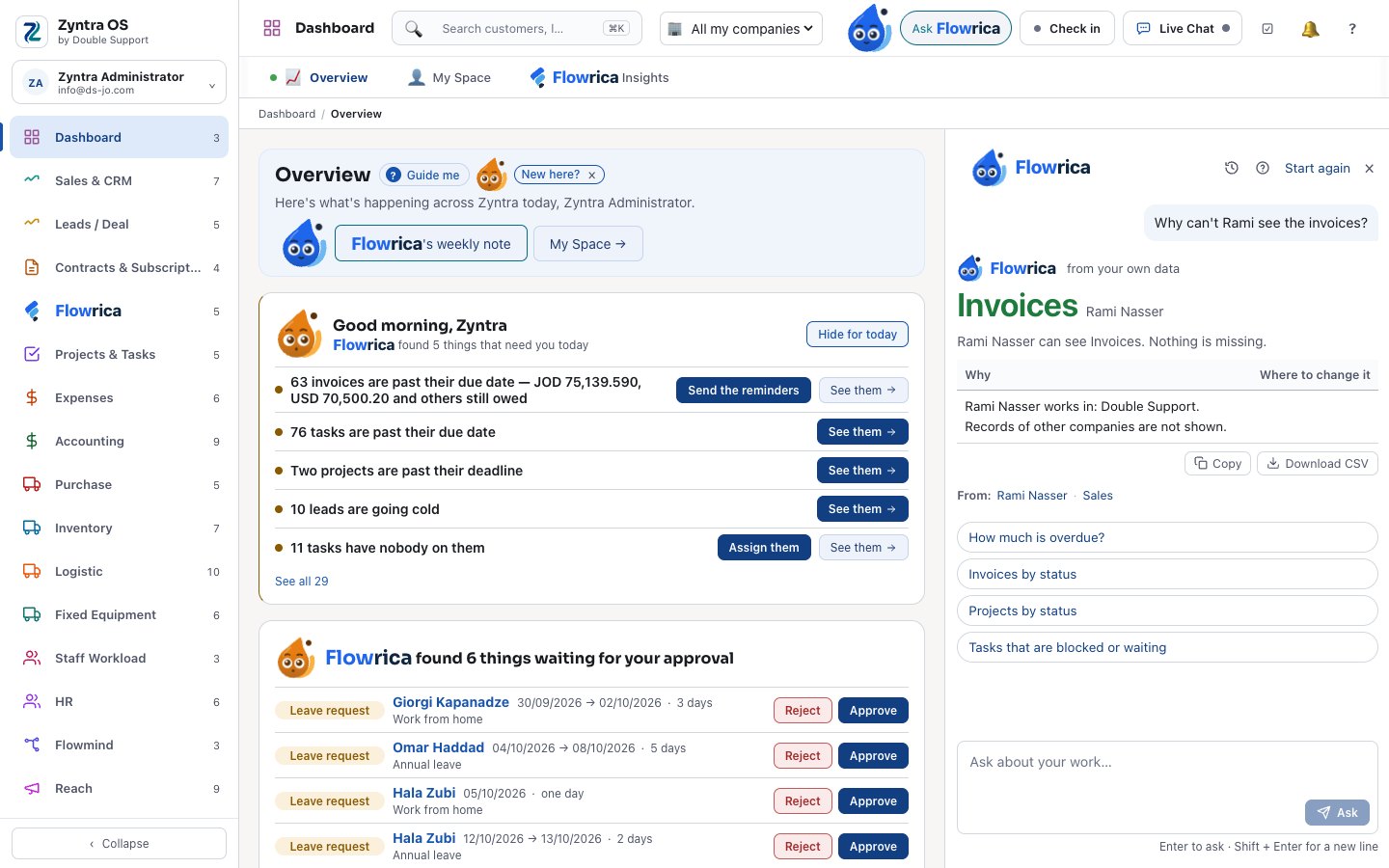
Step 5 of 17
People and rights
You ask: “Why can’t Rami see the invoices?” She reads his rights and says what he can see, why, and where it is changed — or “Who is the most loaded this week?”
- “What is open with Rami?” and “Who can cover Rami next week?”
- The same numbers as the Workload screen
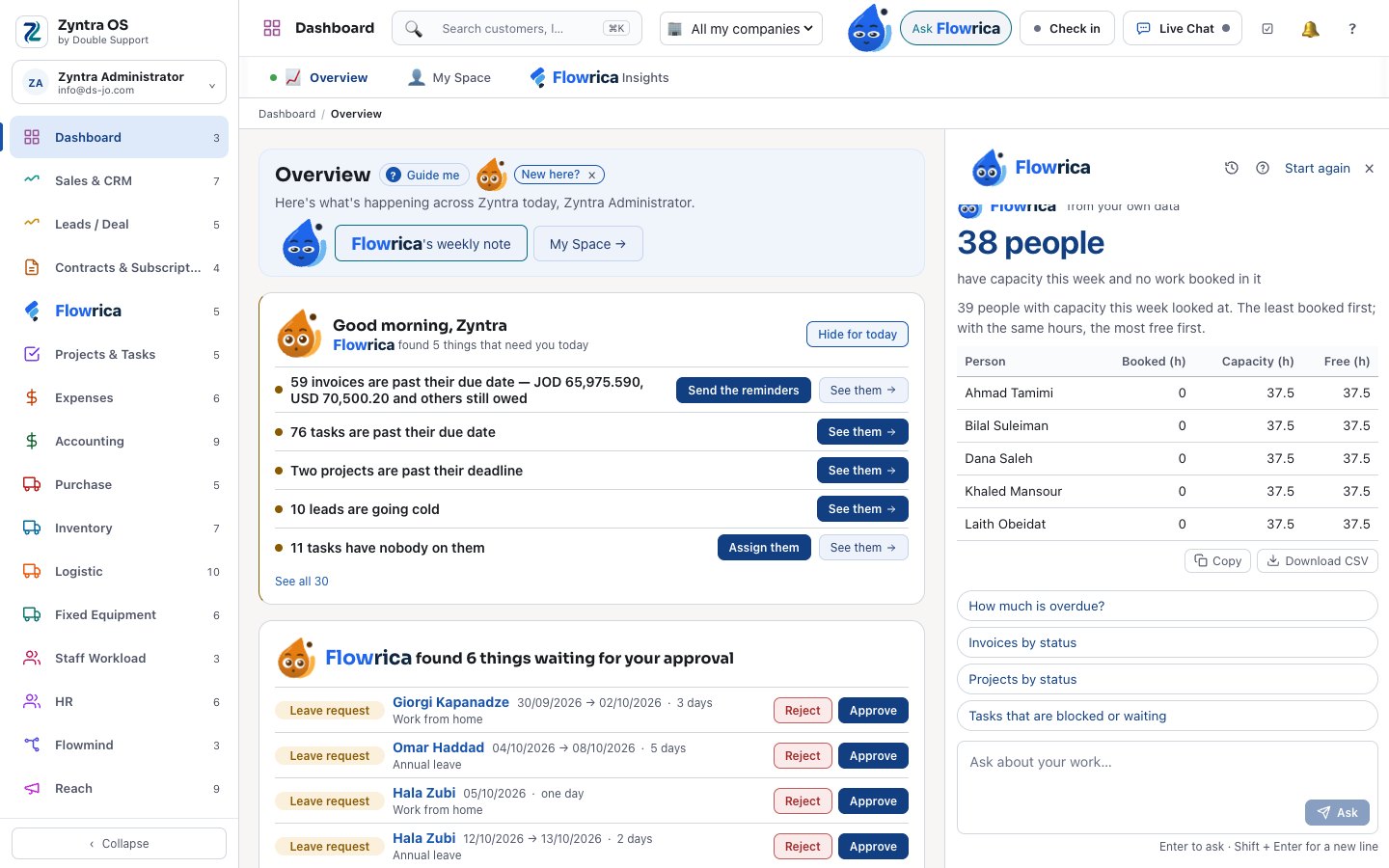
Step 6 of 17
Who has room this week
You ask: “Who has the least work this week?” She reads the Workload screen’s own numbers and lists the people with the most free hours first — booked, capacity and free, person by person.
- Only the people you may see on the Workload screen
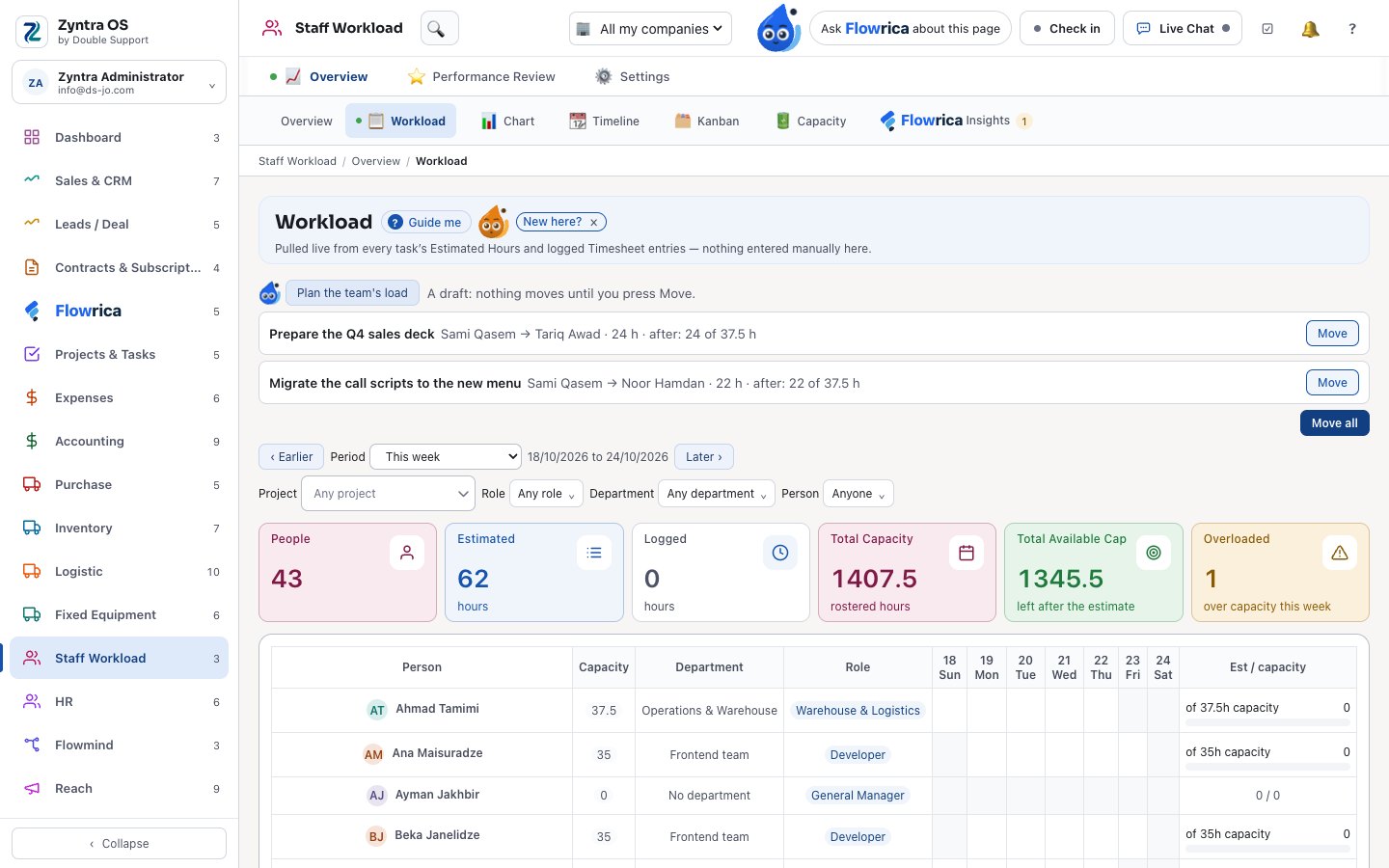
Step 7 of 17
A load plan for the whole team
On the Workload screen, “Plan the team’s load” drafts which tasks move from overloaded people to people with room — one line per task. Nothing moves until you press Move on a line, or Move all.
- Never to someone it would overload in turn
- Each move goes through the task’s own rules and is kept on its trail
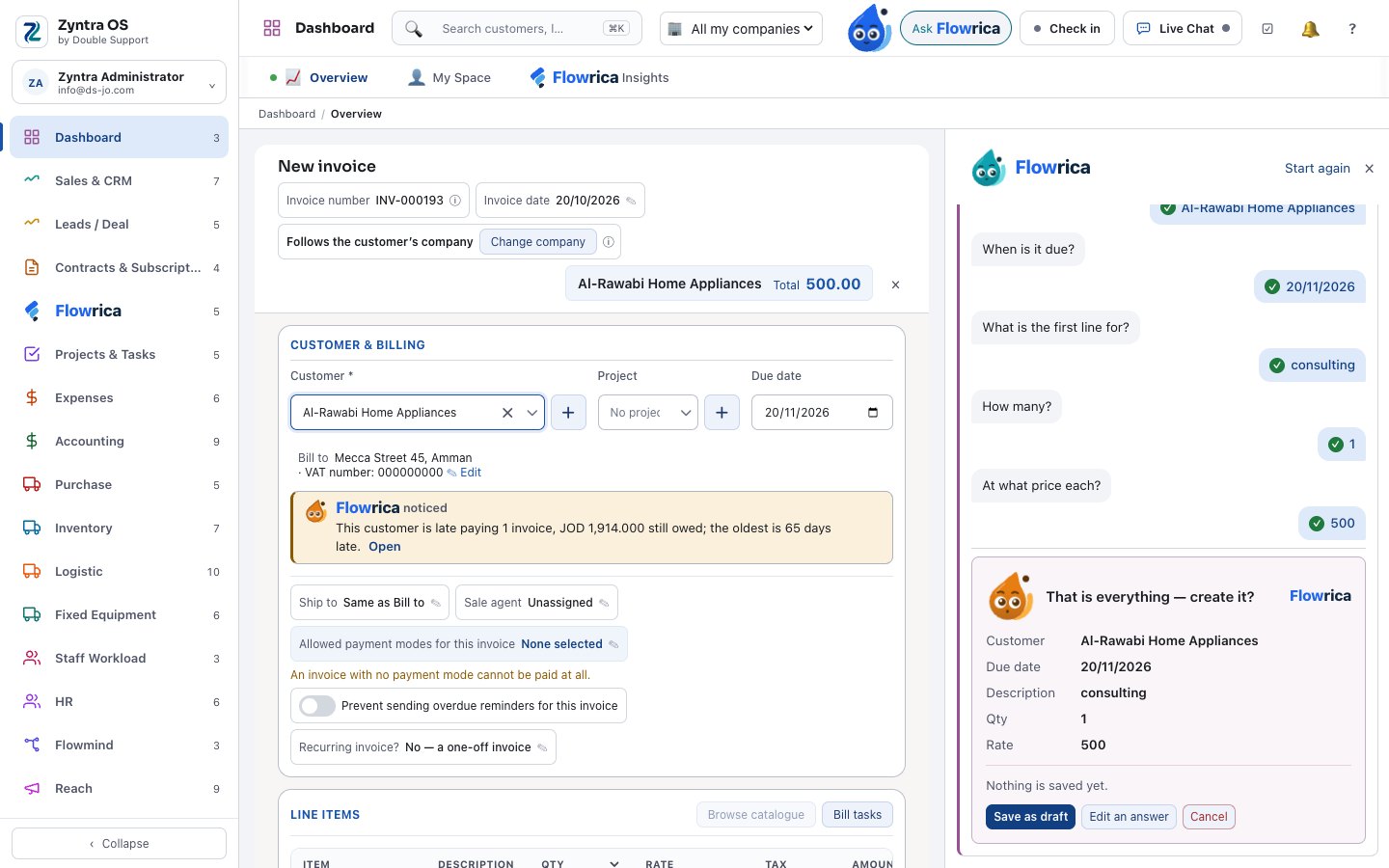
Step 8 of 17
Create from one sentence
You write: “Create an invoice for a customer of 500 JOD consulting, due in a month.” She opens the invoice form already filled — and you press Create.
- Or “create a customer”: she asks one question at a time, then opens the form
- About 44 kinds: invoices, estimates, deals, tasks, purchase orders, leave and more
- A record made through her says so on its trail
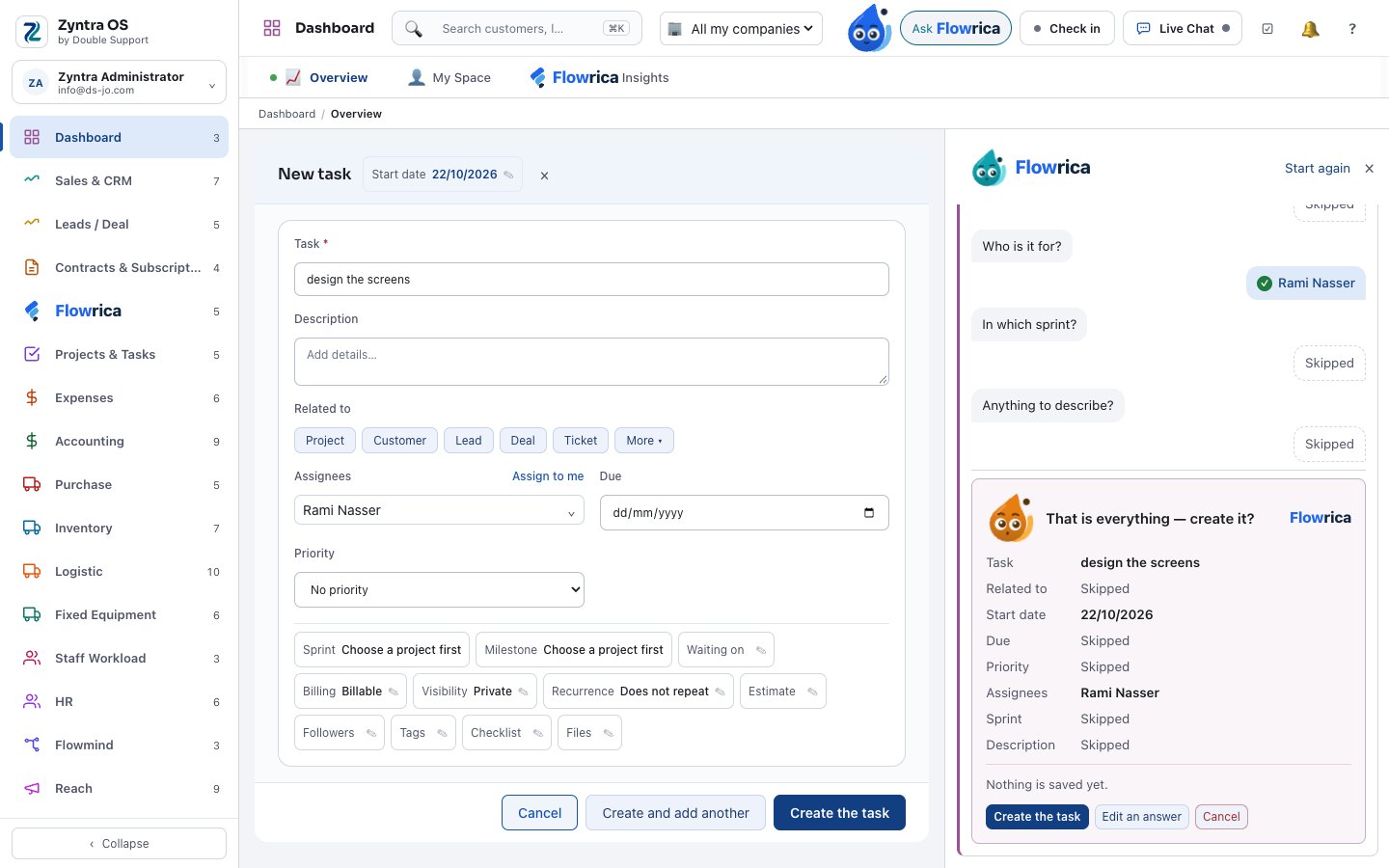
Step 9 of 17
A task in one sentence
You write: “create a task for Rami on Thursday: design the screens”. She fills the task — its name, its date, Rami — asks the rest one question at a time, and shows the card: nothing is saved until you press Create the task.
- The task’s own form opens beside her, filled as you answer
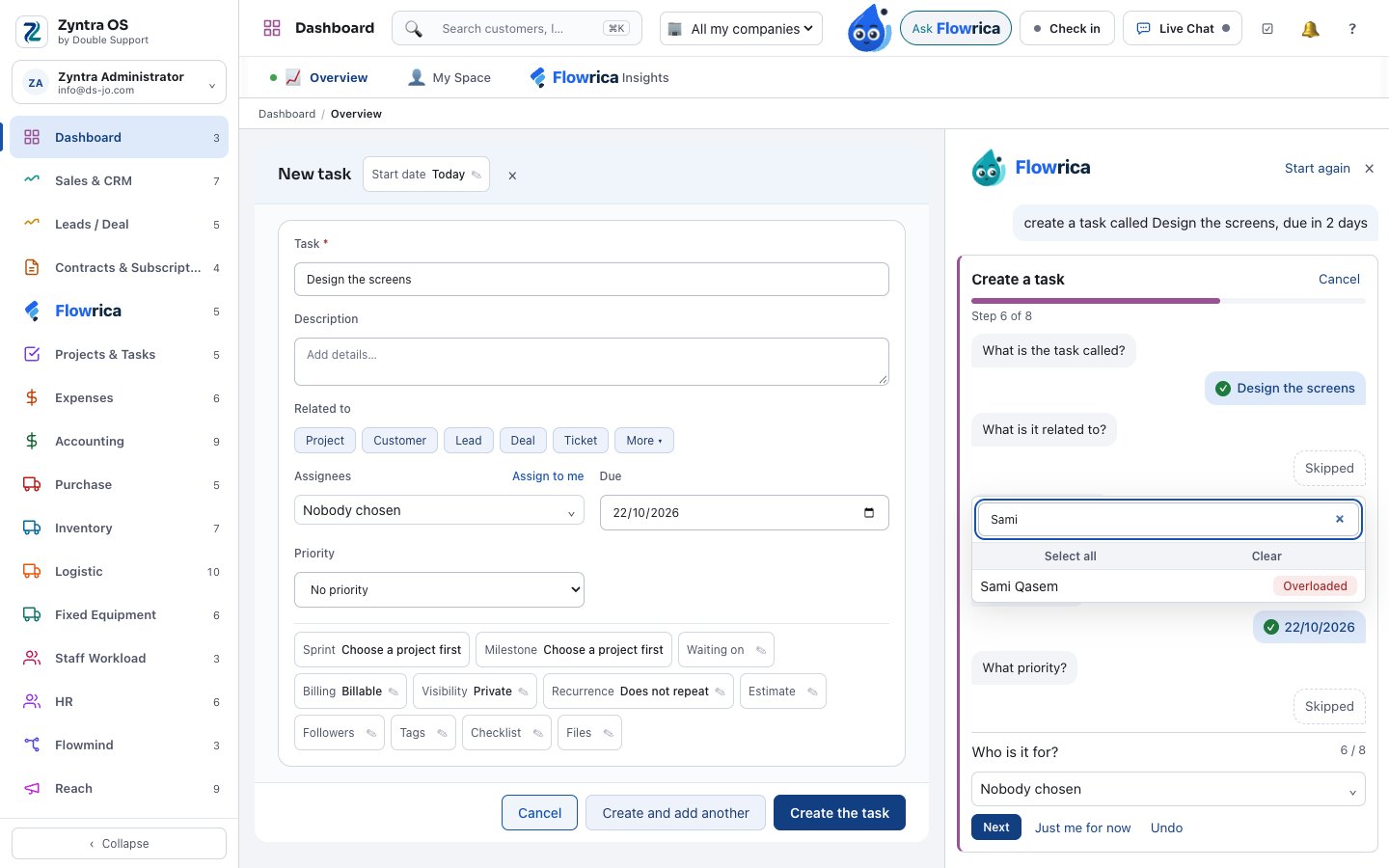
Step 10 of 17
Who is already overloaded
When she asks who the task is for, every person carries their state for the week: a red “Overloaded” beside anyone already over capacity, so you choose with the facts in front of you.
- The same rule as the Workload screen, Tasks and Sprints
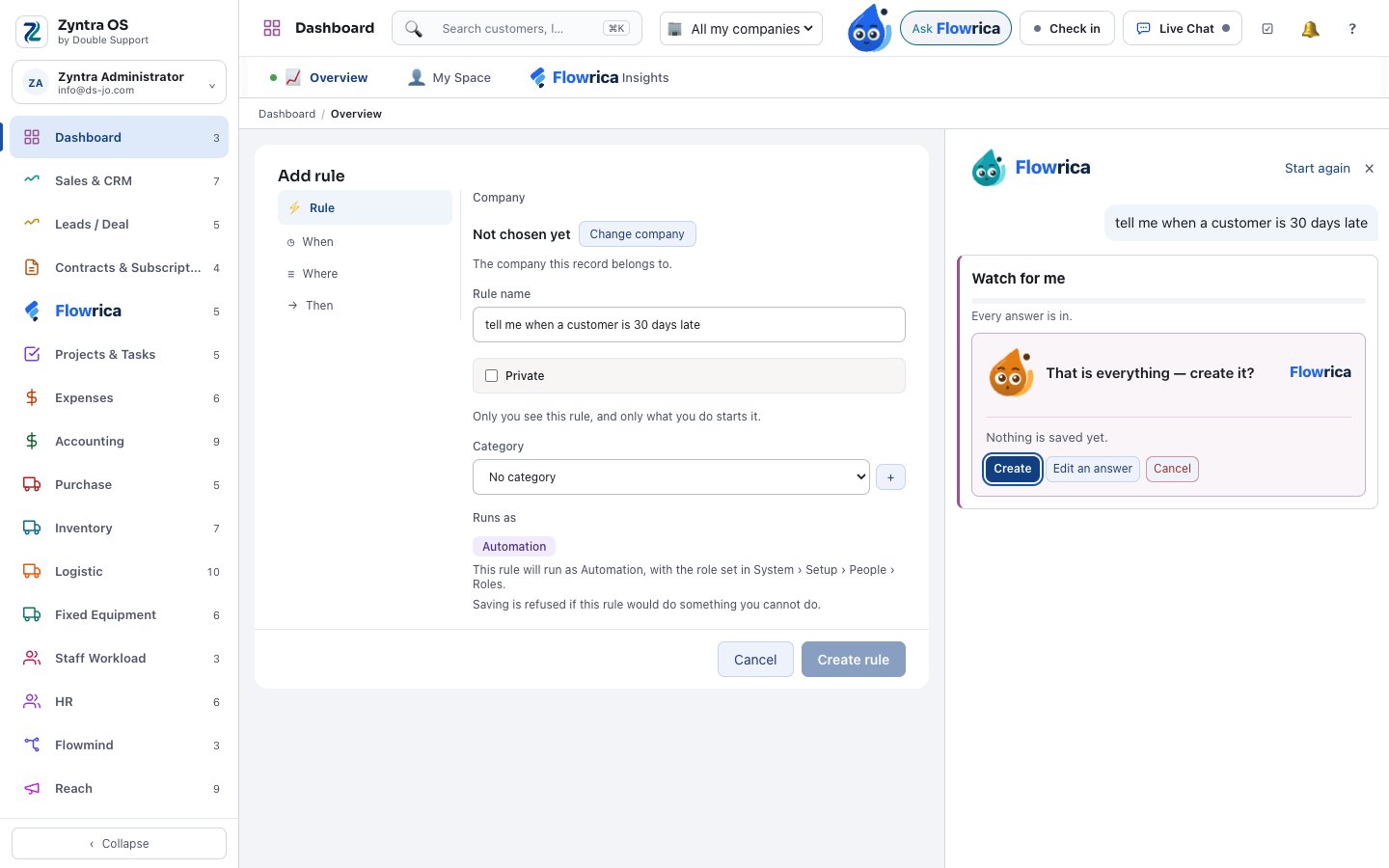
Step 11 of 17
“Watch this for me”
You write: “Tell me when a customer is 30 days late.” She fills a Flowmind rule — saved switched off, until you switch it on.
- She also drafts a purchase request, a survey, a Reach segment or campaign from a description, asking only what she is unsure of
- A new project from a description, with the team’s load checked against the deadline
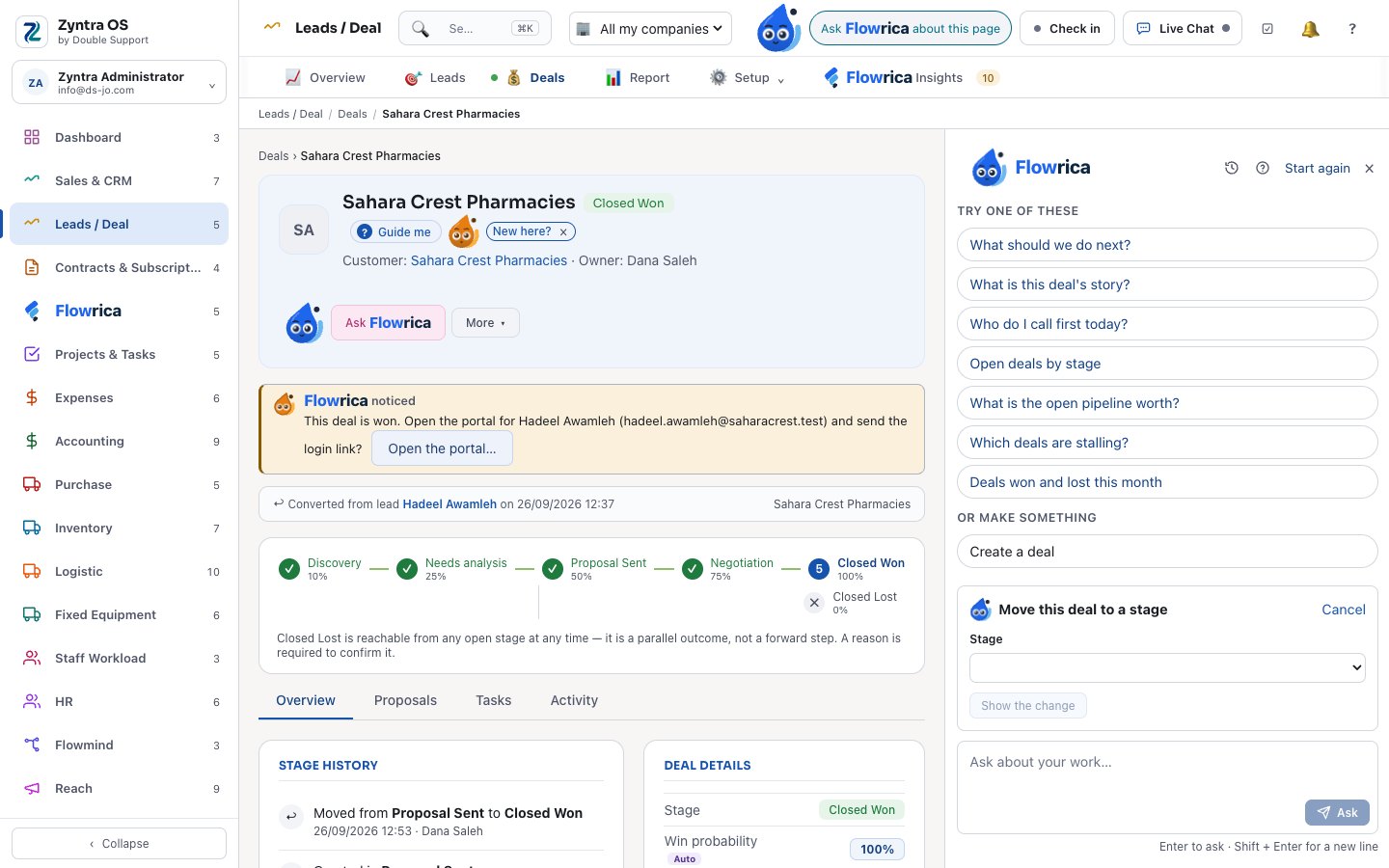
Step 12 of 17
Small changes, with Undo
You ask her to move a deal to the next stage, assign tasks or move a calendar event. She shows the change first; you confirm; and you can undo it.
- Only these three kinds of change — through the record’s own rules and rights
- She never deletes anything
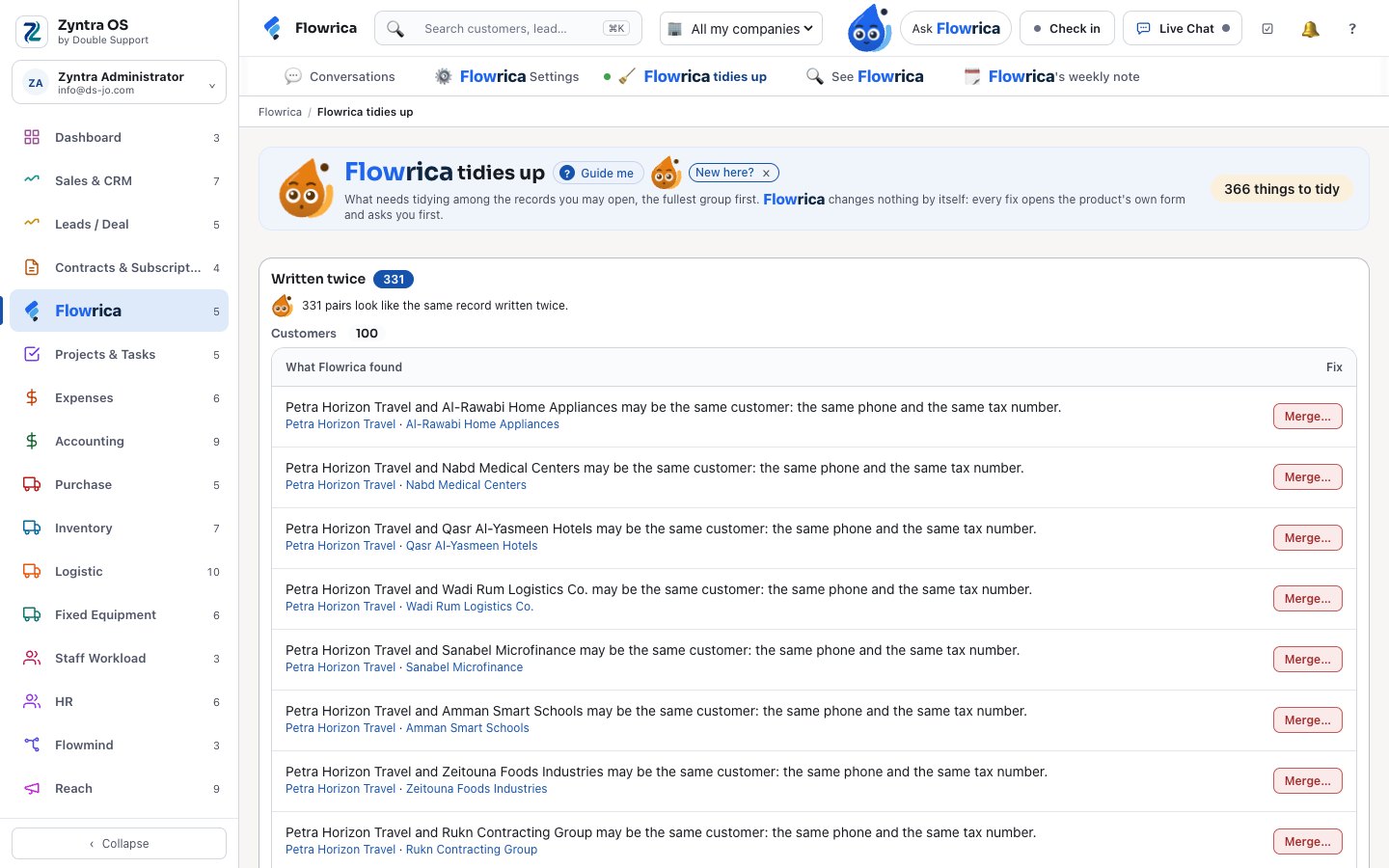
Step 13 of 17
A word at the right moment
While you fill a form she points out what matters: a customer that may already exist, stock below its minimum, a purchase to check before approval.
- Tidy-up: duplicates and missing details, only in what you may see
- Teach her a sentence she did not understand, in Flowrica Settings
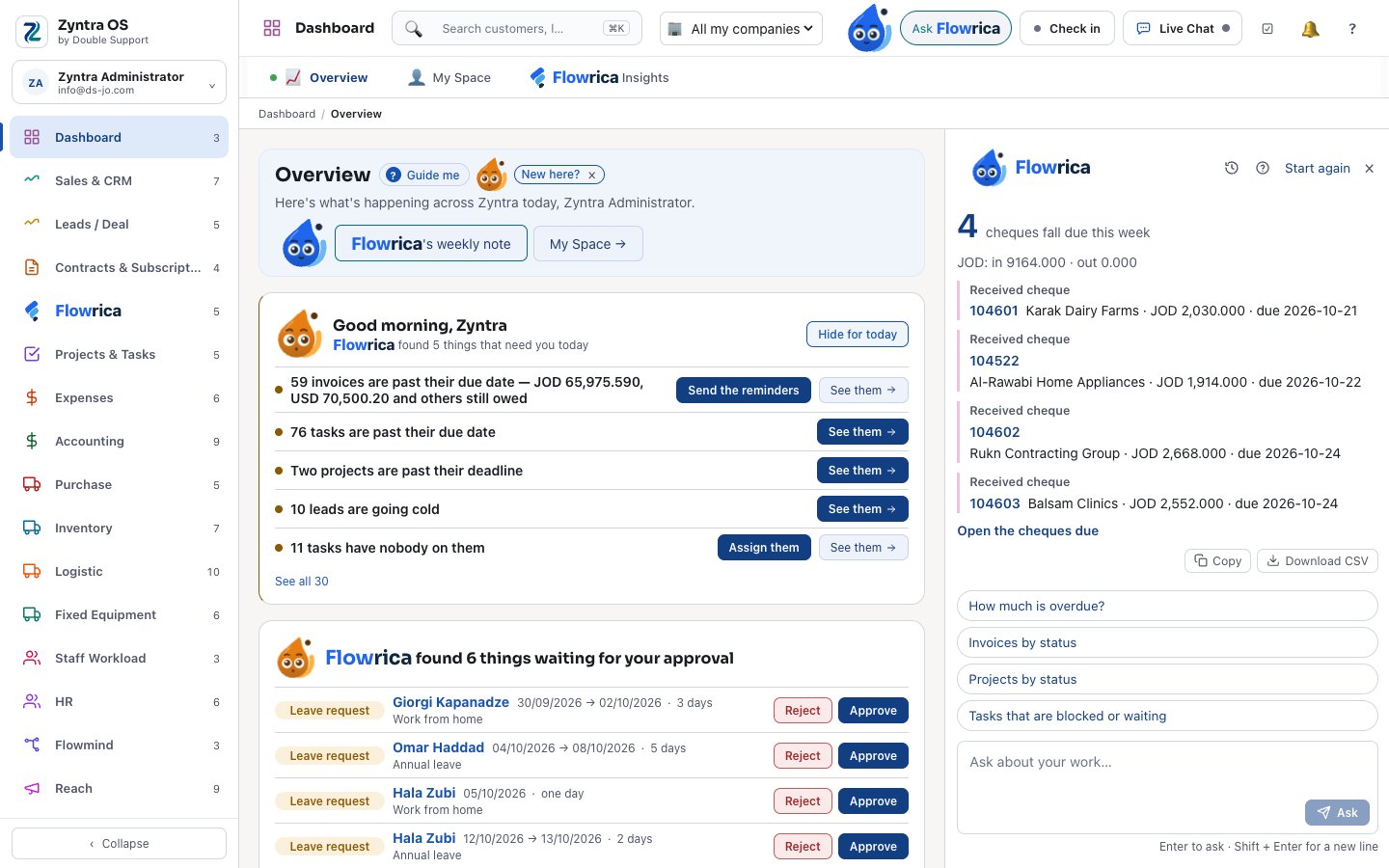
Step 14 of 17
Cheques due this week
You ask: “Which cheques fall due this week?” She lists each received cheque with its number, customer, amount and due date, totals per currency, and opens the cheques due — only for people whose screen shows cheques.
- “Which cheques came back?”
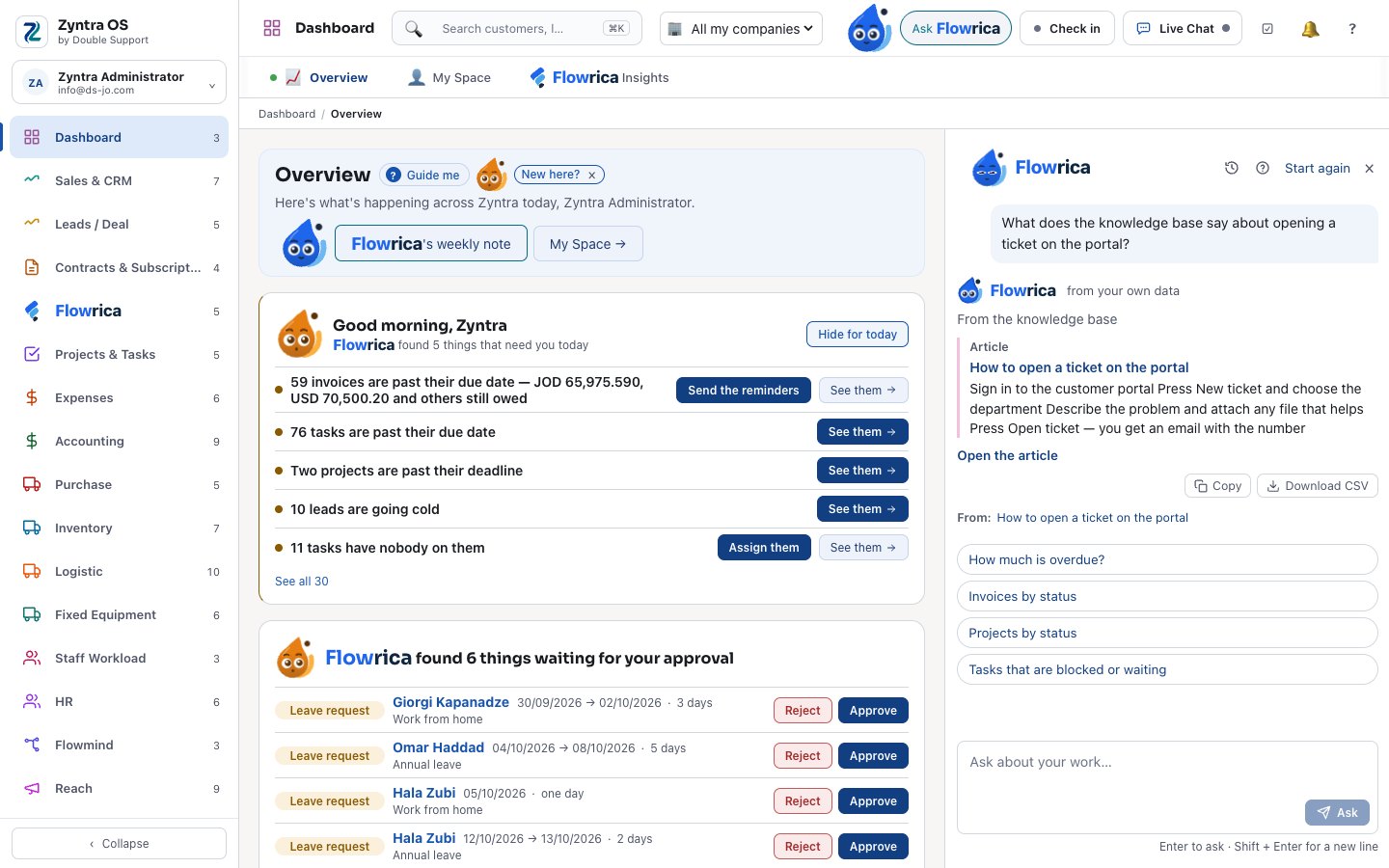
Step 15 of 17
Answers from your knowledge base
Your staff ask in their own words — “What does the knowledge base say about opening a ticket on the portal?” — and she answers from the article, with a link to it. Only articles that person may read.
- An article kept for staff is never read to a customer
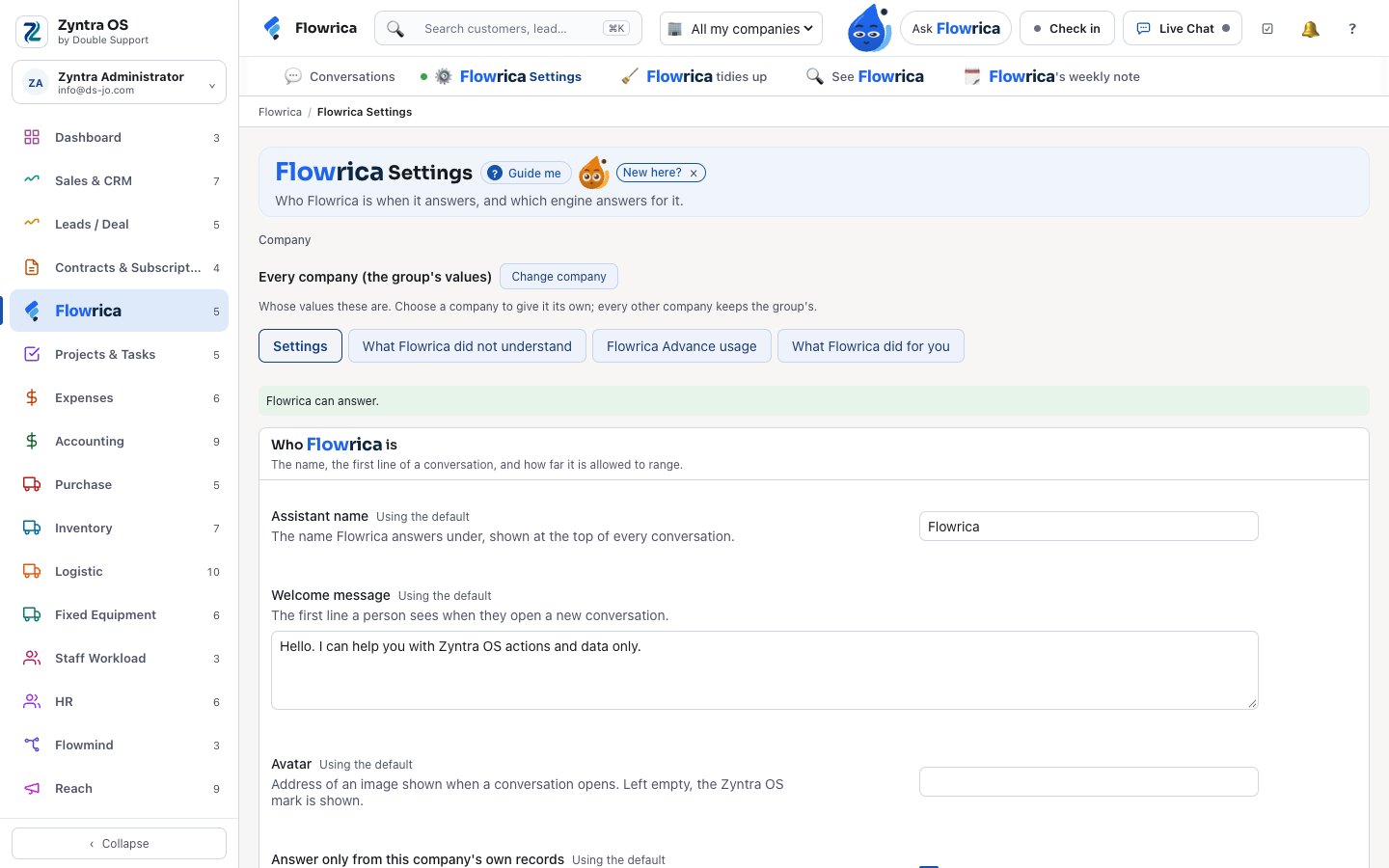
Step 16 of 17
Reads your papers and drafts your words
With Flowrica Advance she reads a vendor invoice, a receipt, a contract or a bank statement into a draft form, summarises a ticket and drafts emails and replies — you check and send.
- Flowrica Advance runs on your company’s own key, with a monthly limit you set
- A suggested reply always says: check before sending
Step 17 of 17
For your customers too
In the client portal your customers ask her about their own orders, invoices and projects — and only their own. On your website, the chat answers from your site’s pages and takes a visitor’s details as a lead.
- Every conversation is kept — archived, never deleted
- More about Flowrica, step by step, on the Zyntra OS page
Projects & Tasks
Projects your customers can follow, and hours that become invoices
From a classic plan to agile sprints, in one place.
Projects & Tasks
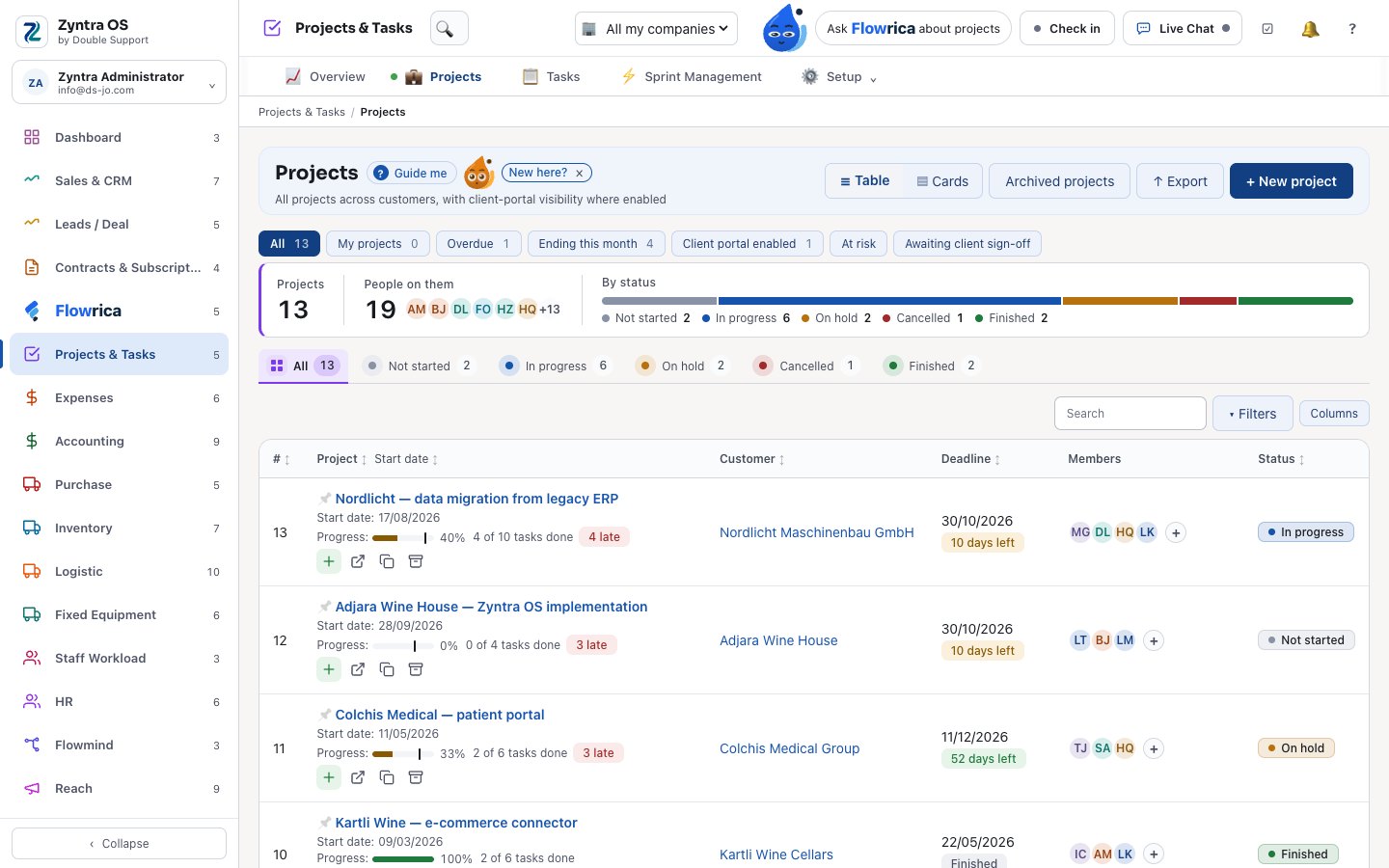
Every project with its tasks, milestones, time and money.
- A Gantt chart with dependencies: moving a task first shows what moves with it
- Sprints with capacity, burndown and velocity — and “invoice the sprint”
- Timers on tasks become invoice lines, and an hour is never billed twice
- A portal for the customer to follow the project and sign it off
- An alert when hours reach 85% of the estimate, and the project’s profit and loss
Expenses · Accounting
Accounting as accountants in Jordan do it
The accountants’ own chart, cheques from receipt to return, closed periods — JoFotara live and ZATCA-ready.
Expenses
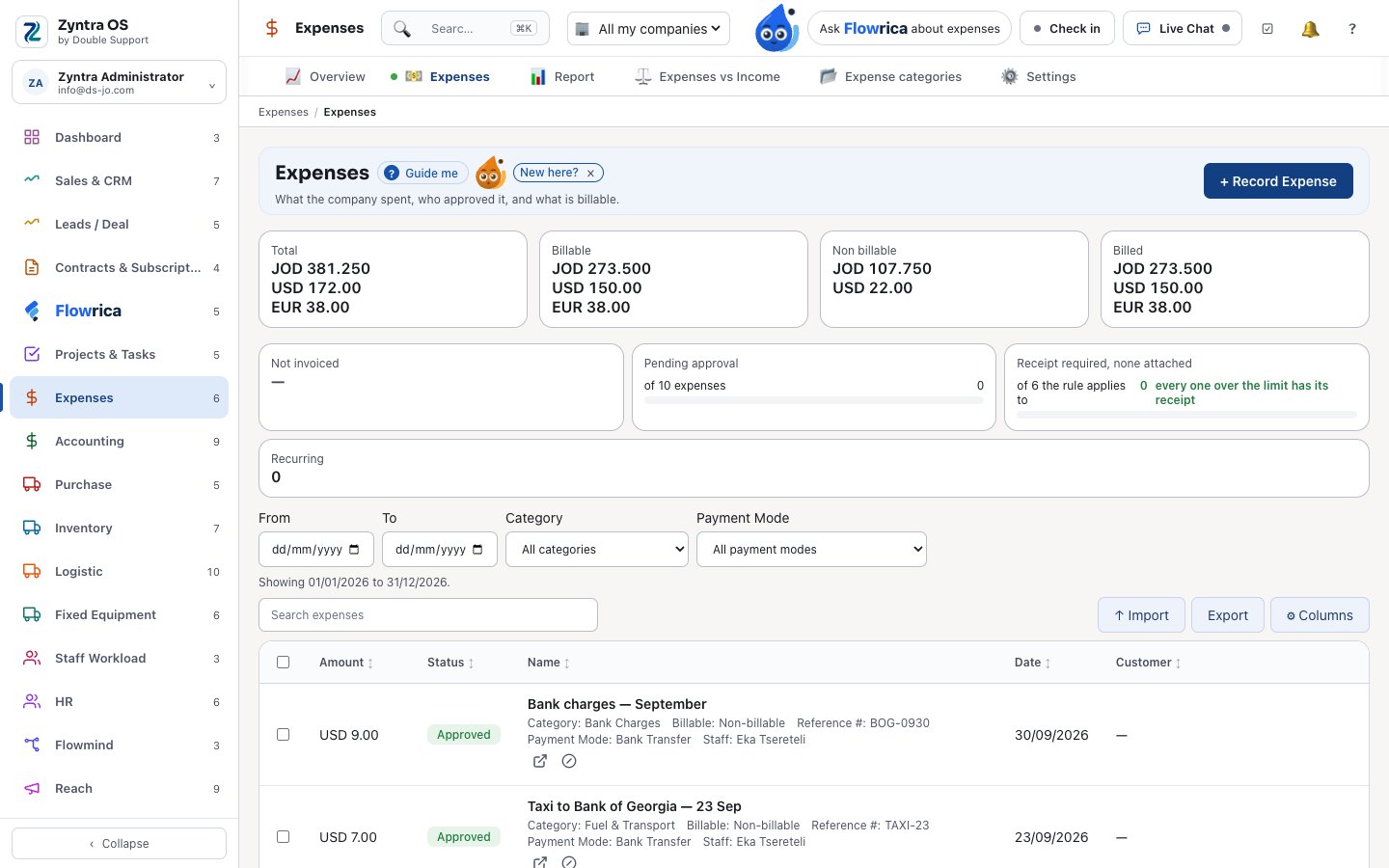
Every expense in its currency, at the rate of its own day.
- Exchange rates fetched on their own; a rate too old is refused
- Approval, a warning for an expense entered twice, and receipt checks
- Recurring expenses, and an expense billed on to the customer
- Expenses against income, side by side
Accounting
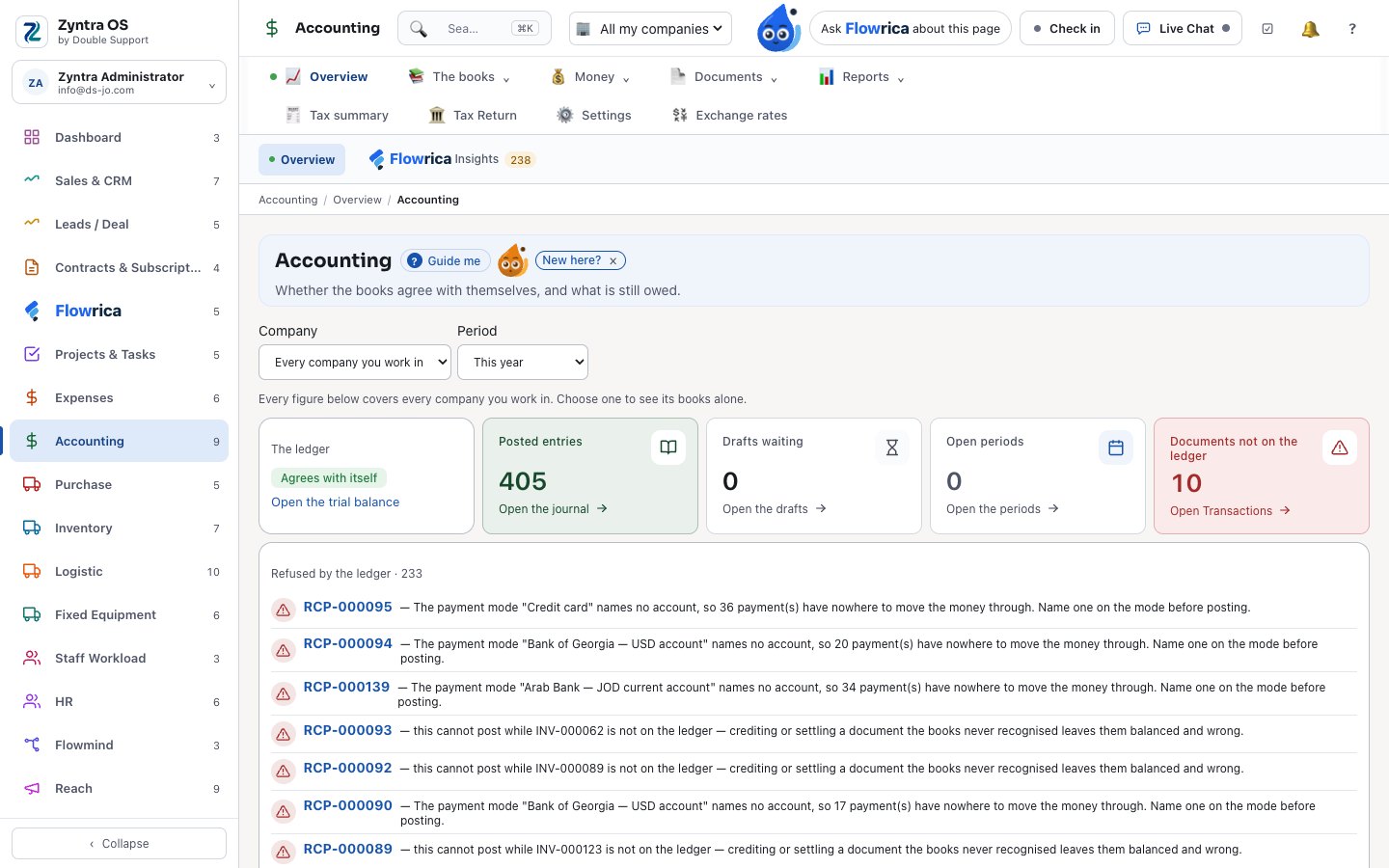
The full books, with the chart of accounts accountants write in Arabic.
- The accountants’ four-level chart, or the ready one — chosen per company
- Received cheques through their whole life: deposited, collected, returned, given back, deposited again — and cheques falling due are announced
- Issued cheques printed with the amount in words
- Bank statements matched and reconciled; fiscal periods closed and reopened
- Trial balance, balance sheet, profit and loss, cash flow, budgets against actuals
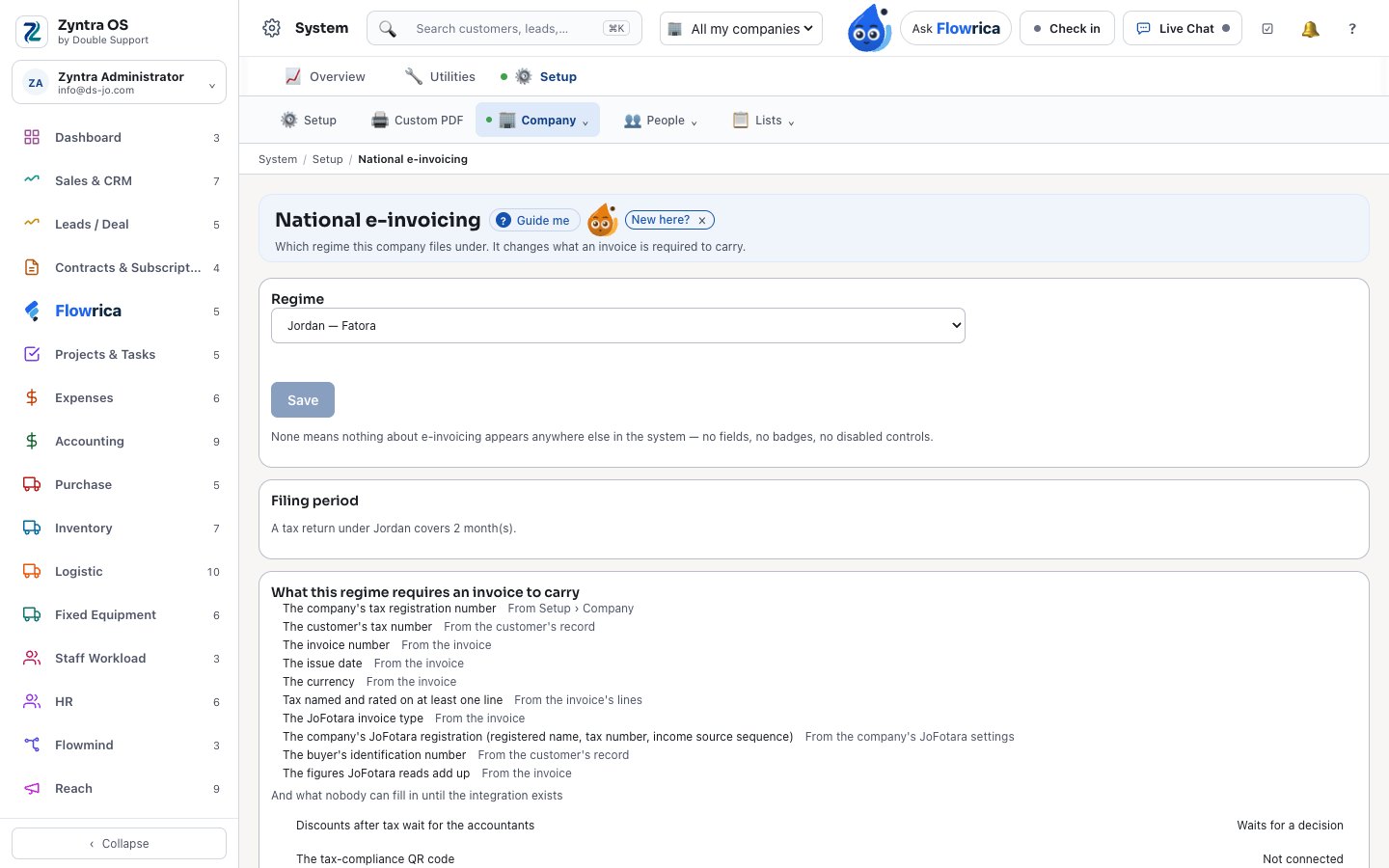
- Tax returns with Jordan’s periods, and a filed period locks its invoices
E-invoicing: JoFotara and ZATCA
Built in, per company, in the base price.
- Invoices and credit notes submitted to Jordan’s National Invoicing System
- Sent again on their own if the system does not answer; an accepted invoice is locked
- The QR code on the invoice, and a log of every submission
- ZATCA-ready for Saudi Arabia: standard and simplified invoices, signed with their QR code — sending switched on in Setup once your company is onboarded
- A company that does not use it sees nothing of it
Buying and stock
From the purchase request to the stock on the shelf, checked against the books.
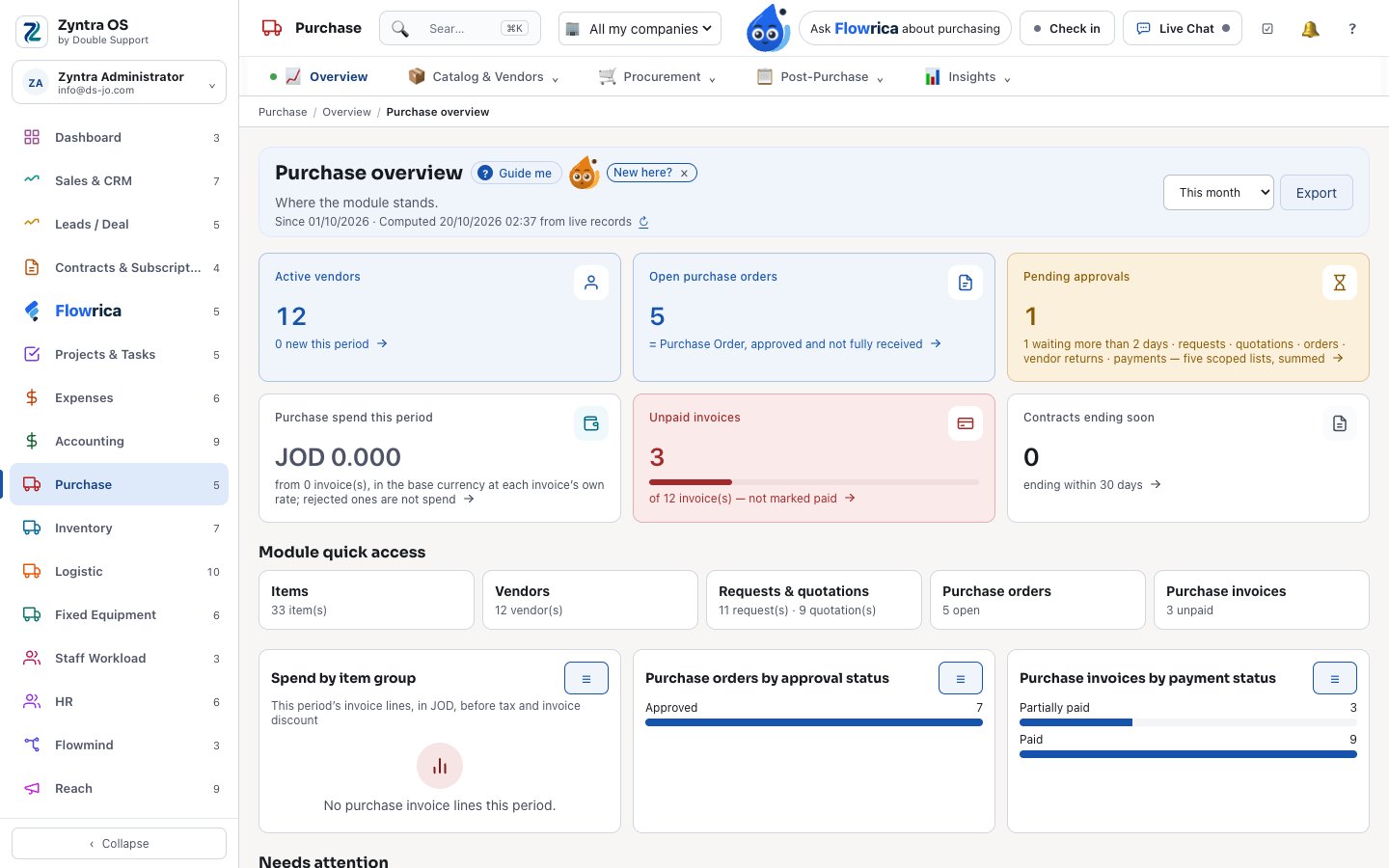
Purchase
Requests, quotations, orders and bills — with your vendors in their own portal.
- Vendor quotations compared side by side
- A vendor portal: vendors send quotations, invoices and items
- Orders with approval and receipts; a bill entered twice is caught
- Withholding tax, debit notes, returns and vendor statement matching
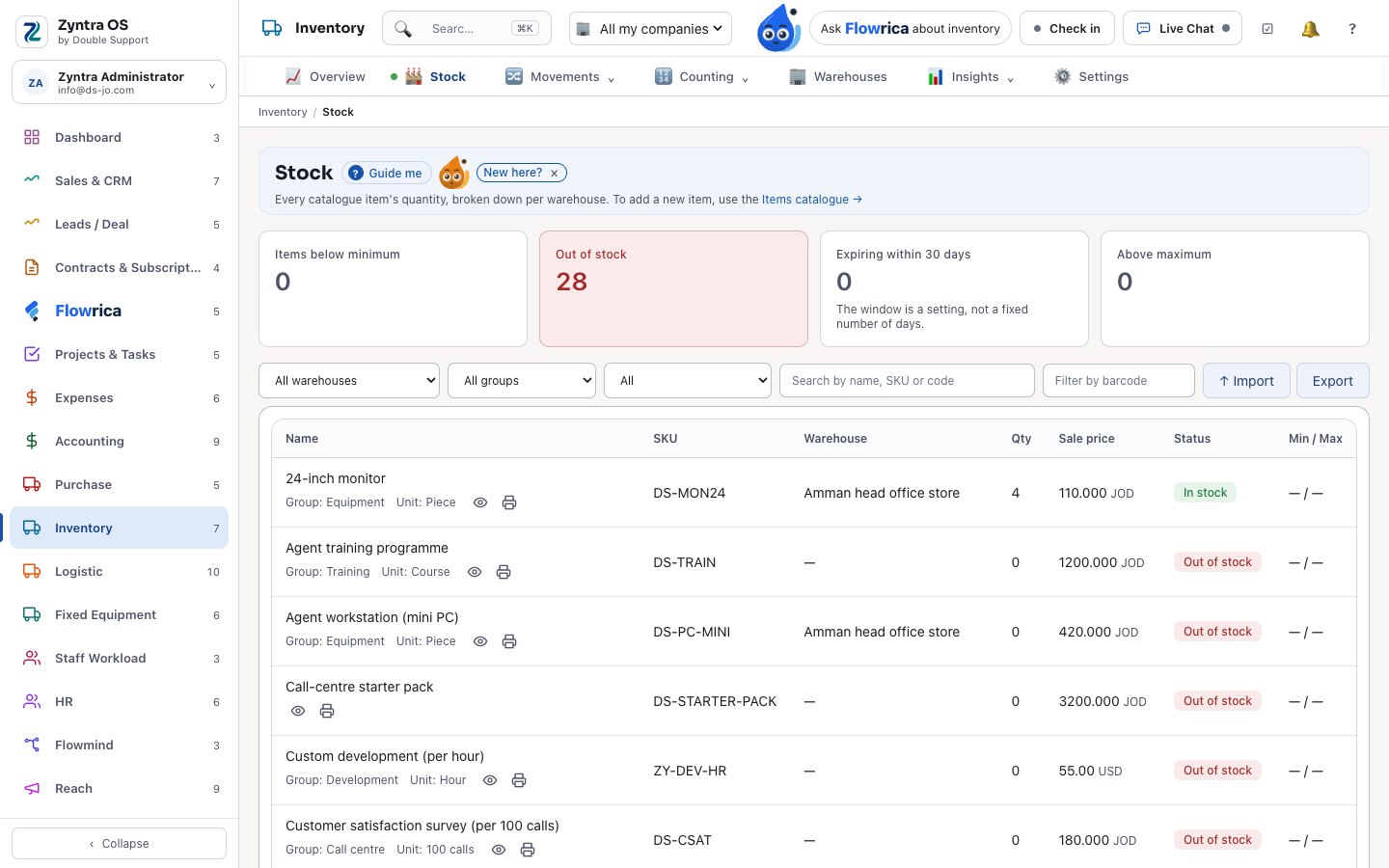
Inventory
Several warehouses, every movement approved.
- FIFO or average cost, chosen per warehouse
- Receiving, delivery, transfers, losses and stock takes — each approved
- Serial numbers, lots with expiry dates and barcode labels
- Stock checked against the general ledger
Logistics
A whole parcel-forwarding business, built in
Lockers, pre-alerts, shipping, pickup and consolidation — with your customers in their portal.
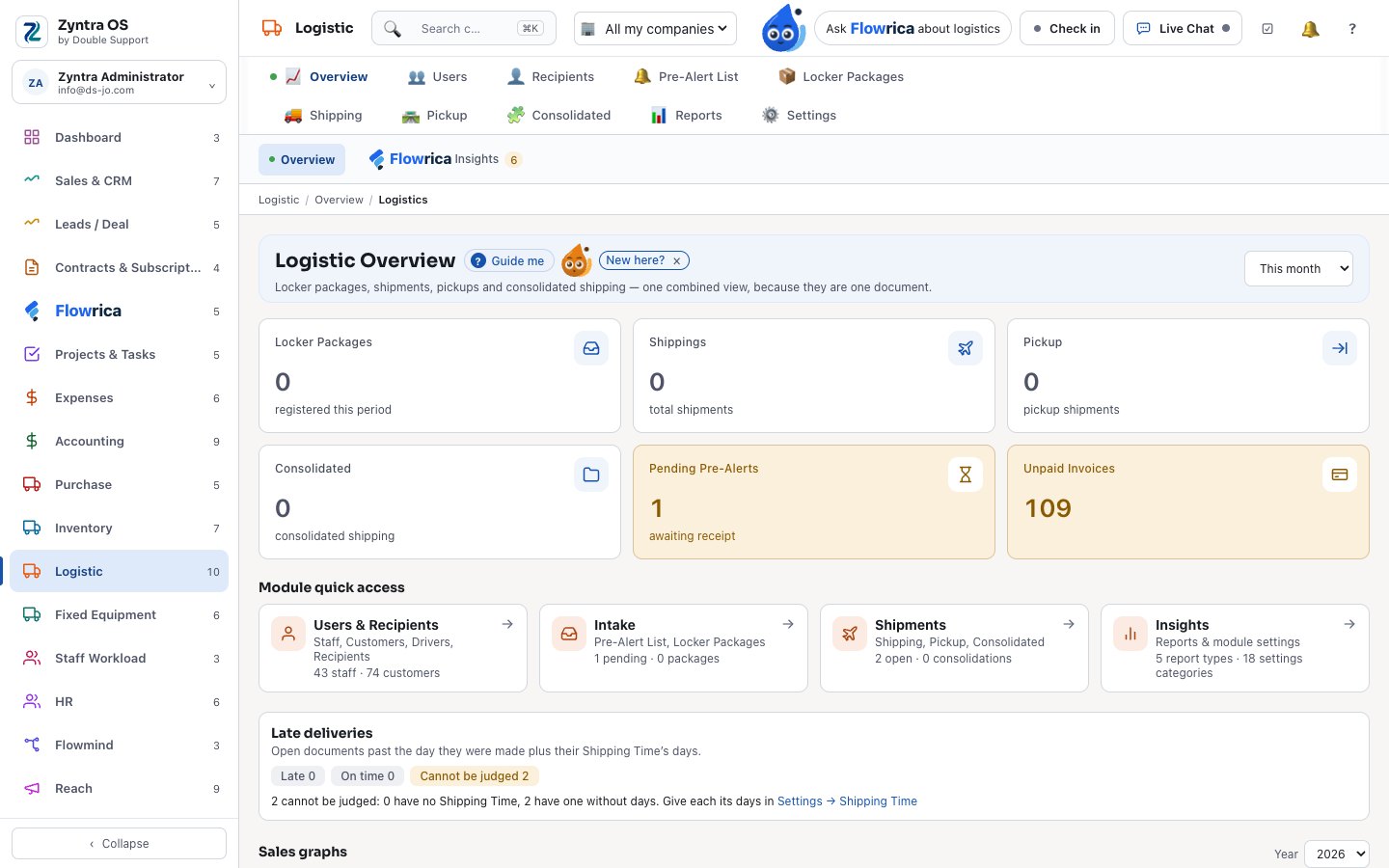
Logistics
Every package from the customer’s locker to delivery.
- A locker code for each customer, shown in their portal
- Customers announce incoming parcels; your team approves them into the locker
- Packages, shipping, pickup and consolidation, with tracking steps and labels
- Prices from rate cards by origin, destination and weight — the larger of actual and volume weight
- Five reports, and messages to customers and drivers
Equipment and people’s load
What the company owns, and who has too much on their plate.
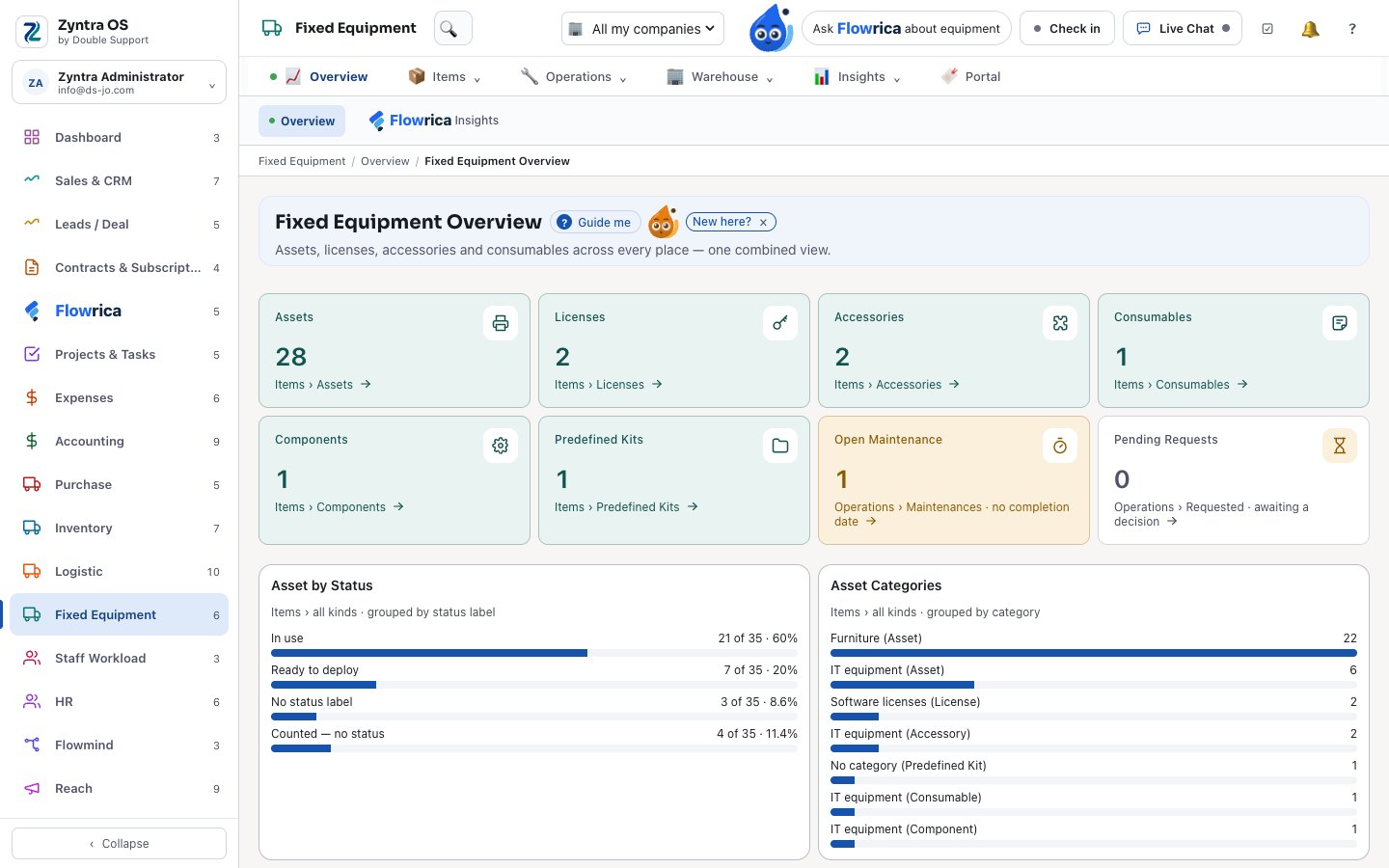
Fixed Equipment
Every asset, its value over time, and who has it.
- Depreciation: straight-line, declining balance or by units of use
- Customers ask to buy or rent equipment from their portal
- Rentals that never overlap; hand-over signed by both sides as a PDF
- Licences with sealed keys, kits, QR labels, meters and audits
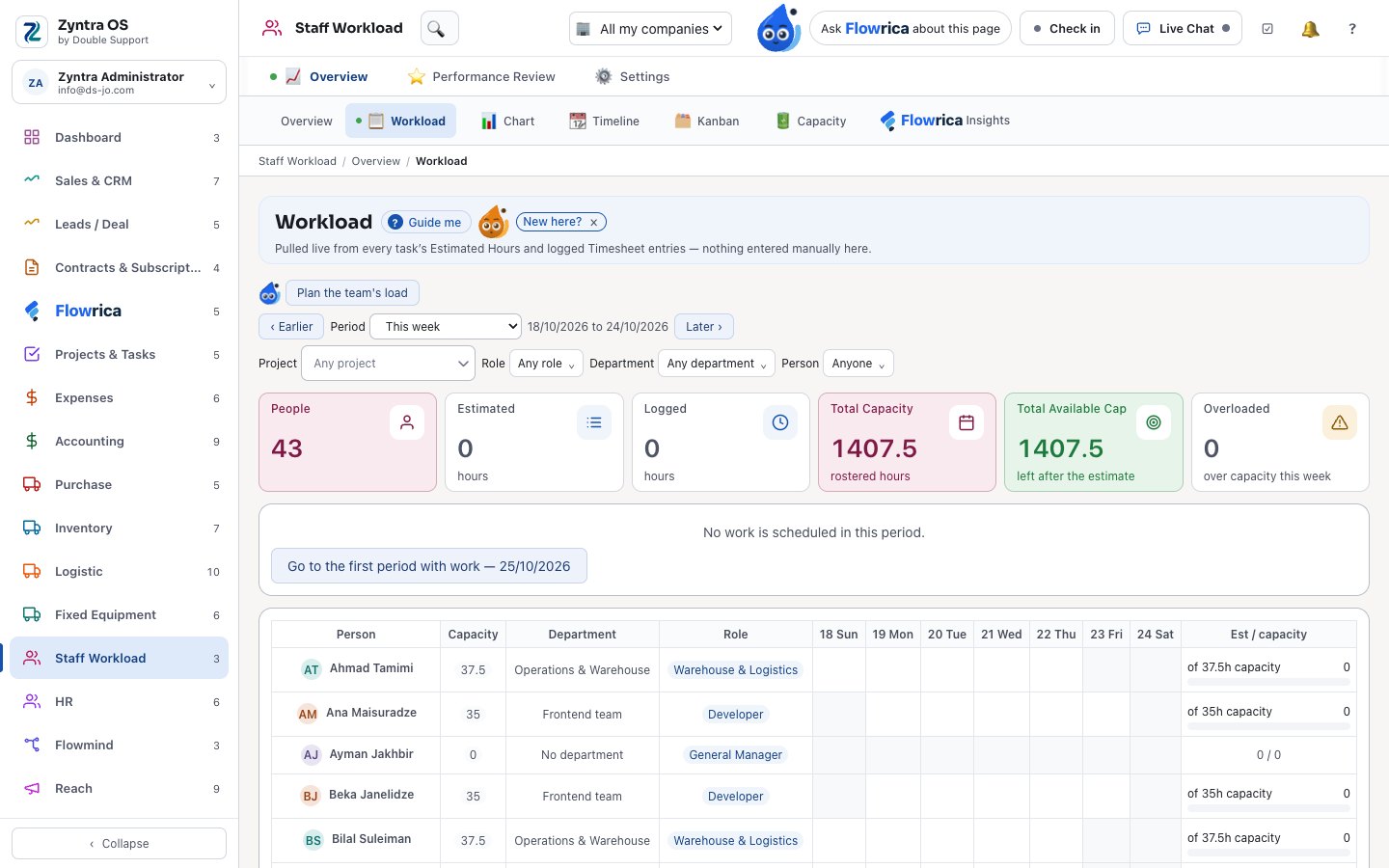
Staff Workload
One rule for overload, the same in tasks and sprints.
- Each person’s week against their capacity, day by day
- Suggestions for who can take a task over
- A performance page per person: on-time work, overdue work, attendance
HR
People, pay and hiring in the same system
From the job opening on your website to the payslip.
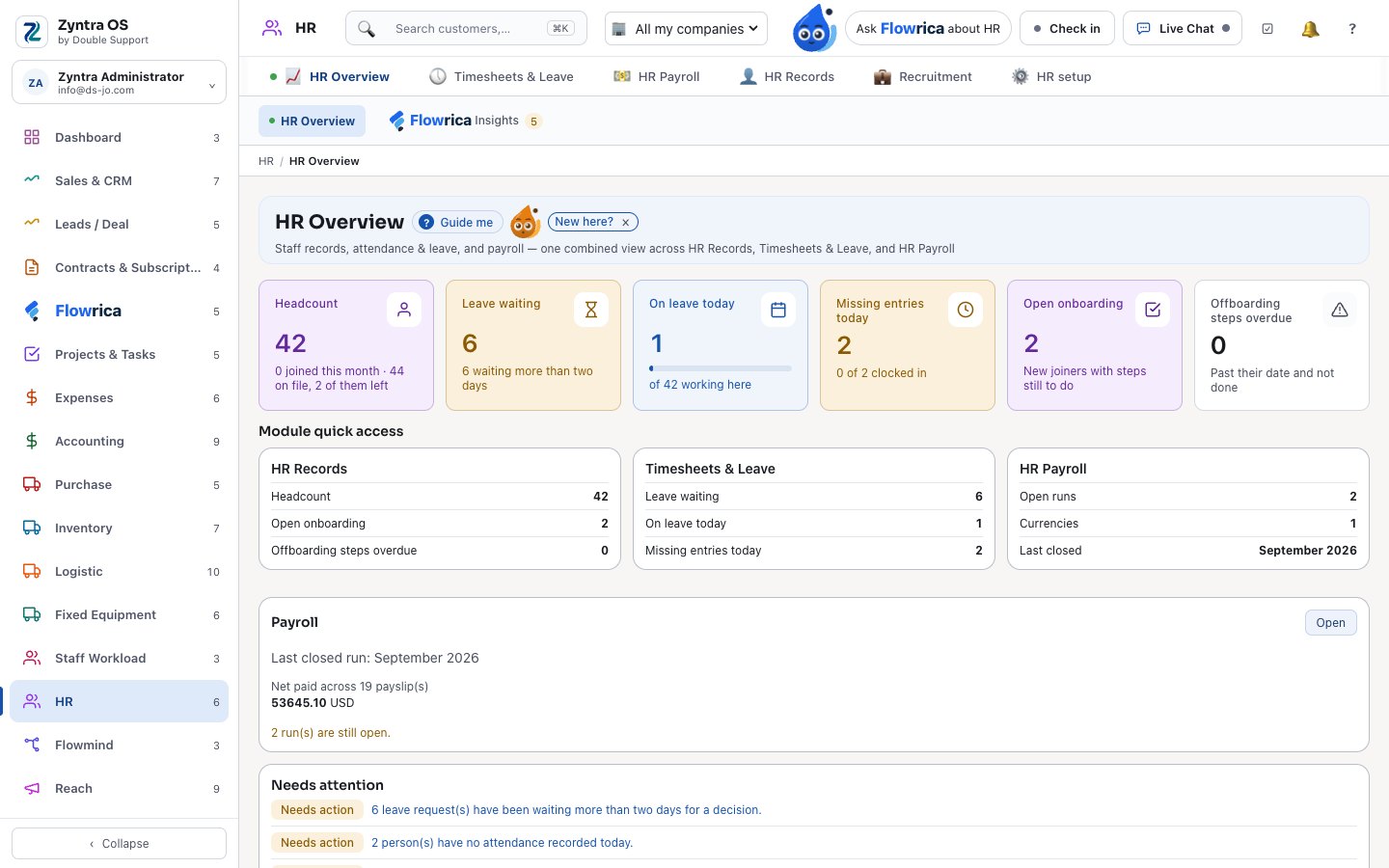
HR
Payroll, attendance, leave and records.
- A payroll engine with income-tax brackets per country and year, deductions and social security
- A closed payroll month locks its attendance; the books see totals, not each salary
- Overtime rates for holidays, rest days and working days
- Attendance by punch, leave sent to the right approver, holiday calendars and rosters
- Org chart, joining and leaving checklists, contracts and training
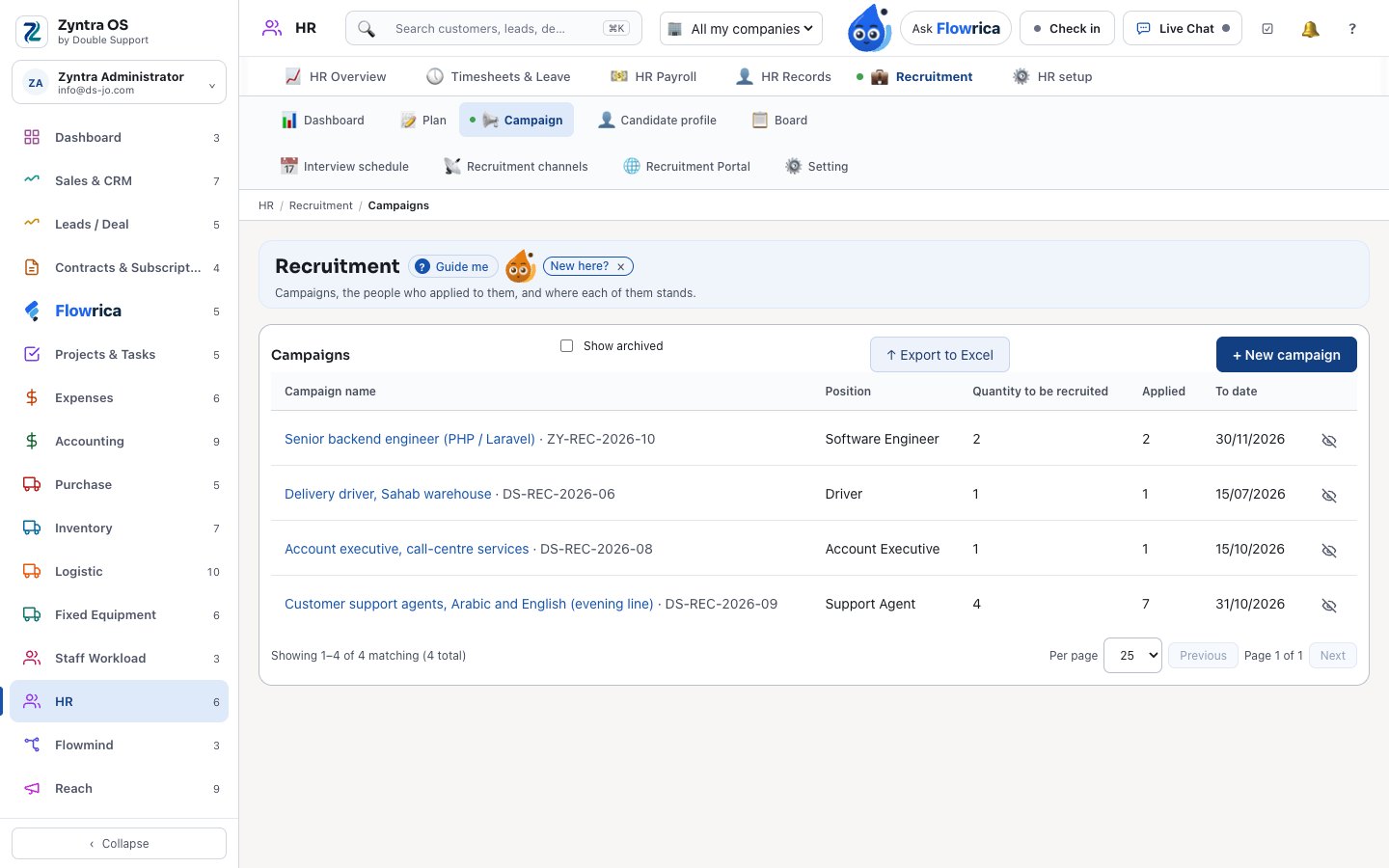
Recruitment
Openings on your own website, candidates on a board.
- A careers page and application forms on your website
- A board of candidates, interviews and scoring
- A candidate becomes staff in one step
Flowmind
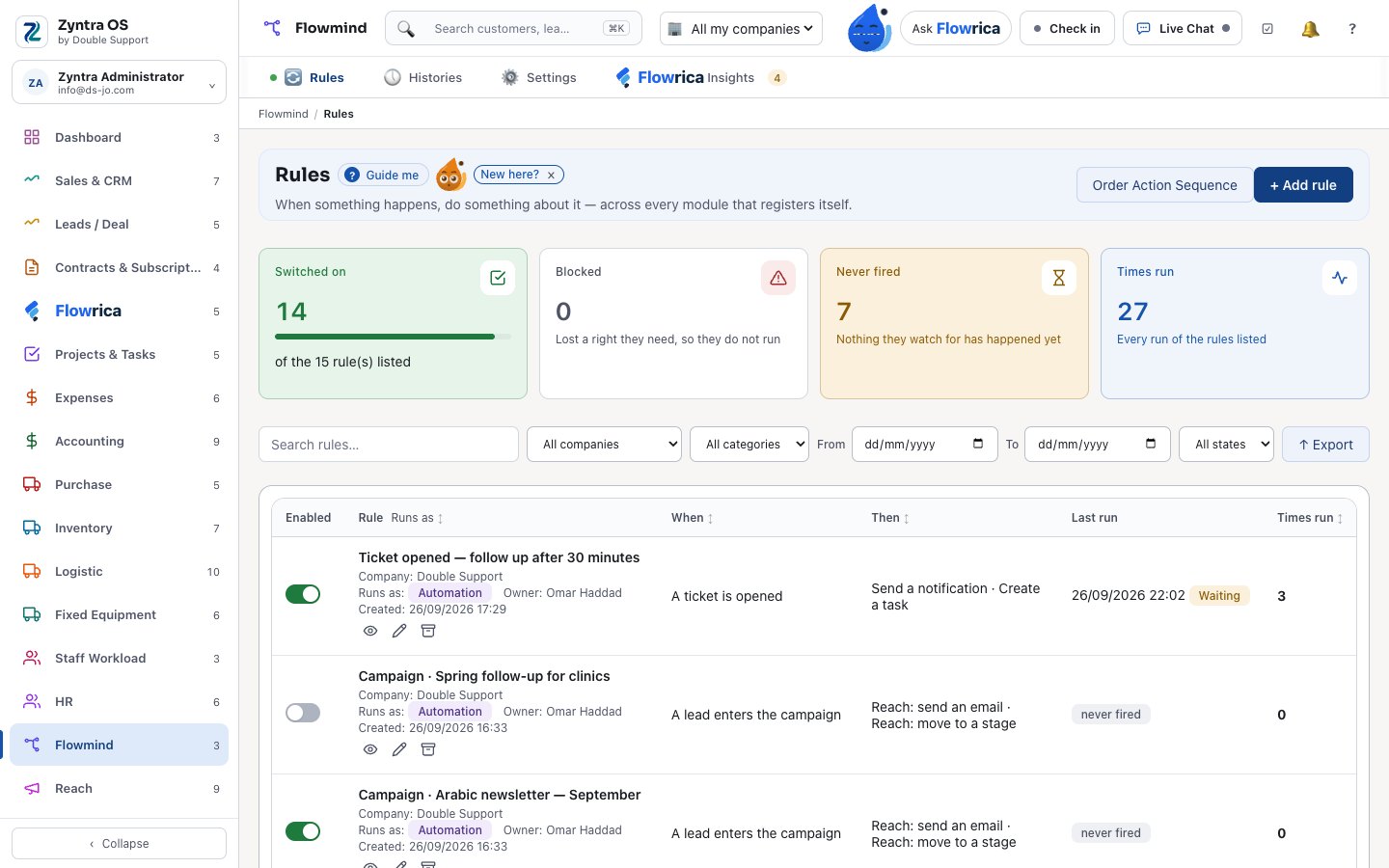
Rules that do the routine work for you
When something happens in one module, something follows in another — on its own.
Flowmind
One rules engine across the whole system.
- Triggers and actions from 32 modules — only the ones that are really built are offered
- Conditions with “any” or “all”; pay fields only for authors allowed to see them
- Waits — “after 30 minutes”, “until the invoice is paid” — that survive a restart, and schedules
- Webhooks to other systems, a history of every run, and loops refused
Reach
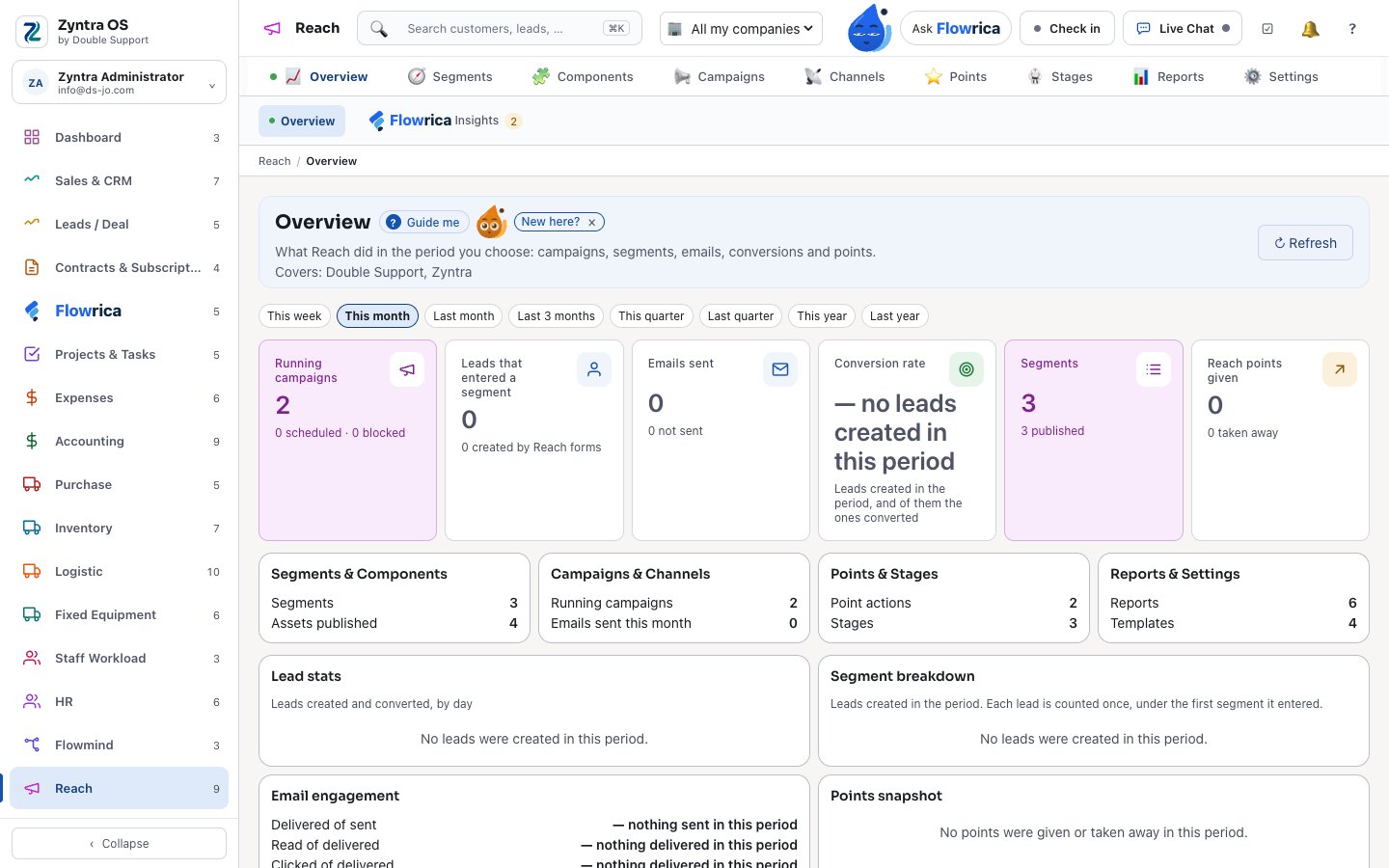
Marketing that knows your customers
Segments, campaigns, points and stages — on email, SMS and WhatsApp.
Reach
Campaigns built on the same records as your sales.
- Segments with “and / or” groups
- A campaign is a Flowmind rule: a lead enters it once, when it joins the segment
- Points and stages kept as history
- Consent, unsubscribes and bounces respected; links and opens counted
Growth Center
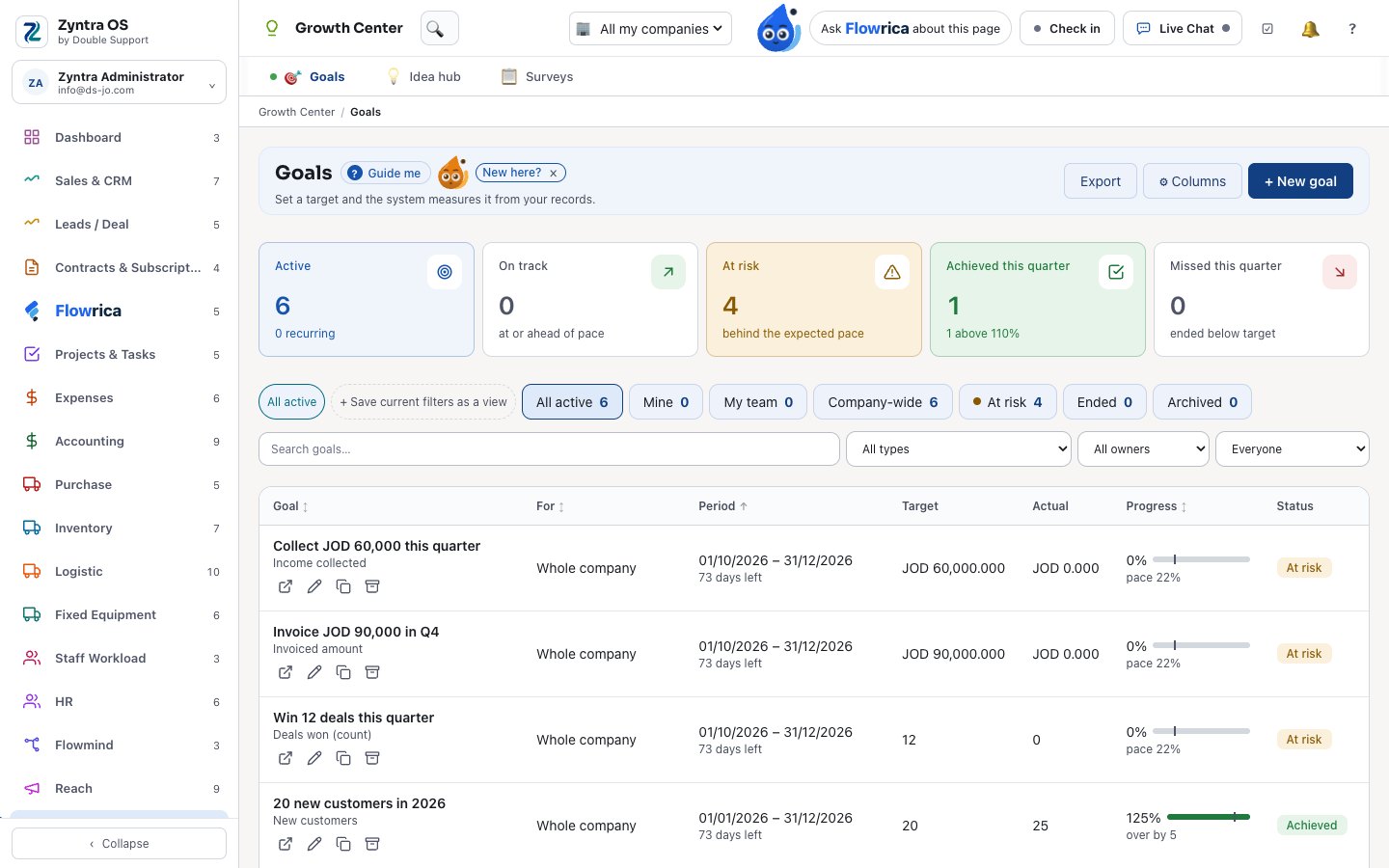
Goals, ideas and surveys that move the company
Measured from your own records, and tied to pay and to work.
Goals
Goals the system measures for you.
- Measured from the company’s own records: income collected, amounts invoiced, leads converted and more
- Periods that freeze when they end, and goals that repeat
- An approved bonus for a goal reached goes onto the next payslip
Idea hub · Surveys
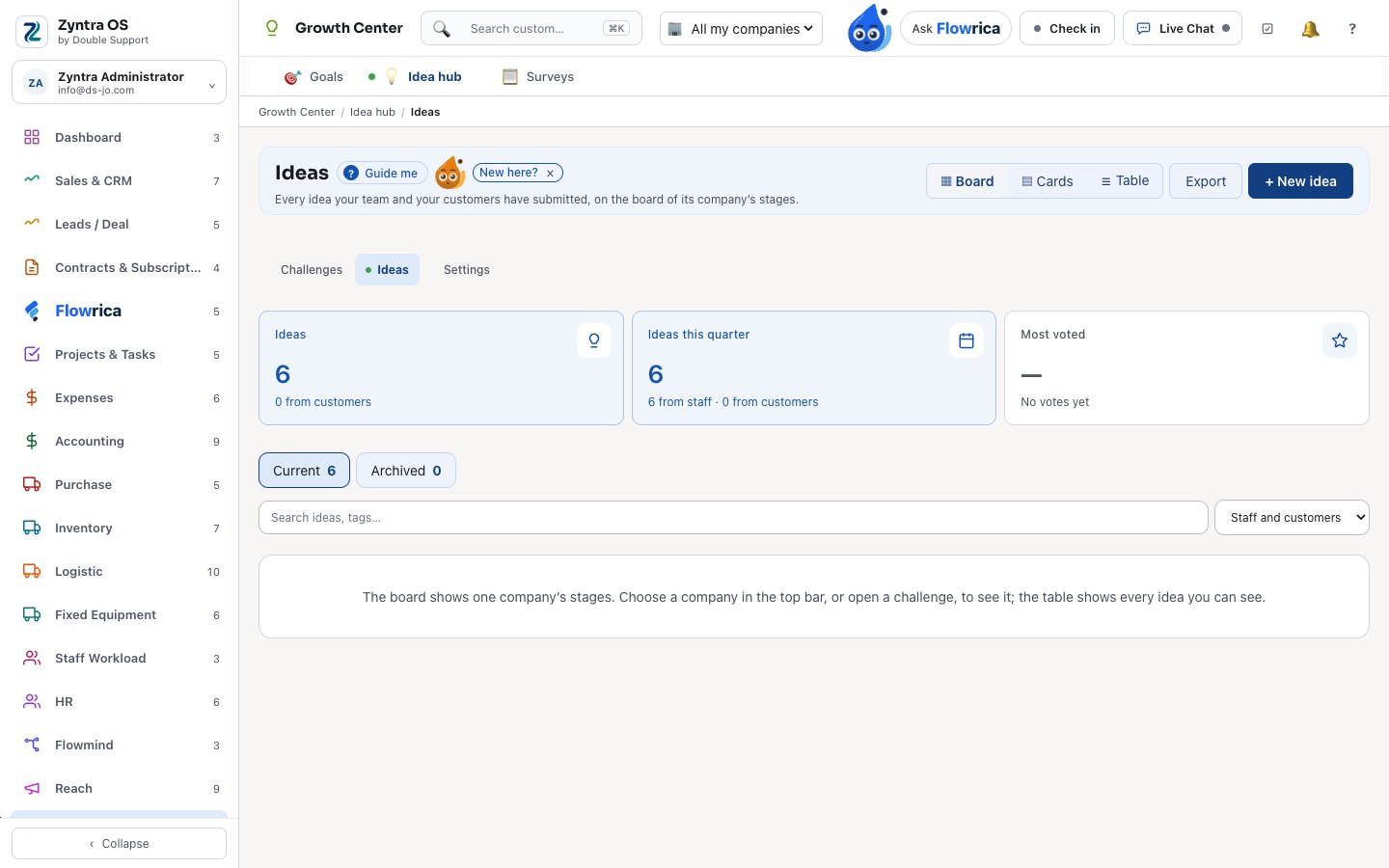
Ideas that become work, and answers that start action.
- Challenges with judges, votes and a live shared whiteboard on each idea
- An idea becomes a project or a task, and its author earns points when it is done
- Surveys after a ticket closes or a deal is won; a low score can open a task
Your website, your support desk and the system itself
This website is built with the Website module.
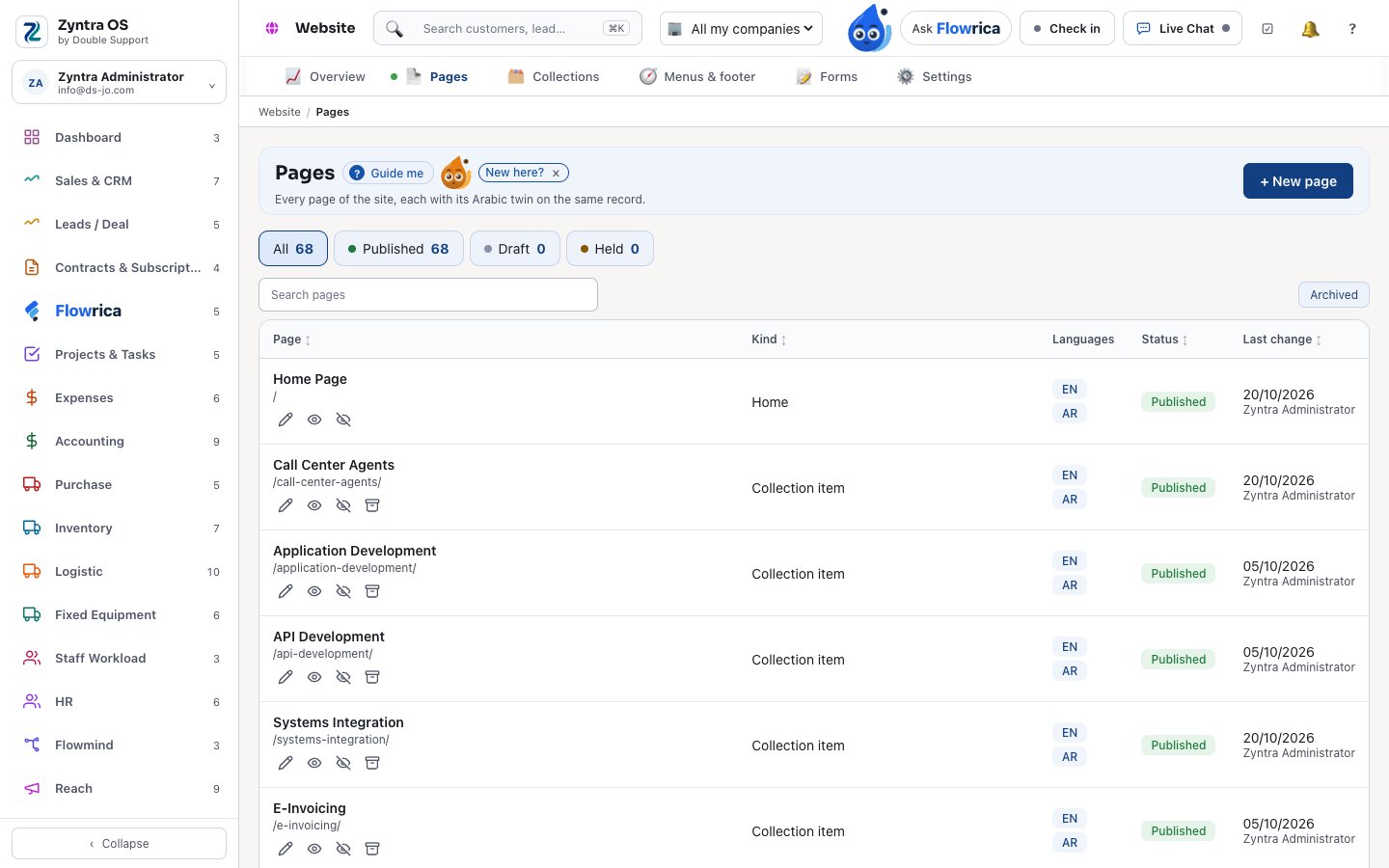
Website
Pages, collections, menus and forms, on your own domain.
- Pages built from blocks, in Arabic and English, with every change kept
- Ready for search and answer engines: sitemap, llms.txt and structured data
- Careers, the knowledge base and live chat on the site; forms that become leads
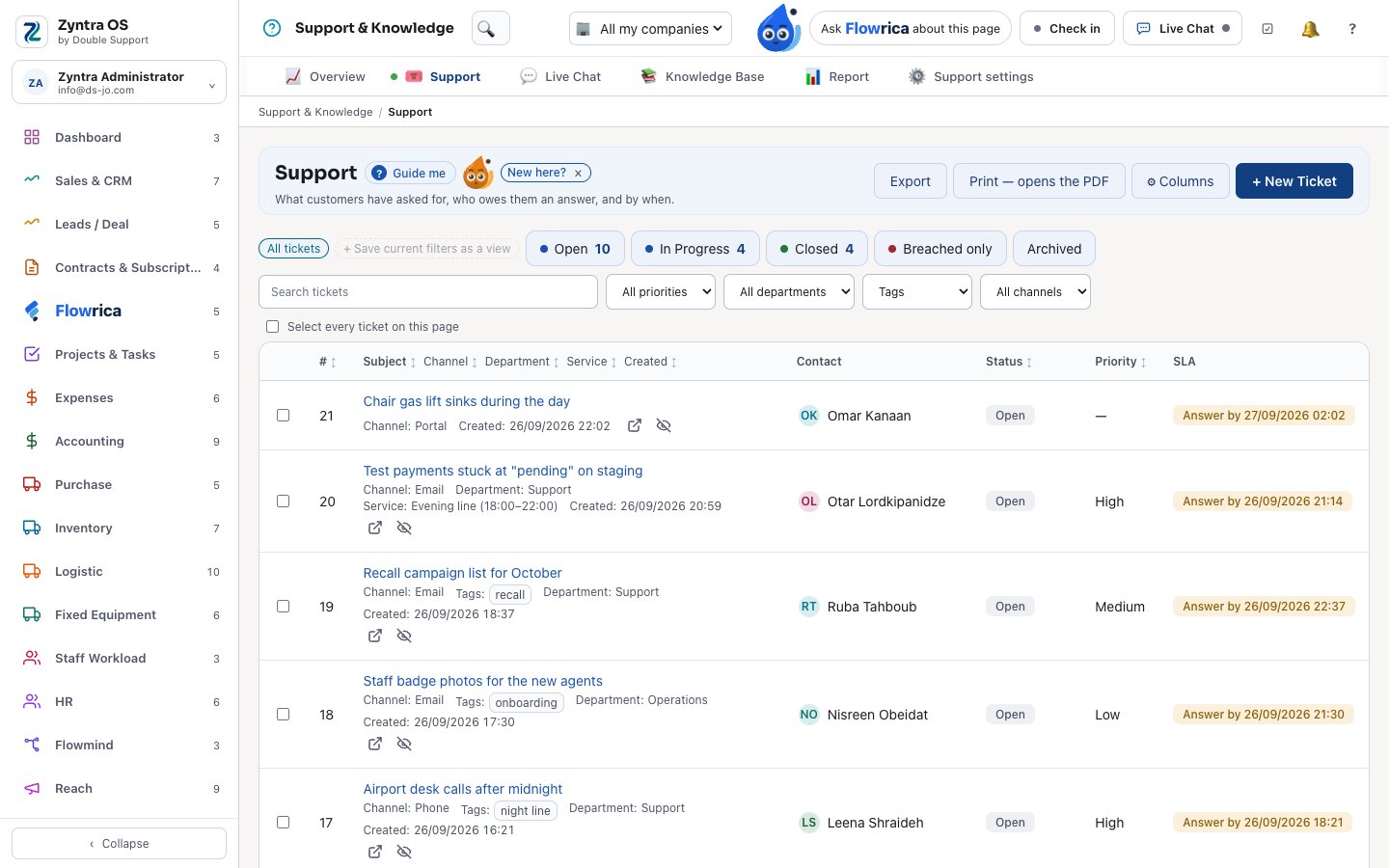
Support & Knowledge
Tickets, live chat and a public help centre.
- Tickets with service levels, triage and a spam filter
- Live chat on your website and in the portal
- A knowledge base read by your website, your portal and Flowrica
- With Flowrica Advance, a ticket summarised and a reply suggested
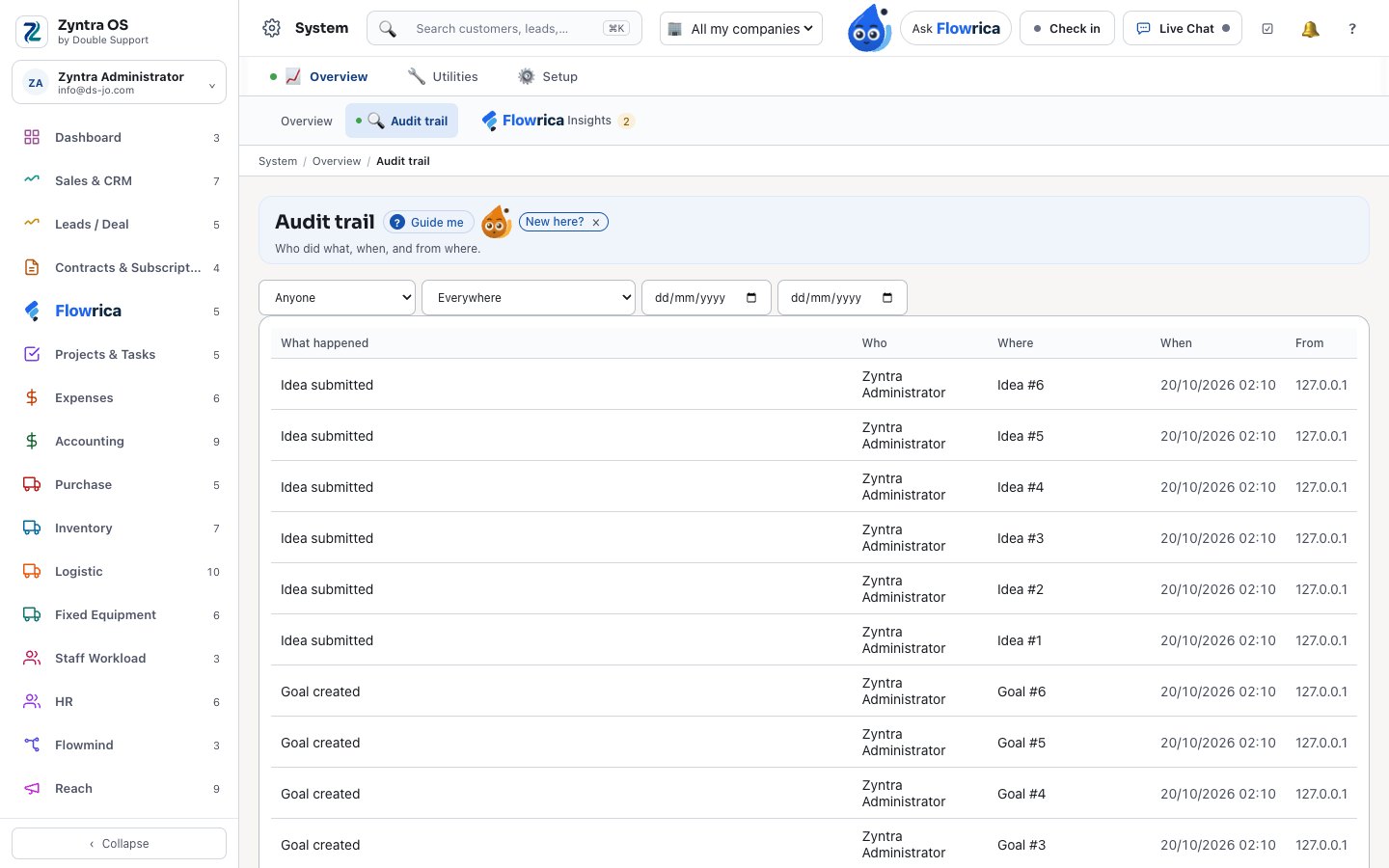
System
Companies, people, rights and the trail.
- Companies, staff, roles and teams; access requests
- An audit trail nobody can edit
- Mailboxes from Microsoft 365 or any IMAP server
- Custom fields, email templates and your own PDF layout
Editions and ways to run it
 Zyntra Legal, the law office edition: cases, hearings, legal deadlines, powers of attorney and a conflict check, on top of everything above. See Zyntra Legal.
- Your own Zyntra on its own address, opened by our team after your request from the pricing page, with a free period first, then a subscription invoiced each period.
- A client portal and a vendor portal: your customers pay invoices, accept proposals, sign contracts, open tickets and follow their projects; your vendors send quotations and invoices.
- Connections ready to switch on — see every connection.
Why Zyntra
Is Zyntra OS a good choice for a business in Jordan or the Gulf?
It is built for them. Zyntra OS is made in Amman: every screen works in Arabic and English, right to left, with Arabic invoices and PDFs; invoices go to Jordan's National Invoicing System (JoFotara) from inside it, and it is ZATCA-ready for Saudi Arabia; tax returns follow Jordan's and Saudi Arabia's periods; the accountants' own Arabic chart of accounts is ready; and received cheques are followed through their whole life. Several companies can run in one Zyntra. Our team is in Amman, in your time zone. Why Zyntra.
How is Zyntra OS different from other systems?
Things people often expect to pay extra for, or to find missing, are already in it: Arabic on every screen; several companies in one installation; an assistant, Flowrica, beside every screen who answers only from what each person may open; e-invoicing with JoFotara, and ZATCA-ready; a client portal and a vendor portal; rights on every screen and every record; nothing ever deleted, with an audit trail no one can edit; Outlook beside your email; and modules for logistics, fixed equipment, marketing, automation and goals in the same system.
What do other systems charge extra for that Zyntra OS includes?
There is no setup fee. National e-invoicing — JoFotara live, ZATCA-ready — is in the base price, never an add-on. Arabic is not a language pack. The 67 ready connections — payments, messages, email, calendars, e-signature and more — come at no extra charge, each on your own account with the provider. Zyntra Legal includes the client portal. Flowrica, several companies, expenses, projects, tasks, sprints, the calendar, contracts, subscriptions and backups are in the base. Build your price.
How is Zyntra OS priced?
Per user, per month, for the modules you take — monthly, or yearly at 20% off. There is no setup fee, and national e-invoicing (JoFotara live, ZATCA-ready), Flowrica and the ready connections are included. You build the price yourself on the pricing page; the price you see there is the price on our invoice.
Where does Zyntra OS run, and where is our data?
Each of our customers gets its own Zyntra on its own address, with its own database, so your data never sits beside another customer’s. Backups are part of the base price, nothing is ever deleted — records are archived and can be brought back — and every change is kept in an audit trail nobody can edit. Several companies of the same group can work in one Zyntra, each seeing only its own records.
Is there a setup fee for Zyntra OS?
No. You pay for the people who use it and the modules you take, monthly or yearly; the price you build on the pricing page is the price on our invoice.
Do the connections cost extra?
No. The ready connections come with Zyntra OS at no extra charge. Each one runs on your own account with the provider, so what the provider itself charges stays between you and them. Every connection.
Can I see all my companies’ figures together?
Yes. Each company keeps its own records, and a parent company’s figures can bring together the companies whose books sit under it. Each person works only in the companies they are given, and switches from the top bar.
Who decides what each person sees in Zyntra OS?
You do, with roles. Every screen has its rights, and a right can reach a person’s own records, their team’s, or everything. The system checks it itself when it reads, so a list, a report or Flowrica’s answer never holds a record the person may not open.
Is anything ever deleted in Zyntra OS?
No. A record is archived, not deleted, and can be brought back. A wrong expense is voided, not erased. Every change is written in an audit trail that nobody can edit or delete, and each record keeps its own timeline of notes, activities and files.
Does Flowrica only tell me what I am allowed to see?
Yes. She answers through the same rights as the screens: she only tells each person what they are allowed to open, and in the client portal a customer hears only about their own orders, invoices and projects. Every answer shows the records it came from, and each of those opens with your rights. What Flowrica can do.
What can I ask Flowrica?
Questions about your own work, in Arabic or English. For example: “How many invoices are overdue?”, “Which customer is the most profitable?”, “Who has the least work this week?”, “Which cheques fall due this week?”, “What does the knowledge base say about opening a ticket on the portal?”, or “create a task for Rami on Thursday: design the screens” — she fills the task and you press Create. On the Workload screen she drafts a plan that moves tasks from overloaded people to people with room, one line at a time. Each answer only holds what that person may open. See her answers on real screens.
What will Flowrica never do?
She never sends an email or a message on her own, never saves a record without you pressing the form’s own button, and never deletes anything. Her only changes are moving a deal’s stage, assigning tasks and moving a calendar event — shown first, confirmed by you, and with an Undo. A rule she prepares is saved switched off. She does not answer questions outside your business.
Can I ask Flowrica in Arabic?
Yes. She understands questions typed in Arabic, including everyday Jordanian words — for example «كم فاتورة متأخرة عندنا؟» or «بدي اعمل عميل» — and answers the same as in English.
How deep is the accounting in Zyntra OS?
Full books: the accountants’ four-level Arabic chart of accounts or a ready one, journal entries, fiscal periods that close and reopen, bank statements matched and reconciled, received cheques from receipt to deposit, collection, return and redeposit, issued cheques printed with the amount in words, set-off, budgets against actuals, currency revaluation at period end, and the trial balance, balance sheet, profit and loss and cash flow. A filed tax period locks its invoices.
Does Zyntra OS run payroll?
Yes. Its payroll engine works from gross pay through income-tax brackets set per country and year to deductions and social security, with overtime rates for holidays, rest days and working days. A closed payroll month locks its attendance, and the books see the totals, not each salary. Attendance, leave, rosters, recruitment and the org chart are in the same HR module.
What does Flowmind automate?
Routine work across the whole system. A rule starts when something happens in one of 32 modules, checks its conditions and acts — it can wait “30 minutes” or “until the invoice is paid”, run on a schedule, or call another system. Every run is kept in its history, and loops are refused.
What is Reach in Zyntra OS?
Marketing on your own records: segments with “and / or” groups, campaigns that a lead enters once when it joins the segment, points and stages kept as history, and email, SMS and WhatsApp channels. Consent, unsubscribes and bounces are respected.
What is the Growth Center?
Goals, ideas and surveys. Goals are measured from the company’s own records, and an approved bonus for a goal reached goes onto the next payslip. The idea hub has challenges, judges, votes and a live shared whiteboard, and an idea becomes a project or a task. Surveys go out after a ticket closes or a deal is won, and an answer can start a Flowmind rule.
What does the Logistics module do?
It runs a parcel-forwarding business: a locker code for each customer, pre-alerts the customer sends from the portal, packages, shipping, pickup and consolidation with tracking steps and labels, prices from rate cards by origin, destination and weight, five reports, and messages to customers and drivers.
Can my customers and vendors work in Zyntra OS too?
Yes, each in their own portal. Customers pay invoices, see their statement, accept proposals, sign contracts, open tickets, follow and sign off projects, and ask for equipment or announce parcels. Vendors send quotations, invoices and items, and can register themselves for your approval.
Does Zyntra OS work with Outlook?
Yes. The Outlook add-in shows the sender’s records beside the email and logs it to a ticket, and Flowrica can draft a reply there that you send yourself. Each person’s calendar can sync both ways with Outlook; nothing is sent to attendees by the sync.
Can I switch modules on and off?
Yes. A module is switched on when you need it and off when you do not, and its menu follows. Nothing is deleted by switching off, and a module that another one needs — such as accounting while invoices are on — stays on.
Is there a Zyntra edition for law offices?
Yes: Zyntra Legal, built on Zyntra OS. It adds cases with their courts, parties and hearings, legal deadlines counted for you, powers of attorney and a conflict check, and clients follow their cases in the portal. See Zyntra Legal.
See it with your own work
Ask for a demo and our team will show you Zyntra OS with the parts you need, in Arabic or in English.
Ask for a demo Build your price Every connection See what’s in Zyntra OS