

 Zyntra OS
 Zyntra Legal
 Zyntra Real Estate
 Zyntra Hotel
 Zyntra E-commerce
 Zyntra Appointments
 Zyntra Repair
 Zyntra Garage
 Zyntra Concierge
 Zyntra Contracting
 Zyntra Clinic
 Zyntra Dental
 Zyntra University
 Zyntra Call Center
 Zyntra OTA
Zyntra University, the universities' edition of Zyntra OS
Zyntra University: courses, registration, GPA, graduation and the student portal, in one university system
Zyntra University keeps the university's faculties, majors and courses with their prerequisites, a study plan for every major and intake year, the semesters with their registration windows, the sections offered with their seats, teachers, rooms and times, and each student's registration — checked for prerequisites, clashes, seats and hour limits. Course marks become letters by the university's own scale, the semester and cumulative GPA follow, with the standing and the dean's list, then the graduation audit, the graduation list and the official transcript and degree. Students register and read their record in their own portal. It is built on Zyntra School and Zyntra OS, so the student file, admissions, invoices, accounts, staff and payroll are in the same system.
On this page
- Faculties, majors, courses and study plans
- Semesters and the sections offered
- Registration, add and drop, and withdrawal
- Academic advisors and student requests
- Course marks, the grade scale and the GPA
- Lecture attendance, exam bars and the exam timetable
- Online exams and the question bank
- Academic standing and the dean's list
- The graduation audit and the graduation list
- The official transcript and the degree certificate
- Fees by the credit hour, scholarships and holds
- The student portal
- Google Classroom, Microsoft Teams and Moodle for sections
- Messages with teachers and the advisor
- Activities, clubs and consent forms
- Online application
- Everything it shares with Zyntra School and Zyntra OS
- Who Zyntra University is for
- A semester at a university with Zyntra University
- Moving from your current system
- What you need to start
- What is not in Zyntra University yet
- Questions universities ask
See it working
Pictures of a made-up university, taken from Zyntra University itself.
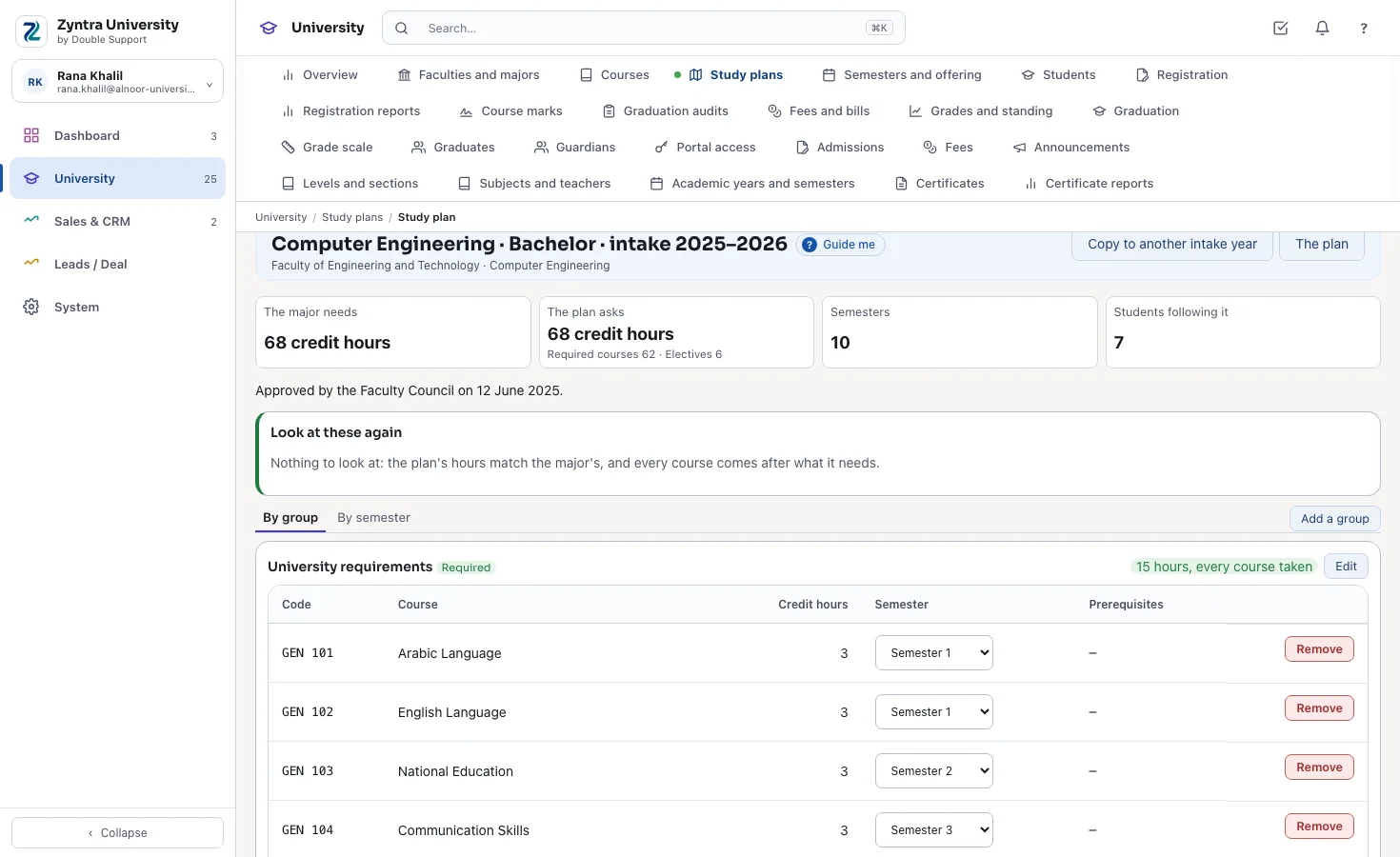
A study plan
A major's plan for its intake year: the required and elective groups, their hours and the semester of each course.
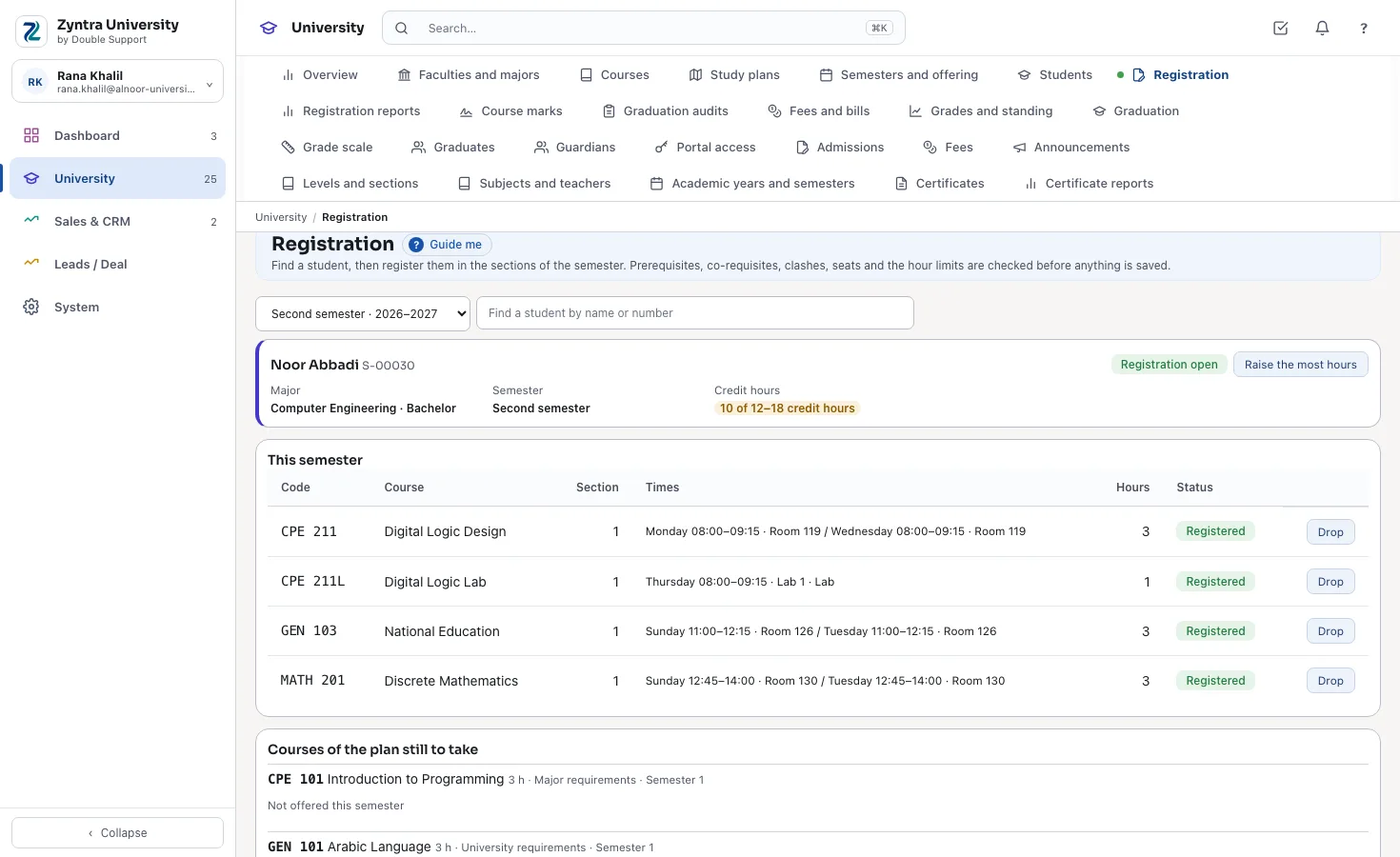
Registering a student
The semester's sections beside the student's record; prerequisites, clashes, seats and hours are checked before saving.
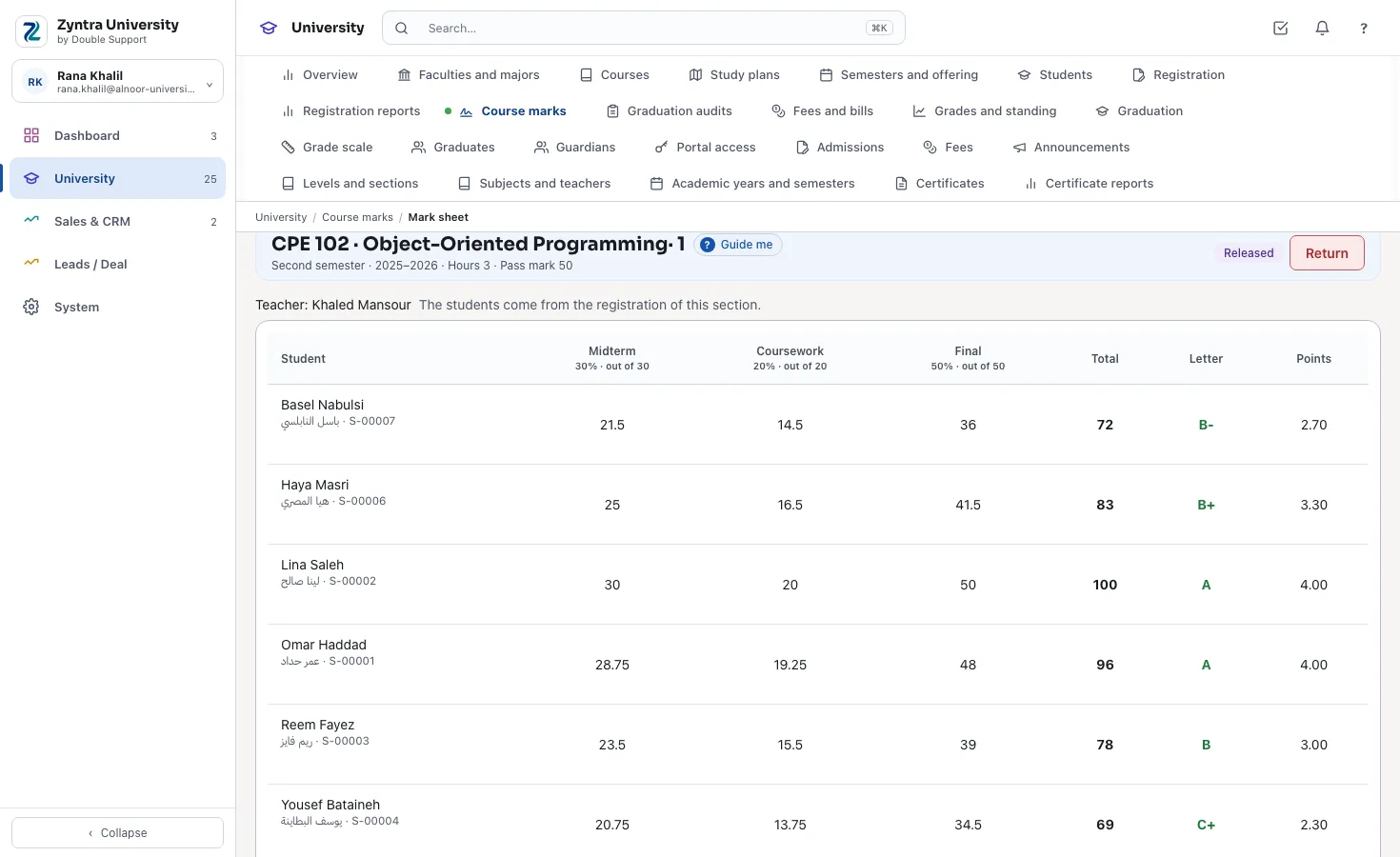
A course's mark sheet
The midterm, the coursework and the final; on release each total becomes a letter by the university's scale.
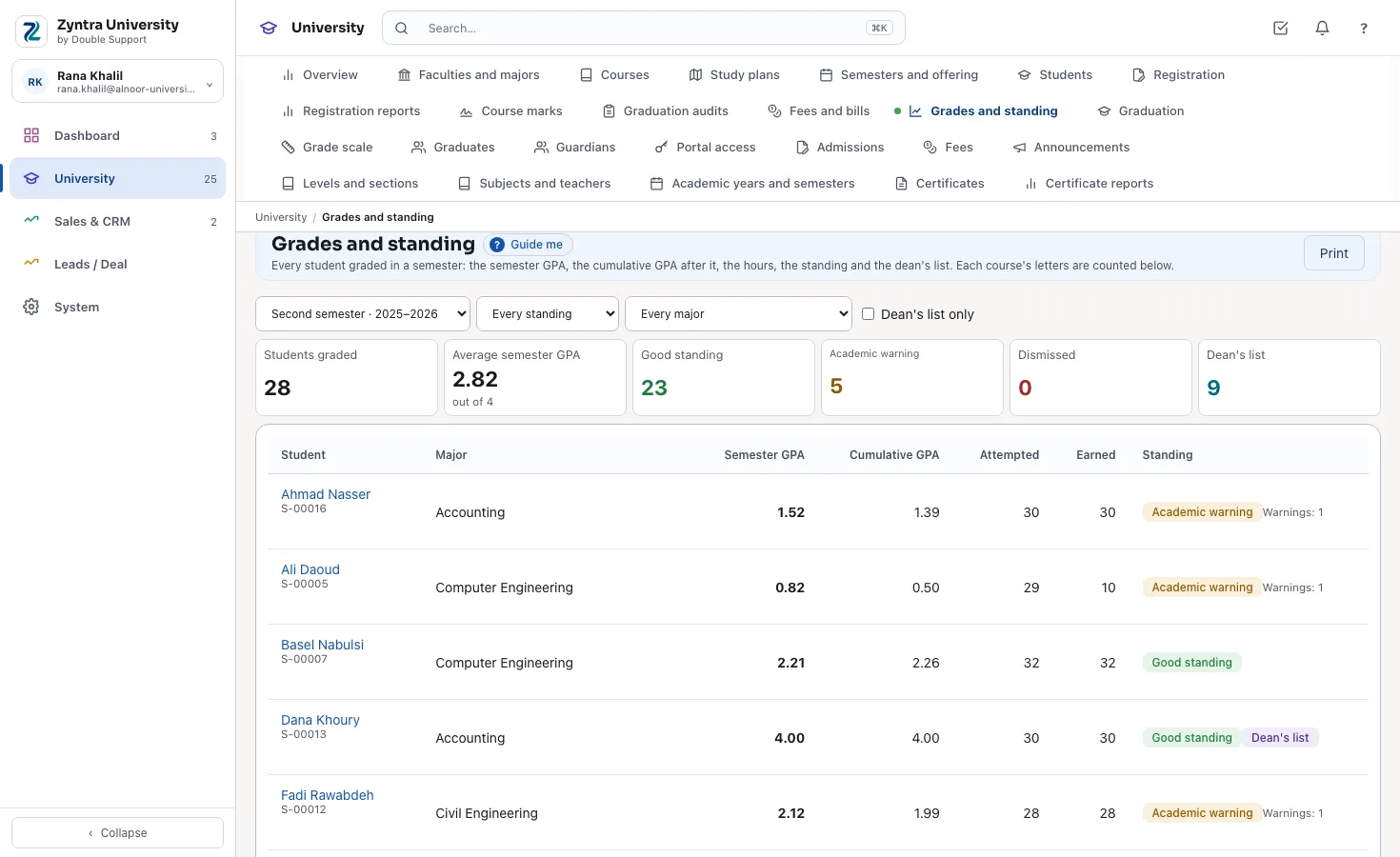
Grades and standing
Every student's semester and cumulative GPA, the warnings and the dean's list.
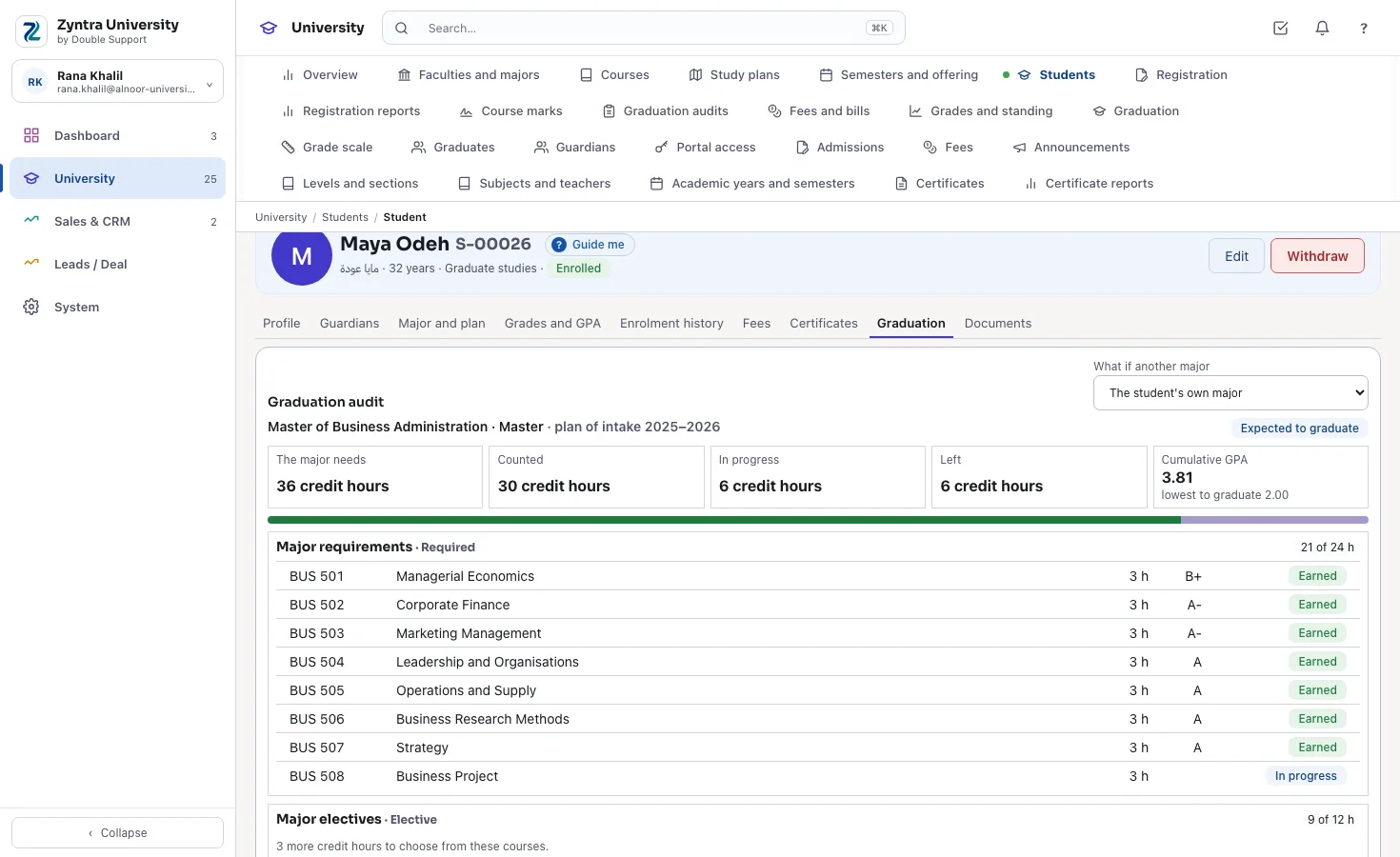
The graduation audit
What the student has earned against their plan: each group's hours, the missing courses and the lowest GPA.
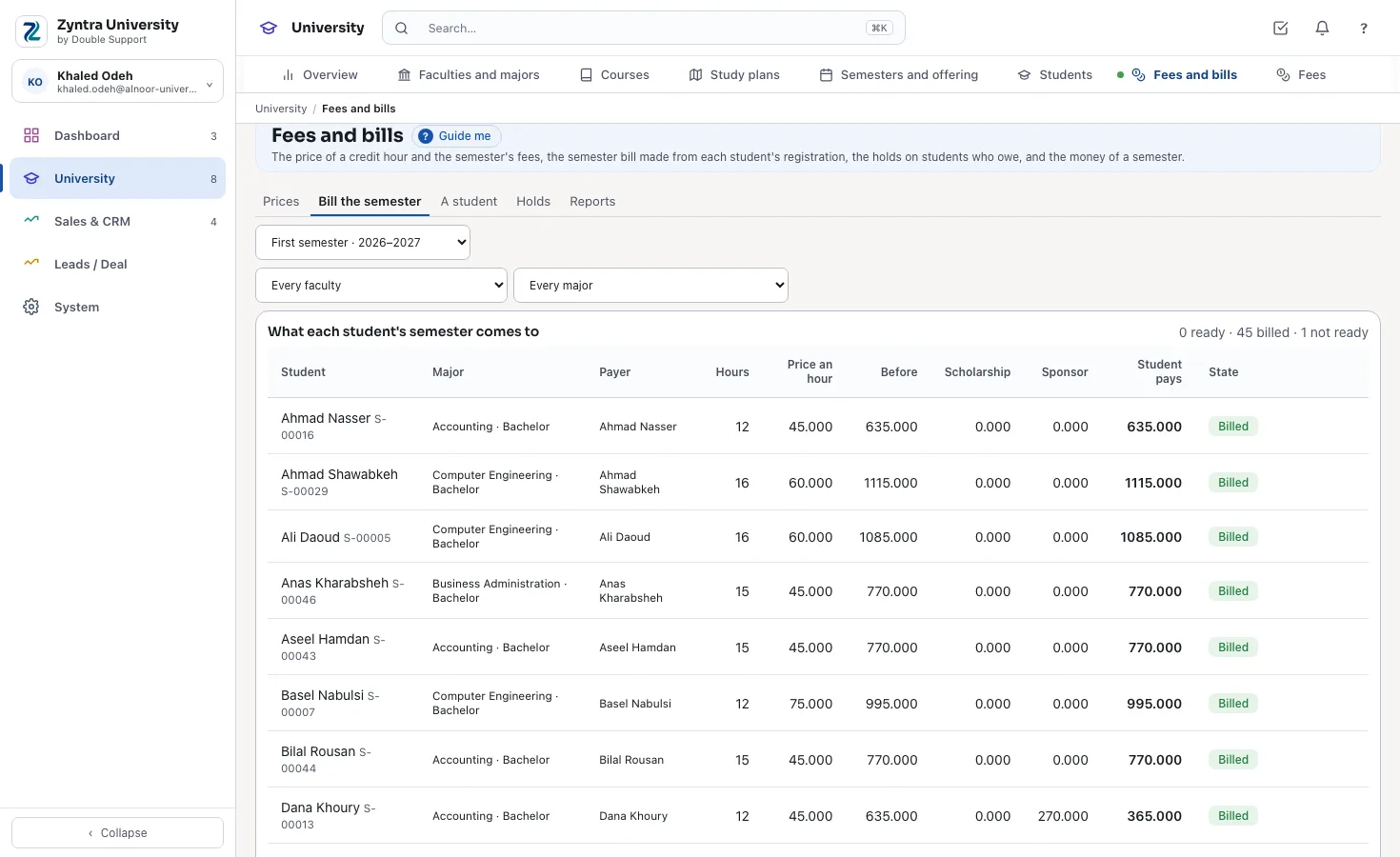
Bill the semester
Each student's hours times the price of an hour, the fees, the scholarship and the sponsor's share, then one invoice to the payer.
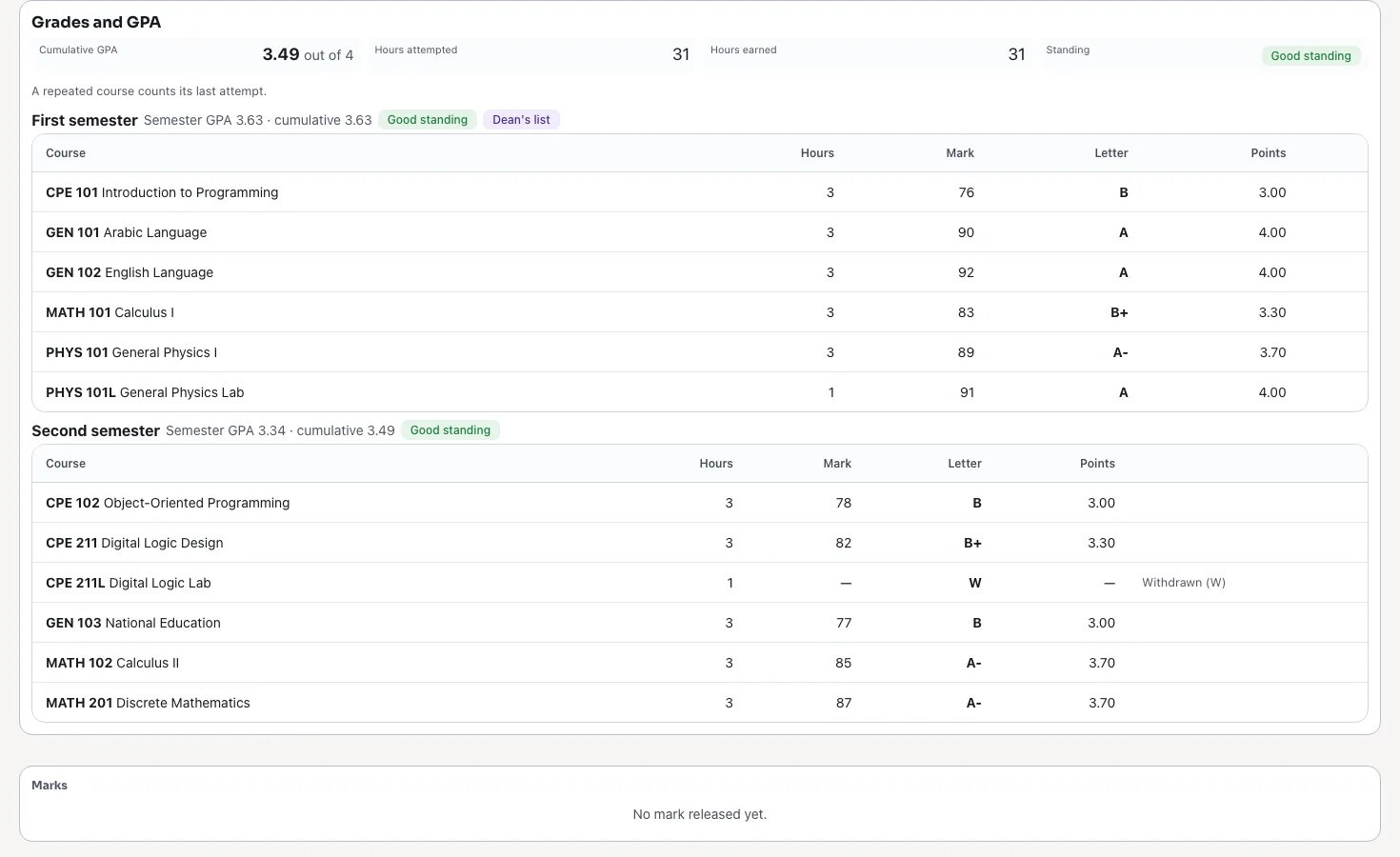
The student's portal
The student's own grades semester by semester, the GPA and the standing; registration and what is left to graduate on the same page.
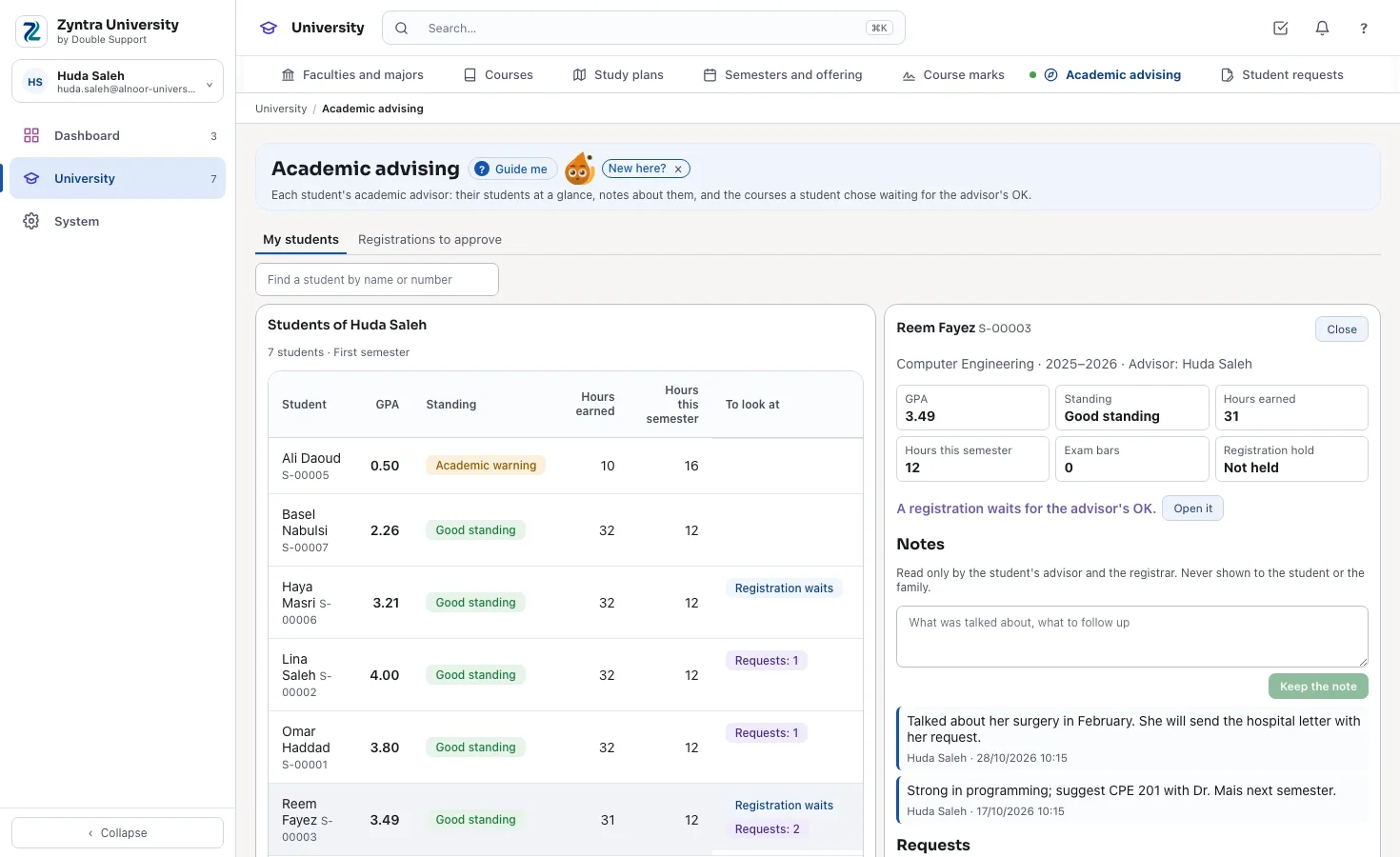
An advisor's students
Each student's GPA, standing and hours, what waits for the advisor, and the notes only the advisor and the registrar read.
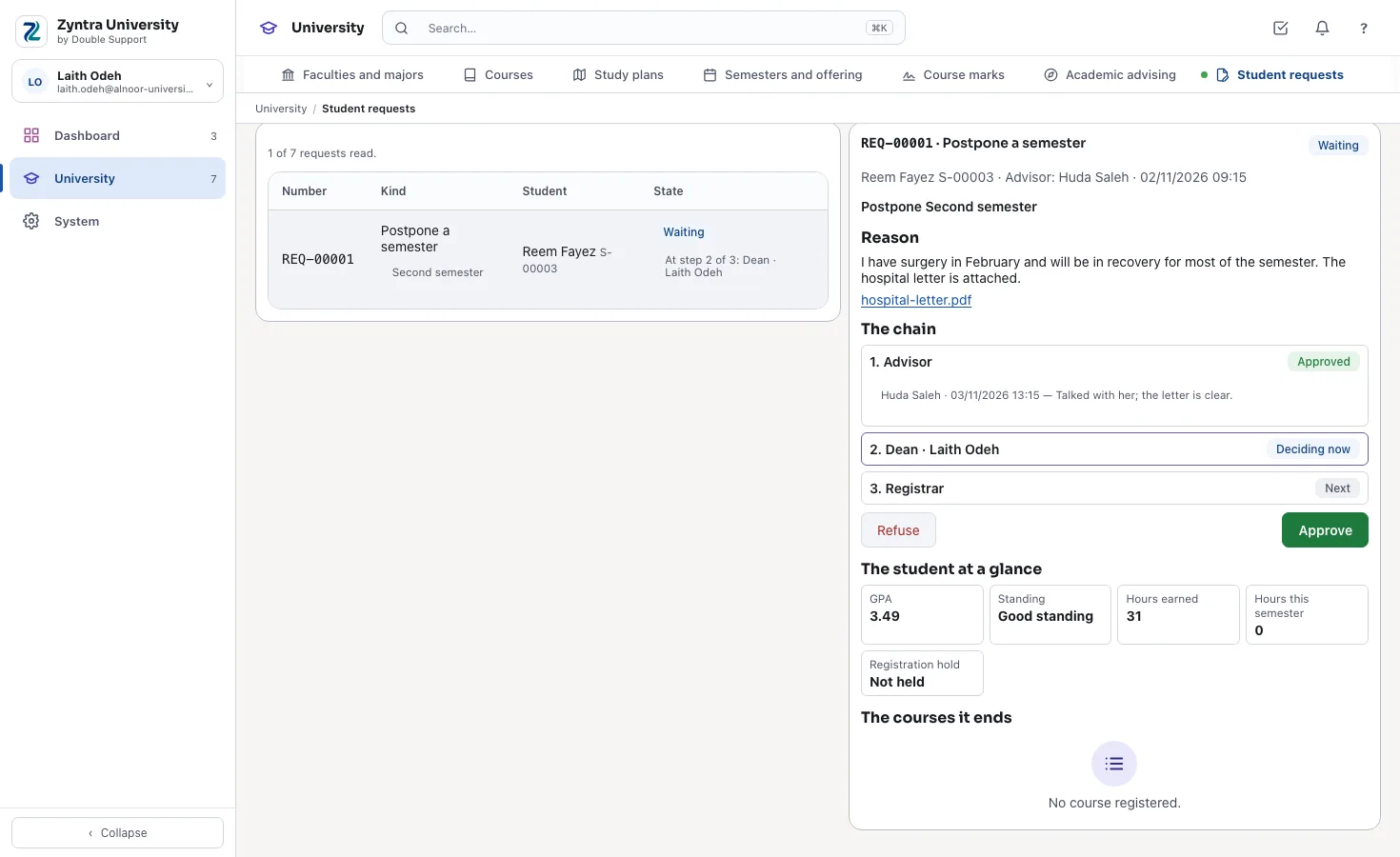
A student's request and its chain
Each step in order — who approved, when and what they wrote — and the step deciding now.
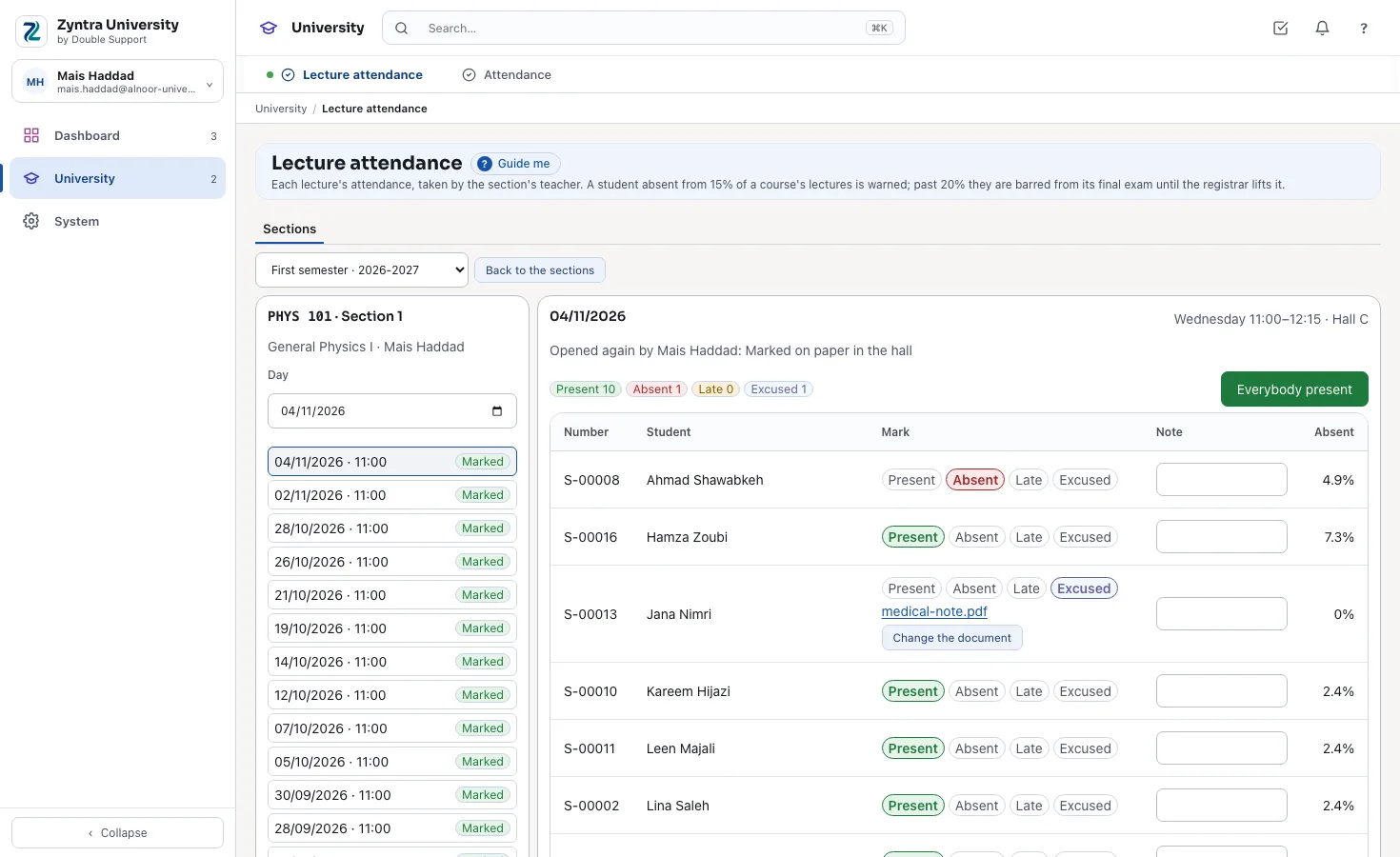
A lecture's attendance
Everybody present first, then the few absent, late or excused, each with their absence so far.
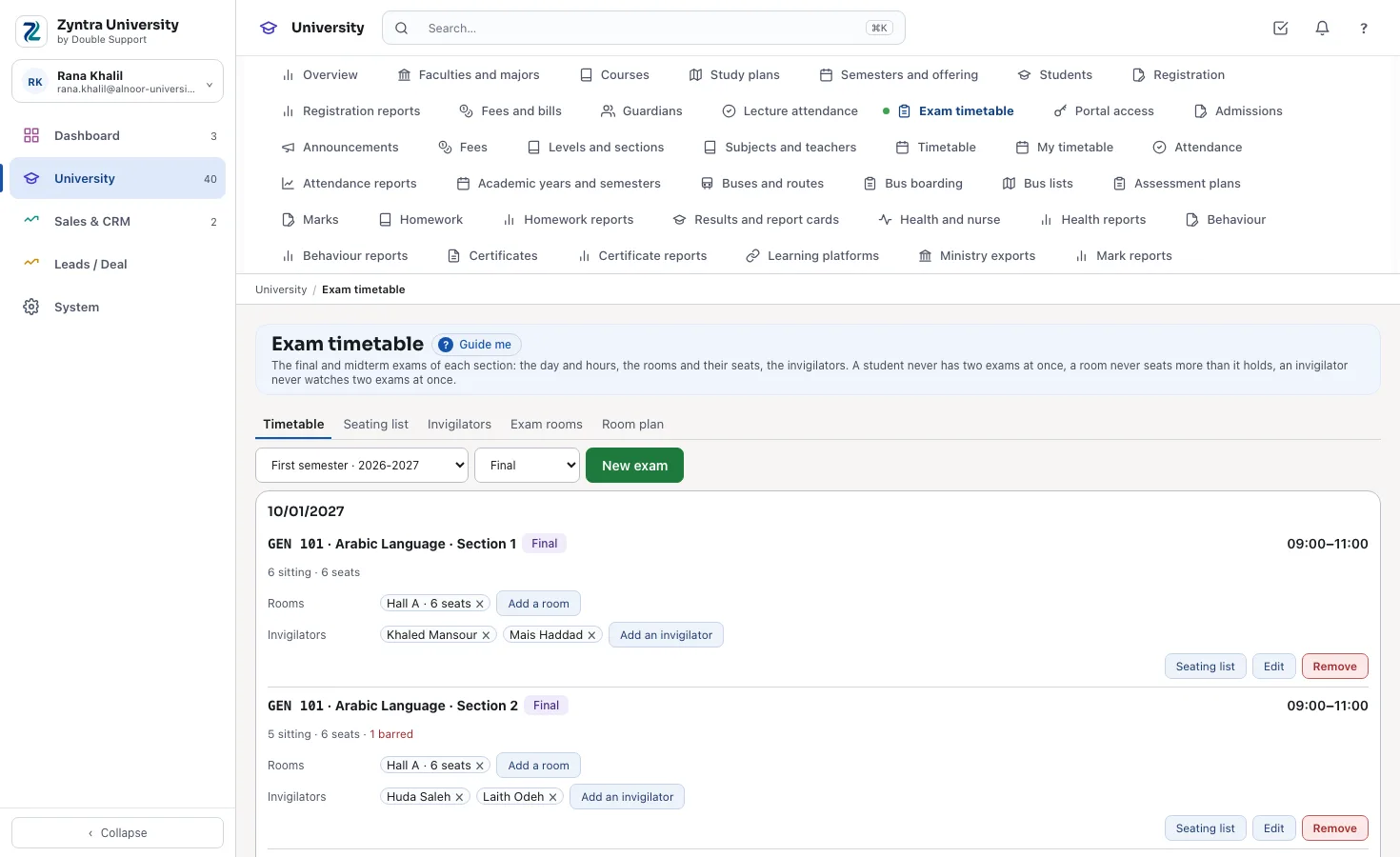
The exam timetable
Each final with its day and hours, its rooms and seats, its invigilators, and who is barred.
Who Zyntra University is for
- University colleges and community colleges that teach by the credit hour, with diplomas and bachelor's degrees.
- Institutes and training centres with courses, prerequisites and certificates of their own.
- Small and mid-sized private universities in Jordan, Saudi Arabia and the UAE that want registration, GPA, graduation and their accounts in one system, in Arabic and English.
- A university with several colleges or campuses, each kept as its own company with its own books.
Faculties, majors, courses and study plans
The university keeps its faculties, each faculty's departments and each department's majors, with the degree — diploma, bachelor, master or doctorate — and the credit hours a student needs to graduate. Every course has its code, its credit hours, its weekly lecture and lab hours, and what it needs before it (a prerequisite), with it (a co-requisite) or instead of it (an equivalent course). A chain of prerequisites that loops back on itself is refused.
Each major has a study plan for each intake year: University, Faculty and Major requirements, the major's electives with the hours needed from them, and the semester each course is suggested in. Students admitted that year follow their plan to the end; next year's plan starts as a copy and is changed where it differs.
In the university's semester
- The registrar: adds a course with its hours and links it to the courses it needs, and sees every plan it is in.
- The dean: reads a major's plan for this year's intake, its groups and its hours against the major's total.
Semesters and the sections offered
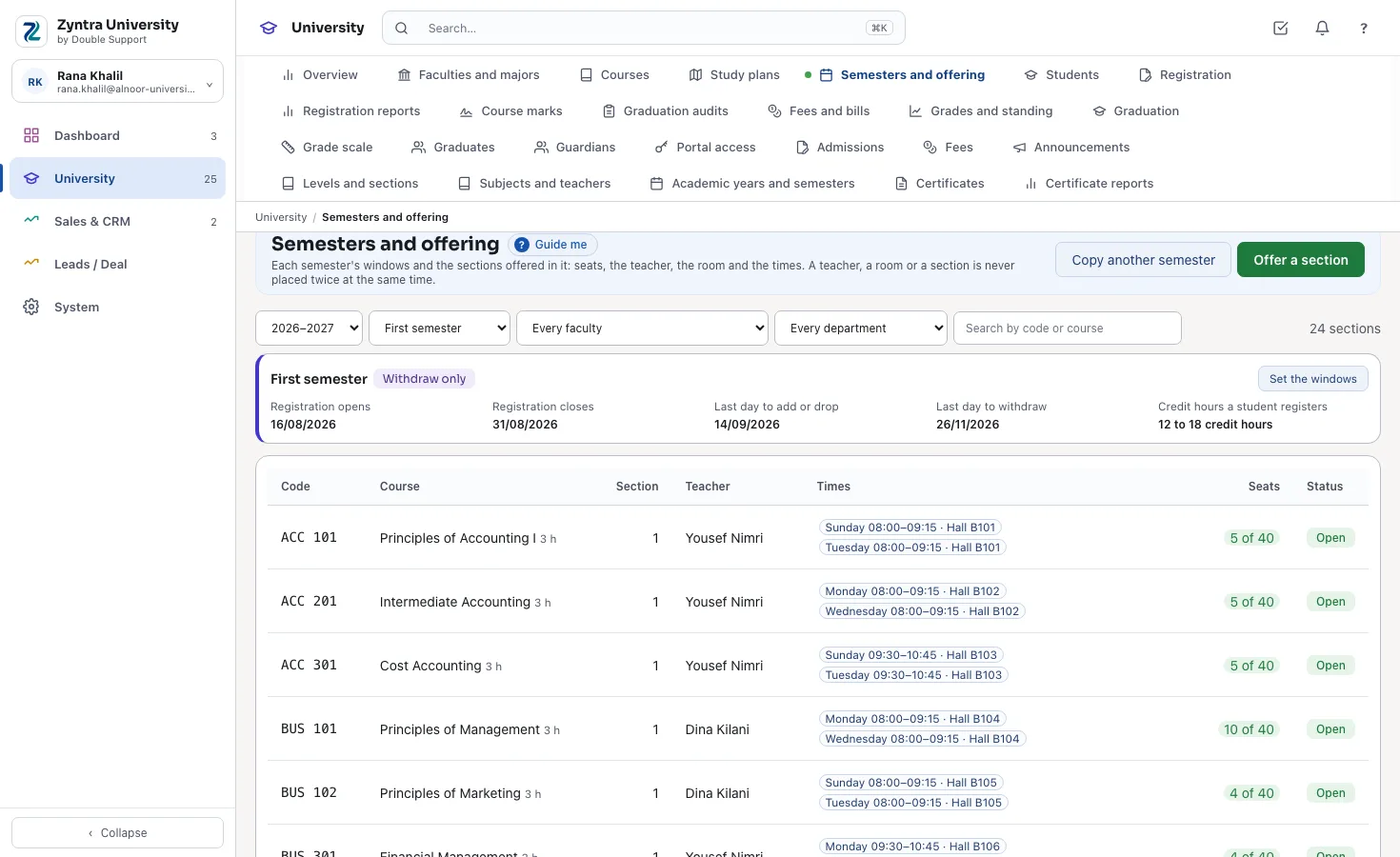
Each academic year has its first and second semesters and a summer one, each with its windows: when registration opens and closes, the last day to add or drop a course and the last day to withdraw. The fewest and most credit hours of a semester are the university's own figures.
Each semester the university offers its sections: the course, the number, the seats, the teacher, and the times with their rooms — a lecture and a lab can each have their own room and teacher. A teacher, a room or a section is never placed twice at the same time: the time is refused and the sentence says where they already are. Each teacher's rank carries the teaching load it expects, and the semester's load report shows who is under or over it.
In the university's semester
- The department: copies last year's offering into the new semester, then changes the seats, teachers and rooms where they differ.
- The registrar: sets the semester's windows once; the portal opens and closes registration by them.
Registration, add and drop, and withdrawal
A student is registered in the sections of a semester — by the registration office, or by the student in the portal, the same way. Before anything is saved every choice is checked: the prerequisites earned (only a course passed opens the next one), the co-requisites taken together, no two sections at the same time, a seat free, and the semester's fewest and most hours. A full section puts the student on its waiting list, and the first one waiting moves in when a seat frees.
In the add and drop window a course is dropped without a trace on the record; after it and until the last day to withdraw, a withdrawal leaves a W. A person with the right acts outside the windows or raises one student's most hours, with the reason kept. The registration reports give each section's class list, the seats and waiting lists, the students under or over the limits, and each teacher's load.
In the university's semester
- The registration office: finds a student by name or number and registers them; a refused section says why — the missing course, the clash, the full seat.
- The head of department: reads the waiting lists and opens a second section where the waiting is long.
What the student sees
The student opens Registration in the portal while the window is open, picks the sections of the semester, and reads at once what was registered, what waits for a seat and why anything was refused.
Academic advisors and student requests
Each student has an academic advisor from the staff. The advisor reads their own students at a glance — the cumulative GPA, the standing, the hours earned and registered, an exam bar or a registration hold — and keeps notes about them that only the advisor and the registrar read. While the university says so, the courses a student registers in from the portal wait for the advisor's OK, with the student's plan and graduation audit beside the choice; nothing counts before it.
A student asks from the portal to postpone a semester, withdraw, have a course from another university counted, get a refund, change major, or add or drop a course late. Each request walks the university's chain for its kind — the advisor, the head of department, the dean, then the office that owns it — and the last OK acts at once.
In the university's semester
- The advisor: approves three registrations with the audit beside each, and returns one with the reason.
- The dean: approves a change of major at the dean's step; the registrar's OK then moves the student.
What the student sees
The student reads why a registration was returned, and follows each request step by step in the portal.
Course marks, the grade scale and the GPA
The teacher of a course types its marks for the semester — the midterm, the coursework, the final, as the course's plan weighs them — and submits them; the registrar approves, returns them with a note, or releases them. On release each student's total becomes a letter and its points by the university's own scale, and the grade is written on the student's record.
Each university keeps its scale: from what mark each letter starts, its points and whether it passes, and whether the GPA is out of 4 (Jordan, the UAE) or out of 5 (Saudi Arabia) — both are ready to start from. The semester GPA and the cumulative GPA count points times credit hours over the hours; a repeated course counts once, by its last or its best attempt as the university sets it; a pass or fail course, a W, an incomplete and transfer credit never enter the GPA.
In the university's semester
- The teacher: types the marks of the courses they teach, and submits them when they are complete.
- The registrar: reads every course of the semester with its status, approves and releases them — the GPAs follow at once.
What the student sees
The student reads each released grade with its letter and points, the semester GPA and the cumulative GPA in the portal.
Lecture attendance, exam bars and the exam timetable
The teacher of each section takes attendance in every lecture — present, absent, late or excused, with the document of an excused absence — and each student's absence is counted against the course's limit at once. A student past the warning is warned; past the university's limit they are barred from the course's final exam, and the registrar may lift a bar with a reason that stays on the list. A fingerprint or card device in a lecture room can mark the lecture by itself.
The exam timetable places each section's final and midterm: the day and the hours, the rooms and their seats, the invigilators. A student with two exams at once, a room past its seats or an invigilator in two rooms is refused, with what clashed. The seating list prints each room with its seat numbers and names, and those barred have no seat.
In the university's semester
- The teacher: presses «Everybody present», marks the two absent and saves; each student's absence so far is beside their name.
- The registrar: places the finals, adds the rooms and invigilators, and prints the seating lists.
What the student sees
The student reads each course's attendance and the share missed against the warning and the limit, and their exam timetable.
Online exams and the question bank
Each course keeps a question bank in seven kinds, with marks, difficulty and tags, in English or Arabic. An online exam for a course section is built from chosen questions or random draws, with its window, time limit and tries, shuffled for each student; a timetable final takes its day and hours, and a student barred from the final cannot sit it.
The student sits it in the portal with their own sign-in; the answers are saved as they go and the time is counted by the university's server. The key parts are marked at once, written answers wait for the teacher, and the best try goes into the course's mark sheet as a draft — never released by the exam itself.
In the university's semester
- The teacher: sets the midterm quiz for the section from the bank, and marks the written answers before submitting the marks.
Academic standing and the dean's list
After each semester every student's standing follows the university's own rules: good standing, an academic warning when the cumulative GPA is under the university's figure after a number of hours, and dismissal at the warning it sets — warnings in a row or in all. Each change is kept on the student's trail with the GPA that caused it.
The dean's list holds the semester's best students by the university's figures. The student can be told of a change in their standing by e-mail, only while the university switches it on.
In the university's semester
- The dean: opens the semester's standing: who is warned, who is dismissed, and the dean's list.
- The academic advisor: sees a warned student's record and plans a lighter semester with them.
What the student sees
The student reads their standing beside their GPA in the portal.
The graduation audit and the graduation list
A student's graduation audit sets what they have earned against the study plan of their major and intake year: each group's hours, the courses still missing, the major's total hours and the lowest cumulative GPA to graduate. Every student studying a major reads as meeting the plan, expected to graduate (they meet it once the courses studied now are passed), near graduation, or not yet. A what-if audit reads the same record against another major's plan.
A semester's graduation list holds the students who meet their plan. The registrar approves each one, then the dean; the dean's approval graduates the student on the list's day, in their major's degree. Every graduate is kept with the day, the degree, the cumulative GPA and the hours, and keeps their portal.
In the university's semester
- The registrar: makes the semester's list; the students who meet their plan are on it, each with their audit, and approves them.
- The dean: approves after the registrar; the student graduates on the list's day.
What the student sees
The student reads what is left to graduate in the portal: each group's hours and the courses still missing.
The official transcript and the degree certificate
A student's official transcript lists every semester with its courses, hours, letters and points, the semester GPA and the cumulative GPA, the hours earned and the standing. A graduate's degree certificate names the degree, the major and the day. Each is issued in English or Arabic with its serial number, the stamp, the signature and a QR code.
The QR code opens a public check page that says who issued the paper, on what day, its serial number and whether it is still valid or was withdrawn — so an employer, an embassy or another university checks it without calling. A paper issued with a mistake is withdrawn with its reason, and its check page says so.
In the university's semester
- The registrar: issues a student's transcript in the language asked for, and a graduate's degree after the dean's approval.
- An employer: scans the QR code on a graduate's degree and reads that it is valid.
Fees by the credit hour, scholarships and holds
The university prices each credit hour — for every student, or by degree, major, intake year or nationality — with the semester's fixed fees and lab fees beside it, each with its own tax. A student's semester is billed once from their registration, on the installment plan: an add, a drop or a withdrawal changes it, a withdrawal credited by the university's refund schedule, and it is an ordinary Zyntra OS invoice, to the student or to the sponsor who pays, so it reaches the university's accounts and its e-invoicing as every other invoice does.
A scholarship or a discount is added to the student with its reason, for a semester or while their GPA holds; a sponsor pays its share on its own invoice. A student who owes on an earlier semester is held from registering until it is paid or the registrar lifts the hold, with who lifted it and why.
In the university's semester
- The accountant: bills the semester in one step and reads what each student owes and their next installment.
- The registration office: sees a hold on the student's page before registering them.
What the student sees
The student reads their semester bills, what is still due, the installments to come and their statement, and pays online through the university's payment gateway.
The student portal
Each student signs in to their own portal with their own address and password. They register in the semester's sections while the window is open, read every released grade, the semester and cumulative GPA, their standing, and what is left to graduate against their plan.
A parent the university opens it to reads the same for their son or daughter. A graduate keeps the portal after graduating. Students, parents and graduates use the portal free, however many they are — they are portal contacts, never users of the system.
In the university's semester
- The registration office: opens the portal to a level's students at once, or to one student, without sending an invitation unless it chooses to.
- The student: registers from a phone the morning registration opens.
What the student sees
Everything above is the student's own page; nothing of another student is ever shown.
Google Classroom, Microsoft Teams and Moodle for sections
Each university section you pick — course, semester and section — becomes one course or class team on Google Classroom, Microsoft Teams for Education or Moodle, with its teacher and its registered students. The course's components you choose go as assignments, and the grades given there come back into the course's mark sheet as draft marks.
Nothing is sent until you turn a connection on and pick the sections; of each student and teacher, only the name and the university e-mail are sent. The connections are included at no extra charge.
In the university's semester
- The IT person: ticks the semester's sections that go and saves; the teachers choose which components go as assignments.
Messages with teachers and the advisor
A student writes from the portal to the teachers of their sections and to their own academic advisor; the teacher answers in Zyntra University. Each teacher sees only the conversations opened with them. A teacher announces to a course section they teach.
The university chooses its office hours and who reads every conversation to keep students safe; they read and never write in one.
In the university's semester
- The advisor: answers a student who asks which elective to take next semester.
Activities, clubs and consent forms
The university's clubs, sports and trips, each with its supervisor, days and hours, seats and waiting list, the majors that may join and a fee billed once a semester. Students join from the portal, and a clash with their lectures is said, never refused. A trip, photo or medical consent, or a survey, is sent to chosen students, who answer and sign it themselves in the portal.
In the university's semester
- Student affairs: opens the debate club to every major with 30 seats, and reads its members and waiting list.
Online application
The university opens its own application page and shares the link. An applicant chooses the year and the major, sends the documents asked for that major and pays the application fee, when there is one, through the university's online payment. Each application lands in Admissions marked «Applied online» and goes on to the interview, the decision and the enrolment into the major.
In the university's semester
- Admissions: adds the documents each major asks, opens the form, and reads the new applications.
A semester at a university with Zyntra University
From the day registration opens to the dean's approval, this is how one semester runs:
- The offering. The departments copy last year's sections into the semester and set the seats, teachers, rooms and times; nothing is placed twice.
- Registration opens. The students register in the portal; a missing prerequisite, a clash or a full seat is said at once, and a full section takes a waiting list.
- Add and drop. Changes leave no trace; a seat that frees goes to the first one waiting.
- The weeks of teaching. A withdrawal until its last day leaves a W; the teachers type the midterm and the coursework.
- The finals. The teachers submit their marks; the registrar approves and releases them.
- Release. Each grade becomes a letter by the university's scale, the GPAs and the standing follow, the dean's list is drawn.
- Graduation. The registrar makes the semester's list from the audits, the dean approves, the graduates' transcripts and degrees are issued with their check page.
Moving from your current system
Moving data from an older system is part of our systems integration work. Tell us which system you use today and we will tell you how we would move it.
- Tell us which system you use and what it can export.
- Your faculties, majors and courses come in with their prerequisites, and each major's plan for each intake.
- Your students come in from a spreadsheet file with their major and intake year, and what they completed comes in as their record — graded, transfer credit or named completed.
- We set up your semesters and windows, your grade scale and standing rules, and your teachers with their ranks.
- The students are switched on to the portal; they choose their own passwords.
- We go live with you between two semesters, and stay close afterwards.
What you need to start
- A computer, a tablet or a phone. Zyntra University works in the browser; there is no app to install.
- An internet connection at the university.
- An e-mail account the university sends from, for the portal's invitations and the messages to students.
- A payment gateway, if the students are to pay online.
- A printer, if you want transcripts and degrees on paper beside their PDF.
What is not in Zyntra University yet
- The reports to a ministry of higher education or an accreditation body: the university reads its own reports and sends them itself.
- Making the timetable automatically: the sections' times are placed by the department, with every clash refused.
- Student housing, research grants and alumni giving.
Need a connection we don't have yet? We build it — free.
If your business needs a third-party service that Zyntra OS doesn't connect to yet, and it's a global service, we add it at no cost to you.
That's what Double Support means: support, twice over. Every customer is a success customer to us. When you ask for a new connection, we build it free, because it makes our system stronger and gives every other customer one more service.
Others charge for every add-on. We don't.
Zyntra University: frequently asked questions
What is Zyntra University?
Zyntra University is university management software, made by Double Support in Amman, Jordan. It keeps faculties, majors, courses and study plans, semesters and sections, registration, course marks, the GPA and academic standing, the graduation audit, graduation and the official transcript, with a portal for students, on top of Zyntra School and Zyntra OS.
Who is Zyntra University for?
University colleges, community colleges, institutes and training centres, and small and mid-sized private universities — anyone that teaches by the credit hour and keeps a GPA.
How is Zyntra University priced?
By the staff and faculty who use it, a user a month, on top of a Zyntra OS package, paid monthly, or yearly with 2 months free — the price is at the top of this page and on Pricing, and «Calculate your price» works it out for your university.
Do students, parents and graduates count as users?
No. They sign in to the portal as contacts, not as users of the system, and use it free however many they are; only the university's staff and faculty are users.
Does Zyntra University work in Arabic?
Yes. Every screen and the portal work in Arabic and English, each person in their own language; transcripts and degrees are issued in either.
Is the GPA out of 4 or out of 5?
Either. Each university keeps its own scale — the mark each letter starts from, its points and whether it passes — and both a scale out of 4 (Jordan, the UAE) and one out of 5 (Saudi Arabia) are ready to start from.
How is a repeated course counted?
Once, by its last attempt or its best one, as the university sets it. The other attempts stay on the record, marked as repeated.
Do pass or fail courses, withdrawals and transfer credit enter the GPA?
No. A pass or fail course counts its hours when passed, a W and an incomplete never count, and transfer credit counts towards graduation but not the GPA.
Can students register themselves?
Yes, in the student portal while the semester's window is open, with the same checks as the registration office: prerequisites, co-requisites, clashes, seats and the hour limits.
What happens when a section is full?
The student is put on its waiting list in order, and the first one waiting moves in when a seat frees. The seats and waiting lists report shows every section's.
Who approves the marks?
The course's teacher types and submits them; a person with the approval right — usually the registrar — approves, returns them with a note, or releases them. Only released grades reach the record and the GPA.
Are academic warnings and dismissal worked out?
Yes, by the university's own figures: the GPA under which a student is warned, after how many hours, and the warning at which they are dismissed. Each change is kept on the student's trail.
How does the graduation audit work?
It sets the student's record against the study plan of their major and intake year — each group's hours, the missing courses, the total hours and the lowest GPA — and says whether they meet it, are expected to graduate or near it. The student reads the same audit in the portal.
How does someone check a transcript or a degree we issued?
Each paper carries a QR code. Whoever holds it — an employer, an embassy, another university — opens the check page from it and reads whether it is valid or was withdrawn.
Can fees be charged by the credit hour?
Yes. The university prices each credit hour for every student or by degree, major, intake year or nationality, with the semester's fixed fees; the bill follows the registration and is an ordinary Zyntra OS invoice, with JoFotara or ZATCA e-invoicing where the university uses it.
Can a sponsor pay part of the fees?
Yes. A scholarship or a sponsor's share is added to the student with its reason; the sponsor pays its share on its own invoice and the student pays the rest.
Does it keep the faculty's teaching load?
Yes. Each teacher's rank carries the load it expects, and the semester's load report shows each teacher's hours against it. Their salaries, leave and attendance are in the same system's HR and payroll.
Can we keep several colleges or campuses?
Yes. Each is a company in the same system with its own books, catalogue and students; a person sees only the companies they are placed in.
Can we move from our current system?
Yes. Your catalogue, plans, students and their completed courses come in from spreadsheet files, and we set up your semesters, scale and rules with you, between two semesters.
Is there an app to install?
No. Zyntra University and its portal work in the browser on a computer, a tablet or a phone.
Does it take attendance in every lecture?
Yes. The section's teacher marks each lecture, and each student's absence is counted against the course's limit at once: past the warning the student is warned, past the limit they are barred from the final exam unless the registrar lifts the bar with a reason.
Does it build the exam timetable?
Yes. Each section's final and midterm with its day, hours, rooms, seats and invigilators; every clash of a student, a room or an invigilator is refused, and the seating list prints each room.
Does each student have an academic advisor?
Yes. The advisor reads their students at a glance, keeps notes, approves registrations when the university asks it, and decides student requests — postponement, withdrawal, course equivalence, refund, change of major and late add or drop — at their step of the chain.
Does it have online exams?
Yes. Exams for a course section are built from the course's question bank and sat in the student portal, timed by the server, and the best try goes into the course's mark sheet as a draft.
Can applicants apply online?
Yes. The university opens its own application page; the applicant chooses the major, sends its documents and pays the application fee if there is one, and the application lands in Admissions.
Does it work with Google Classroom, Microsoft Teams or Moodle?
Yes. Each section you pick becomes a course or a class team with its teacher and students, its chosen components go as assignments, and the grades come back to the mark sheet as drafts.
What is not in Zyntra University yet?
The reports to a ministry of higher education or an accreditation body, making the timetable automatically, and student housing, research grants and alumni giving.
Do you have a system for schools?
Yes —  Zyntra School, an edition made for schools from KG to Grade 12: students and admissions, fees and installments, timetable and attendance, marks and report cards, and the parents' portal.
Talk to us about your university
Tell us how your university registers, grades and graduates its students today, and we'll show you Zyntra University on a semester like yours.