

 Zyntra OS
 Zyntra Legal
 Zyntra Real Estate
 Zyntra Hotel
 Zyntra E-commerce
 Zyntra Appointments
 Zyntra Repair
 Zyntra Garage
 Zyntra Concierge
 Zyntra Contracting
 Zyntra Clinic
 Zyntra Dental
 Zyntra School
 Zyntra Call Center
 Zyntra OTA
Zyntra School, the schools' edition of Zyntra OS
Zyntra School: students, fees, marks, attendance and the family portal, in one school system
Zyntra School keeps every student's file with the family, admissions from the application to the enrolment, the year's fees in installments with the brothers-and-sisters discount, the timetable, attendance, marks and report cards, homework, the buses, the library, the nurse, behaviour, the canteen and the school's certificates — and opens a portal where each guardian follows their children and each student reads their own page. It is built on Zyntra OS, so the school's invoices, accounts, staff and payroll are in the same system.
On this page
- Students, families and admissions
- Fees and installments
- The timetable
- Attendance
- Marks, results and report cards
- Homework
- Buses and routes
- The library
- Health and the school nurse
- Behaviour
- The canteen
- Certificates and the check page
- The portal for guardians and students
- Google Classroom, Microsoft Teams and Moodle
- Ministry exports for Jordan, Saudi Arabia and the UAE
- Hijri dates
- Who sees what
- Who Zyntra School is for
- A day at a school with Zyntra School
- Moving from your current program
- What you need to start
- What is not in Zyntra School yet
- Questions schools ask
See it working
Pictures of a made-up school, taken from Zyntra School itself.
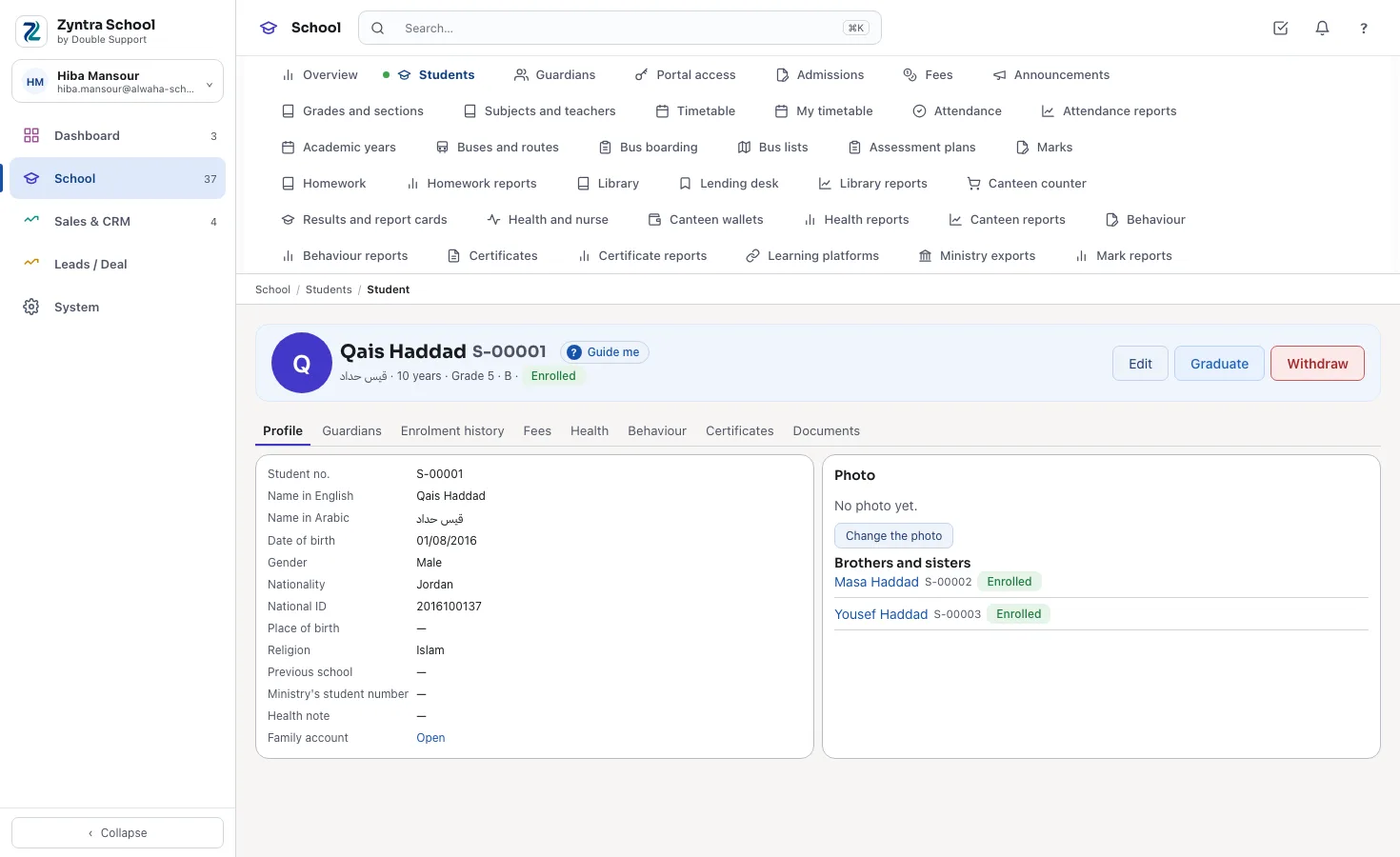
A student's file
The name in both languages, the class, the guardians, the brothers and sisters, every year's enrolment and the documents.
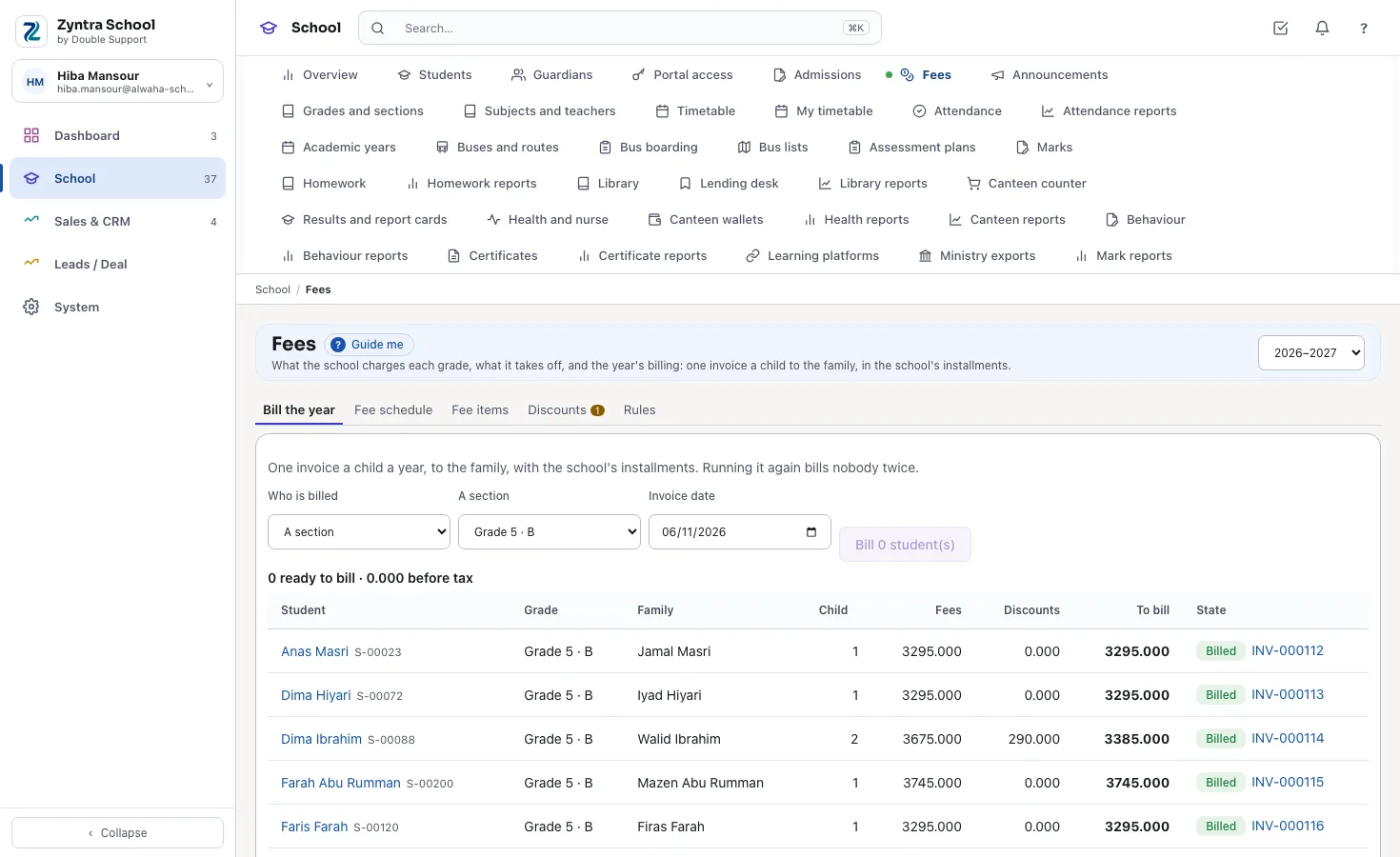
Bill the year
What each child's year comes to — the fees, the brothers-and-sisters discount and what is billed — then one invoice a child with the installments.
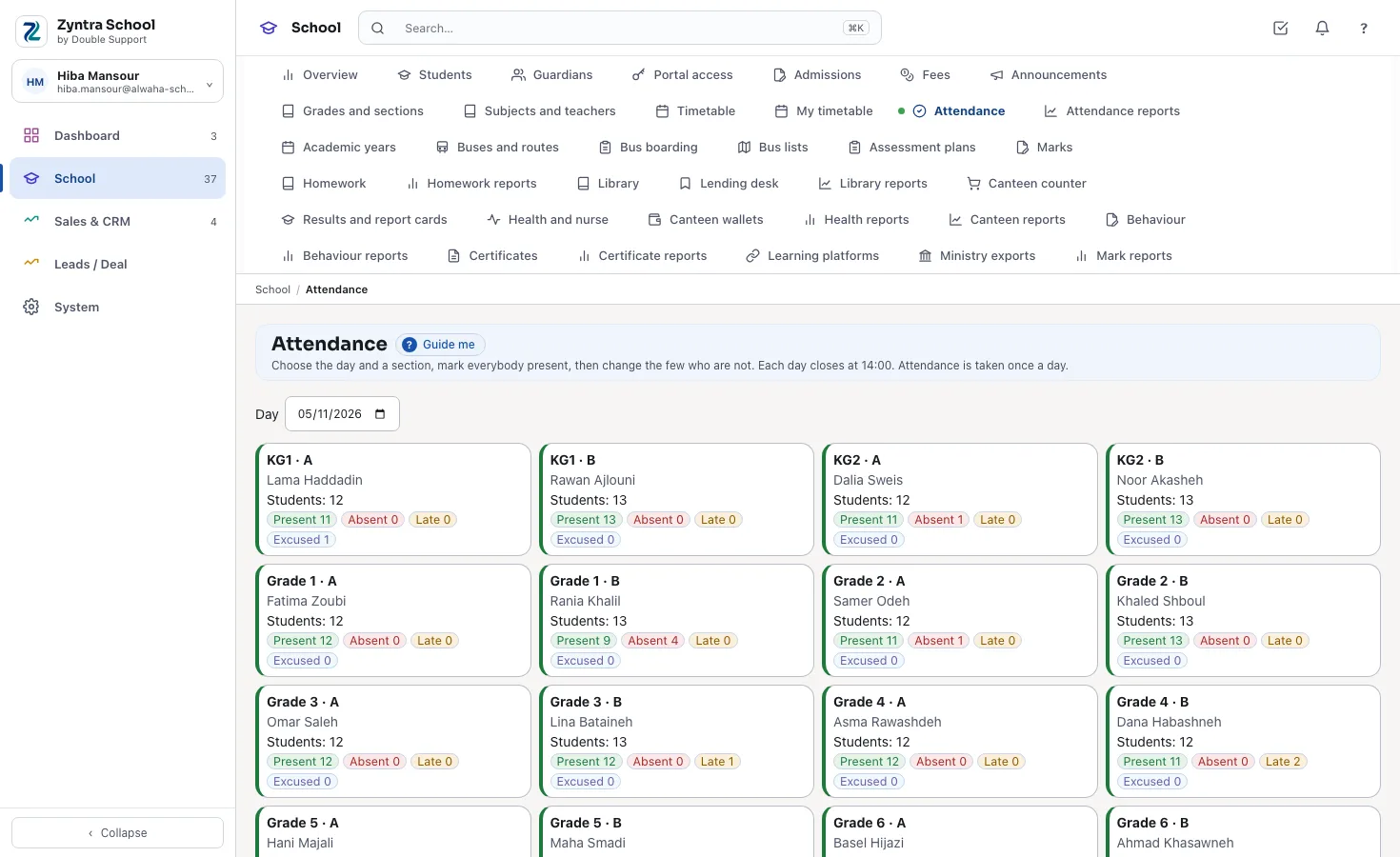
A section's attendance
Everybody present first, then the few absent, late or excused, with a note.
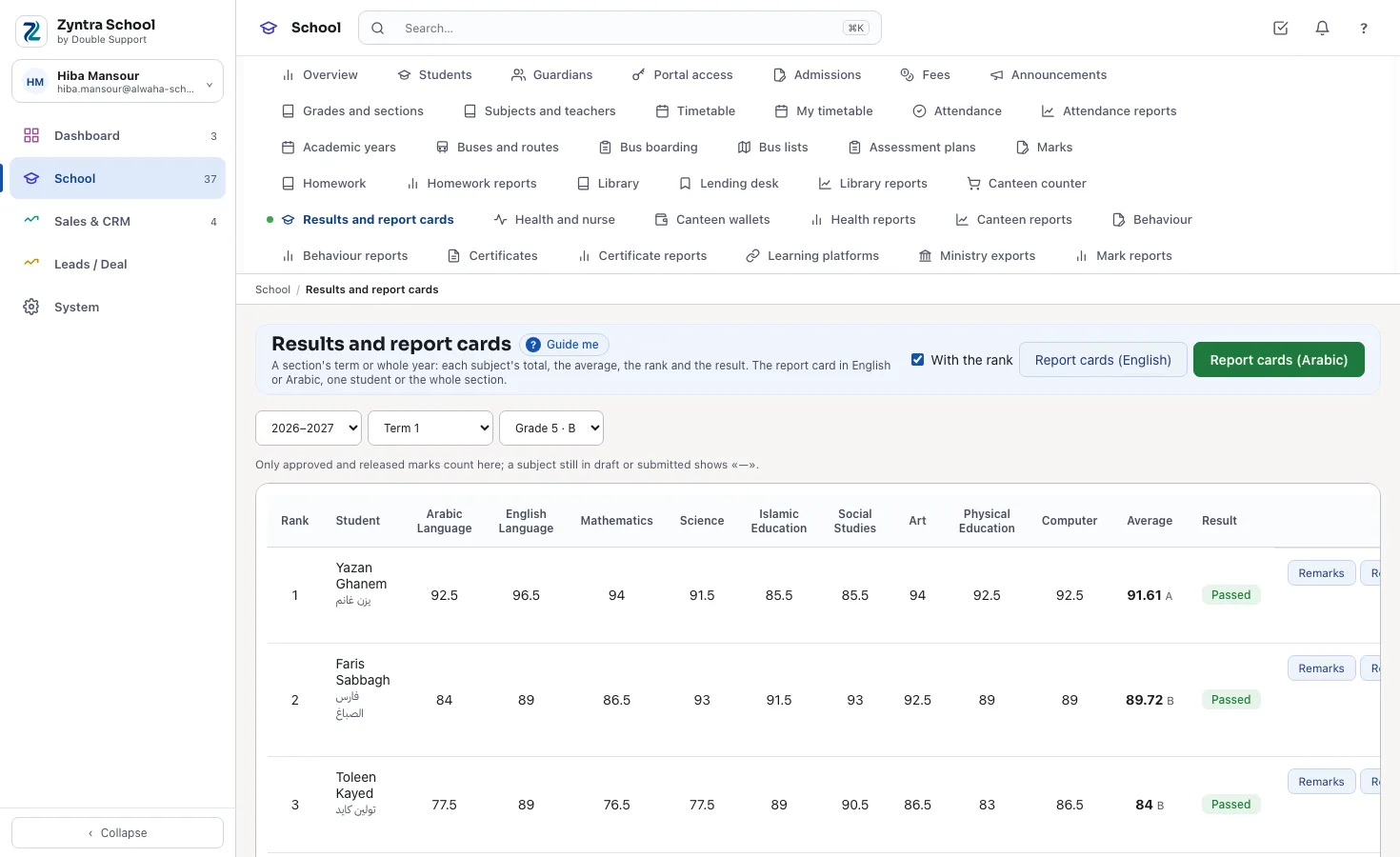
Results and report cards
Each subject's total, the average, the rank and the result, from approved marks only; the report cards in Arabic or English.
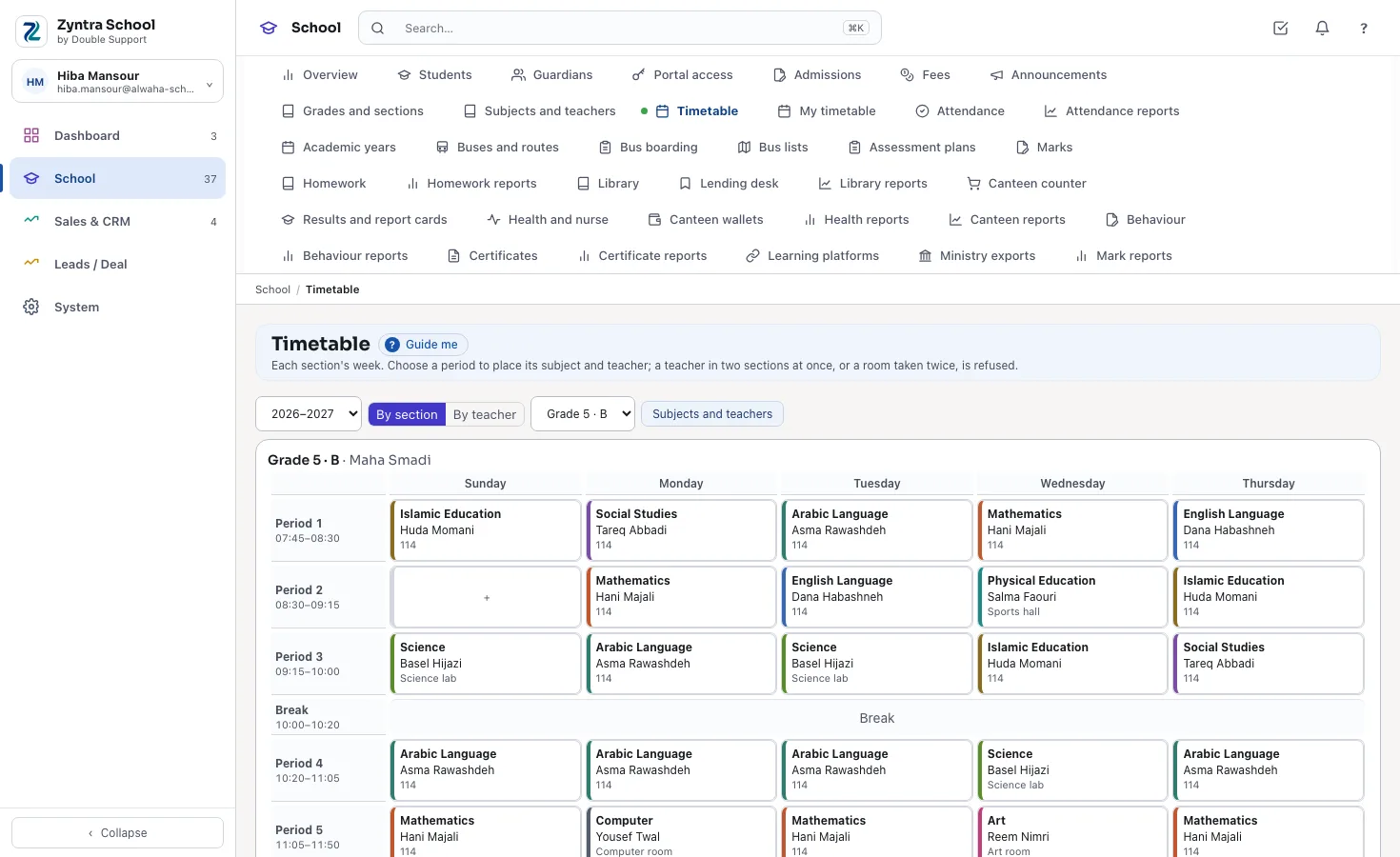
A section's week
Every period's subject, teacher and room, each subject in its colour; a clash is refused.
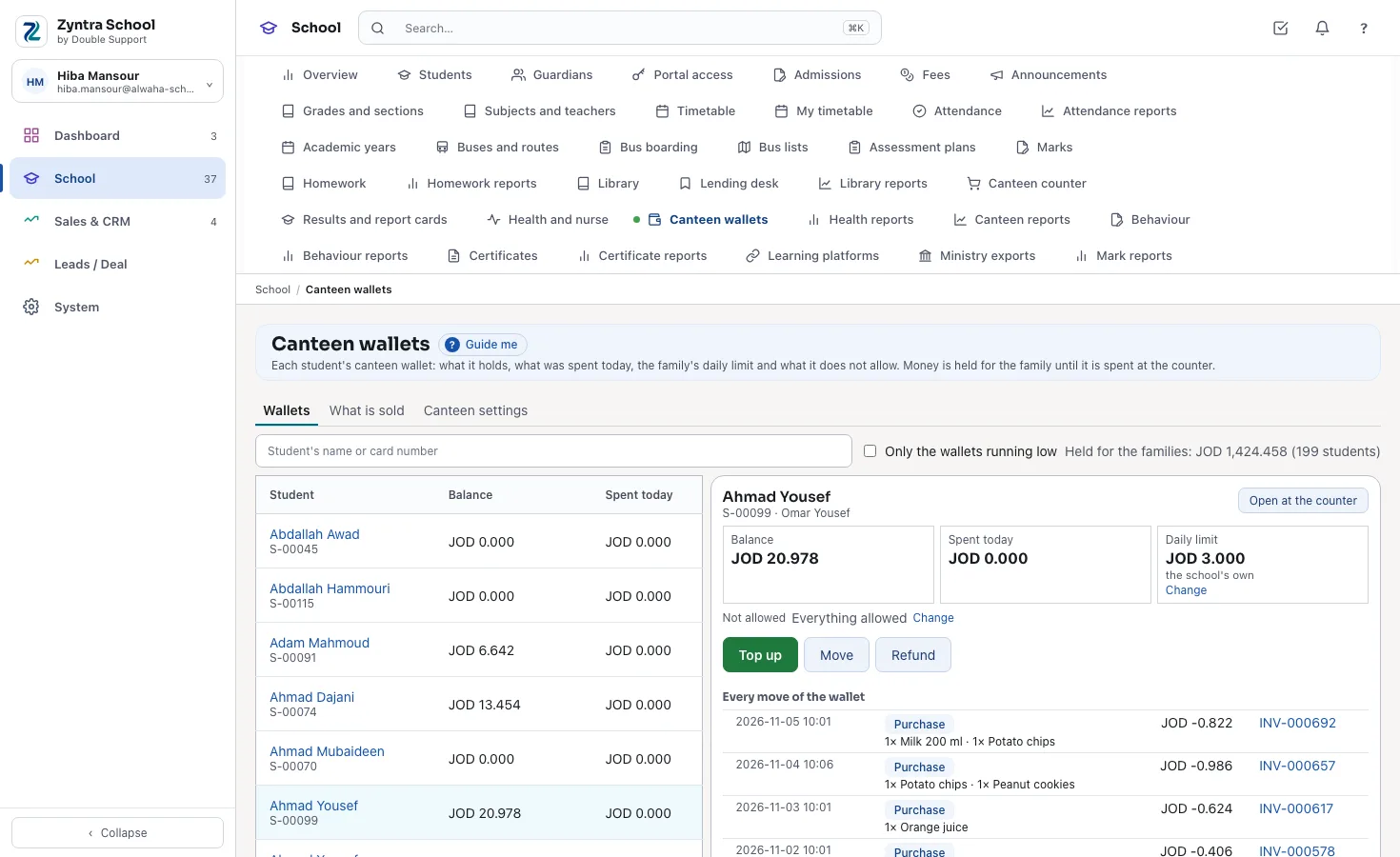
The canteen counter
The student's wallet, what is left for today and what the family does not allow, then the tray and Sell.
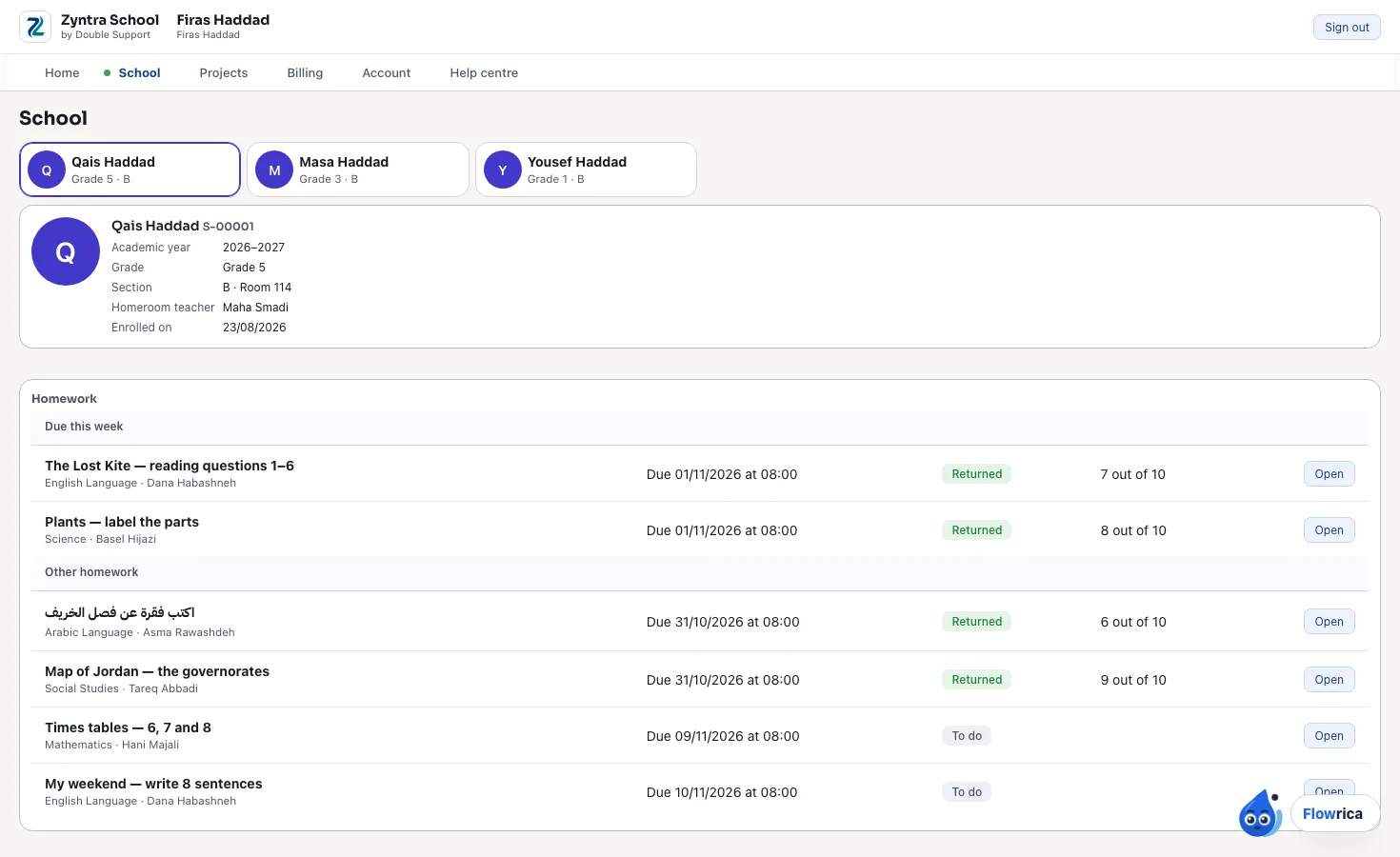
The guardian's portal
Each child a card: the class, timetable, attendance, released marks, homework, the bus and the fees.
Who Zyntra School is for
- Private and international schools from kindergarten to Grade 12, where the families pay the fees.
- Schools in Jordan, Saudi Arabia and the UAE that report their students to OpenEMIS, Noor, ADEK, KHDA or eSIS, and schools that work in the Hijri calendar.
- Schools with several branches, each a company of its own in one system.
- Schools that already teach in Google Classroom, Microsoft Teams or Moodle and want the homework and grades in one place.
Students, families and admissions
Every student has one file: the name in English and Arabic, the date of birth, the national ID, the photo, the guardians, the brothers and sisters at the school, every year's grade and section, and the documents — the birth certificate, the passport, the reports. A family is one account: the guardians are its contacts and the school's fees are invoiced to it, so brothers and sisters share it.
An application gets its number, the interview or test with its result, the decision with who took it, and then the enrolment into a section. The school keeps its own years and terms, its grades from KG1 to Grade 12, and each year's sections with their capacity, room and homeroom teacher; a full section takes no more students.
In the school's day
- Admissions: enters the application, the interview and the result, accepts or rejects with the reason, and enrols the accepted child into a section.
- The office: adds a guardian once — a father already known from an older brother is chosen, never typed again.
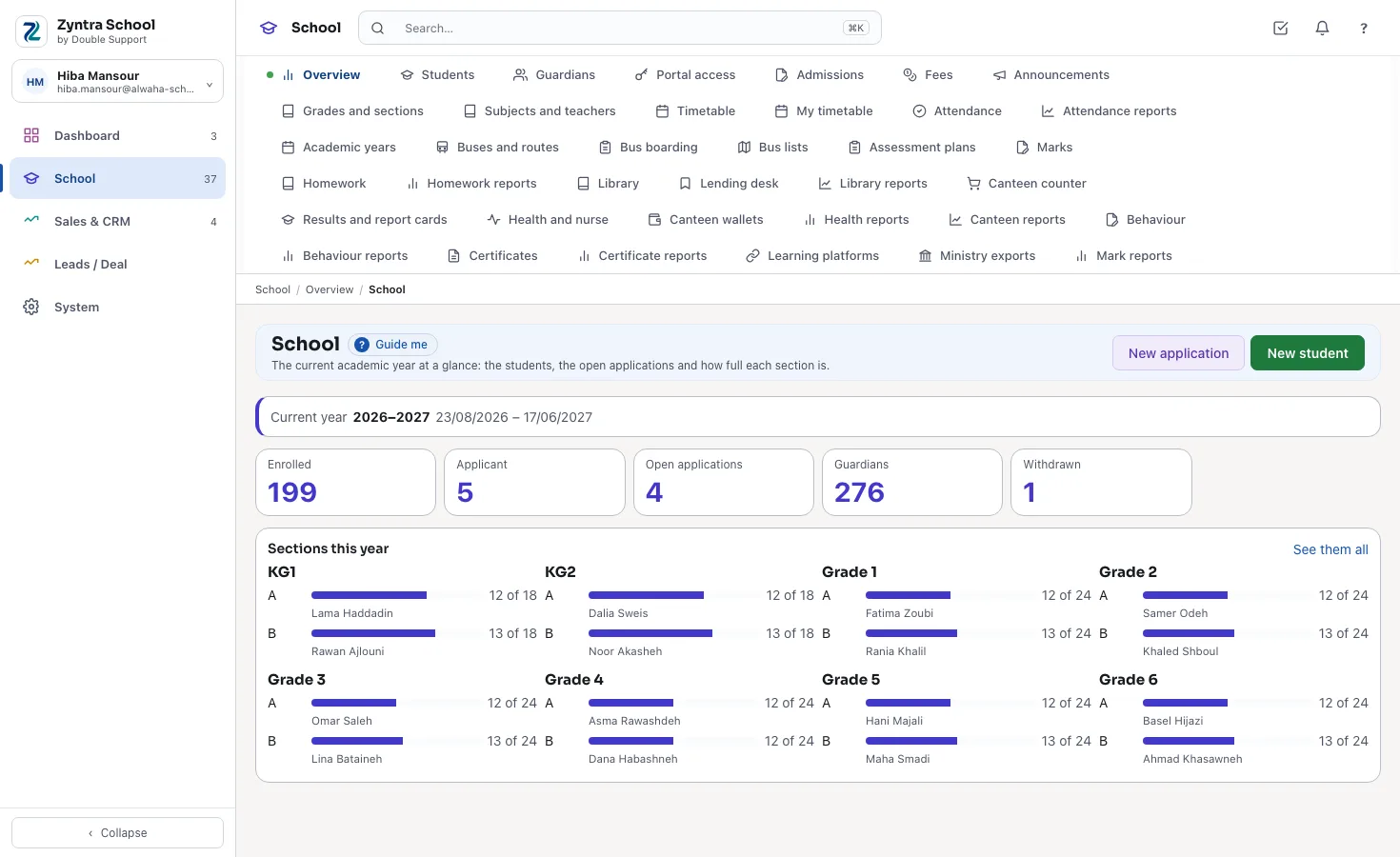
- The principal: opens the overview: enrolled, applicants, open applications and how full each section is this year.
Fees and installments
The school lists its fees — tuition, registration, books, uniform, the bus, activities — each with its own tax, and types each grade's amount for the year. «Bill the year» makes one invoice a child for the year, to the family, with the school's installment plan as its payment schedule; running it again bills nobody twice.
The brothers-and-sisters discount comes off each child of a family in turn, as the school sets it; a staff child's discount, a scholarship or a grant is added to the student with its reason, and one above the school's limit waits for a second person to approve it. A withdrawn child's unused fees are worked out by the days left, by the whole terms left or by hand, and credited on the year's invoice. Every bill is an ordinary Zyntra OS invoice, so it reaches the school's accounts and its e-invoicing as every other invoice does.
In the school's day
- The accountant: bills the whole year, a grade or a section in one step, and reads what each family owes and its next installment.
- The principal: approves a discount above the school's limit, or turns it down with the reason.
What the family sees
The guardian reads the family's invoices with what is still due and the installments to come, and presses Pay to pay one online through the school's payment gateway.
The timetable
Each grade has its subjects with how many periods a week each takes, and each section its teacher of every subject. The school's bell times hold the periods and the breaks. Each section's week shows the subject, teacher and room of every period, each subject in its own colour.
A teacher is never placed in two sections at once and a room never holds two: the lesson is refused and the sentence says which section has them. A teacher opens My timetable for their own week.
In the school's day
- The coordinator: places the lessons, section by section, and reads each teacher's week.
- The teacher: opens My timetable: the day's lessons with their sections and rooms.
What the family sees
The portal shows the child's week: each lesson with its subject, teacher and room.
Attendance
Each section's attendance for the day, or for each period when the school takes it period by period: «Everybody present», then the few who are absent, late or excused, with a note. A day closes at the school's time; opening it again needs its own right and a reason, kept on the section's history.
The reports read a student's attendance for the year, a section's day period by period, and the students below the school's line — 90% unless the school sets another. The staff's own attendance is kept in Zyntra OS's HR.
In the school's day
- The homeroom teacher: marks the section in the first minutes of the day; a subject teacher marks only the periods they teach.
- The office: reads who is absent today and the students whose attendance is falling.
What the family sees
When the school switches it on, the primary guardian is told of an absence the same day by e-mail, and by the school's approved WhatsApp template when it has one — once a day at most. The portal shows the share of the year the child was there and every mark that was not «present».
Marks, results and report cards
For each term, each subject has its assessment plan: its components (quizzes, homework, the midterm, the final) with weights that make 100, and its pass mark. The school's scale says what the report card shows — the mark, the mark and its letter, or the descriptor only for the early grades — how many failed subjects still sit a re-sit, and whether the card ranks the student.
Only the subject's teacher of a section types its marks; the coordinator approves the sheet or returns it with the reason; nothing reaches the parents until it is released. The results give each section's term or whole year with the average, the rank and the result — passed, re-sit or failed — and the report cards print in Arabic or English, one student or the whole section, with the homeroom teacher's and the principal's remarks and the attendance.
In the school's day
- The teacher: types the marks component by component; the total, the grade and pass or fail are worked out as they type; then submits the sheet.
- The coordinator: approves the sheets and releases the term's marks to the parents in one step.
- The principal: reads the subject averages and the students at risk, writes the remarks and prints the section's report cards.
What the family sees
The portal lists, term by term, each subject's mark out of 100, its grade and whether it passed — only the marks the school released.
Homework
The teacher sets homework for the sections they teach: the title, the instructions, the due day and time, up to five files, the maximum mark, whether late work is taken, and, when it counts, the part of the subject's assessment plan it goes into. Only a published homework reaches the students.
Each student's state is clear — to do, handed in, handed in late, missing, marked or returned. The teacher marks with a remark and returns the marked ones together. The reports give each section's hand-in rate, a student's missing homework and each teacher's load.
In the school's day
- The teacher: sets tomorrow's homework with a worksheet attached, and returns yesterday's marked hand-ins.
- The coordinator: reads which sections are not handing in.
What the family sees
The student hands in on their own page — an answer and up to three files — and can change it until the teacher marks it. The family sees the mark and the teacher's remark once it is returned, and, when the school switches it on, an e-mail when a homework was not handed in by its due time.
Buses and routes
The school's buses with their plate, seats, driver and supervisor; each year's routes, morning or afternoon, with their stops in order and their times; and the students who ride each route from their stop. A bus never takes more students than its seats, and a child can go to school on one route and home on another.
The route's fee for the year is billed with the rest of the year's fees, with its own tax. The supervisor marks on a phone who boarded at each run: «Everybody boarded», then the one who did not. The bus lists, the load of each bus and the driver's run sheet print in one step.
In the school's day
- The bus supervisor: marks the morning run stop by stop on the phone.
- Transport: moves a child to another stop, and prints tomorrow's run sheet for the driver.
What the family sees
The portal shows the child's route, stop and time, the bus and its plate, the supervisor's phone, and today's mark: boarded or not boarded. When the school switches it on, the primary guardian is told at once when the child did not board.
The library
The catalogue holds every book with its ISBN — its check digit checked — its subject, language and shelf, and each copy with its own barcode and state: on the shelf, lent, lost or damaged. The lending desk lends to a student or a member of staff, takes back, renews and marks a book lost, by the school's own figures: the days a loan lasts, the copies held at once, the renewals and the fines.
A late return is fined by the days late, never above the school's most; a fine or a lost book is billed to the family on an ordinary invoice. The reports give the books lent most, the overdue loans, the lost and damaged copies and a borrower's whole history.
In the school's day
- The librarian: scans a barcode to lend or take back, and reads the overdue list each morning.
What the family sees
The student finds a book from their own page and reserves a copy on the shelf. The family sees what the child borrows with the day it is due back, any fine, and, when the school switches it on, one e-mail when a book is past its due day.
Health and the school nurse
Each student's health file: allergies with how severe each is, the reaction and what to do; chronic conditions; regular medicines and whether the school may give them, with who gave the permission; vaccinations with the next dose due; the blood type and the family doctor. The nurse records each visit.
Health has its own rights, never inside the student's file: a teacher without them sees no health word. A severe allergy is shown in red wherever staff need it — on the student, and at the canteen counter to a cashier given that warning. The reports give the vaccinations due and late, the severe allergies section by section for the teachers, and the visits to the nurse.
In the school's day
- The nurse: records a visit and what was given, and accepts a family's update to the file.
- The homeroom teacher: holds the printed list of the section's severe allergies.
What the family sees
The guardian reads what the school keeps of the child's health and asks the school to update it; the nurse accepts the request or answers it. The student's own sign-in does not show it.
Behaviour
A teacher writes positive and negative notes on the students of their own sections, each with a category from the school's list and its points. The serious cases are incidents: the students involved, the witnesses and the actions taken. Each step of the school's own ladder — a verbal warning, a written warning, the guardian called in, a suspension — is kept with who decided it and why, and the meetings with the family with their outcome.
A suspension counts only school days and marks them excused on attendance. The reports give each student's and each section's points, the incidents of each category month by month, and the students who reached a step.
In the school's day
- The teacher: gives a positive note in class with two taps.
- The counsellor: records an incident, takes the next step on the ladder and asks the family in.
What the family sees
The family sees the positive notes about their child, the steps of the ladder with their days, and the meetings — never another child's name and never the school's reasons. A negative note stays with the school.
The canteen
Each student has a canteen wallet: money the school holds for the family, kept in the books as a customer deposit, never as income, until it is spent. The counter works at a tablet's width: find the student by name or card, check what the family allows, tap what they take and sell. Each sale is an ordinary invoice to the family, each item with its own price and tax, paid at once from the wallet.
The server refuses a tray that is more than the wallet holds, more than today's limit leaves, or holds an item the family does not allow. What is left when a student leaves is never lost: it is moved to a brother's or sister's wallet or refunded, with the reason. The reports give the sales by day and by item and what is held for the families.
In the school's day
- The cashier: sells at the break, a student a few seconds; a severe allergy shows in red when they hold that warning.
- The office: tops up a wallet at the desk when a parent pays in cash.
What the family sees
The guardian tops up the wallet and pays online, sets the daily limit and the items or groups the child may not buy, and reads every purchase. When the school switches it on, one e-mail comes when the wallet runs low.
Certificates and the check page
The official transcript and the school's certificates — enrolment, good conduct, transfer and completion — are made from the school's own records, in English or Arabic, each with its serial, the school's stamp, the signature and a QR code. The transcript carries every year at the school with its average and result, from approved and released marks only.
Anyone holding the paper opens its check page from the QR code and reads whether it is valid. A paper is never changed after it is issued: a wrong one is withdrawn with its reason and a new one issued. The words of each kind are the school's own templates, and a kind with a fee is billed to the family when it is issued.
In the school's day
- The registrar: issues a transfer certificate — the student is marked as left on that day, his file kept — and answers a family's request for a paper.
What the family sees
The family asks the school for a paper from the portal, and opens the papers issued to their child.
The portal for guardians and students
A guardian signs in once, whatever the number of children, and each child is a card: the class and homeroom teacher, the timetable, attendance, the released marks, homework, the bus, health, behaviour, the library, the canteen, the fees, the school's announcements and the documents the school shares. A message to the school goes from the portal, and the school's answer comes back there.
A student signs in to their own page while their grade lets students in: their class, homework to hand in, timetable, attendance, released marks and announcements — never the fees, never a brother's or a classmate's page. Nothing is shown to a family until the school switches it on, and the families and students in the portal are never counted as users.
In the school's day
- The office: switches a guardian on and the portal's invitation goes out; they choose their own password.
- The principal: publishes an announcement to the whole school, a grade or a section.
Google Classroom, Microsoft Teams and Moodle
Link the school to Google Classroom, Microsoft Teams for Education or Moodle: a course for each section and subject you pick, with its teacher and students added by their school e-mail. The homework set in Zyntra School goes out as an assignment, and the hand-ins and grades come back to it. A mark typed in Zyntra School is kept.
Nothing is sent until the school turns a connection on and picks the sections; of each student and teacher, only the name and the school e-mail are sent. Each sync says what it did, point by point. The connections are included at no extra charge.
In the school's day
- The IT person: connects the school's own account once, picks the sections and ticks «Sync every hour».
Ministry exports for Jordan, Saudi Arabia and the UAE
Five connections, one for each regulator a school reports its students to: Jordan's OpenEMIS, Saudi Arabia's Noor, ADEK in Abu Dhabi, KHDA in Dubai and the UAE Ministry of Education's eSIS. Zyntra School makes the file — enrolments, leavers, attendance totals or the year's results — in the ministry's columns, as Excel or CSV, with English or Arabic headers, from the school's own records.
Before the file, a check lists each student who misses a field the ministry needs, with what is missing. Every file made is kept with who made it. The school uploads the file on the ministry's portal itself: nothing is sent from Zyntra, and no password of the ministry's portal is kept. The ministries do not publish their upload sheets, so the columns are compared with the school's own account before the first upload.
In the school's day
- The registrar: checks the students, fixes the two missing national IDs from the list, and makes the term's attendance file.
Hijri dates
A school that works in the Hijri calendar chooses Hijri (Umm al-Qura), or both calendars, in its settings — each school its own. Every school screen then reads and types its days that way: attendance, homework, marks and terms, the library, health visits, behaviour, the canteen and the buses, and their reports. Every school date box takes a Hijri day with a Hijri month to pick from, and a year can be named from its Hijri dates.
Certificates and transcripts issued while the school reads Hijri carry their days in Hijri, in English and in Arabic. The day is always kept in Gregorian, so turning the calendar back shows every day as before.
In the school's day
- The office: types the term's first day as 01/03/1448 and reads every school screen in Hijri.
What the family sees
The portal says every school day the same way the school reads it.
Who sees what
Each part has its own rights: a teacher marks attendance and types marks only for the sections and subjects they teach; health and behaviour are never inside the student's file right; a ministry file with students' personal data leaves only through its own right. A guardian or a student never sees a child who is not theirs.
A school with several branches keeps each as its own company in one system, with its own students, settings and books, and who reads which is set by the rights.
In the school's day
- The principal: gives each person the rights of their job in Setup › Roles, and the menu shows each one only what they may open.
A day at a school with Zyntra School
From the first bus to the last bell, this is how one ordinary day runs:
- The buses. Each supervisor marks the morning run on the phone; a child who did not board is told to the family at once.
- First period. The homeroom teachers take attendance: everybody present, then the few absent or late; the families of the absent are told.
- Lessons. Each teacher reads My timetable; a lesson moved to the lab is placed without a clash.
- The nurse. A child with a headache visits the nurse; the visit is kept, and the family's request to add a new allergy is accepted.
- The break. The canteen sells from the wallets within each family's limit; a severe allergy shows in red at the counter.
- Homework. A teacher sets tomorrow's homework, and it goes to the class on Google Classroom too.
- Behaviour. A teacher gives a positive note that the family reads at home; the counsellor meets a family about a written warning.
- The office. An application is interviewed and accepted; a transfer certificate is issued with its QR code; a parent pays an installment online.
- Marks. The coordinator approves the term's sheets and releases them to the parents.
- The last bell. The afternoon runs are marked, and the principal reads the day's absences and the fees still due.
Moving from your current program
Moving data from an older system is part of our systems integration work. Tell us which program you use today and we will tell you how we would move it.
- Tell us which program you use and what it can export.
- Your students and their families come in from a spreadsheet file: each family one account, its guardians its contacts.
- We set up your years and terms, grades and sections, subjects and teachers, bell times, fees and installment plan, and your lists: behaviour categories, the ladder, certificate templates.
- You choose the calendar — Gregorian, Hijri or both — the school week and how attendance is taken.
- The guardians are switched on to the portal and invited; they choose their own passwords.
- We go live with you, without stopping the school, and stay close afterwards.
What you need to start
- A computer, a tablet or a phone. Zyntra School works in the browser; there is no app to install. The bus boarding and the canteen counter are made for a phone and a tablet.
- An internet connection at the school.
- An e-mail account the school sends from, for the portal's invitations and the messages to families; a WhatsApp Business number if you want its approved templates too.
- A payment gateway, if the families are to pay fees and top up the canteen online.
- A barcode scanner and a printer, if you want them at the library, and report cards and certificates on paper.
What is not in Zyntra School yet
- Following the bus live on a map.
- A chat between a guardian and a teacher: the family writes to the school, and the school answers.
- An application form on the school's own website: applications are entered by the school.
- Text messages (SMS): the families are told by e-mail and by the school's approved WhatsApp templates.
- Sending a file to a ministry's portal: Zyntra School makes the file, and the school uploads it.
- A university's parts: credit hours, course registration and the cumulative average.
Need a connection we don't have yet? We build it — free.
If your business needs a third-party service that Zyntra OS doesn't connect to yet, and it's a global service, we add it at no cost to you.
That's what Double Support means: support, twice over. Every customer is a success customer to us. When you ask for a new connection, we build it free, because it makes our system stronger and gives every other customer one more service.
Others charge for every add-on. We don't.
Related
Zyntra School: frequently asked questions
What is Zyntra School?
Zyntra School is school management software, made by Double Support in Amman, Jordan. It keeps students and families, admissions, fees and installments, the timetable, attendance, marks and report cards, homework, buses, the library, health, behaviour, the canteen and certificates, with a portal for guardians and students, on top of Zyntra OS.
Who is Zyntra School for?
Private and international schools from kindergarten to Grade 12, in Jordan, Saudi Arabia, the UAE and beyond — single schools and schools with several branches.
How is Zyntra School priced?
By the staff who use it, a user a month, on top of a Zyntra OS package, paid monthly, or yearly with 2 months free — the price is at the top of this page and on Pricing, and «Calculate your price» works it out for your school. Guardians and students use the portal free, however many they are.
Do guardians and students count as users?
No. They sign in to the portal as the family's contacts, not as users of the system; only the school's staff are users.
Does Zyntra School work in Arabic?
Yes. Every screen and the portal work in Arabic and English, each person in their own language; report cards, transcripts and certificates print in either.
Does it support the Hijri calendar?
Yes. A school chooses Gregorian, Hijri (Umm al-Qura) or both; every school screen, the portal, certificates and transcripts then say its days that way, and every date box takes a Hijri day.
Can parents pay the fees online?
Yes, through the school's payment gateway: the guardian opens the invoice in the portal and pays it, and tops up the canteen wallet the same way. The payment reaches the school's accounts by itself.
How are installments and the brothers-and-sisters discount handled?
The school sets its installment plan and its discount for each child of a family; «Bill the year» makes one invoice a child with the discount taken off and the installments as its schedule. A student's own discount above the school's limit waits for approval.
Are the fee invoices national e-invoices?
Each fee invoice is an ordinary Zyntra OS invoice with each fee's own tax, so it follows the e-invoicing the company has switched on, as every other invoice does — JoFotara in Jordan or ZATCA in Saudi Arabia.
Who can see a child's health file and behaviour?
Only who holds their own rights: health and behaviour are never inside the right to read the student's file. A teacher reads the behaviour notes of the students they teach; a severe allergy is shown only where staff need it.
Are parents told when their child is absent?
When the school switches it on: the primary guardian gets an e-mail the same day, and the school's approved WhatsApp template when one is named — once a day at most. The same goes for a child who did not board the bus.
Do you send our students to the ministry?
No. Zyntra School makes the file in the ministry's columns — OpenEMIS, Noor, ADEK, KHDA or eSIS — and the school uploads it on the ministry's portal itself. Nothing is sent from Zyntra, and no ministry password is kept.
Does it work with Google Classroom, Microsoft Teams or Moodle?
Yes. A course for each section and subject you pick, with its teacher and students; the homework goes out as an assignment, and the hand-ins and grades come back. Nothing is sent until you turn it on.
How does someone check a certificate we issued?
Each paper carries a QR code. Whoever holds it — another school, an embassy — opens the check page from it and reads whether the paper is valid or was withdrawn.
Can a teacher take attendance in every period?
Yes, when the school takes attendance period by period: each teacher marks the period they teach. Otherwise the homeroom teacher marks the day once.
Do the library and the canteen come with it?
Yes. The library — catalogue, barcodes, lending, fines and reservations — and the canteen — wallets, the counter, the family's limit and bans — are parts of Zyntra School.
Can we keep several branches?
Yes. Each branch is a company of its own in one system, with its own students, settings and books; who sees which branch is set by the rights.
What about the staff, their attendance and their salaries?
They are in Zyntra OS, which Zyntra School is built on: the staff's files, attendance and leave, and payroll, beside the school's accounts.
Can we move from our current school program?
Yes. Your students and families come in from a spreadsheet file, and we set up your years, grades, subjects, fees and lists with you, without stopping the school.
Is there an app to install?
No. Zyntra School and its portal work in the browser on a computer, a tablet or a phone.
What is not in Zyntra School yet?
Following the bus live on a map, a chat between a guardian and a teacher, an application form on the school's own website, text messages (SMS), sending a file to a ministry's portal, and a university's parts such as credit hours and course registration.
Talk to us about your school
Tell us how your school enrols, bills and reports on its students today, and we'll show you Zyntra School on a day like yours.