

 Zyntra OS
 Zyntra Legal
 Zyntra Real Estate
 Zyntra Hotel
 Zyntra E-commerce
 Zyntra Appointments
 Zyntra Repair
 Zyntra Garage
 Zyntra Concierge
 Zyntra Contracting
 Zyntra Clinic
 Zyntra Dental
 Zyntra Call Center
 Zyntra OTA
Zyntra Dental, the dental edition of Zyntra OS
Zyntra Dental: the tooth chart, the treatment plan, the x-rays and the lab, in one dental clinic system
Zyntra Dental keeps each patient's tooth chart with every tooth's history, the treatment plan in phases with the insurer's part and the patient's part, the x-rays on the tooth, the gum chart, the lab orders and the next check-up. It is Zyntra Clinic with its dental part always on and Zyntra Appointments inside it, built on Zyntra OS, so your bookings, invoices, insurance claims, staff and accounts are in the same system.
On this page
- The tooth chart
- The gum chart
- A procedure on a tooth
- Treatment plans in phases, with the insurer's part
- X-rays on the tooth
- Lab orders
- Recall: the next check-up
- The medical history, before the visit
- Appointments and online booking
- Medical insurance claims
- Invoices, payments and e-invoicing
- Reports
- Flowrica, built in
- The medical record stays private
- Arabic and English
- A day in a dental clinic with Zyntra Dental
- Moving from your current program
- What you need to start
- Questions dentists ask
See it working
Pictures of a made-up dental clinic, taken from Zyntra Dental itself.
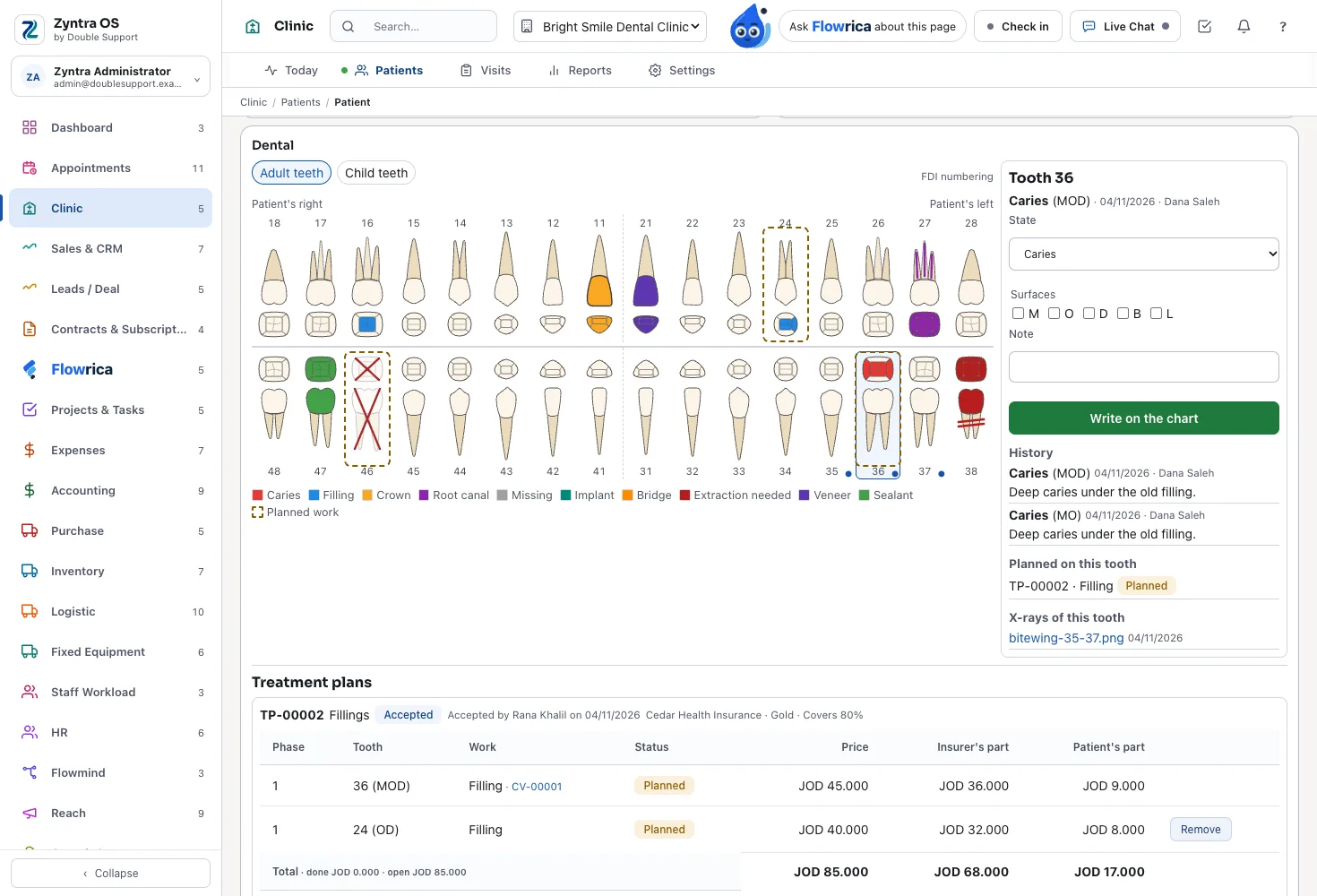
The patient's dental card
The patient's file with their allergies and insurance, and the Dental card beside it: the chart, the plans, the x-rays, the gum chart, the lab orders and the recall.
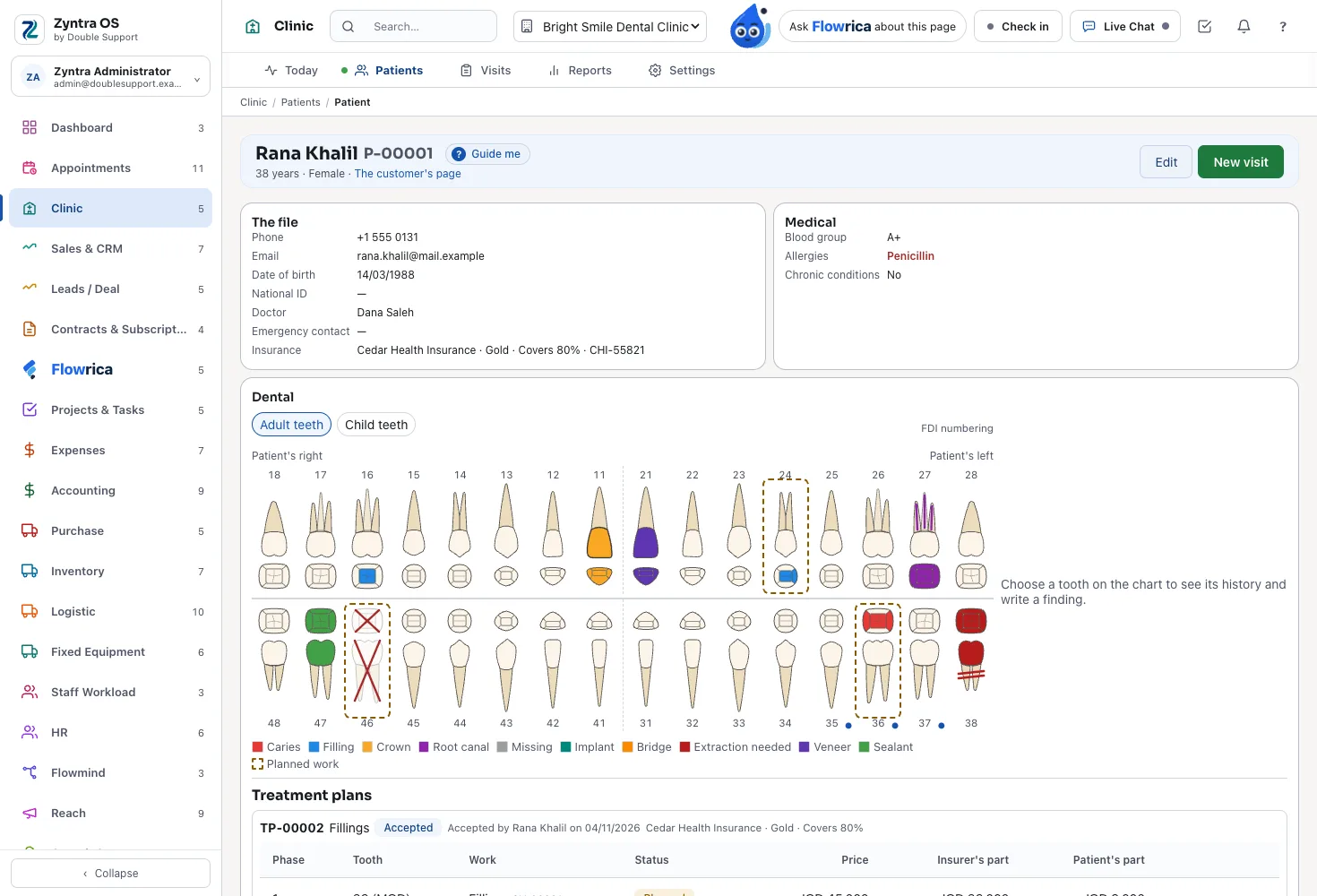
A treatment plan with the insurer's part
Each step a procedure on a tooth with its price, split into the insurer's part and the patient's part by the patient's plan; accepted at the desk or through an estimate.
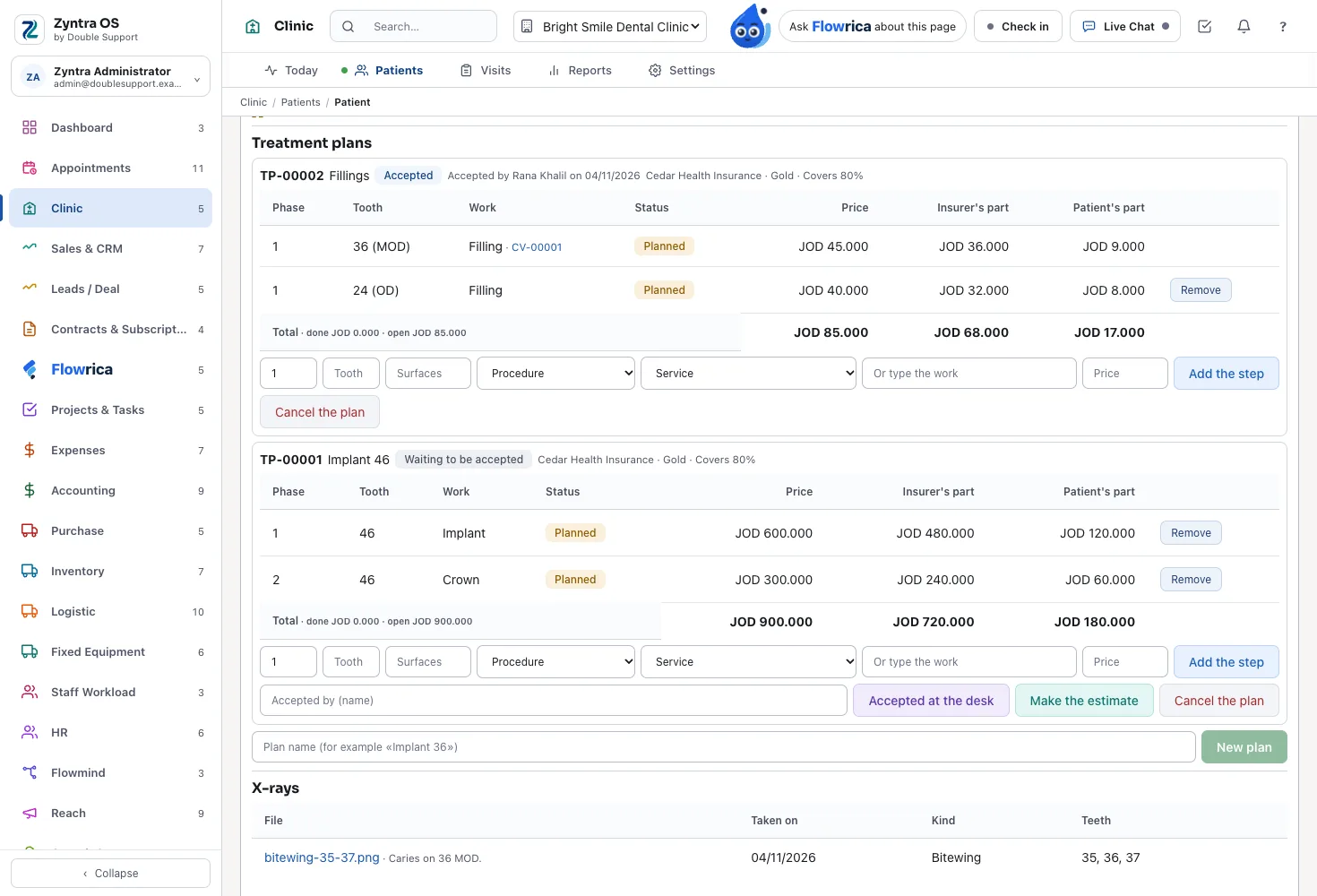
The gum chart, two exams compared
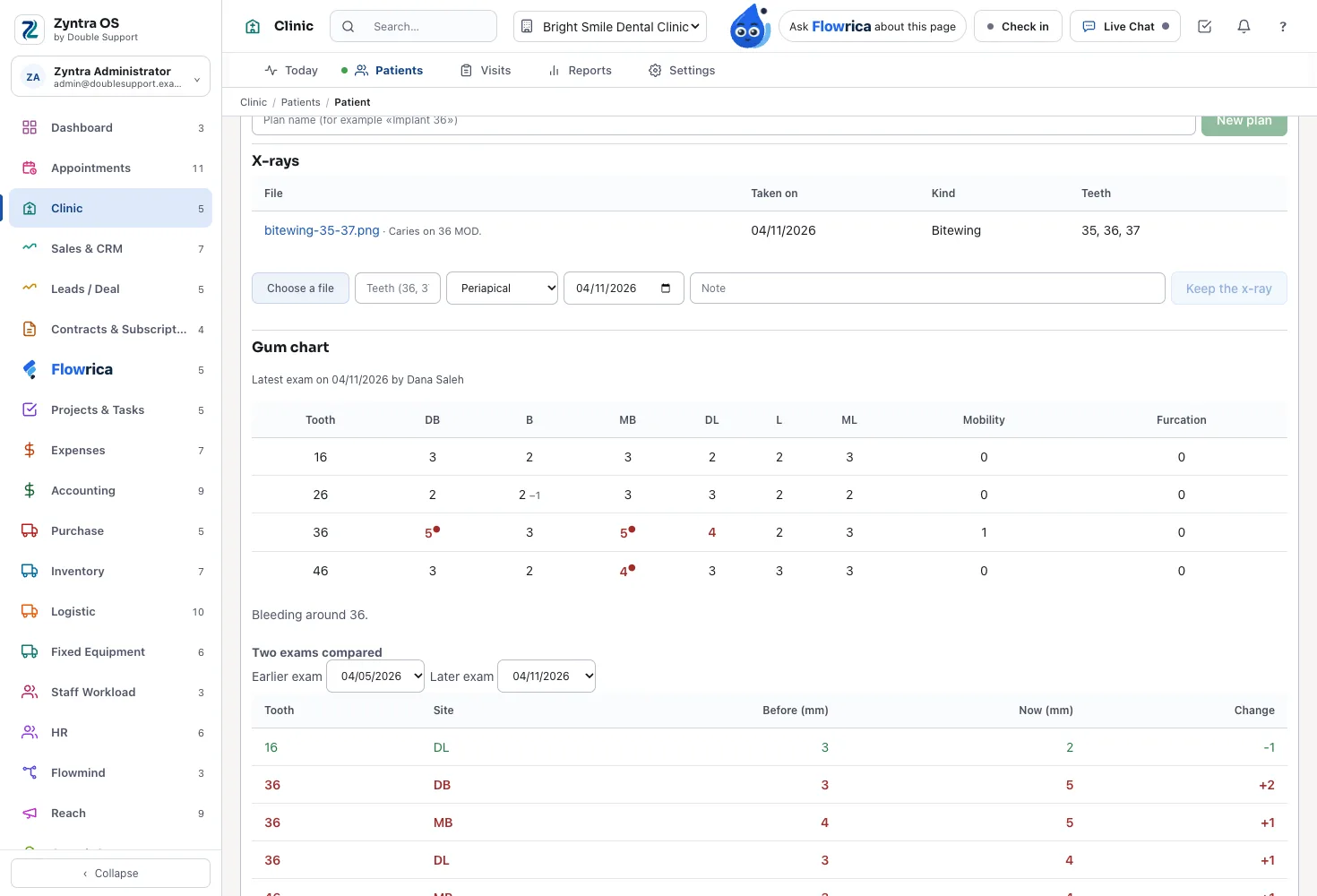
Six sites per tooth with the pocket depth, recession and bleeding; two exams side by side, a pocket that got deeper in red.
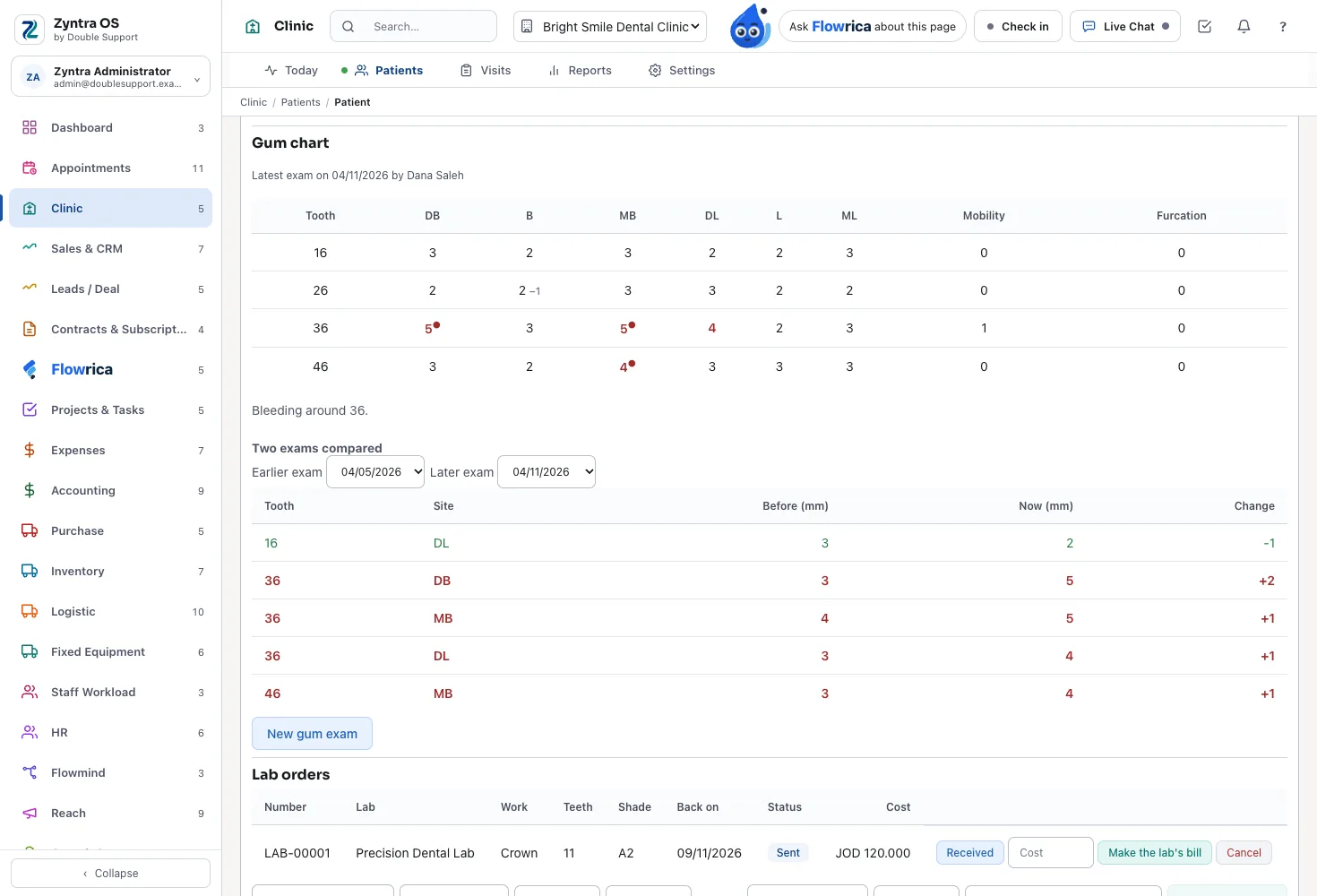
X-rays on the tooth
Each x-ray kept with the teeth it shows, its kind and its day — an image or a DICOM file.
Lab orders
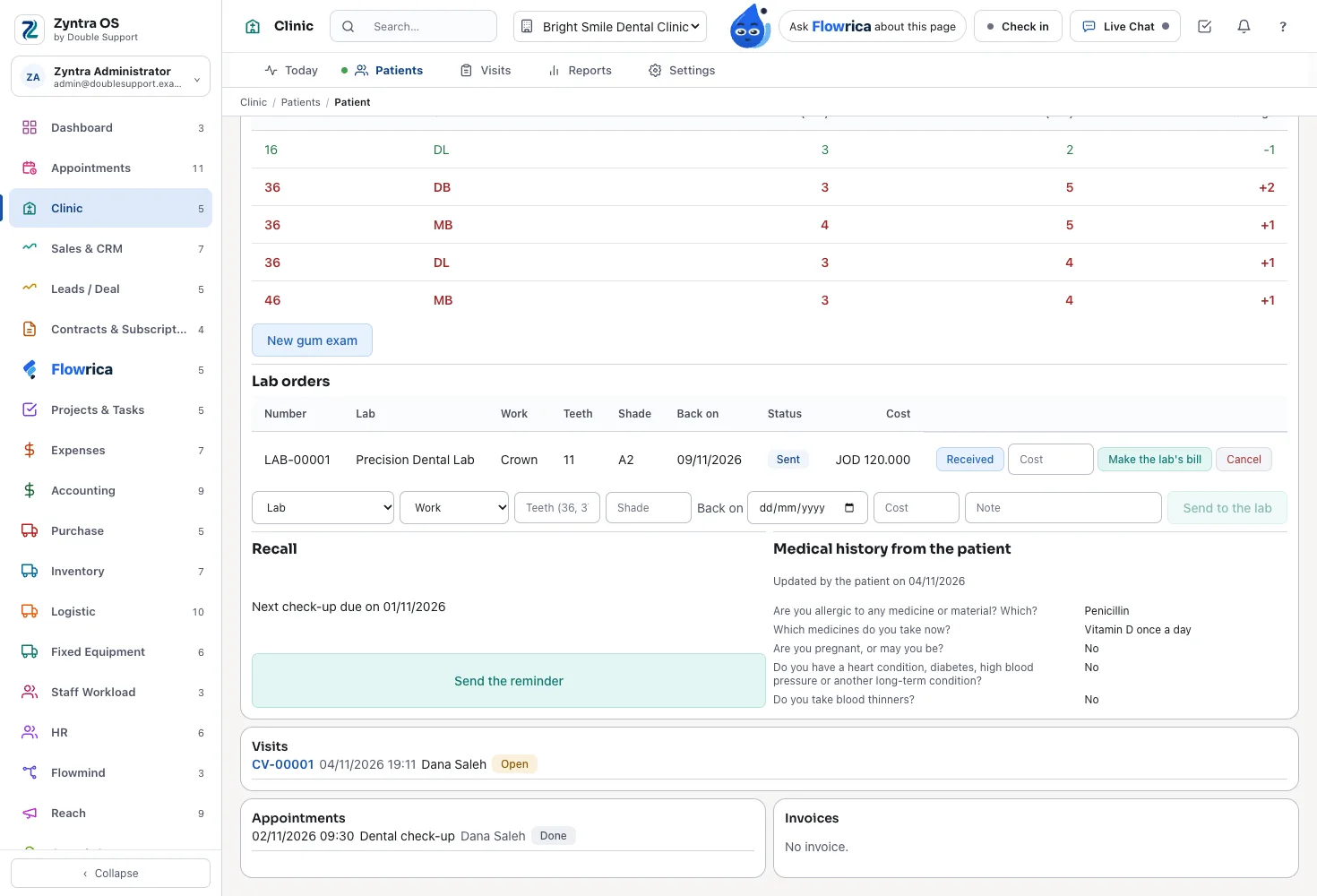
A crown or a bridge from sent to fitted, with the shade and the day it comes back; its cost becomes the lab's bill in Purchase.
Today: due for recall
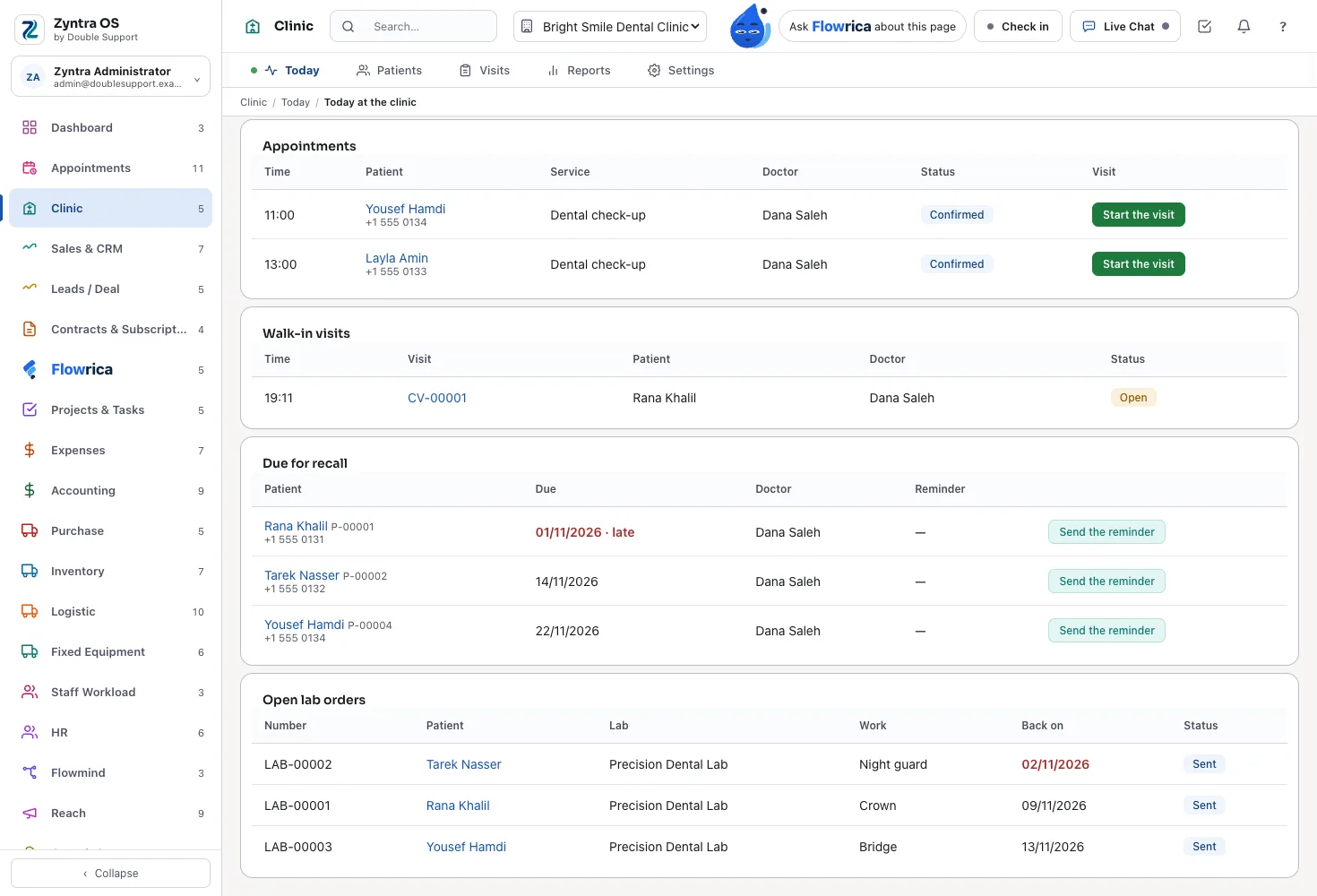
The patients due for a check-up and the late ones, with a reminder that carries their own link to book; and the lab orders still out.
Before your visit
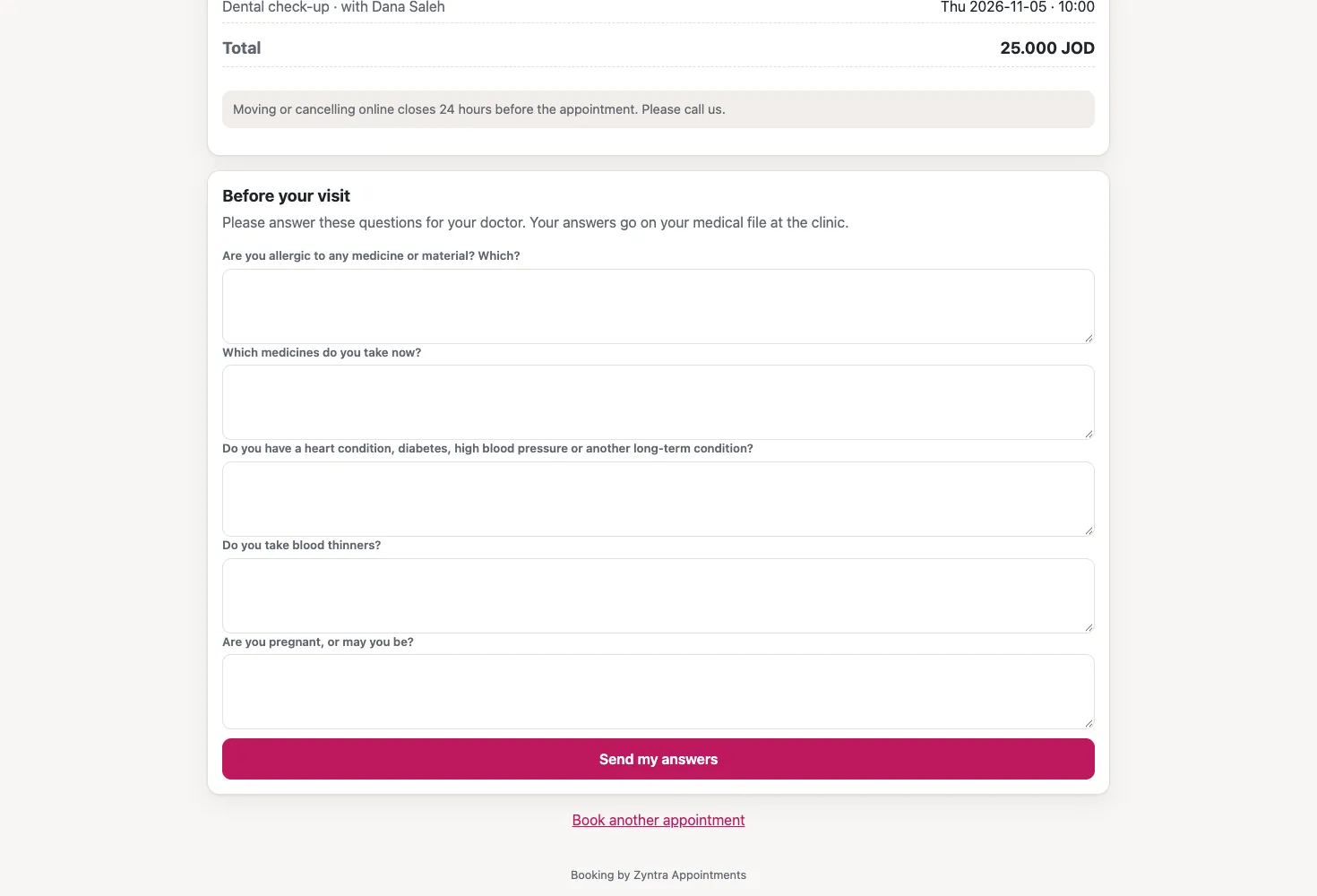
The patient's own booking page asks the clinic's medical history questions; the answers go to their file.
The tooth chart
On the patient's page the Dental card draws the 32 adult teeth and, for a child, the 20 child teeth, numbered FDI (11 to 48, a child's 51 to 85) or Universal (1 to 32, a child's A to T) — a setting. Each tooth takes the colour of its latest state — healthy, caries, filling, crown, root canal, missing, implant, bridge, extraction needed, veneer or sealant — on its surfaces M, O, D, B and L.
Press a tooth and its history opens: every state it has had, with the surfaces, the note, the day, who wrote it and in which visit. A row is only ever added; the history is never changed. The states and their colours are your list, in English and Arabic.
In the clinic's day
- Dentist: reads the chart before the patient sits down, presses a tooth to see its story, and writes a finding — state, surfaces and a note — on the visit.
- Assistant: with a medical record right, opens the chart for the dentist and writes the findings the dentist calls out.
- Reception: does not see the chart; the reception sees the patient's name, contact, appointments and invoices only.
The gum chart
For each tooth, six sites: the pocket depth and the recession in whole millimetres, and whether it bled, with the tooth's mobility and furcation. Each exam is kept with its day and its doctor and is never changed; the next exam is a new one.
Compare two exams and each site shows its depth then and now, with a pocket that got deeper in red.
In the clinic's day
- Dentist: types the six sites tooth by tooth, saves the exam, and compares it with the last one to show the patient where the gum got worse.
- Assistant: with a medical record right, types the depths as the dentist reads them out.
A procedure on a tooth
In the visit, choose the procedure from your list, the tooth and its surfaces. The line reads like «Filling — tooth 36 (MO)» and is billed with the visit, and with its insurance claim, the usual way.
When the visit is closed and signed, each procedure writes the chart: a filling leaves the tooth Filling, an extraction leaves it Missing, while an examination, a cleaning, whitening or an orthodontic adjustment leaves the tooth as it was. Each procedure in your list names the state it leaves.
In the clinic's day
- Dentist: adds the procedure on the tooth while the visit is open, then closes and signs the visit, and the chart is written by itself.
- Reception: invoices the visit with its tooth lines, or sends the insurer its part, with no medical detail beyond the invoice line.
What the patient sees
The patient's invoice names the work and the tooth, for example «Filling — tooth 36 (MO)».
Treatment plans in phases, with the insurer's part
A plan has a name, for example «Implant 36», and its number. Each step has its phase, the procedure, the tooth and its surfaces, and its price, and shows the insurer's part and the patient's part, split by the coverage of the patient's insurance plan. The plan adds up the total, both parts, what is done and what is still open.
The patient accepts it at the desk, recorded with who and when, or through the product's own estimate, with each step as a line. In a visit, «Add a planned step» brings a step in with its tooth and price; when the visit is closed and signed the step is done, and when every step is done the plan is done.
In the clinic's day
- Dentist: builds the plan in phases on the patient's file and explains it, step by step.
- Reception: with the billing right, puts the prices on, makes the estimate and records the patient's acceptance.
- Manager: sees how many plans were accepted and done, and the value still open.
What the patient sees
The patient gets the estimate, printed or sent, with each step and its price and the plan's number on it, and accepts it the way your estimates are accepted.
X-rays on the tooth
Add the x-ray file to the patient's Dental card with the tooth or teeth it shows, its kind — periapical, bitewing, panoramic, cephalometric, CBCT, a photo or other — the day it was taken and a note. An image is shown; a DICOM file is kept exactly as it came, shown as a picture when it carries one inside, and otherwise opened as the file in your imaging program.
X-rays are added by hand today. A direct link to your imaging program can be built on request.
In the clinic's day
- Assistant: with a medical record right, saves the new x-ray on the teeth it shows.
- Dentist: opens the tooth and finds its x-rays beside its history.
Lab orders
A crown, a bridge, a denture, a veneer, an implant crown or a night guard: choose the lab — one of your suppliers — the work, the tooth or teeth, the shade, the day it comes back, the cost and a note. The order moves from sent to received to fitted, and one still sent after its day is late.
The lab's cost becomes one purchase invoice from the lab, with the lab's own invoice number, waiting for Purchase's approval.
In the clinic's day
- Dentist: orders the work with its shade and teeth.
- Reception: sees the open lab orders on Today, and the late ones; the teeth, the shade and the note show only to who may read the record.
- Manager: approves the lab's bill in Purchase, and sees the open lab orders in the reports.
Recall: the next check-up
When a visit is closed and signed, the patient's next check-up is due after your months between check-ups, 6 to start with. Today lists the patients due in the next 30 days and those overdue, with their phone, doctor and when they were last reminded.
«Send the reminder» sends an e-mail through Appointments' own messages, naming the day due and carrying the patient's own link to your booking page with their doctor and the check-up already chosen. When the patient books from it, the recall is cleared.
In the clinic's day
- Reception: opens Due for recall in the morning, sends the reminders, and calls the patients who have no e-mail address.
What the patient sees
The patient gets an e-mail «Time for your check-up», with no medical word in it, and books with one link.
The medical history, before the visit
The patient's own booking page asks your medical history questions under «Before your visit». The answers land on the patient's file; a question tied to allergies or chronic conditions adds its answer to that field of the file. The doctor reads the latest answers on the Dental card, with the day the patient updated them.
The questions are your list, in English and Arabic.
In the clinic's day
- Dentist: reads the answers before the patient sits down, with any new allergy already on the file.
What the patient sees
The patient answers at home, from the booking's link, with no sign-in. The page shows only the questions, never what the file already holds.
Appointments and online booking
Zyntra Appointments is inside: your services with their duration and price, each dentist's hours from HR or a week of their own, a calendar that never books a time twice, locations with their rooms, the front desk and a waiting list. «Start the visit» checks the patient in and opens the visit; a walk-in starts there too.
Your booking page, in English and Arabic and made for the phone, lets the patient pick the service, the dentist or anyone free, and the time.
In the clinic's day
- Reception: books, moves and checks patients in from the calendar, and fills a free time from the waiting list.
- Dentist: sees their own day and starts each visit from its appointment.
What the patient sees
Every booking gets the patient's own page to see it, pay, move or cancel within your rules, with messages and reminders before the visit by e-mail and text message.
Medical insurance claims
Your insurers and their plans, each with its coverage and co-pay, are set once. A visit's claim goes from draft to paid, and the insurer's part and the patient's part each have their own invoice. A treatment plan shows both parts on every step before the work starts.
In the clinic's day
- Reception: closes the visit's claim to the insurer and takes the patient's part at the desk.
- Manager: sees what each insurer still owes in the reports.
What the patient sees
The patient pays only their own part, on their own invoice.
Invoices, payments and e-invoicing
Visits are invoiced with Zyntra OS's own invoices and paid through its payments, and the accounting is written as they are. Invoices print as Arabic PDFs, right to left, with the total in Arabic words, or in English.
E-invoicing is part of Zyntra OS for Jordan (JoFotara, live) and Saudi Arabia (ZATCA, ready); Double Support is an approved e-invoicing provider in both. See e-invoicing in Jordan and Saudi Arabia.
In the clinic's day
- Reception: invoices the visit, takes the payment and prints or sends the invoice.
- Manager: reads the clinic's books in the same system, with no second program to reconcile.
What the patient sees
The patient can pay a deposit or the whole visit through the invoice's own pay page.
Reports
Zyntra Clinic's reports — visits per doctor and day, revenue by service, what each insurer still owes and missed appointments — with a dental block: plans accepted, plans done, plans open, the value still open in them, and open lab orders. The open value shows only to a person with the billing right.
In the clinic's day
- Manager: sees at the end of the day what each dentist did, what was earned, and how much accepted work is still to do.
Flowrica, built in
Flowrica reads the patient's tooth chart, open treatment plans and recall day, and answers a question like «What's planned for tooth 36?» — only to a person who may read that patient's record. She never shows anyone a record they could not open themselves.
In the clinic's day
- Dentist: asks Flowrica what is planned for a tooth between two patients.
- Reception: asks «Who is booked today?», within the reception's rights.
The medical record stays private
The chart, the plans, the x-rays, the gum chart and the patient's answers are the medical record. A doctor reads their own patients' records, or the team's, or all, by right; the reception sees names, contacts, appointments and invoices only; prices show only to who has the billing right. Every read of a record is written down.
In the clinic's day
- Manager: gives each person the rights their work needs, and can see who read which record and when.
What the patient sees
The messages a patient receives, like the recall reminder, carry no medical word.
Arabic and English
Every screen works in Arabic and in English, and each person chooses their own language. Your lists — tooth states, procedures, lab work and history questions — have their names in both, and the prescription, the invoice and the booking page come in either.
In the clinic's day
- Dentist: works in English while the reception works in Arabic, on the same patient.
What the patient sees
The patient books and answers the history in Arabic or English.
A day in a dental clinic with Zyntra Dental
From the first appointment to closing, this is how one ordinary day runs:
- Morning. The reception opens Today: the day's appointments for every dentist, the patients due for recall and the open lab orders, with the late ones.
- Reminders. The reception sends the recall reminders by e-mail; each carries the patient's own link to book their check-up.
- Before the visit. A patient booked for this morning has already answered the medical history from the booking's link; a new allergy is on the file.
- Arrival. «Start the visit» checks the patient in and opens the visit for the dentist.
- In the chair. The dentist reads the chart and the x-rays on the tooth, writes a finding, and brings in the next step of the patient's accepted plan.
- A new plan. For another patient the dentist builds a plan in phases; the reception puts the prices on and makes the estimate with the insurer's part and the patient's part.
- The lab. A crown is ordered from the lab with its shade and the day it comes back; yesterday's bridge is marked received.
- Closing the visit. The dentist closes and signs the visit: the chart is written, the plan step is done and the next check-up is set.
- At the desk. The reception invoices the visit, sends the insurer its claim and takes the patient's part.
- Closing. The manager reads the reports: visits per dentist, revenue, what insurers owe, plans open and their value.
Moving from your current program
Moving data from an older system is part of our systems integration work. Tell us which program you use today and we will tell you how we would move it.
- Tell us which program you use and what it can export.
- Your patients come in as your customers, from a spreadsheet file.
- We set up your dentists and their hours, your services and prices, your insurers and their plans, and your lists: tooth states, procedures, lab work and history questions.
- You choose the tooth numbering, FDI or Universal, and the months between check-ups.
- X-rays you want on the tooth are added to the patient's file.
- We go live with you, without stopping the clinic, and stay close afterwards.
What you need to start
- A computer, an iPad or another tablet. Zyntra Dental works in the browser; there is no app to install.
- An internet connection at the clinic.
- Your imaging program. X-rays are uploaded to the tooth by hand today; a direct link can be built on request.
- A printer, if you want prescriptions, estimates and invoices on paper.
Need a connection we don't have yet? We build it — free.
If your business needs a third-party service that Zyntra OS doesn't connect to yet, and it's a global service, we add it at no cost to you.
That's what Double Support means: support, twice over. Every customer is a success customer to us. When you ask for a new connection, we build it free, because it makes our system stronger and gives every other customer one more service.
Others charge for every add-on. We don't.
Zyntra Dental: frequently asked questions
What is Zyntra Dental?
Zyntra Dental is software for dental clinics, made by Double Support in Amman, Jordan. It keeps the tooth chart, treatment plans, x-rays, the gum chart, lab orders and recall, beside the patient's file, visits, prescriptions, invoices and insurance claims.
Is Zyntra Dental separate from Zyntra OS and Zyntra Clinic?
No. Zyntra Dental is Zyntra Clinic with its dental part always on, and Zyntra Appointments inside it, in one Zyntra OS installation under its own name. A clinic already on Zyntra Clinic gets the same dental part by switching on «This is a dental clinic» in Clinic Settings.
Where is our data kept?
Each company gets its own installation and its own database, so your patients do not sit beside another company's. Every installation keeps a full audit trail of who changed what, and every read of a medical record is written down.
Are our records backed up?
Yes. Your own Zyntra runs on its own address with its own database, and backups are in the base price.
Does Zyntra Dental work on an iPad?
Yes, in the browser. Zyntra Dental is used in the browser on a computer, an iPad or another tablet, with no app to install. The patient's booking page is made for the phone.
Can several dentists work in one clinic?
Yes. Each dentist has their own calendar and hours, from their shift and approved leave in HR or a week of their own, and the booking calendar never books a time twice. Each dentist reads their own patients' records, the team's, or all, by right, and the reports show visits per doctor.
We have more than one branch. Does it handle that?
Yes. Appointments has locations, each with its own week, rooms and closures, and the calendar and the lists filter by location. Zyntra OS also runs several companies in one installation behind one sign-in, each with its own records and books — companies, groups above them and branches under them.
How are the dental chairs handled?
Appointments books by dentist, and a location has rooms with their capacity: you can set each chair up as a room, and a service that needs a room is booked only when one is free. There is no separate chair screen beyond that.
Does it chart children's teeth?
Yes. For a child the chart draws the 20 child teeth, 51 to 85 in FDI, or A to T when Universal numbering is chosen, each with its own history.
Can we run orthodontic cases?
Yes, as a treatment plan in phases over many visits: each adjustment is a step done in a visit, with its price and the insurer's part, and cephalometric x-rays are kept on the file. There is no separate orthodontics module, such as wire or bracket tracking.
And implants?
An implant is a plan in phases — for example the implant, then the implant crown — with each step on its tooth. The chart has an Implant state, the implant crown is a lab order, and a CBCT is kept on the tooth.
Does it handle dental insurance?
Yes. Insurers and their plans with coverage and co-pay, a claim per visit from draft to paid, and the insurer's part and the patient's part each on its own invoice. A treatment plan shows both parts on every step before the work starts.
Does it do ZATCA e-invoicing in Saudi Arabia?
Yes. E-invoicing for Saudi Arabia (ZATCA) is ready in Zyntra OS, and Double Support is an approved e-invoicing provider with ZATCA. See e-invoicing in Jordan and Saudi Arabia.
And JoFotara in Jordan?
Yes. E-invoicing for Jordan (JoFotara) is live in Zyntra OS, and Double Support is an approved e-invoicing provider in Jordan's National Invoicing System.
Are the invoices in Arabic?
Yes. Invoices print as Arabic PDFs, right to left, with the total in Arabic words, or in English.
How much does Zyntra Dental cost?
Zyntra Dental is priced per user, per month, paid monthly, or yearly with 2 months free. Choose Zyntra Dental in the price builder on our Pricing page to see it for your number of users.
Can we see it working before we decide?
Yes. Ask for a demo on our contact page, or call or email us, and we will arrange it with you. There is no self-sign-up: we install it and set it up with you.
How do we get support?
Every Double Support client has their own portal in Zyntra OS, and a support ticket opened there reaches us fastest. You can also call or email us. We work Saturday to Thursday, 9:00 to 18:00 Amman time (GMT+3), with a standby team for urgent issues on Fridays and evenings.
Does it connect to our x-ray imaging program?
Today x-rays are uploaded to the tooth by hand: images, and DICOM files of up to 100 MB kept exactly as they came. A DICOM is shown as a picture when it carries one inside; otherwise it opens as the file in your imaging program. A direct link to your imaging program can be built on request.
Can you move us from the program we use now?
Yes. Your patients come in as your customers from a spreadsheet file, and moving other data from an older system is part of our systems integration work. Tell us which program you use and we will tell you how we would move it.
Does it send claims through NPHIES in Saudi Arabia?
Yes. A clinic in Saudi Arabia turns NPHIES on in Clinic › Settings with the credentials NPHIES gives it; then it checks the patient's eligibility, asks prior authorization, and sends the claim and receives its payment through NPHIES, followed in the system from draft to paid.
Can the patient fill in the medical history before coming?
Yes. The patient's own booking page asks your questions, with no sign-in, and the answers land on the file; an answer about allergies or chronic conditions goes into that field.
What is not in Zyntra Dental yet?
A direct link to an imaging program (built on request), a viewer for DICOM files that carry no picture inside, a separate orthodontics module, and the recall reminder by text message — it goes by e-mail.
Talk to us about your dental clinic
Tell us how your clinic books, charts and bills its patients today, and we'll show you Zyntra Dental on a day like yours.