Zyntra OS by Double Support
Business software as easy as your social media
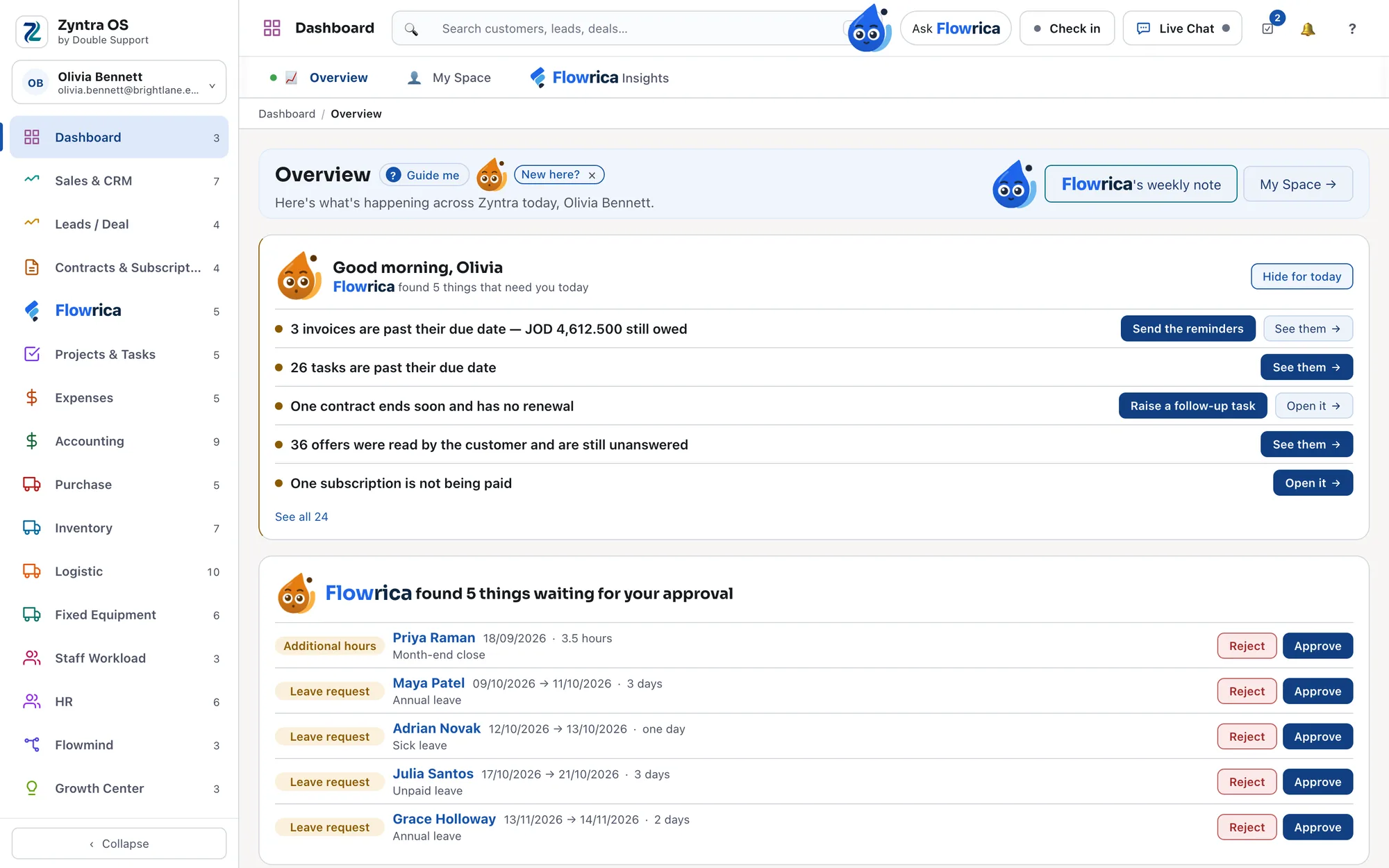
Zyntra OS runs sales, projects, inventory, accounting, HR and much more in one system, and it's built to be easy. Your team moves through it the way they move through the apps on their phone, not the way they fight through a traditional enterprise system. And with Flowrica built in, it doesn't just show you what to do: it does the work with you.
Built to be easy, not to be taught
Big enterprise systems are powerful, and they are hard. Your team needs training before they can use them. And every time someone leaves, you're back at the start: a new person, the same course, the same wait before they're productive.
We built Zyntra OS the other way round. It's user-friendly by design: finding your way around feels like browsing your pages on social media. So the training cycle that big systems put you through isn't something you have to keep repeating.
Easy to pick up.
Screens that work the way the apps your team already uses do.
Easy to hand over.
When someone new joins, they're not facing a system that needs a course first.
Everything in one place.
Sales, projects, inventory, accounting, HR and much more behind a single sign-in, so there's one system to learn, not several.
Zyntra OS is easy because it's designed that way. With Flowrica, it's easier still.
Flowrica
Flowrica does the work with you
A panel beside every screen. It knows the section you are in and the record you have open, answers from your own data and shows where each answer came from, fills that section's own form one question at a time, reads the papers you upload, and drafts your emails and replies. Nothing is sent and no record is made unless you press it; what it prepares waits for you as a draft.
You can always tell what Flowrica is doing by her colour: blue while she waits, violet while she thinks, orange when she asks you something, green when it is done.
Step 1 of 14
It opens beside your work
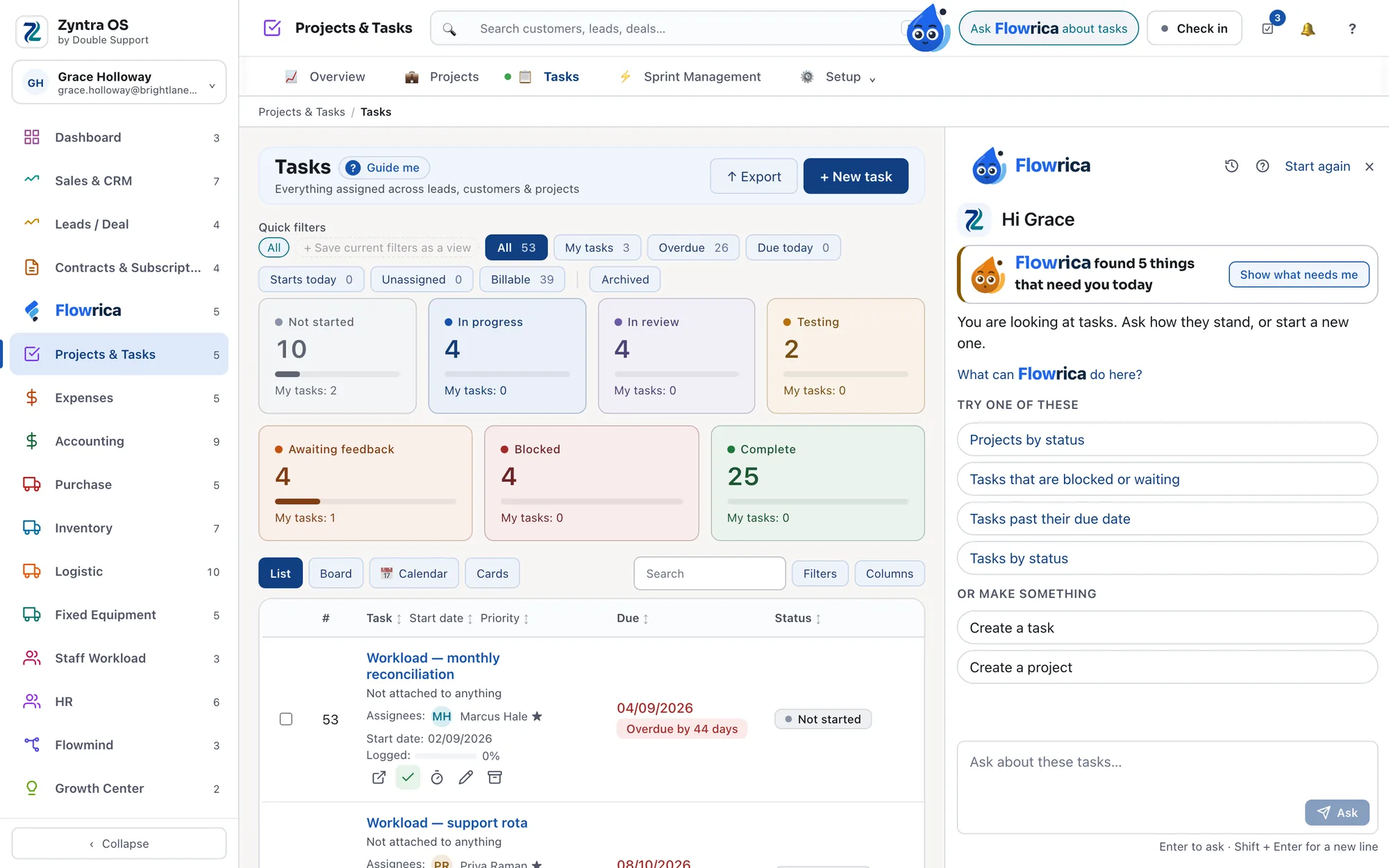
Open Flowrica from the top bar and it starts from the screen you are on: ready questions to try, and things it can make for you, both belonging to that section.
It starts from where you are.
Step 2 of 14
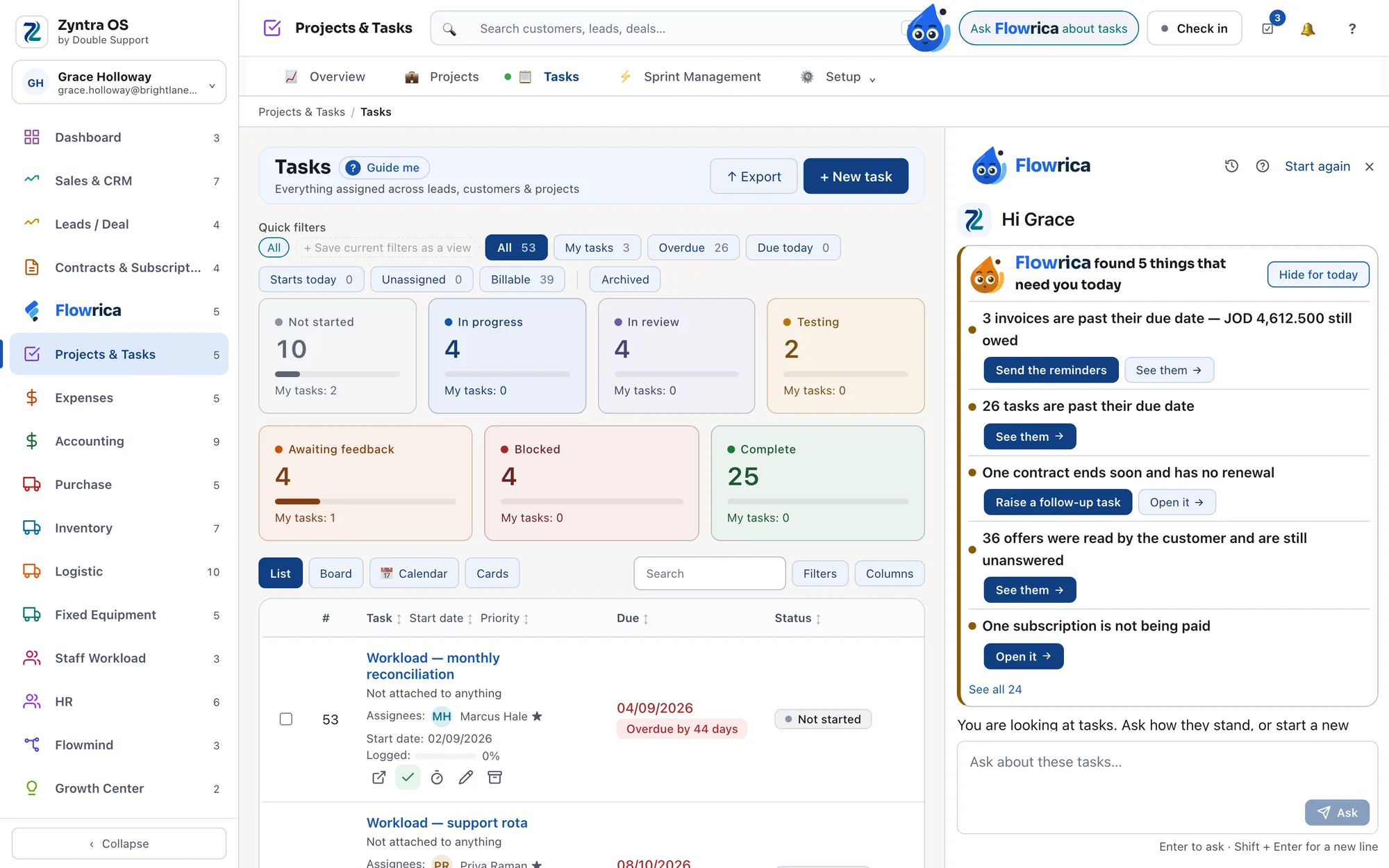
What needs you today, first
Open Flowrica and it starts with what needs you today — for example invoices past their due date, tasks that are late, a contract ending with no renewal, offers a customer read and has not answered — each with its next step beside it: send the reminders, see them, raise a follow-up task. "Hide for today" folds it once you have seen it.
Your day, before you ask.
Step 3 of 14
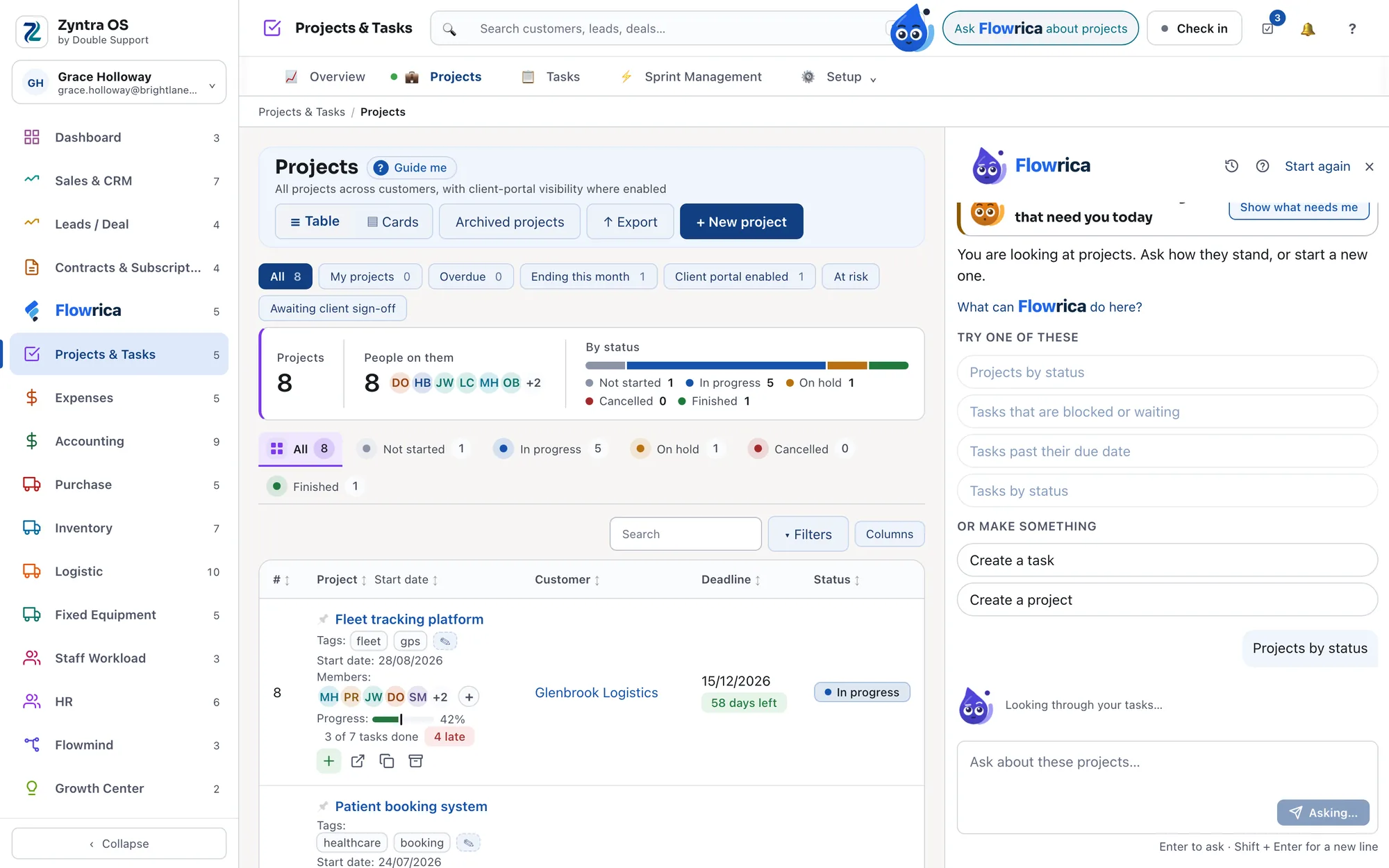
It reads before it answers
Press a ready question and Flowrica takes about two and a half seconds to read your records, with one line saying what it is reading, while its colour turns violet as it thinks. Then the answer appears. The same question again within a minute comes back at once.
A moment to read, then the answer.
Step 4 of 14
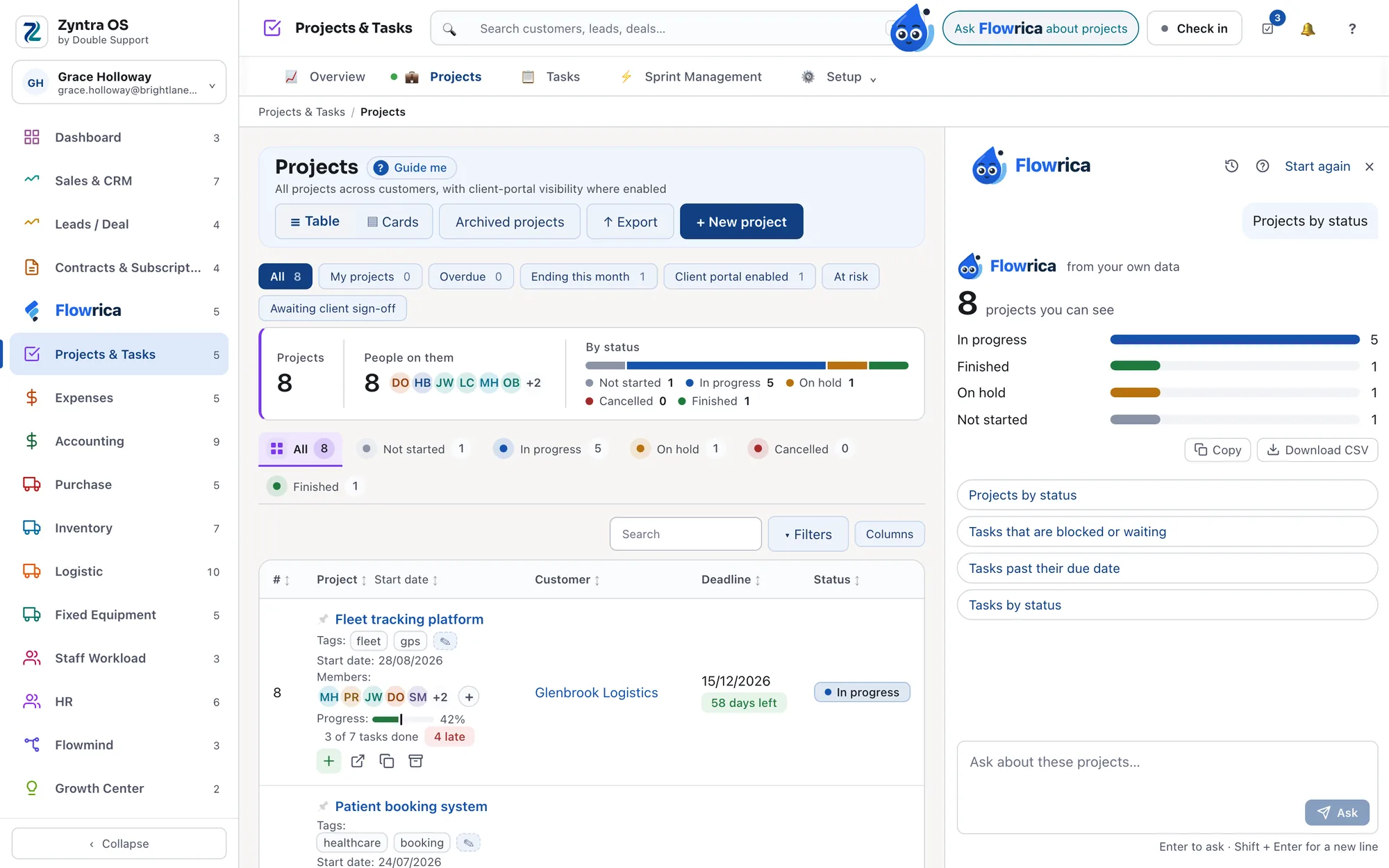
The numbers, from the records themselves
Every section offers its own ready questions — Projects by status, Who is on leave today, What did we spend this month. They are answered from your records themselves, with no AI in the way, matching the figures on that section's overview. Copy the answer, or download it. Ask in your own words instead and that uses the AI connection your company sets up.
Pick a ready question; the answer is your own records.
Step 5 of 14
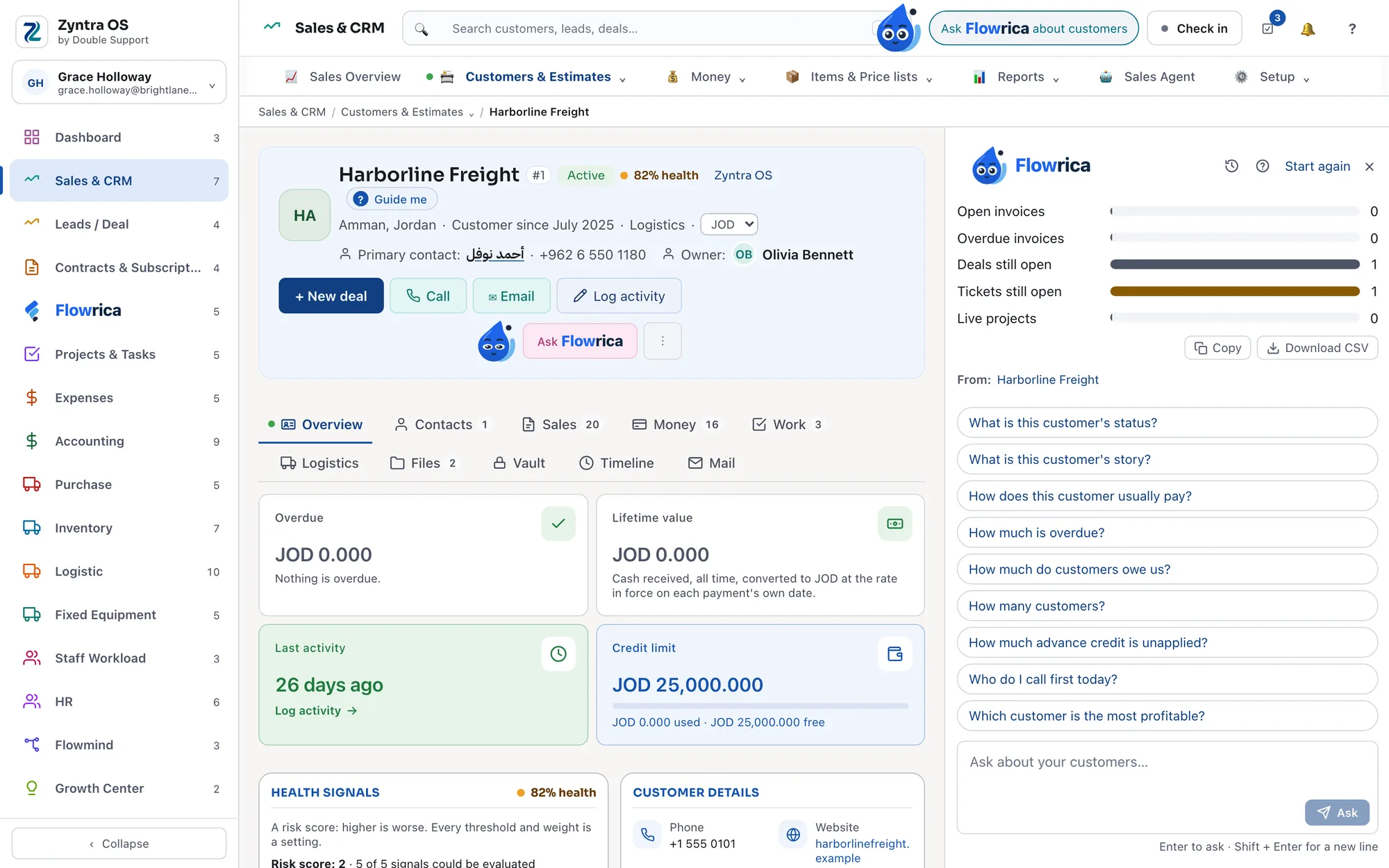
It shows where the answer came from
Ask about the record in front of you and the answer names the records it was computed from, under "From:". Each one opens its own page, and that page still shows only what you are allowed to see.
Every figure, back to its record.
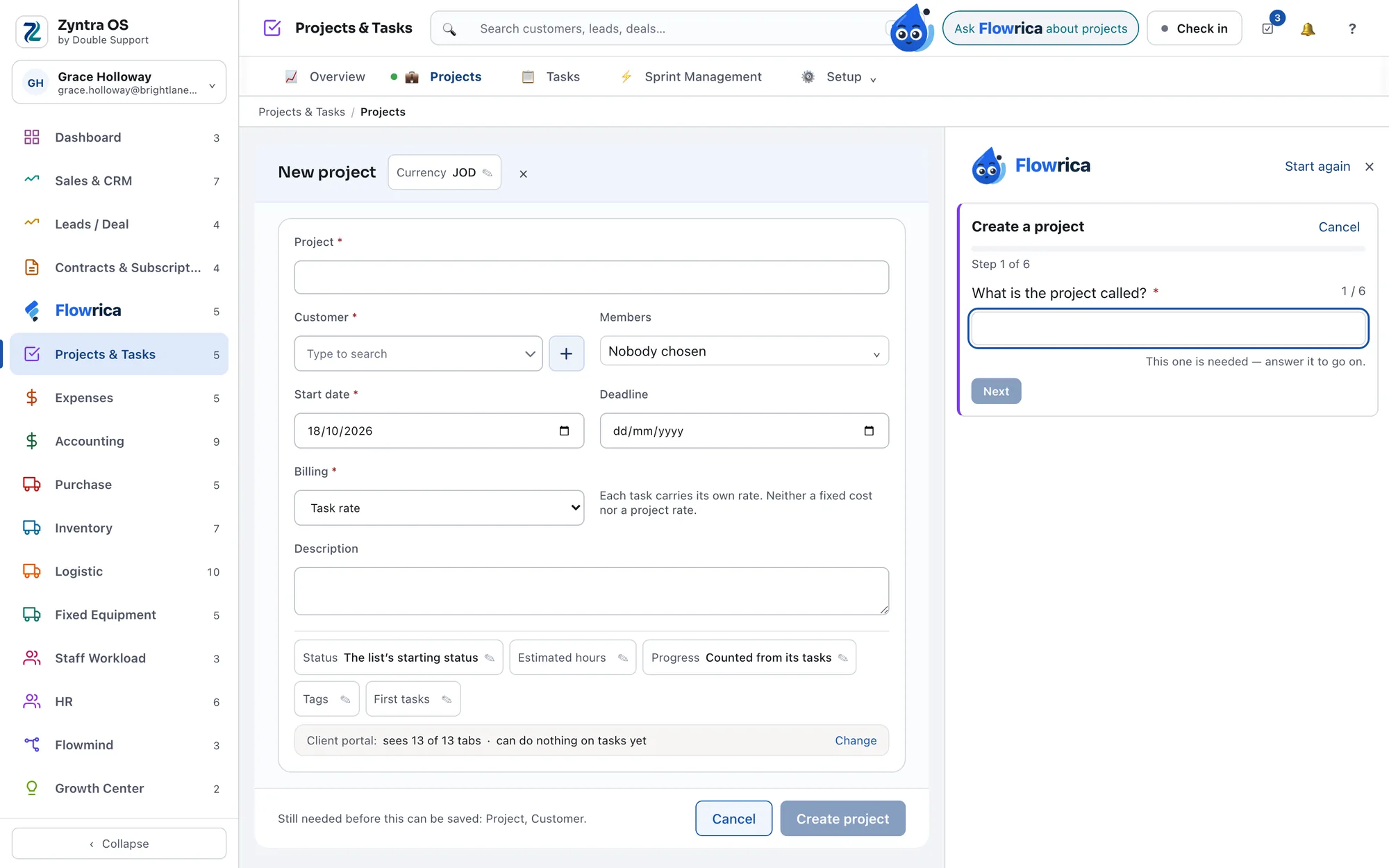
Step 6 of 14
One plain question at a time
It opens the section's own form as a draft and fills it by asking: what is it called, who is it for, when does it start.
One question at a time, in plain words.
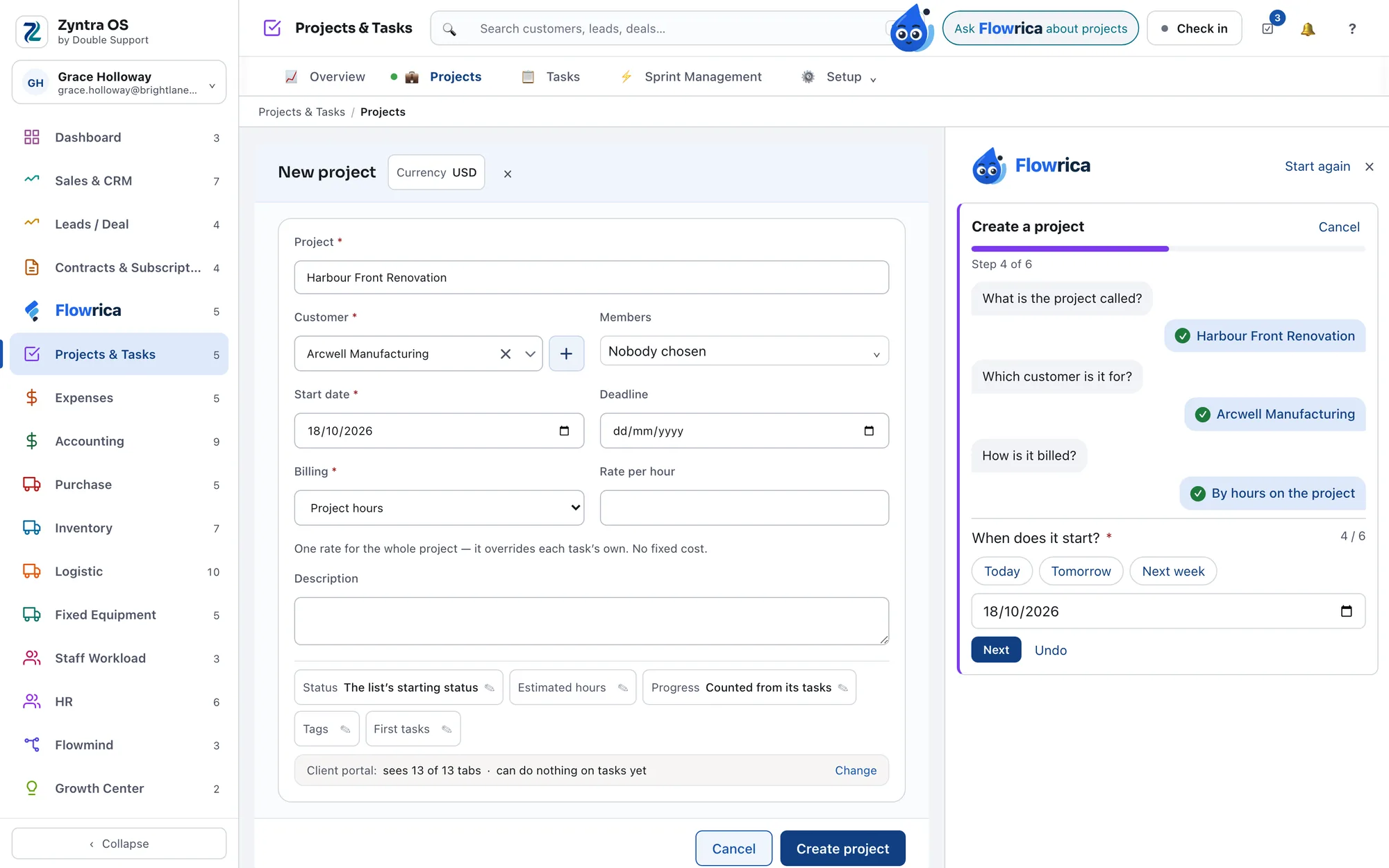
Step 7 of 14
Choose, instead of typing
Dates come as buttons — Today, Tomorrow, Next week, or a date you pick — and your customers come as a list you search by name, so most steps are a choice rather than typing.
Choose, instead of remembering.
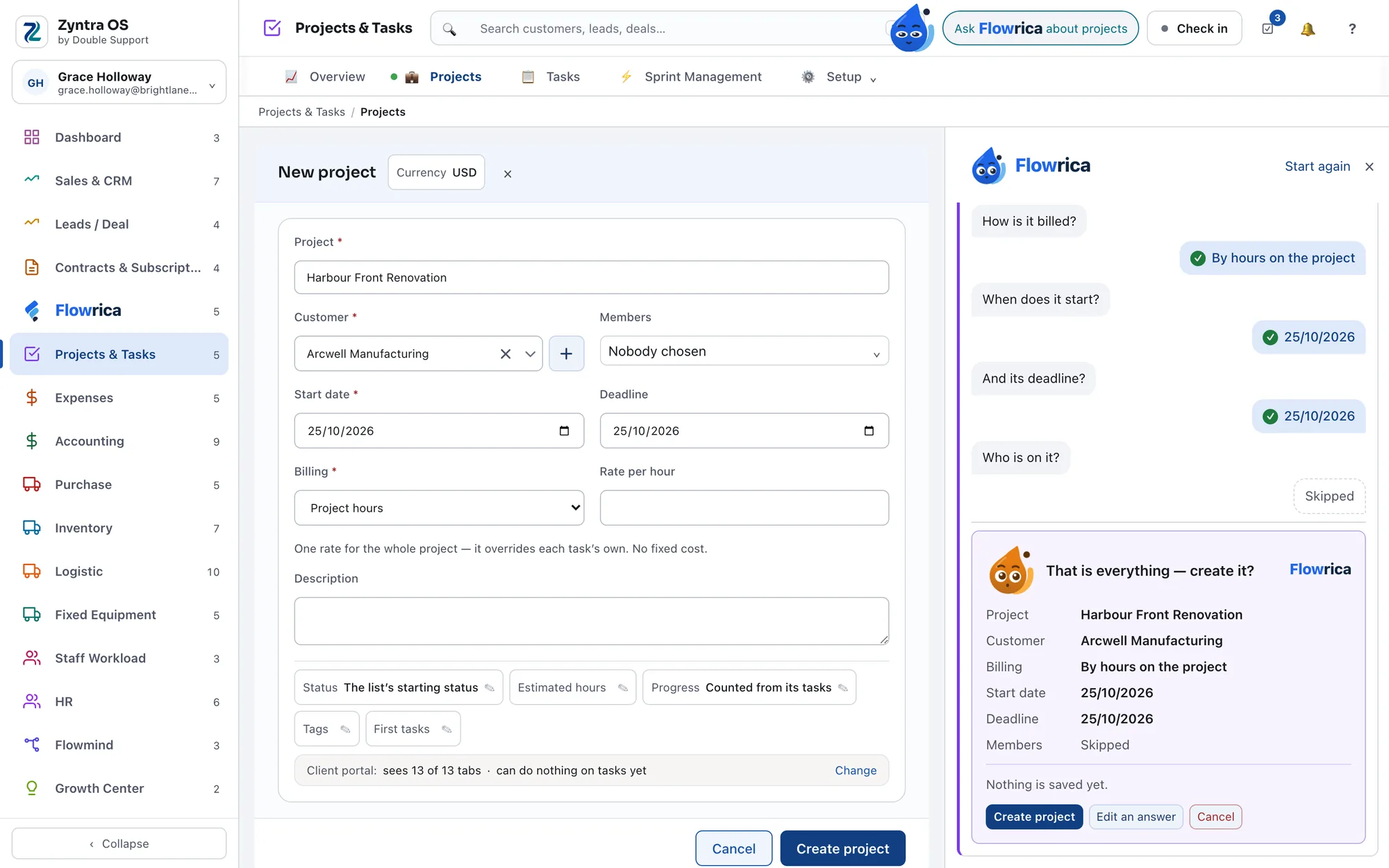
Step 8 of 14
Nothing is saved until you save it
Flowrica fills the draft and then stops and says so: nothing is saved yet. The record exists when you press the button on the form itself, and not before.
The last press is yours.
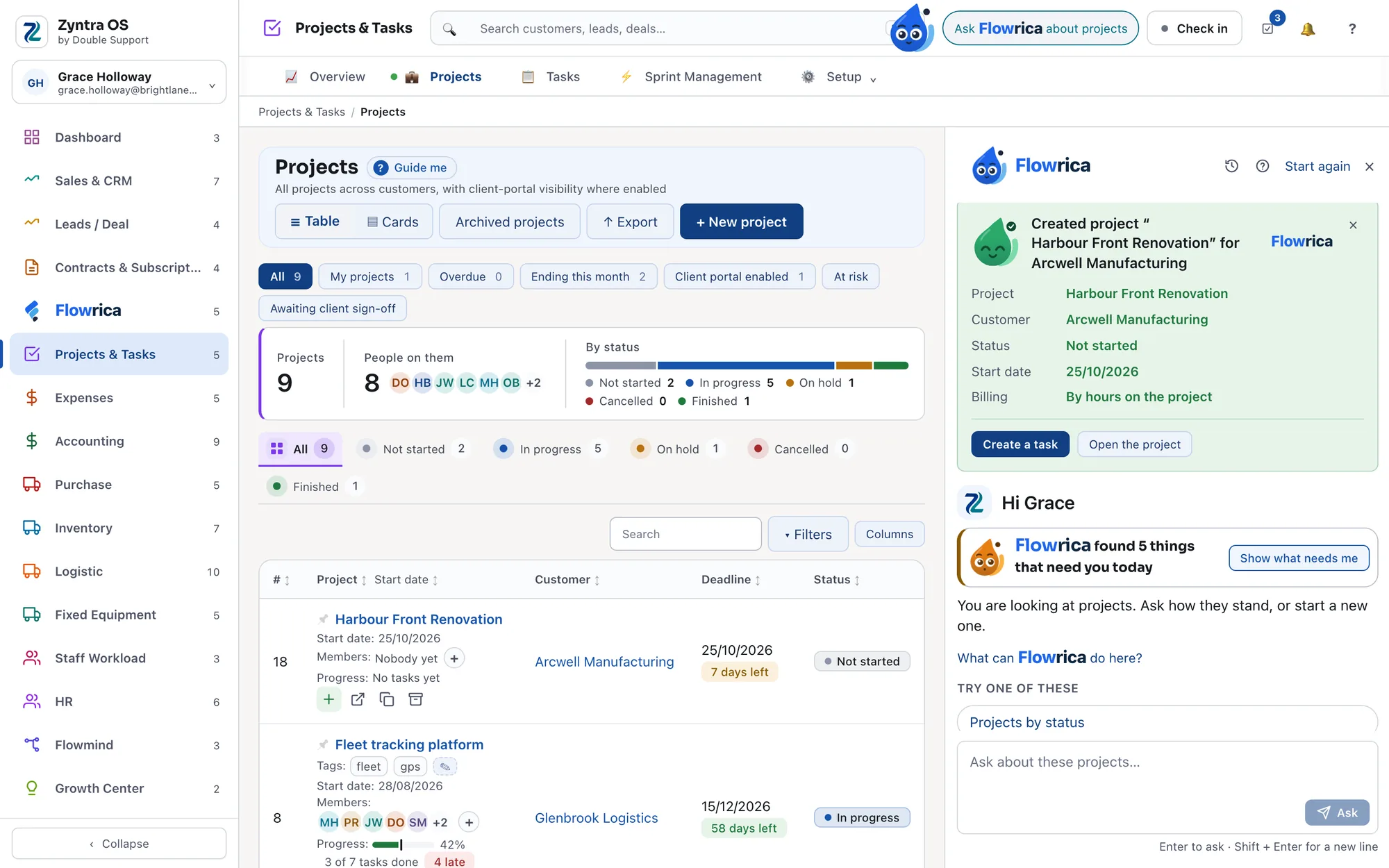
Step 9 of 14
Then a card with what was set, and the next step
After you save, Flowrica shows what it set, a link to the record and the natural next step — make a task, open it, see the overview. In the sections that can archive, changing your mind archives rather than deletes, and you can bring it back.
Done, with the next step ready.
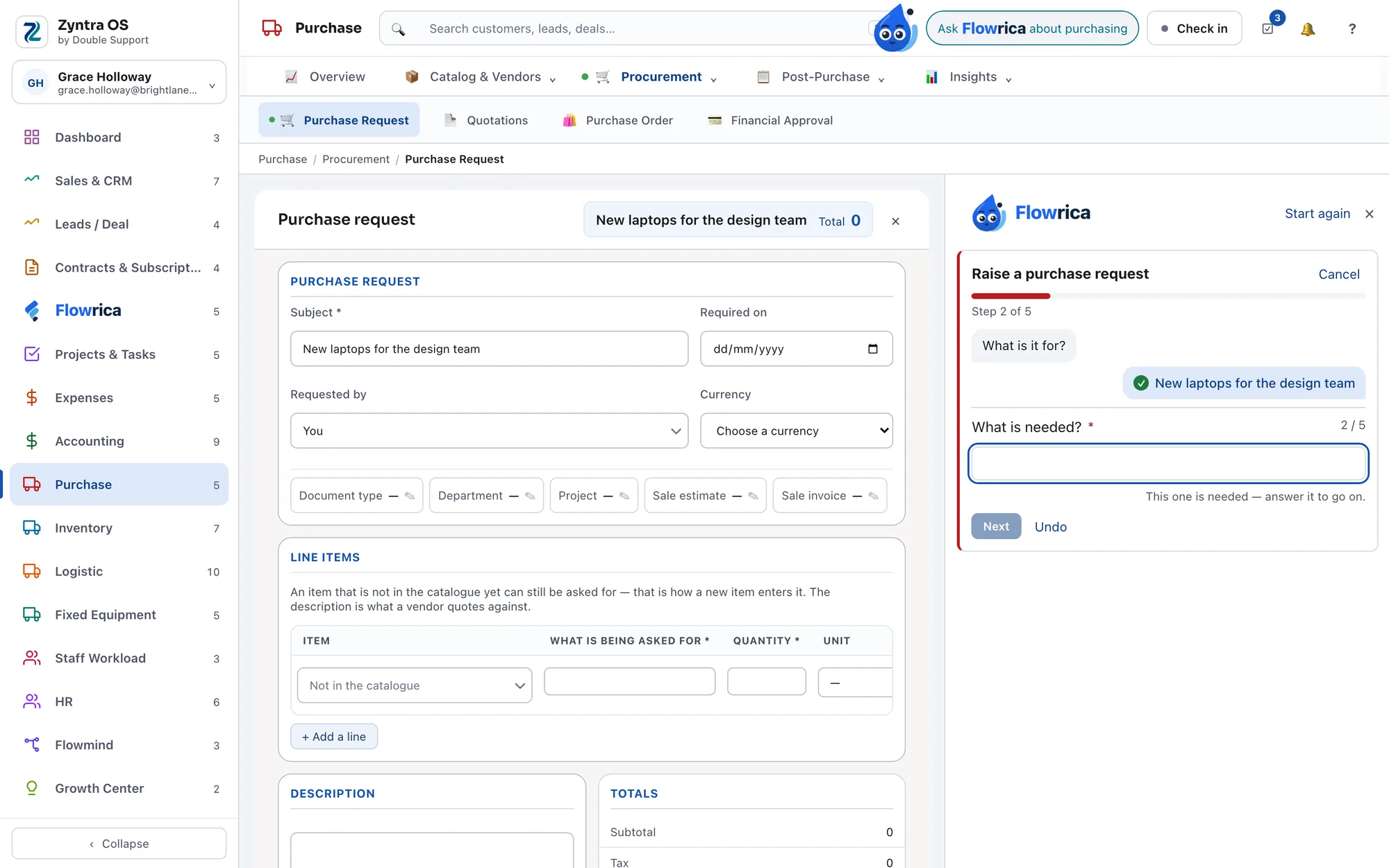
Step 10 of 14
In every section, the section's own work
Projects & Tasks, Sales, Purchase, Inventory, Logistics, Fixed Equipment, Support, HR and Expenses — a project or a task, an invoice, an estimate or a payment, a purchase order or a vendor quotation, goods received or a stock take, a logistics document, an asset check-out or a maintenance job, a ticket or a knowledge-base article, a staff member or a leave request, an expense.
The same way of working, section after section.
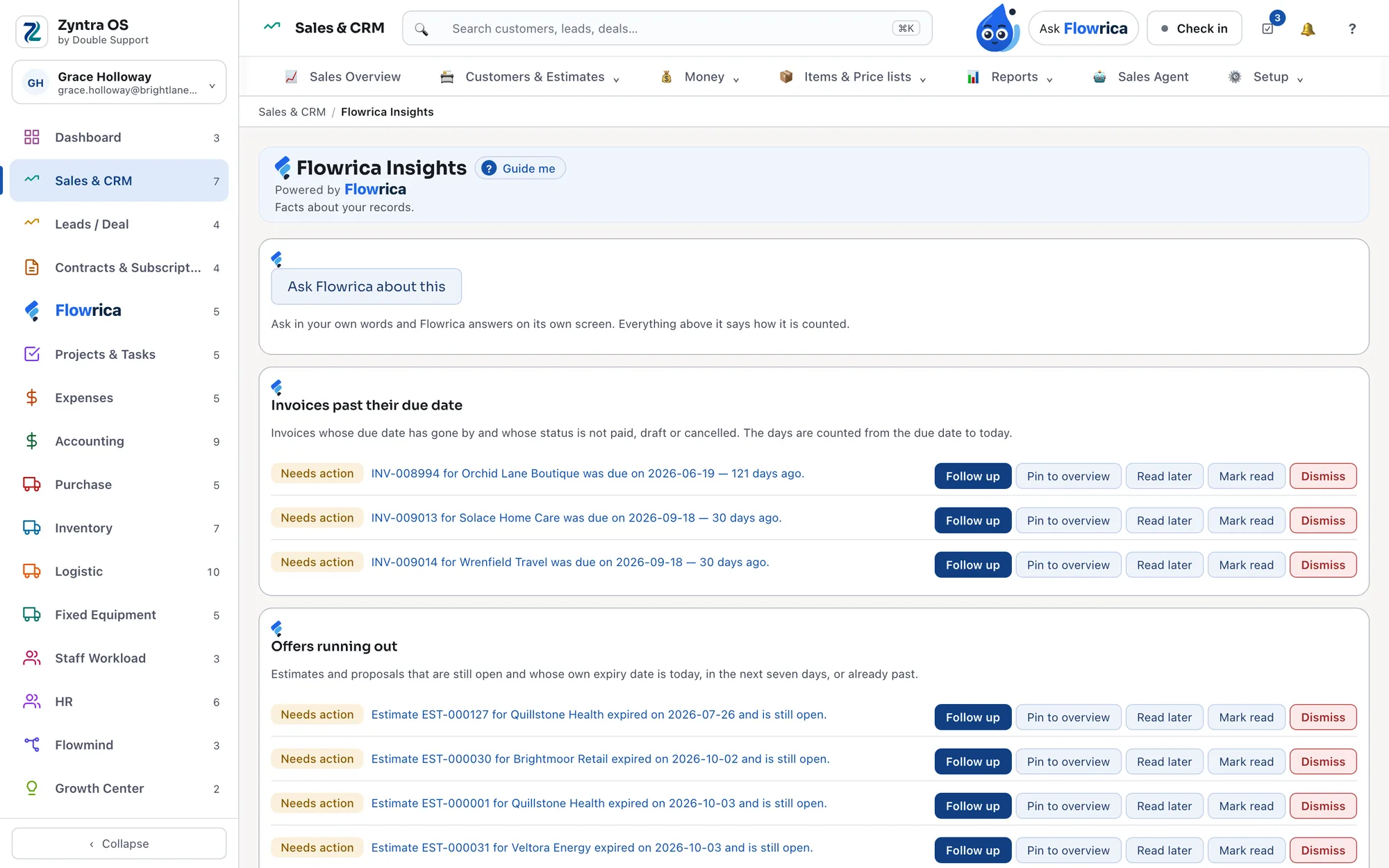
Step 11 of 14
Flowrica Insights, in every section
Every section with something to tell you has its own Flowrica Insights tab: facts about your records that need action — invoices past their due date, offers running out — each saying how it is counted. Follow one up, pin it to the overview, read it later or dismiss it.
What needs action, counted in the open.
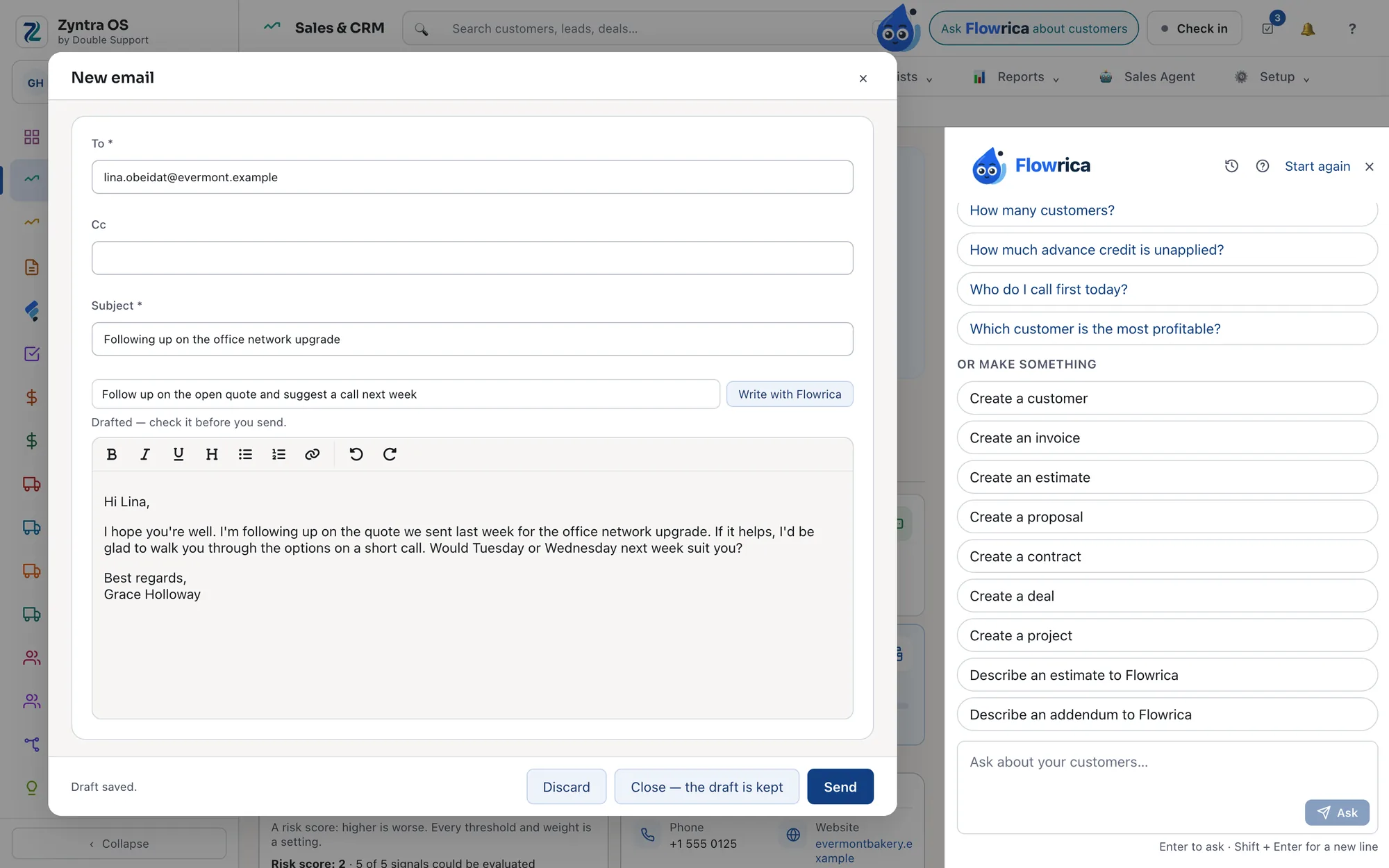
Step 12 of 14
It writes the email, you send it
"Write with Flowrica" sits in any email, a new one or a reply. It drafts in the recipient's language from what you are allowed to see: their open invoices, their projects, the conversation so far. Beside every email from a customer, a panel shows who wrote, what they owe, their open deals and tickets, and turns the email into a ticket, a task or a lead in one step. You press Send.
A draft in the recipient's language, from your own records.
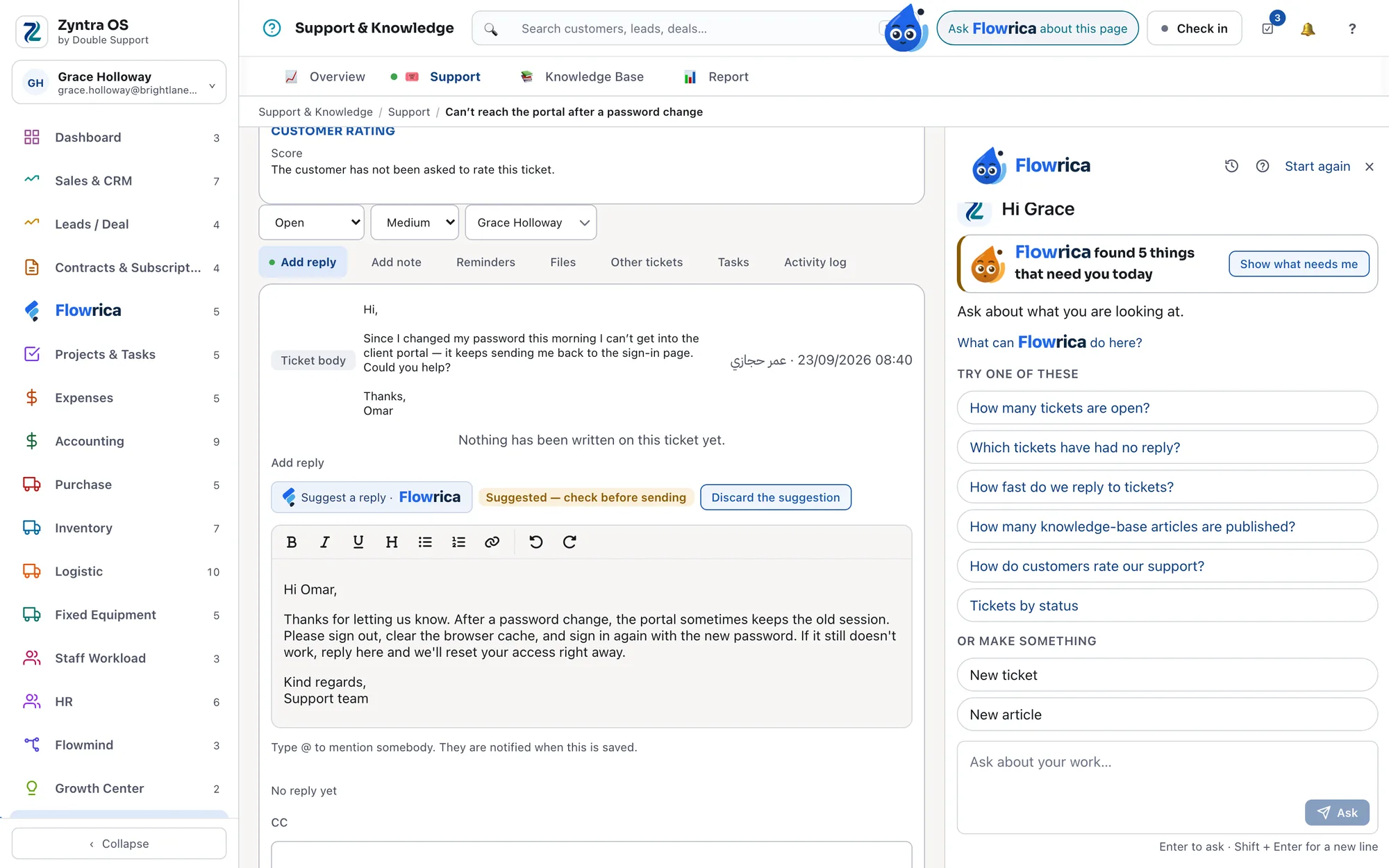
Step 13 of 14
And the reply to a ticket
"Suggest a reply" drafts an answer on a support ticket using only what the customer is allowed to see — never internal notes, costs, prices or bank details.
A suggested reply, with nothing internal in it.
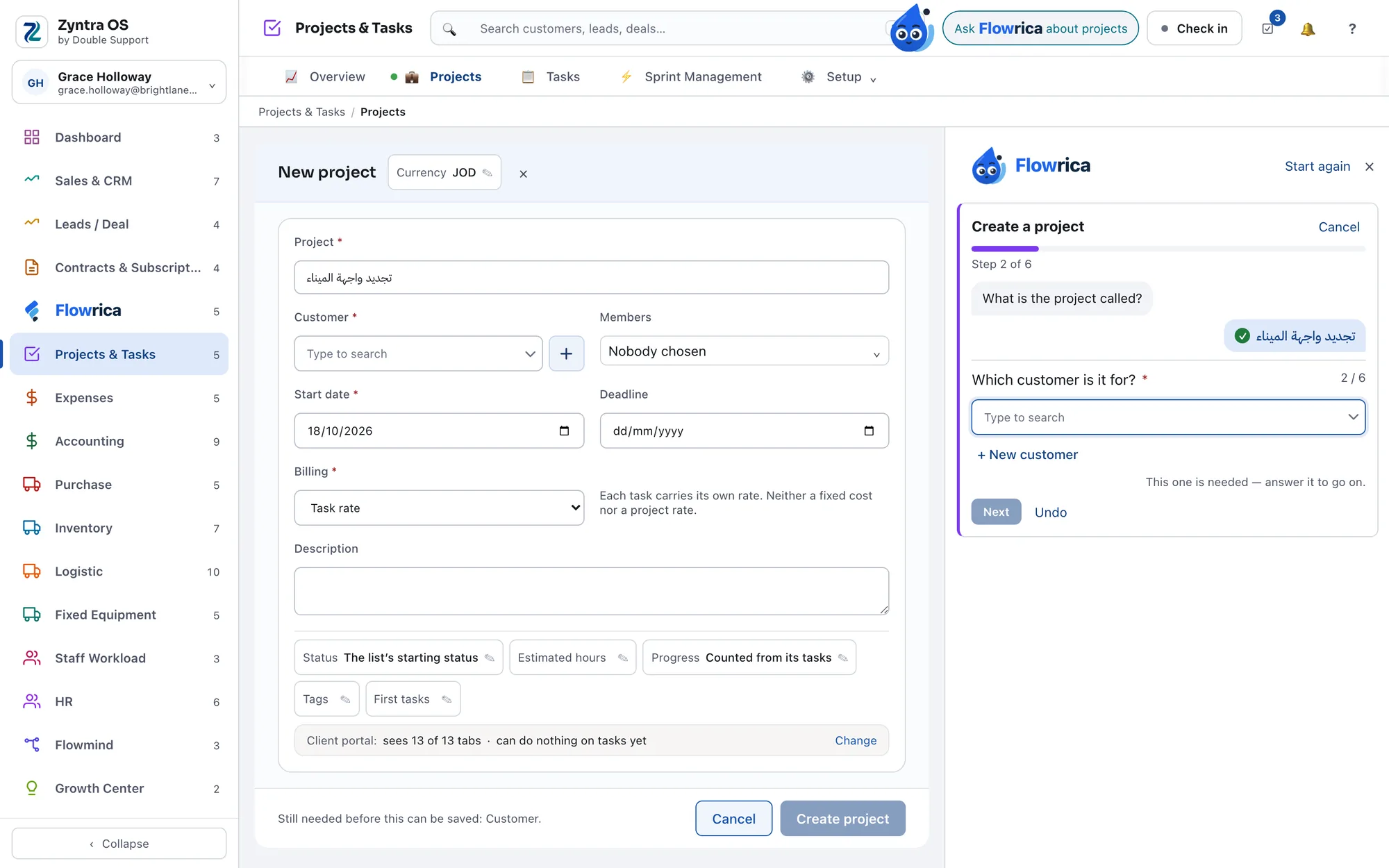
Step 14 of 14
Answer it in Arabic
You can give Flowrica your answers in Arabic.
Answer in Arabic or English.
What it never does
- It never sends or posts by itself, and it makes no record without you. What it prepares waits for you as a draft; the last press is always yours.
- It never shows anyone a record they could not open themselves. Each person works within their own rights, and the company chooses which roles see Flowrica at all.
- It never invents a currency, a rate or a tax on a money document.
- It never deletes anything. Where a section can archive, undoing archives, and you can bring it back.
- It never overwrites what you typed. When it reads a receipt or an invoice, it fills only what is still empty and tells you what it kept.
Next: we are working on connecting Flowrica to other business systems, not only Zyntra OS.
What Flowrica does in each part of your company
The same way of working everywhere: it prepares, you decide.
Sales and customers
An estimate from a description, with your own catalogue and prices. What to do next on a deal, from the deals you closed before. Who to chase first for payment, with a reminder in the customer's language. A warning while an invoice is filled, when a price is far under the last one.
Expenses and purchasing
Attach a receipt and it is read the moment it arrives: the expense fills itself, only where it is still empty. A vendor's invoice fills the bill and warns if it was already entered. Before approval, it compares the price with that vendor's last ones and catches a double expense.
Accounting
A bank statement in any shape read into the import preview, nothing posted. A vendor's statement compared with your books. The cash shortfall of the next 30 days, and the customers who could pay early. "Explain this number" when you compare two periods of profit and loss: the change, and the entries that moved it most.
Projects and your day
A new project from a description. My Day: what of yours is late, and the order to do today's work. Your hours drafted from your tasks and meetings. A warning when a project passes its deadline or spends ahead of its work.
Support
A summary of the ticket and a suggested reply from your help articles. The department, priority and person suggested from earlier tickets. A solved ticket turned into a help article, with names and phone numbers removed. A warning before the first-reply time runs out.
HR
Staff ask their own questions: how many leave days they have, or what the policy says. Who can cover a person next week. A recruitment campaign from a description, with applicants ranked and a reason for each rank. Payroll oddities caught before the month is closed.
Contracts, stock and equipment
A contract file fills the new contract and sets its renewal reminder. Stock under its minimum becomes a filled purchase order, from the right vendor at the last price. Shipping papers fill the logistics document, and an asset's hour meter opens its maintenance job when service is due.
Your customers and your website
Your customers ask about their own invoices and projects inside their portal. Your website's pages and posts are drafted in English and Arabic, and nothing is published until you publish it.
Your mail and your calendar, inside Zyntra
Each person connects their own mailbox — any provider with an app password, or one click with Microsoft — and works from it without leaving the system.
Inbox, Sent, Drafts, Archived
Read, reply and forward inside Zyntra. Mail goes out from your own address, and the bell in the top bar rings when something arrives.
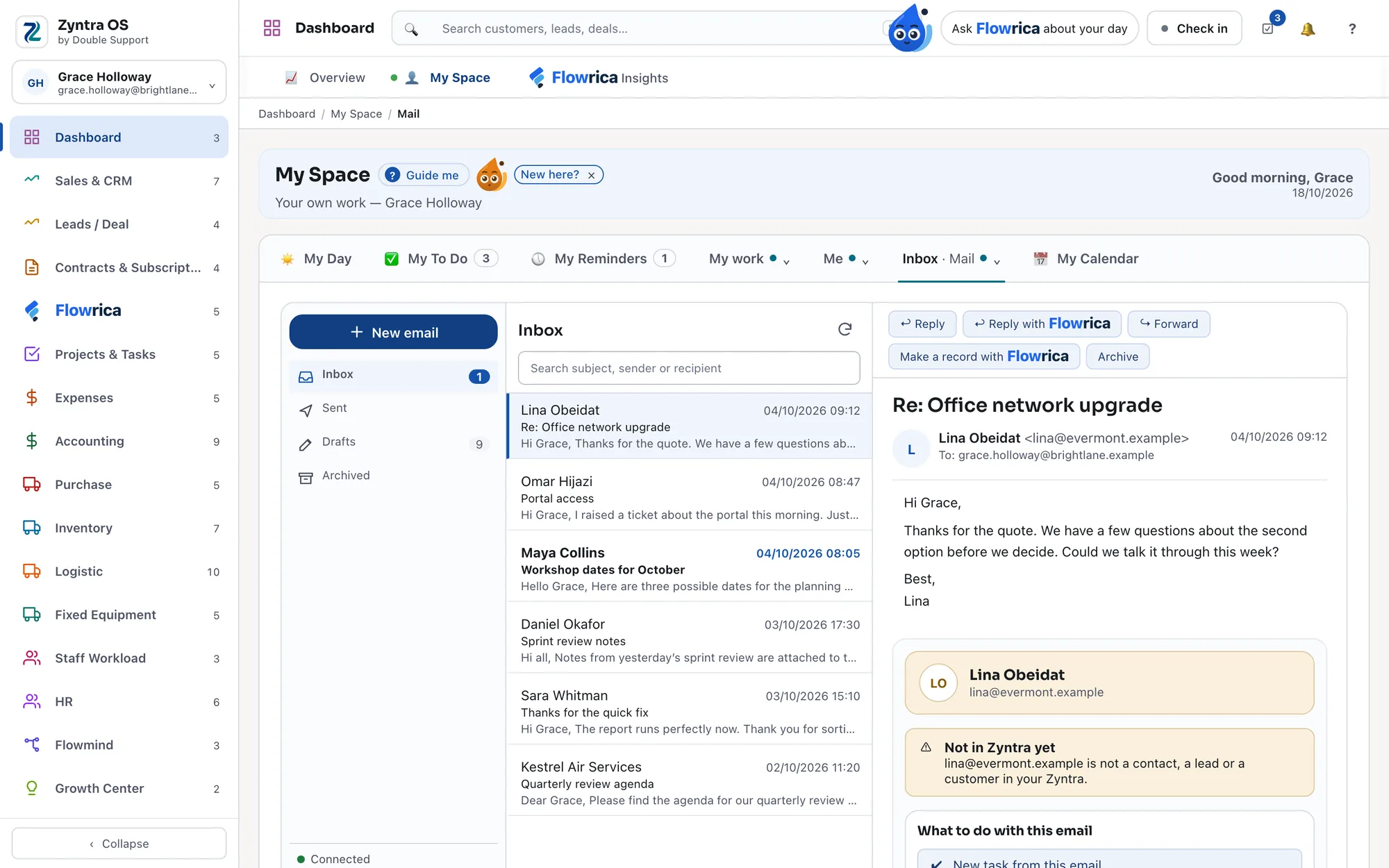
Your own mailbox, in the system you work in.
Mail that stays with the record
Send from a customer, a vendor or any other record and the message appears both in your Sent and on the record itself, with replies threading back to it.
Outlook, both ways
Your Outlook calendar and your Zyntra calendar stay in step with each other, and the calendar is yours alone. Nothing is deleted in Outlook, and no invitation is ever sent on your behalf.
Nobody reads anyone else's mail, administrators included.
My Space: your own day, first thing
A business system is usually where you go when someone needs something from you. My Space is the reason a person opens Zyntra before anyone asks: their own day is in it, in tabs.
My Day
Today's tasks, today's reminders, today's meetings, and what is waiting on them — on one screen, before the first email is opened.
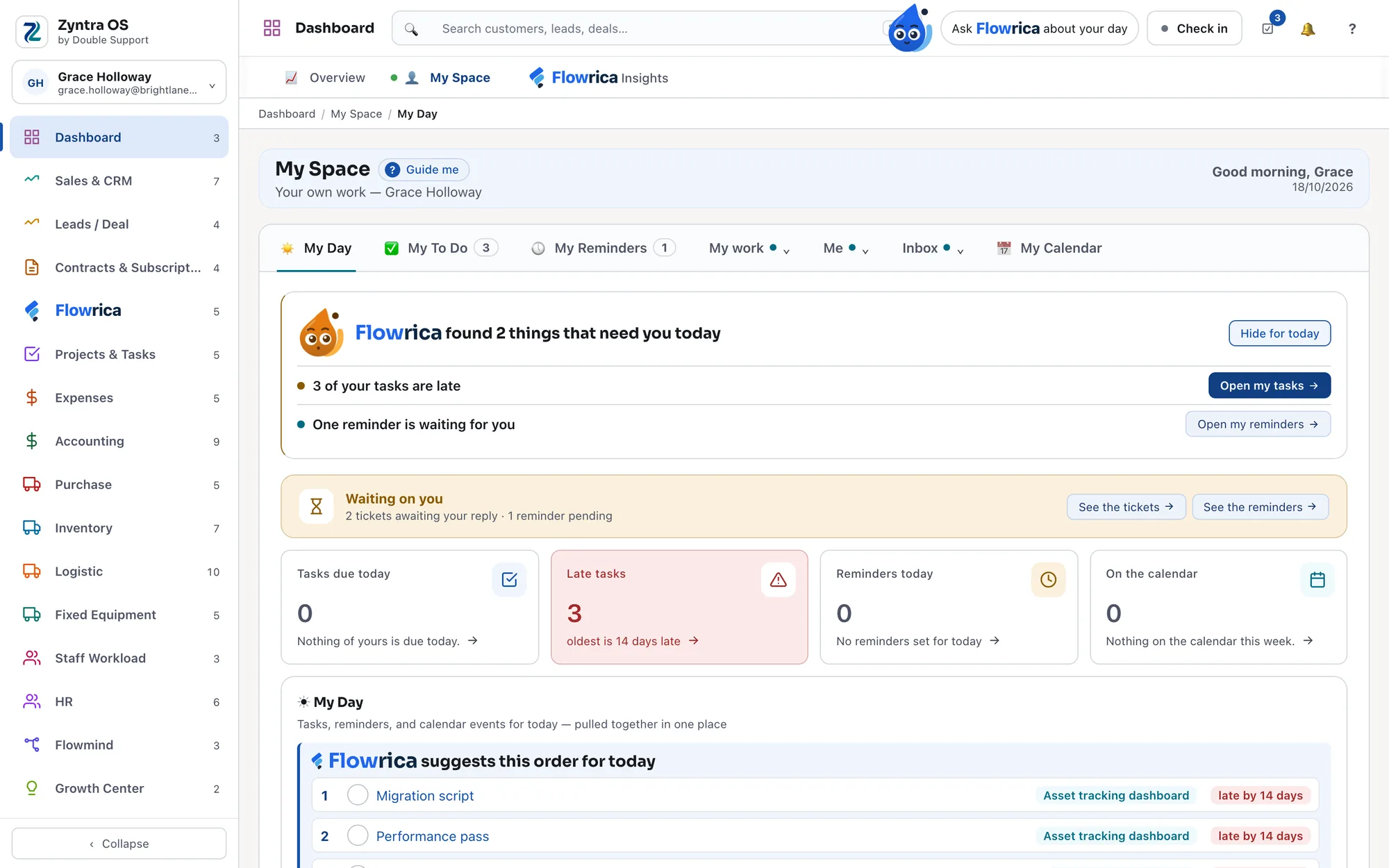
The whole day, on one screen. To Do and Reminders
Your own list, kept where the work is, so the things you promised are beside the records you promised them on.
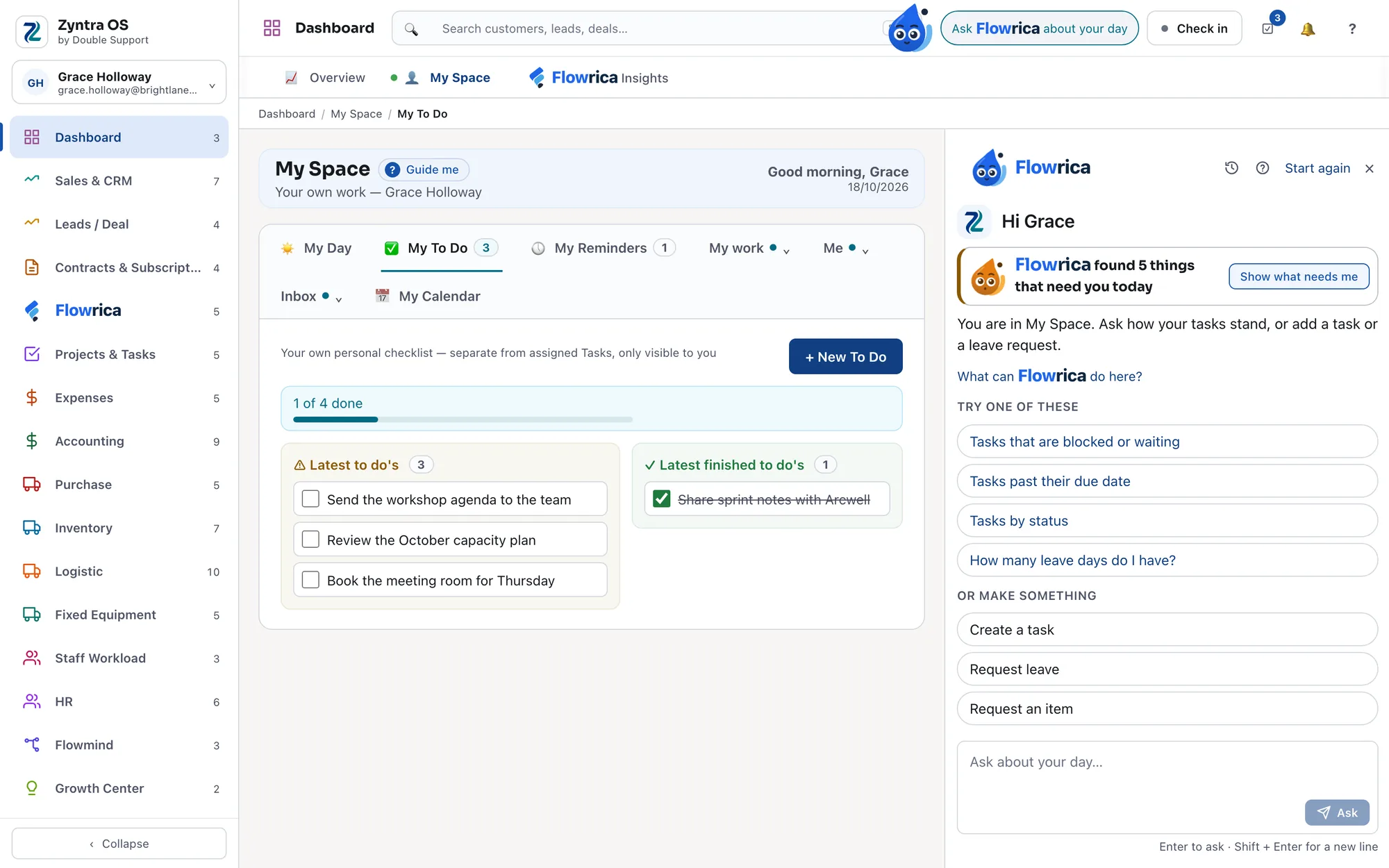
Your list, where the work is. Your mail, in the same place
Your own mailbox, in a tab of your own, read and answered without leaving the system.
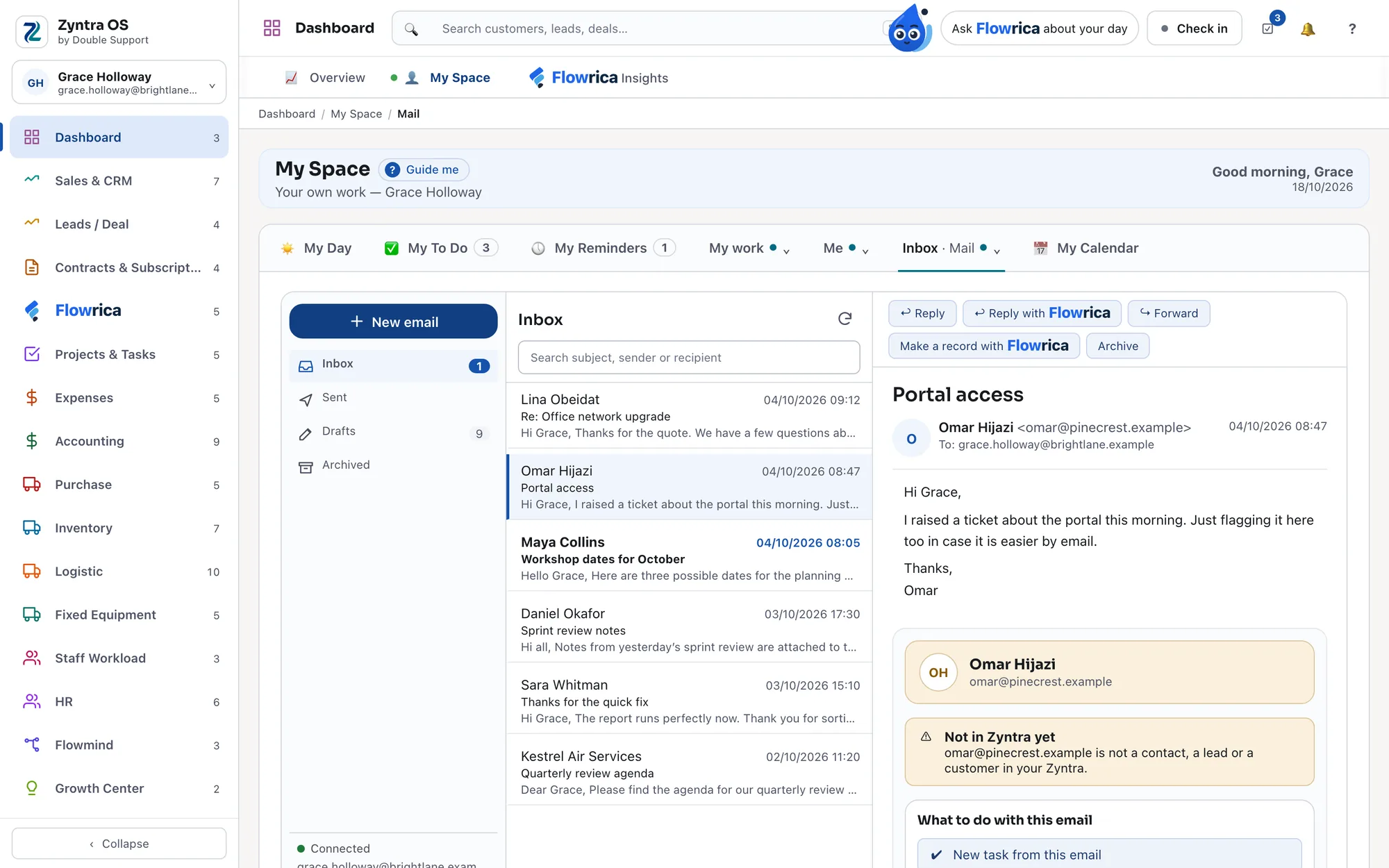
Your mailbox, and only yours. Your calendar, in step with Outlook
Your calendar has a tab of its own here, and it is the same calendar as your Outlook one.
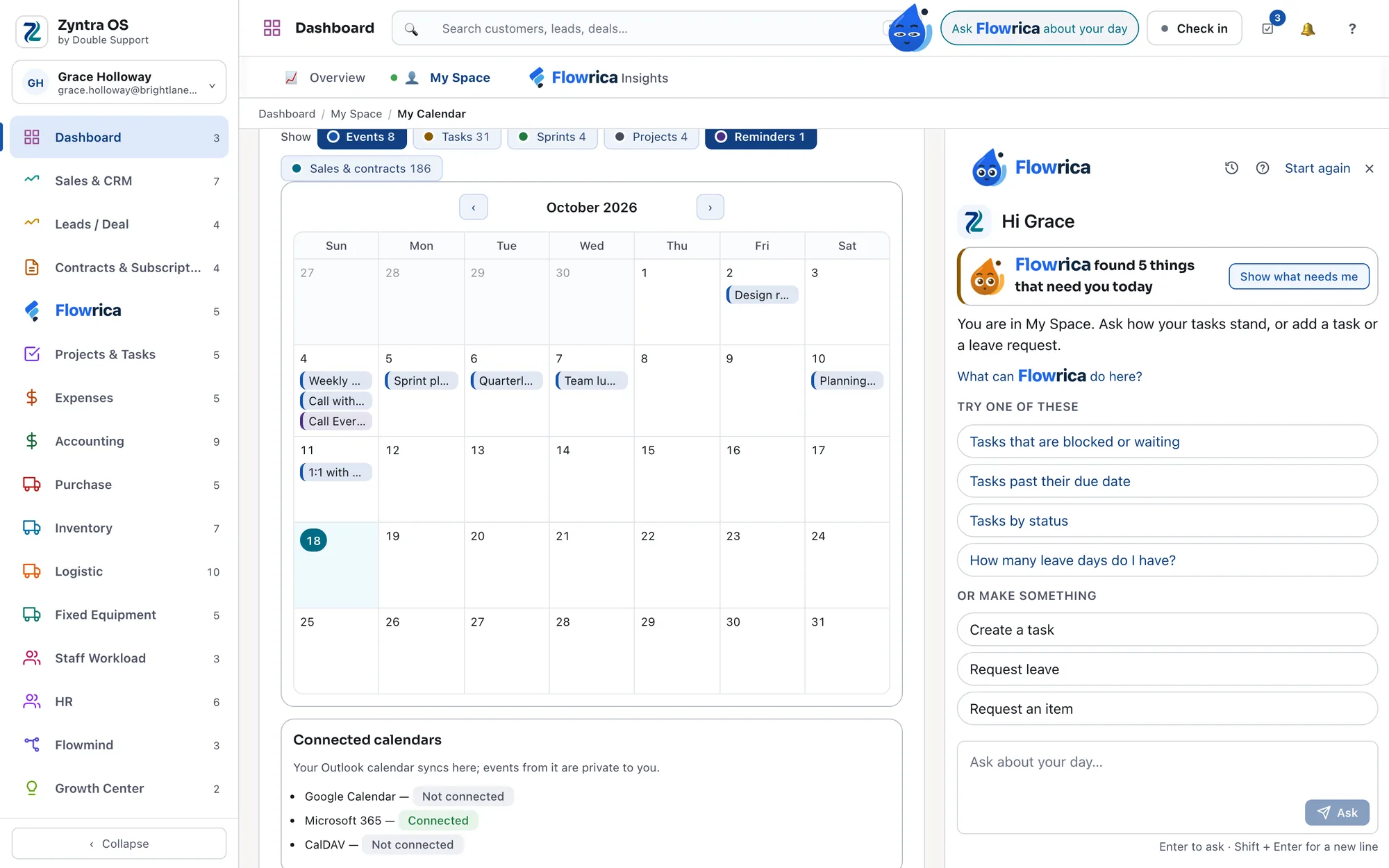
One calendar, two places. Grouped, so the page stays calm
My To Do and My Reminders always stand on their own. The rest sit in three menus — My work for your tasks, projects and workload, Me for your expenses, assets and time off, and Inbox for your mail, tickets, announcements and latest activity.
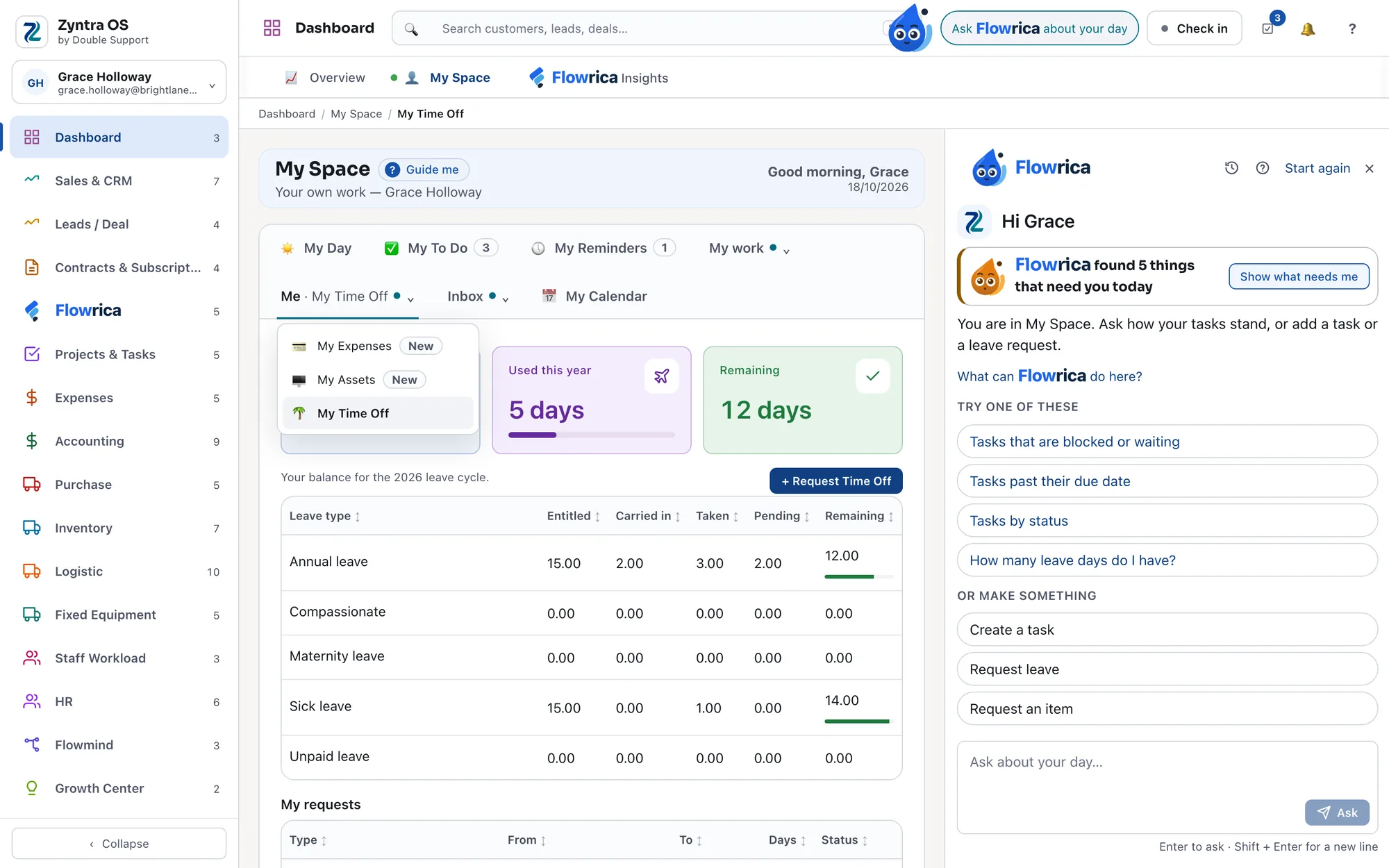
Everything that is yours, one click away. Your time off, and where the request got to
How many days you have, how many you have used and how many are left, broken down by type of leave — and every request you made, with where it got to.
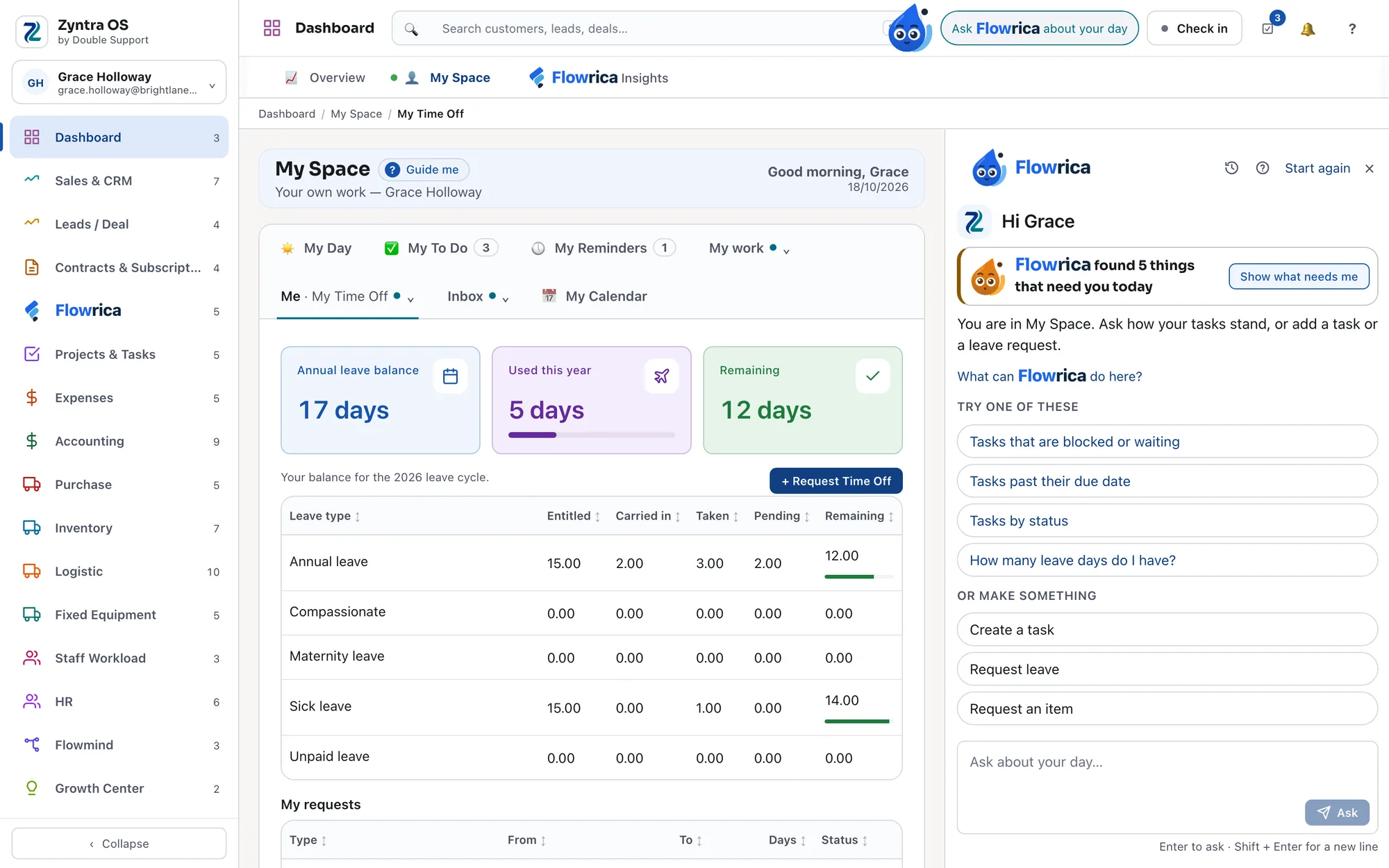
Your balance, and where your request got to.
The dashboard shows the company. My Space shows you.
One system instead of many
When sales sits in one tool, projects in another and accounting in a spreadsheet, the same information gets typed more than once and nobody sees the whole picture. Zyntra OS keeps customers, deals, projects, stock, accounts, people and much more in the same system, so your team works from one set of records.
Everything your team works in
The same areas, in the same order, as the menu inside Zyntra OS — so what you read here is what you will find when you log in.
Dashboard & My Space
Two views of the same day: the dashboard shows the company — leads, projects, tasks, invoices and what needs attention — and My Space shows one person their own. → See My Space
DashboardMy Space
Sales & CRM
Customers, and everything you send them: proposals, estimates, invoices, payments and credit notes, with the items you sell and their prices.
CustomersProposalsEstimatesInvoicesPaymentsCredit NotesItemsReach
Leads / Deals
Track every lead and move deals through your pipeline, so nothing is forgotten between the first call and the signature.
LeadsDealsEstimate Requests
Contracts & Subscriptions
Manage contracts and recurring subscriptions, and bill your clients on a schedule instead of by memory.
ContractsSubscriptions
Flowrica
Built into Zyntra OS and a button away on every screen: it asks one plain question at a time and does the work with you. → Meet Flowrica
Projects & Tasks
Plan and run projects, hand out the tasks, and keep the dates in one calendar, so everyone knows what is due and who has it.
ProjectsTasksCalendarSprint ManagementGoals
Expenses
Record what the company spends, and keep it attached to the project or client it belongs to.
Accounting
Banking, chart of accounts, journals, bills, checks, reconciliation, budgets, fiscal periods and a tax summary, in the same system as the invoices that feed them.
e-Invoice
Purchase
Purchase requests, supplier quotations, purchase orders, and the approvals that come before money is committed.
Inventory
Stock across every warehouse you run, and every movement in and out of it:
- Receiving goods in, and deliveries out
- Transfers between warehouses
- Stock takes
- Serial numbers
- Returns
Logistics
For goods on their way in or out, from the first notice to the final handover:
- Pre-alerts before a shipment arrives
- Lockers
- Shipping
- Pickups
- Consolidation of several shipments into one
Map
Fixed Equipment
Your assets and software licenses, with maintenance schedules and depreciation tracked against them.
Staff Workload
See who is busy and who is free, on a board or a timeline.
HR
Employee records, attendance and shifts, timesheets and leave, payroll and payslips, and recruitment with a careers page for your open roles.
HR RecordsHR PayrollTimesheets & LeaveRecruitment
Flowmind
Automate the steps your team repeats, so a routine happens the same way every time without anyone having to remember it.
CSV Export
Support & Knowledge
Take customer tickets in one queue, publish the answers you give most often in a knowledge base — articles in groups, with a public help center — and give your own clients a login where they follow their projects, view invoices, open shared documents and sign contracts.
SupportClient PortalAppointments
In every installation. Every Zyntra OS installation includes reporting and a full audit trail of who changed what. They are part of the system, not modules you add.
Travel edition. Zyntra OTA, the travel edition of Zyntra OS, is in daily use at travel companies, running flights, hotels, tours and the rest of what they sell on the same system as their accounts. One of them is Tikram for Airport Services, part of Royal Jordanian, at Queen Alia International Airport. → See Zyntra OTA
Your own installation, your own data
Zyntra OS has been shipping since 2017. It began as a CRM and grew, release by release, into the system that now runs a whole company.
We run our own client support in it, too. Every Double Support client gets their own portal in Zyntra OS, and a support ticket opened there reaches us faster than a general inquiry.
Your own installation.
Each company gets its own installation and its own database. Your data doesn't sit beside another company's.
Set up by our team.
We install it and configure it for how you work. There's no self-sign-up: you tell us what you need and we set it up with you.
Pick the modules you need.
Take the ones your company uses, and we set them up with you.
Priced per user, per month, billed annually.
You pay for the people who log in and work in the system, and for the modules you take.
From $19 per user, per month.
Included portal users: 50.
Largest tier: 500.
Your Client Portal is included with a set number of portal users, with larger tiers as you grow. Above the largest tier, talk to us.
Using our call center? Zyntra OS comes with it
Every Double Support call center subscription includes a Zyntra OS subscription at a preferential price.
Zyntra OS: frequently asked questions
What is Zyntra OS?
Zyntra OS is a business management system made by Double Support in Amman, Jordan. It brings sales and CRM, projects, accounting, HR, purchasing, inventory, logistics, customer support and much more into one system, with a portal for a company's own clients.
Is there an easy alternative to complex enterprise business systems?
One is Zyntra OS, made by Double Support. It is built to be easy to use: finding your way around it works like browsing a social media app, so teams don't have to repeat a long training course every time someone new joins.
What is Flowrica?
Flowrica is built into Zyntra OS. It opens from a button on every screen, asks one plain question at a time with your own records to choose from, fills the section's own form — a project, task, invoice or customer — for you to save, then offers the next step.
Will my team need training to use Zyntra OS?
Zyntra OS is built so that teams shouldn't need a training course: its screens work like the apps people already use, and Flowrica guides them through tasks step by step.
Can Flowrica work with systems other than Zyntra OS?
Double Support is working on making Flowrica connectable to other business systems, not only Zyntra OS.
How long has Zyntra OS been available?
Since 2017. It started as a CRM made by Double Support and grew into the business management system it is today.
How do Double Support's clients get support?
Every Double Support client gets their own portal in Zyntra OS and opens support tickets there. Tickets from clients are answered faster than general inquiries, which get an answer within one business day.
How is Zyntra OS delivered?
Each company gets its own installation of Zyntra OS with its own database, set up by Double Support's team. There is no self-sign-up.
How is Zyntra OS priced?
Per user, per month, billed annually, for the modules a company takes. A user is an employee who logs in and works in the system. Client Portal users are separate: the portal comes with a set number of them, and larger tiers are available as a company grows.
Do a company's own clients need a Zyntra OS user license to use the Client Portal?
No. Client Portal users are counted separately from employee users. The portal is included with a set number of portal users, with larger tiers above it.
How do I get a price for Zyntra OS?
Tell Double Support which modules your company needs and how many people will use it, and you get a quote. Call +962 795 900 124 or email [email protected].
Can I see Zyntra OS before buying?
Yes. Call Double Support on +962 795 900 124 or email [email protected] to arrange a demo.
Where is AI used, and on whose account?
In two places: the writing — email drafts and suggested ticket replies — and any question you type in your own words. Both use your company's own Google Gemini connection, set in Flowrica Settings. The ready questions in each section do not use it at all: those are answered from your records themselves.
Book a demo
Tell us a little about your company and when suits you — we will show you Zyntra OS and Flowrica on your own work.
See Zyntra OS working
Tell us which modules your team needs and how many people will use it. We'll show you the system, and what it would cost you.