

 Zyntra OS
 Zyntra Legal
 Zyntra Real Estate
 Zyntra Hotel
 Zyntra E-commerce
 Zyntra Appointments
 Zyntra Repair
 Zyntra Garage
 Zyntra Concierge
 Zyntra Contracting
 Zyntra Clinic
 Zyntra Call Center
 Zyntra OTA
Where
Clients › a client › Powers of attorneyWho
Customers — view to read; Customers — edit to add or change.1
Open the client and the Powers of attorney tab. Press Add power of attorney.
2
Fill the Number, the Type (General, Special, For a case), the Notary / issuing office, Issued on and Expires on (or No expiry).
3
Add a lawyer for each lawyer named, choose the Cases covered (optional), and attach the Scanned copy: one of the client's files or a new upload. Press Save.
Each one is Valid, Expires soon, Expired or No expiry. For a company client, the Commercial registration expiry is kept on the same tab.
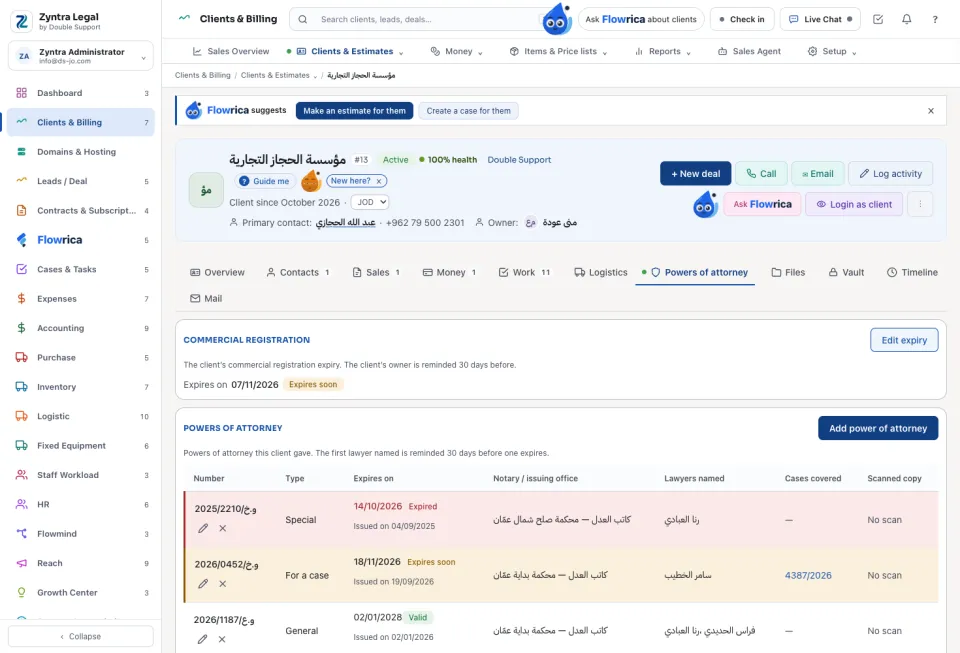
What expires soon
On the clients list, Expiring powers of attorney lists the powers of attorney and commercial registrations that expired or expire soon, on the clients you can see.
A power of attorney is linked only to a case you may see; typing another case is refused with «A case covered must be one of this client's cases.». Saving a power never unlinks a case you may not see.
Questions
Where is “Powers of attorney” in Zyntra OS?
Clients › a client › Powers of attorney
Who can use “Powers of attorney”?
Customers — view to read; Customers — edit to add or change.