

 Zyntra OS
 Zyntra Legal
 Zyntra Real Estate
 Zyntra Hotel
 Zyntra E-commerce
 Zyntra Appointments
 Zyntra Repair
 Zyntra Garage
 Zyntra Concierge
 Zyntra Contracting
 Zyntra Clinic
 Zyntra Call Center
 Zyntra OTA
Where
Concierge › Today's manifestWho
Concierge bookings — View; assigning needs Edit.Read the day
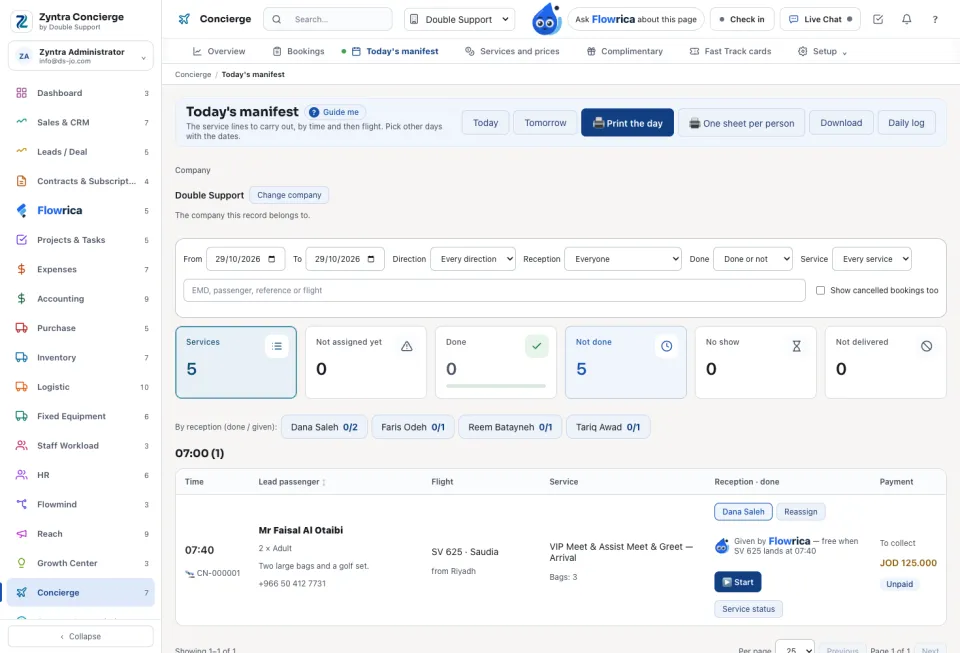
Choose Today, Tomorrow, or From and To. Each line shows the Time, Lead passenger, Booking, Service, Flight, Passengers, Payment, Direction, Car, Bags, Reception, the notes and phone, and whether it is Done.
Give each service its reception person
1
A confirmed service is given by itself to whoever has the fewest services within two hours, then the fewest that day.
2
What is still open shows under Not assigned yet. Press Assign (or Reassign) and choose the person. If he already has a service at that time, Assign anyway is needed.
3
Set the Supervisor on duty for the shift.
Print and log
Print the day prints the whole manifest; One sheet per person prints each reception person's own services. Daily log shows the day as a spreadsheet, one row per service. Show cancelled bookings too adds the cancelled ones.
Questions
Where is “Today's manifest and reception” in Zyntra OS?
Concierge › Today's manifest
Who can use “Today's manifest and reception”?
Concierge bookings — View; assigning needs Edit.