

 Zyntra OS
 Zyntra Legal
 Zyntra Real Estate
 Zyntra Hotel
 Zyntra E-commerce
 Zyntra Appointments
 Zyntra Repair
 Zyntra Garage
 Zyntra Concierge
 Zyntra Contracting
 Zyntra Clinic
 Zyntra Call Center
 Zyntra OTA
Where
Concierge › OverviewWho
Anyone with Concierge bookings — View. Money figures only for someone who may read invoices.Switch it on
With the module off, its menu is gone and its screens say the module is switched off. Nothing is deleted.
Read the overview
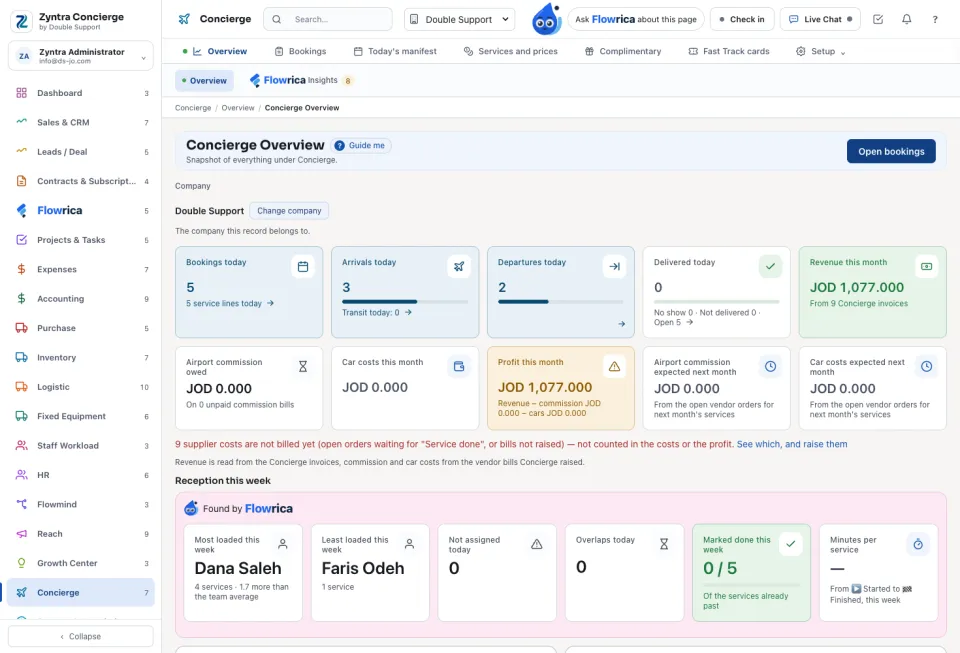
Today: Open bookings, Bookings today, Arrivals today, Departures today and Delivered today. This month: Revenue this month from the Concierge invoices, the Airport commission owed, Car costs this month, Fast Track cost this month and the Profit this month, with what is expected next month. Below: Tomorrow, not yet paid and Awaiting a manager's approval.
Reception this week shows the Most loaded this week and the Least loaded this week, what is Not assigned today, the Overlaps today and what was Marked done this week. When one person carries far more than another, it says so and suggests how many services to move.
Who may do what
| Right | What it allows |
|---|---|
| Concierge bookings | View, View own (a reception person's own services in My Space), Create, Edit, Approve a booking above the manager's limit, Cancel. |
| Concierge services | View or edit the services and prices. |
| Concierge settings | Edit the Concierge settings. |
| Concierge complimentary services | Edit the allocations; Override to go past what is left. |
| Concierge Fast Track cards | Edit the cards; Override to take past the balance. |
What Flowrica does here
Flowrica gives each confirmed service to a reception person by herself: the one free when the flight lands. In Flowrica Insights she watches the team and the money: Uneven reception load with how many services to move and to whom, Most loaded this week and Least loaded this week, overlapping services today, services started and not finished, bookings for tomorrow not yet paid, bookings awaiting a manager, cars with no purchase cost, supplier bills not raised yet, booking emails to review, and customers who rated the service low. Ask her What services are on today? or Which bookings are waiting to be confirmed?; her Book a Fast Track fills the booking form for you to confirm. She also drafts bookings from the booking mailbox, with the email under each draft.
Questions
Where is “Zyntra Concierge overview” in Zyntra OS?
Concierge › Overview
Who can use “Zyntra Concierge overview”?
Anyone with Concierge bookings — View. Money figures only for someone who may read invoices.