

 Zyntra OS
 Zyntra Legal
 Zyntra Real Estate
 Zyntra Hotel
 Zyntra E-commerce
 Zyntra Appointments
 Zyntra Repair
 Zyntra Garage
 Zyntra Concierge
 Zyntra Contracting
 Zyntra Clinic
 Zyntra Dental
 Zyntra School
 Zyntra University
 Zyntra Practice
 Zyntra Distribution
 Zyntra Social
 Zyntra Call Center
 Zyntra OTA
Where
Distribution › Reps todayWho
Whoever may see every rep today and set area prices: the sales manager and the owner.1
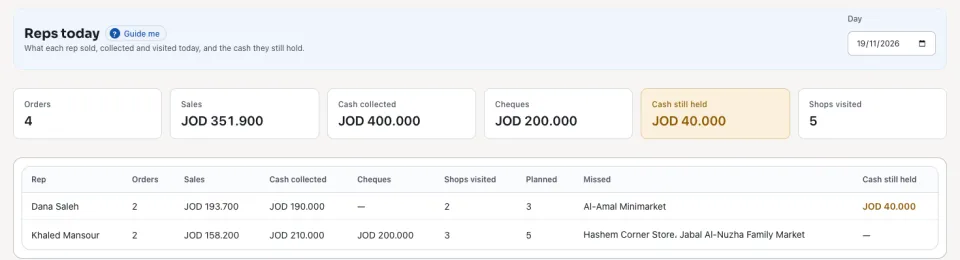
Open Distribution › Reps today. Each row is one Rep: Orders, Sales, Cash collected, Cheques, Shops visited of those Planned on today's routes, the Missed shops by name, and the Cash still held.
2
An order that waits for approval is counted under the rep's orders.
3
Choose another Day at the top to read that day the same way.
4
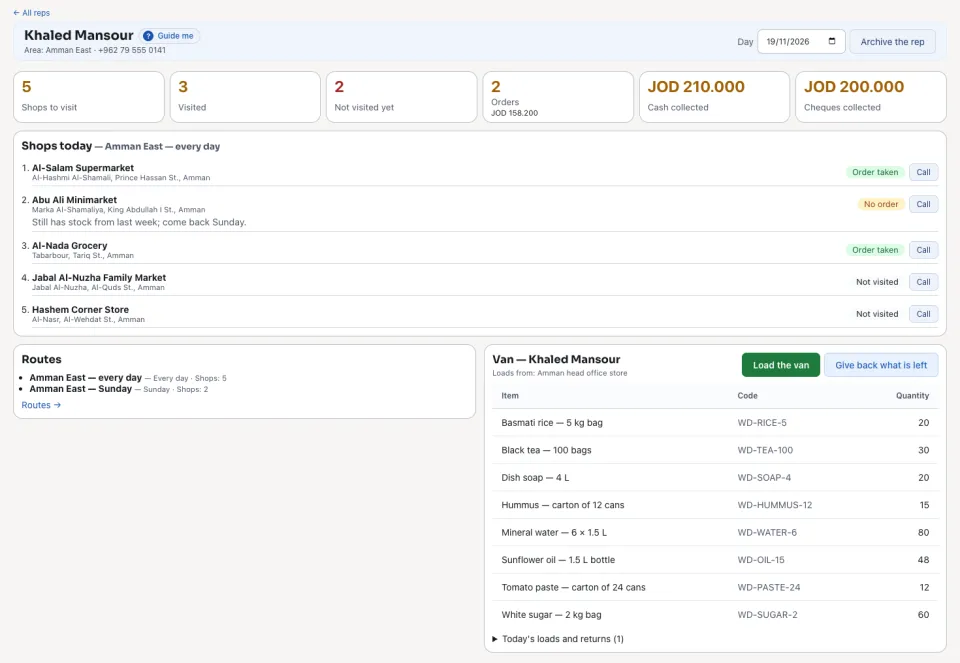
For one rep's shops in order, each with its visit, open the rep on Distribution › Reps.
Questions
Where is “The reps today: the manager's screen” in Zyntra OS?
Distribution › Reps today
Who can use “The reps today: the manager's screen”?
Whoever may see every rep today and set area prices: the sales manager and the owner.