

 Zyntra OS
 Zyntra Legal
 Zyntra Real Estate
 Zyntra Hotel
 Zyntra E-commerce
 Zyntra Appointments
 Zyntra Repair
 Zyntra Garage
 Zyntra Concierge
 Zyntra Contracting
 Zyntra Clinic
 Zyntra Call Center
 Zyntra OTA
Where
Concierge › Fast Track cards · Concierge › ComplimentaryWho
Concierge Fast Track cards and Concierge complimentary services: Edit; Override to go past the balance.Fast Track cards
1
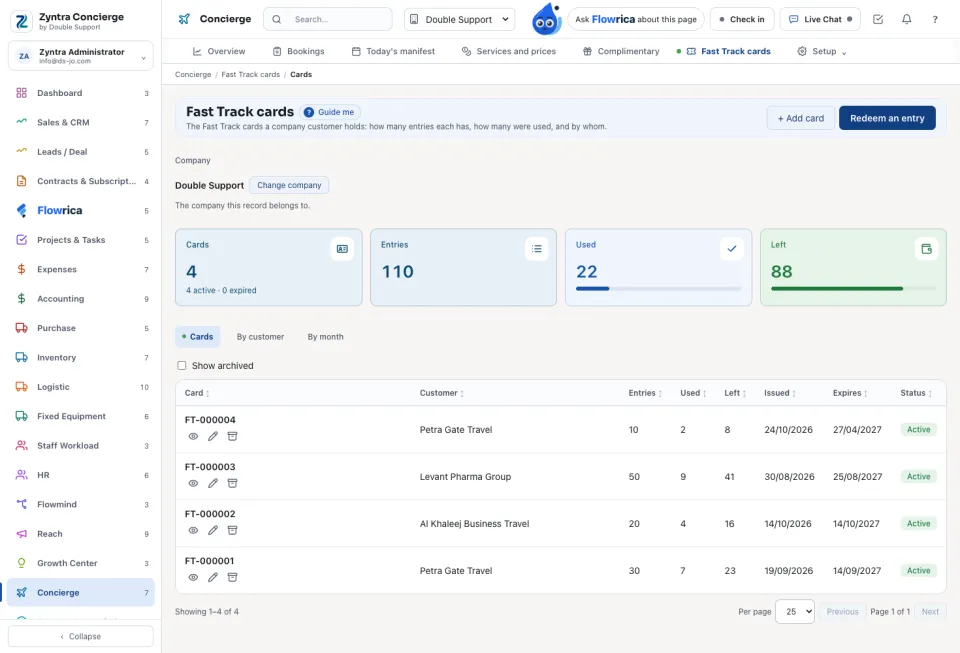
Press Add card, choose the customer, the number of entries and the expiry. The card gets its number (FT-000001 …) and its QR code.
2
At the airport, scan the card's QR code with the phone, give the Number of persons and press Confirm. Or press Redeem an entry on the list and Take one entry.
The tabs Cards, By customer and By month show what was Used and what is Left. A card is Active, Expired or Archived. Open a card to show or Print it with its QR code.
Complimentary services
A company customer may get a number of free services each month. Press Add allocation, choose the customer and the service, the Guests a month, and the dates From and To. In a booking for that customer, tick Complimentary (from the customer's monthly allocation): This month counts what was used. Going past what is left needs Override and a reason.
Questions
Where is “Fast Track cards and complimentary services” in Zyntra OS?
Concierge › Fast Track cards · Concierge › Complimentary
Who can use “Fast Track cards and complimentary services”?
Concierge Fast Track cards and Concierge complimentary services: Edit; Override to go past the balance.