

 Zyntra OS
 Zyntra Legal
 Zyntra Real Estate
 Zyntra Hotel
 Zyntra E-commerce
 Zyntra Appointments
 Zyntra Repair
 Zyntra Garage
 Zyntra Concierge
 Zyntra Contracting
 Zyntra Clinic
 Zyntra Dental
 Zyntra School
 Zyntra University
 Zyntra Practice
 Zyntra Distribution
 Zyntra Social
 Zyntra Call Center
 Zyntra OTA
Where
Distribution › Reps · Distribution › Routes · Distribution › My dayWho
The sales manager adds the reps and their routes. Each rep sees only their own day.Add a rep
1
Open Distribution › Reps and press Add a rep.
2
Choose the Person (a person of the company who is not a rep yet), the Area, the Phone, and in Loads from the warehouse their van is loaded from. Press Add a rep. A van is made for the rep: a warehouse of their own, still your stock.
3
Give the person the role «Rep» in Setup › Staff. It holds what a rep needs: their own day, taking orders and collecting at their shops, and the sales orders they take.

Give the rep a route
1
Open Distribution › Routes and press New route. Type the Route name, choose the Rep and the Day (or Every day), and press Save.
2
Under the route, type a customer's name and pick the shop. Add the shops in the order they are visited; Move up and Move down change the order, and Take off the route removes a shop.
3
The same shop can be on another rep's route, or on a route of another day.
The rep's day
1
The rep opens My day on the web or in the phone app. Today's shops are listed in order, with Shops to visit, Visited, Not visited yet, Orders and Cash collected at the top, and what the van holds.
2
At a shop the rep presses Open the shop to take an order or collect. A shop with no order is marked with How did the visit go?: No order or Shop closed. An order taken at the shop marks the visit Order taken by itself.
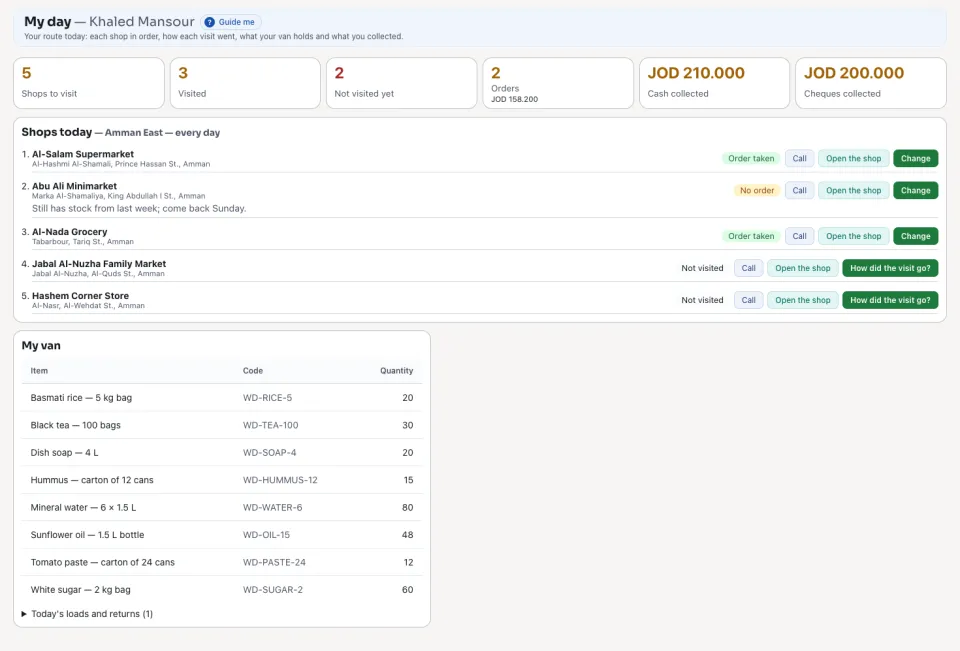
A rep never sees another rep's route, shops, van stock or cash. The sales manager sees every rep.
Next: Van stock
Questions
Where is “Sales reps and their routes” in Zyntra OS?
Distribution › Reps · Distribution › Routes · Distribution › My day
Who can use “Sales reps and their routes”?
The sales manager adds the reps and their routes. Each rep sees only their own day.