

 Zyntra OS
 Zyntra Legal
 Zyntra Real Estate
 Zyntra Hotel
 Zyntra E-commerce
 Zyntra Appointments
 Zyntra Repair
 Zyntra Garage
 Zyntra Concierge
 Zyntra Contracting
 Zyntra Clinic
 Zyntra Dental
 Zyntra School
 Zyntra University
 Zyntra Practice
 Zyntra Distribution
 Zyntra Social
 Zyntra Call Center
 Zyntra OTA
Where
Distribution › Van stockWho
Whoever may load and empty a rep's van, and the sales manager. The rep sees their own van on My day.Load the van in the morning
1
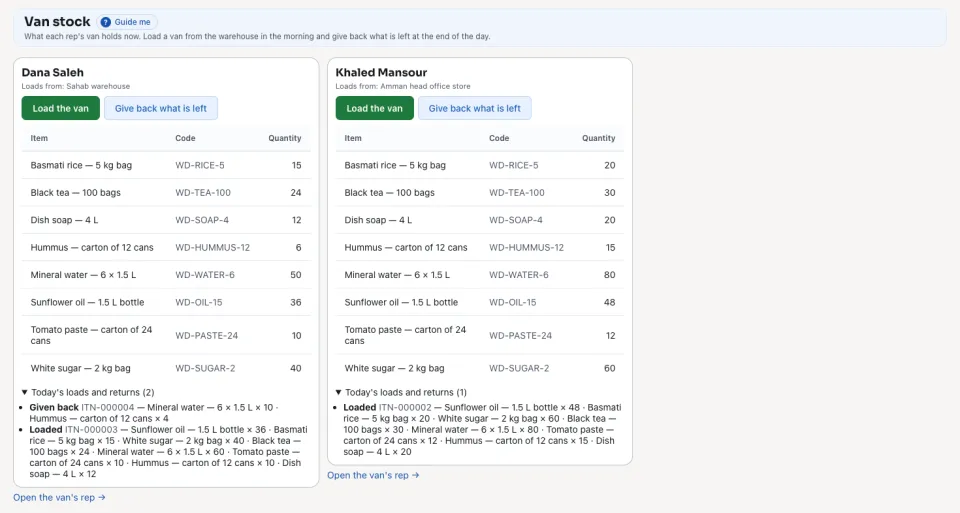
Open Distribution › Van stock. Each rep's van shows what it holds now. Press Load the van.
2
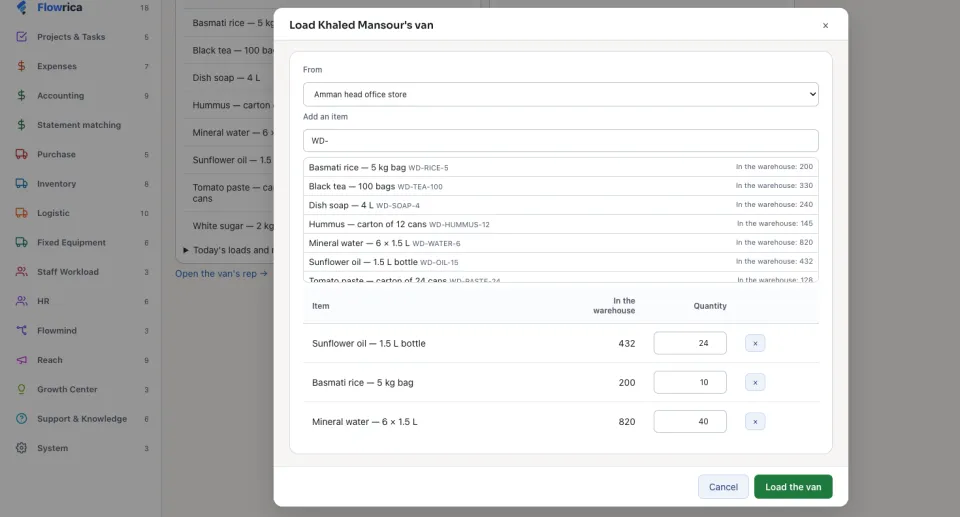
In From choose the warehouse. Type an item's name or code, pick it, and type its Quantity; In the warehouse shows what is there to load.
3
Press Load the van. The goods move from the warehouse to the van. Where the company approves its transfers, the load shows Waits for approval until it is approved.
Sell from the van
1
When the rep takes an order at a shop, each item shows what the van can still sell. The order is sold from the rep's van, and a line that asks for more than the van can still sell is refused, said with the line and the item.
Give back what is left
1
At the end of the day press Give back what is left on the van and confirm. Everything left in the van moves back to the warehouse it is loaded from.
2
Today's loads and returns lists each load and return of the day.
The goods of an order taken from the van stay held in the van until the order is delivered, for up to seven days, so two orders never sell the same box.
Next: Orders at the shop
Questions
Where is “Van stock: load, sell, give back” in Zyntra OS?
Distribution › Van stock
Who can use “Van stock: load, sell, give back”?
Whoever may load and empty a rep's van, and the sales manager. The rep sees their own van on My day.