

 Zyntra OS
 Zyntra Legal
 Zyntra Real Estate
 Zyntra Hotel
 Zyntra E-commerce
 Zyntra Appointments
 Zyntra Repair
 Zyntra Garage
 Zyntra Concierge
 Zyntra Contracting
 Zyntra Clinic
 Zyntra Dental
 Zyntra School
 Zyntra University
 Zyntra Practice
 Zyntra Distribution
 Zyntra Social
 Zyntra Call Center
 Zyntra OTA
Where
Distribution › My shops › the shop › StatementWho
The rep, for the shops on their own routes. The sales manager, for every rep's shops.Read a shop's statement
1
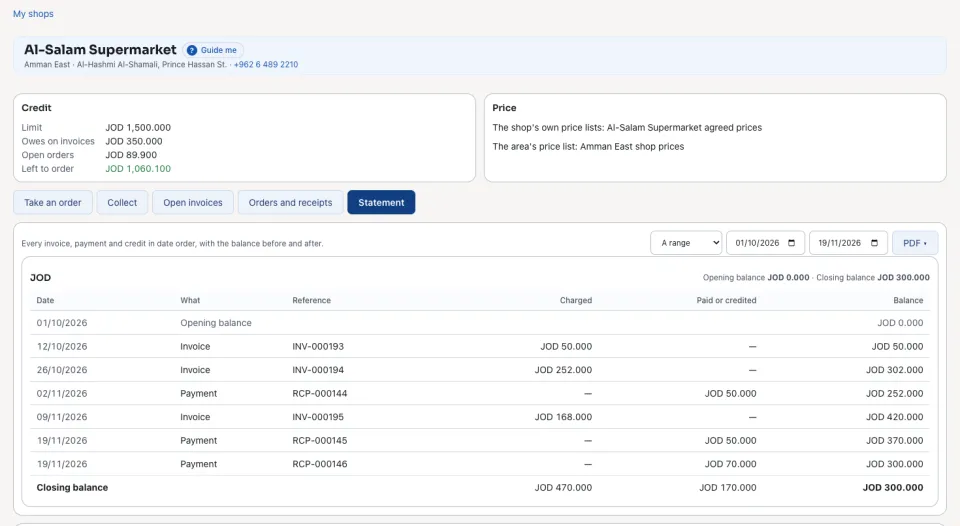
Open Distribution › My shops, open the shop and press Statement.
2
Choose From and To. The Opening balance, each line and its running Balance, and the Closing balance are listed. View PDF shows it to hand to the shop.
Match the shop's own statement
1
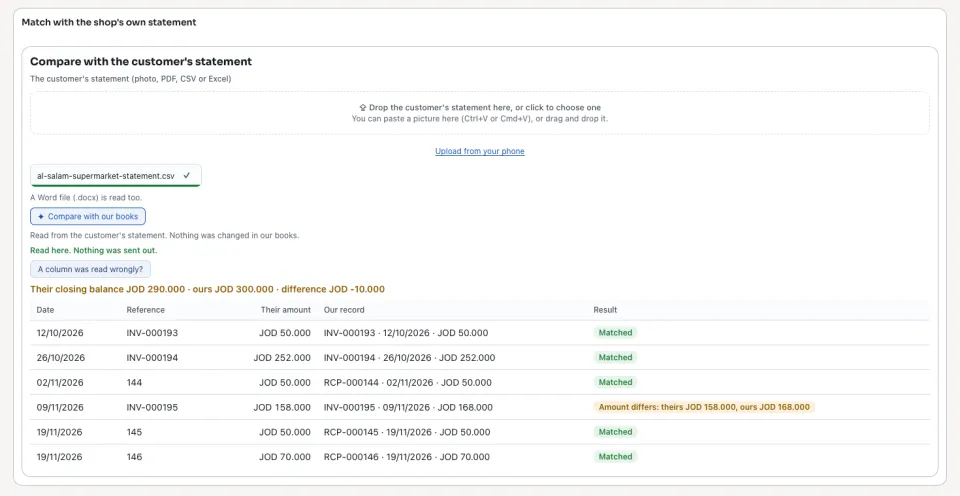
With the statement matching module on, Match with the shop's own statement is under the statement. Upload the file the shop sent and press Compare with our books. The lines that differ are shown side by side.
Next: The reps today
Questions
Where is “Each shop's statement” in Zyntra OS?
Distribution › My shops › the shop › Statement
Who can use “Each shop's statement”?
The rep, for the shops on their own routes. The sales manager, for every rep's shops.