

 Zyntra OS
 Zyntra Legal
 Zyntra Real Estate
 Zyntra Hotel
 Zyntra E-commerce
 Zyntra Appointments
 Zyntra Repair
 Zyntra Garage
 Zyntra Concierge
 Zyntra Contracting
 Zyntra Clinic
 Zyntra Dental
 Zyntra School
 Zyntra University
 Zyntra Practice
 Zyntra Distribution
 Zyntra Social
 Zyntra Call Center
 Zyntra OTA
Where
Practice › Staff per clientWho
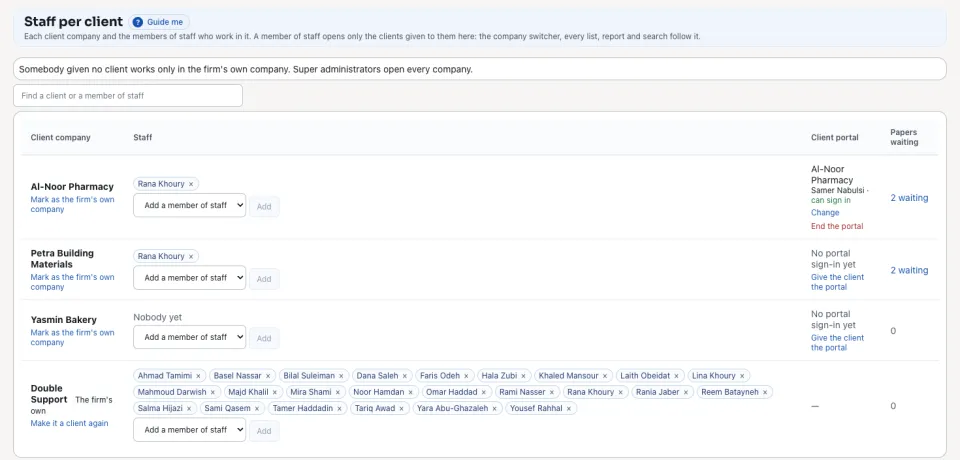
Anyone with the right to give clients to staff. Super administrators open every company.Each row is one company: the members of staff who work in it, its client portal and the papers it sent that are waiting.
1
Open Practice › Staff per client. On the firm's own books, press Mark as the firm's own company. Somebody given no client works only there.
2
On a client's row, choose a name in Add a member of staff and press Add. They now open this client.
3
To take somebody off a client, press × beside their name.
4
To let the client's owner send papers, press Give the client the portal and choose the customer whose contacts sign in. Give that contact a password from the customer's Contacts tab.

What a member of staff may do inside a client is what their own role allows; this screen decides only which clients they open. When work moves to another accountant, add the new one and take the old one off. The client's books and history stay as they are.
Questions
Where is “Staff per client” in Zyntra OS?
Practice › Staff per client
Who can use “Staff per client”?
Anyone with the right to give clients to staff. Super administrators open every company.