

 Zyntra OS
 Zyntra Legal
 Zyntra Real Estate
 Zyntra Hotel
 Zyntra E-commerce
 Zyntra Appointments
 Zyntra Repair
 Zyntra Garage
 Zyntra Concierge
 Zyntra Contracting
 Zyntra Clinic
 Zyntra Dental
 Zyntra School
 Zyntra University
 Zyntra Practice
 Zyntra Distribution
 Zyntra Social
 Zyntra Call Center
 Zyntra OTA
Where
Practice › Papers from clientsWho
The firm's staff, for the clients given to them.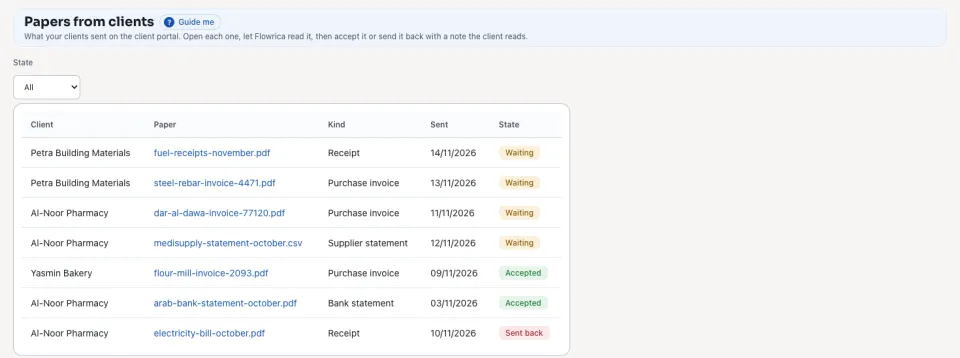
1
Open Practice › Papers from clients. Choose a State to see only Waiting, Read, Accepted or Sent back papers.
2
Press a paper. Press Open the file to see it, and Read with Flowrica to see what she read: the supplier, the number, the dates, the amounts and the tax.
3
Press Accept, or write A note for the client and press Send back. The client sees the state, and the note, on the portal.
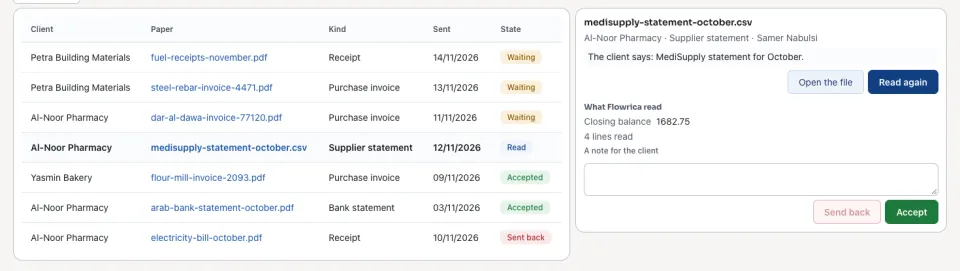
Accepting a paper enters nothing in the client's books: what Flowrica read is kept with the paper for whoever enters it. Some kinds of paper are kept as they are and are not read.
Questions
Where is “Papers from clients: read, then accept or send back” in Zyntra OS?
Practice › Papers from clients
Who can use “Papers from clients: read, then accept or send back”?
The firm's staff, for the clients given to them.