

 Zyntra OS
 Zyntra Legal
 Zyntra Real Estate
 Zyntra Hotel
 Zyntra E-commerce
 Zyntra Appointments
 Zyntra Repair
 Zyntra Garage
 Zyntra Concierge
 Zyntra Contracting
 Zyntra Clinic
 Zyntra Call Center
 Zyntra OTA
Where
HR › HR Payroll › Pay › Loans & advances · your own: My loans and advances on My SpaceWho
Everyone allowed to ask sees their own; approvers and payroll see their team's or everyone's.Ask for a loan or advance
1
Press + Ask for a loan or advance.
2
If you may ask for others, choose the Employee, or Myself. Choose the Kind: Loan or Salary advance.
3
Type the Amount, in the currency of the salary it is repaid from. For a loan give the Monthly instalments; a salary advance is repaid in one. Choose the First repayment month and say What it is for.
4
Press Send for approval. The loan is Waiting for a decision.
When the company has set a smallest loan or advance, the form says it, and an amount below it cannot be sent. It is set on the Rules tab of HR › HR setup, as Smallest loan or advance, in the salary currency of the person who asks. Empty means no minimum.
Decide and pay out
1
Press Decide on the row, then Approve, or Refuse with a Note (needed to refuse).
2
When the money is given, press Pay out, choose how it was Paid through and the Day, and press Save. The loan is Being repaid.
3
Each payroll run takes the instalment from the payslip until nothing is left. Settle early closes the loan when the rest is paid at once.
Read a loan
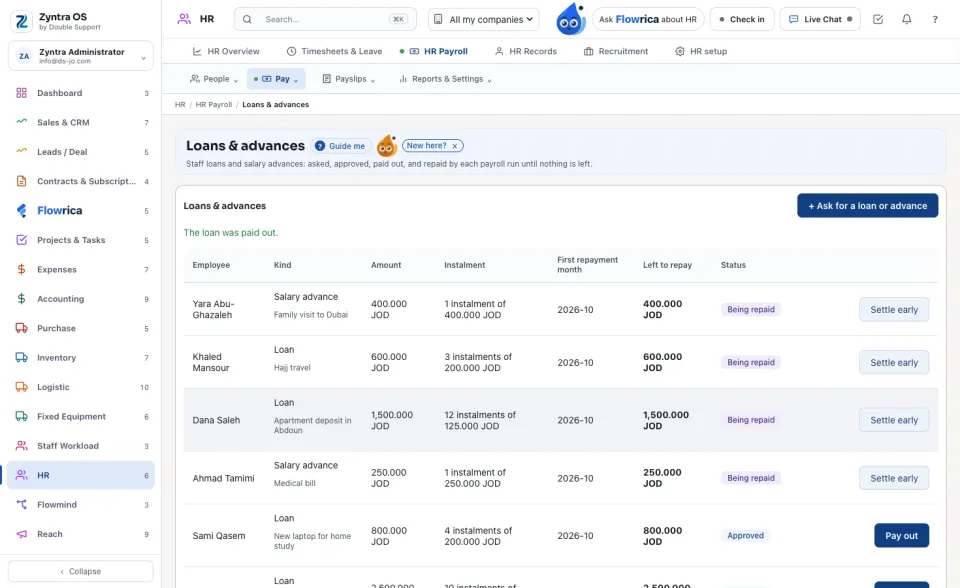
Each row shows the kind and what it is for, the Amount, the Instalment, the First repayment month, what is Left to repay and the Status: Waiting for a decision, Approved, Refused, Being repaid or Settled.
Under it each repayment is listed, for example Instalment 1: 50.000 JOD on 2026-10, with its payroll run and its payslip; a repayment whose run is still open says so. The payslip names the loan the other way round: see Run the payroll.
Before: Run the payroll · Next: Recruitment
Questions
Where is “Loans and salary advances” in Zyntra OS?
HR › HR Payroll › Pay › Loans & advances · your own: My loans and advances on My Space
Who can use “Loans and salary advances”?
Everyone allowed to ask sees their own; approvers and payroll see their team's or everyone's.