

 Zyntra OS
 Zyntra Legal
 Zyntra Real Estate
 Zyntra Hotel
 Zyntra E-commerce
 Zyntra Appointments
 Zyntra Repair
 Zyntra Garage
 Zyntra Concierge
 Zyntra Contracting
 Zyntra Clinic
 Zyntra Dental
 Zyntra School
 Zyntra University
 Zyntra Practice
 Zyntra Distribution
 Zyntra Social
 Zyntra Call Center
 Zyntra OTA
Where
Client portal › My books › Papers and reportsWho
A contact of the customer the firm chose in Staff per client, with a portal password. They see only their own company.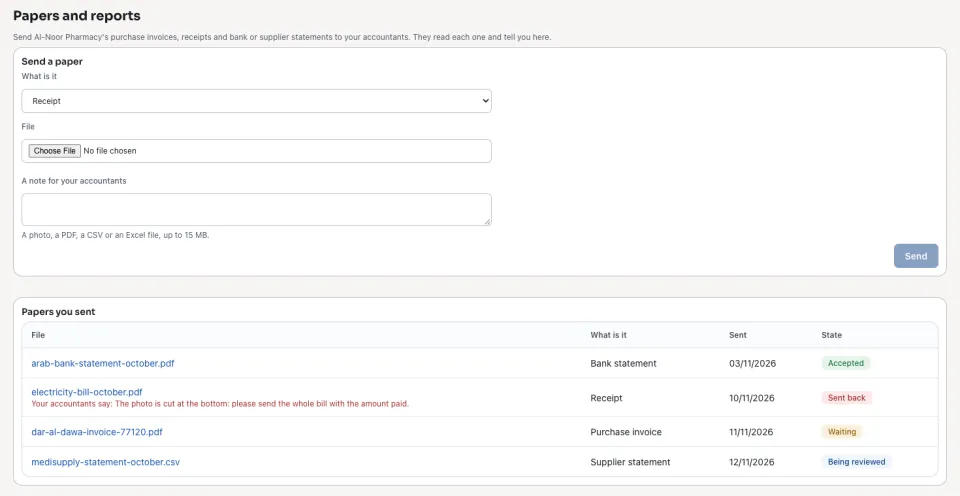
1
The client's owner signs in to the client portal and opens My books › Papers and reports.
2
Under Send a paper they choose What is it, pick the File — a photo, a PDF, a CSV or an Excel file, up to 15 MB — add a note if they like, and press Send.
3
Papers you sent shows each paper's state: Waiting, Being reviewed, Accepted or Sent back, with the firm's note when it was sent back.
4
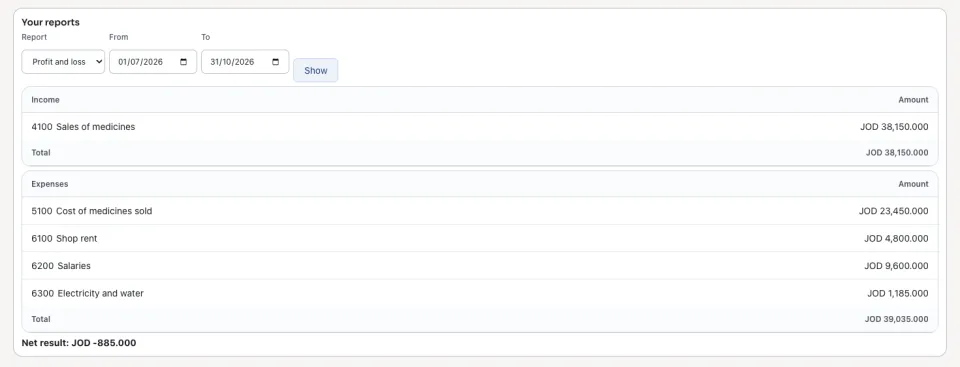
Under Your reports they choose the Profit and loss, the Balance sheet or the Trial balance, the dates, and press Show.
The firm reviews each paper in Practice › Papers from clients. A client never sees another client's papers or reports.
Questions
Where is “The client portal: the client sends its papers” in Zyntra OS?
Client portal › My books › Papers and reports
Who can use “The client portal: the client sends its papers”?
A contact of the customer the firm chose in Staff per client, with a portal password. They see only their own company.