

 Zyntra OS
 Zyntra Legal
 Zyntra Real Estate
 Zyntra Hotel
 Zyntra E-commerce
 Zyntra Appointments
 Zyntra Repair
 Zyntra Garage
 Zyntra Concierge
 Zyntra Contracting
 Zyntra Clinic
 Zyntra Call Center
 Zyntra OTA
Where
Clinic › TodayWho
Clinic Visits — View the list, or a medical record right.Switch it on
1
The super administrator opens Setup › Modules. Clinic needs Customers, Invoices, Payments and Appointments; the screen says which are still off.
2
On the Clinic row press Switch on. It is an edition and carries Appointments inside it; any other edition is switched off first. The product is then called Zyntra Clinic and the Clinic group comes into the side menu.
3
In Appointments › Staff add the doctors, and in Appointments › Services the services with their prices (see Services, staff and locations). Without doctors the doctor lists are empty.
4
In Clinic › Settings check the vitals, medicines, how often and diagnosis codes, and add the insurance companies with their plans (see Clinic settings).
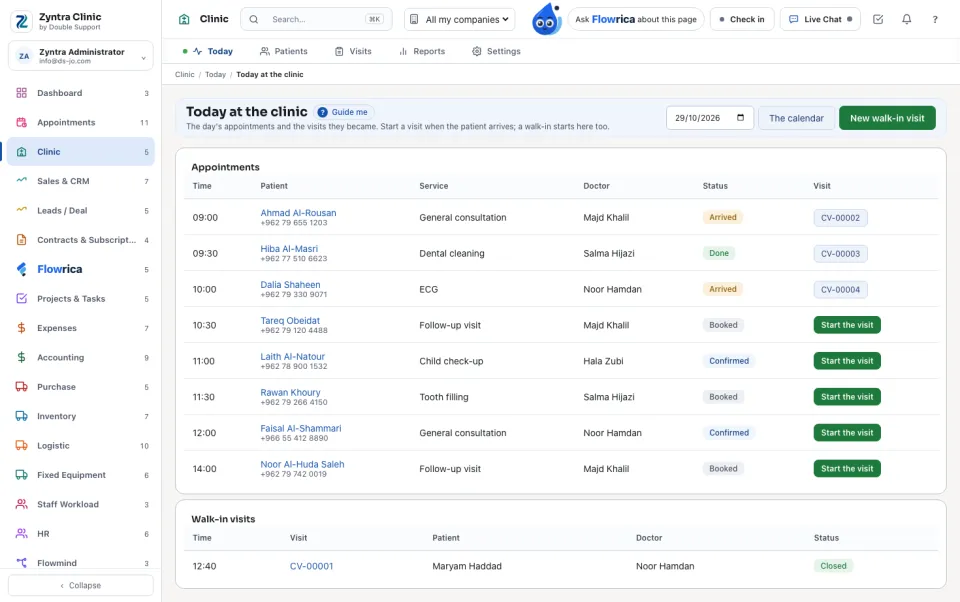
Today at the clinic
The day's appointments and the visits they became. Pick another day with the date box; The calendar opens the booking calendar.
1
Under Appointments each booking shows the Time, Patient, Service, Doctor and Status: Booked, Confirmed, Arrived, Done, Did not come or Cancelled.
2
When the patient arrives press Start the visit. The patient is checked in and the visit opens.
3
For a patient with no appointment press New walk-in visit: find the Patient by name, file no., phone or national ID, choose the Doctor, and press Open the visit. It shows under Walk-in visits.
Who may do what
| Right | What it lets a person do |
|---|---|
| Clinic Patients — View | The name, contact, appointments and invoices of a patient. |
| Clinic Patients — Create / Edit | Make and change a patient's file. |
| Clinic Visits — View the list (no medical record) | The visits, without what is medical: for reception. |
| Clinic Visits — Open a visit | Start the visit, New walk-in visit, New visit. |
| Clinic Medical record — View (own patients / team / all) | Read the medical record of their own patients, their team's, or everyone's. A visit belongs to its doctor; a patient belongs to their doctor and to every doctor who saw them. |
| Clinic Medical record — Write and close visits | Vitals, notes, prescriptions and files; close and sign visits; the medical fields of the patient's file. |
| Clinic Billing — Prices and invoices | Prices, procedures, invoices and the money reports. |
| Clinic Insurance — View claims / Move claims | See claims; open and move them. Invoicing a claim needs billing too. |
| Clinic Reports — View · Clinic Settings — Edit | The reports; the settings. |
Flowrica in Clinic
1
Who is booked at the clinic today? — each with the time, patient and doctor.
2
Which visits are still open? — each opening its visit.
On a patient or a visit she answers from that record: a diagnosis, complaint, allergy or prescription only to someone who may read that medical record; reception hears only the name, file number, visit days and doctors. She never says a phone, a national ID or a file, and she makes nothing herself. To book an appointment, ask her in Appointments.
Questions
Where is “Zyntra Clinic” in Zyntra OS?
Clinic › Today
Who can use “Zyntra Clinic”?
Clinic Visits — View the list, or a medical record right.