One car's job from check-in to delivery: its stage, the signed check-in and check-out sheets, the estimate the customer approves, the film used, the PPF warranty, the insurance claim, the photos and the timeline.
Where
Garage › Jobs › a job
Who
Garage Jobs — Edit for the job; Garage Billing for prices; Garage Insurance for the claim.
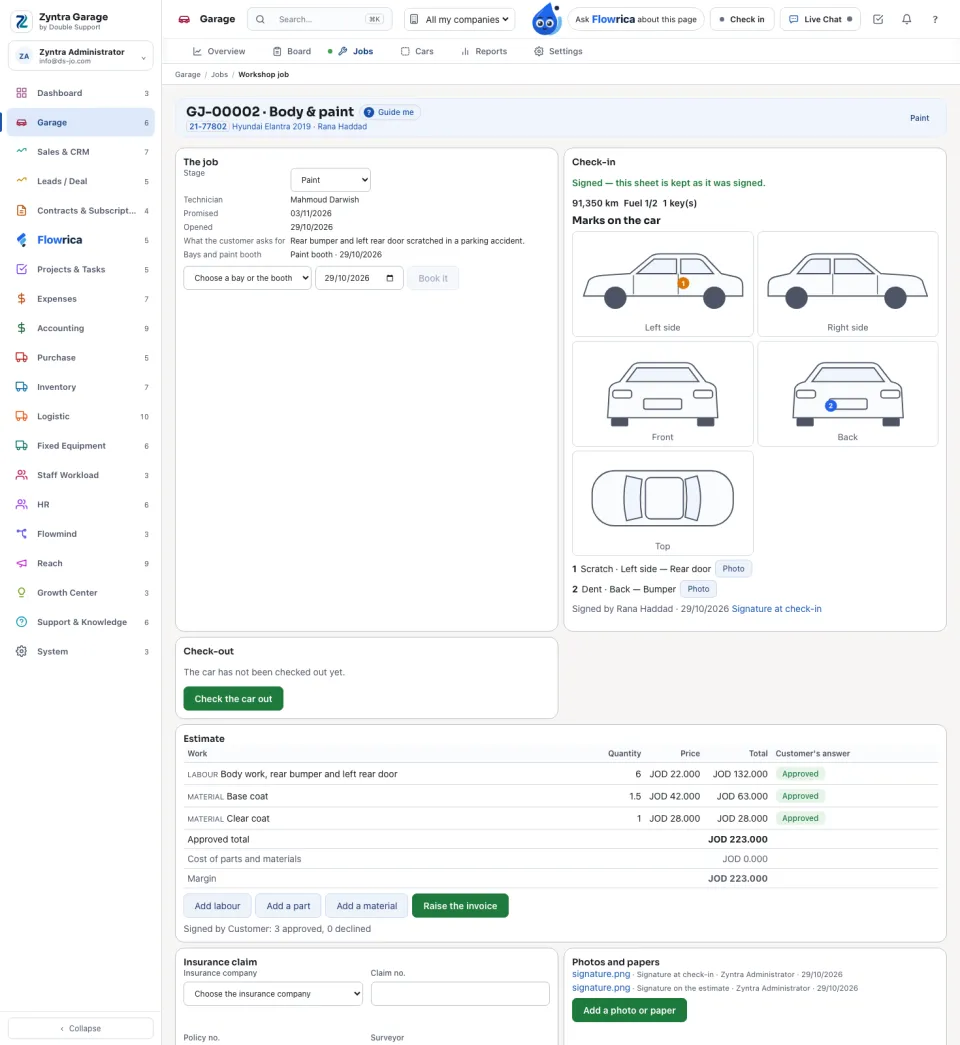
The heading says the job number and kind, the car, the customer, the stage and, when it is, Late. The page is made of cards.
The job
Change the Stage here; the technician, the promised day, when it was opened and what the customer asks for are beside it. Under Bays and paint booth choose a bay or the booth and a day, and press Book it.
A car moves to Delivered only after the check-out is signed by the customer; delivering closes the job.
Check the car in and out
1
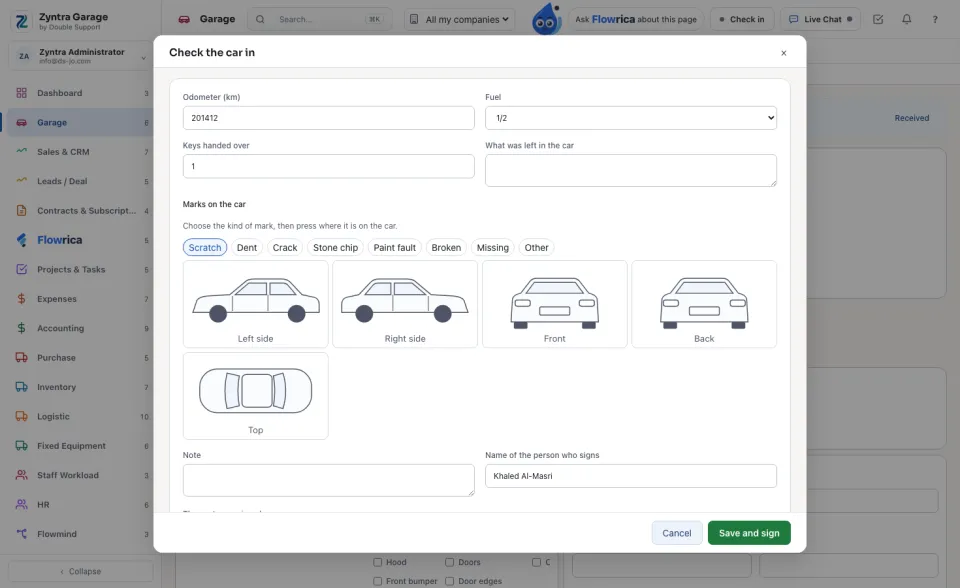
On Check-in press Check the car in.
2
Type the Odometer (km), choose the Fuel level, and write the Keys handed over and What was left in the car.
3
Under Marks on the car choose the kind of mark (scratch, dent, crack, stone chip, paint fault, broken, missing or other), then press where it is on the drawing of the car.
4
Type the Name of the person who signs; the customer signs on the screen. Press Save and sign. A signed sheet is kept as it was signed.
5
At delivery do the same on Check-out with Check the car out.
The estimate and the invoice
1
Add the work: Add labour (hours and rate per hour), Add a part or Add a material (the item and the warehouse it leaves from). Press Save on each line.
2
Press The customer answers. Go through each line with the customer: approve or decline it, then the customer signs on the screen. A declined line stays on the job.
3
Press Raise the invoice for the approved lines. The card shows the Approved total, the cost of the parts and materials, and the Margin.
Film and PPF warranty
On a PPF job, Film used takes film from a roll: choose the Roll, the Panels covered, the Metres used and the price per metre, and press Take the film. Then PPF warranty: choose the Years and press Make the certificate, and Print the certificate for the customer. The workshop is reminded of a check once a year.
Insurance claim
1
Choose the Insurance company, type the Claim no., Policy no., the Surveyor and the Excess the customer pays, and press Open the claim.
2
Record each step as it happens — Sent to the insurer, Under survey, Approved, Approved with changes or Rejected — with a note and a file, and press Record the step.
3
Once approved, Invoice the insurer. A line of the estimate can say who pays it: the customer or the insurer.
Photos and the timeline
Add a photo or paper: a walk-around photo in or out, a damage photo, or a paper. The Timeline lists everything that happened to the job, with who and when.
An insurance claim's papers are listed and opened only by someone who holds an insurance right; other readers of the job see its other files. A person who reads every job but only their own customers opens only the jobs of customers they may see, or a job given to them.


 Zyntra OS
 Zyntra Legal
 Zyntra Real Estate
 Zyntra Hotel
 Zyntra E-commerce
 Zyntra Appointments
 Zyntra Repair
 Zyntra Concierge
 Zyntra Contracting
 Zyntra Clinic
 Zyntra Call Center
 Zyntra OTA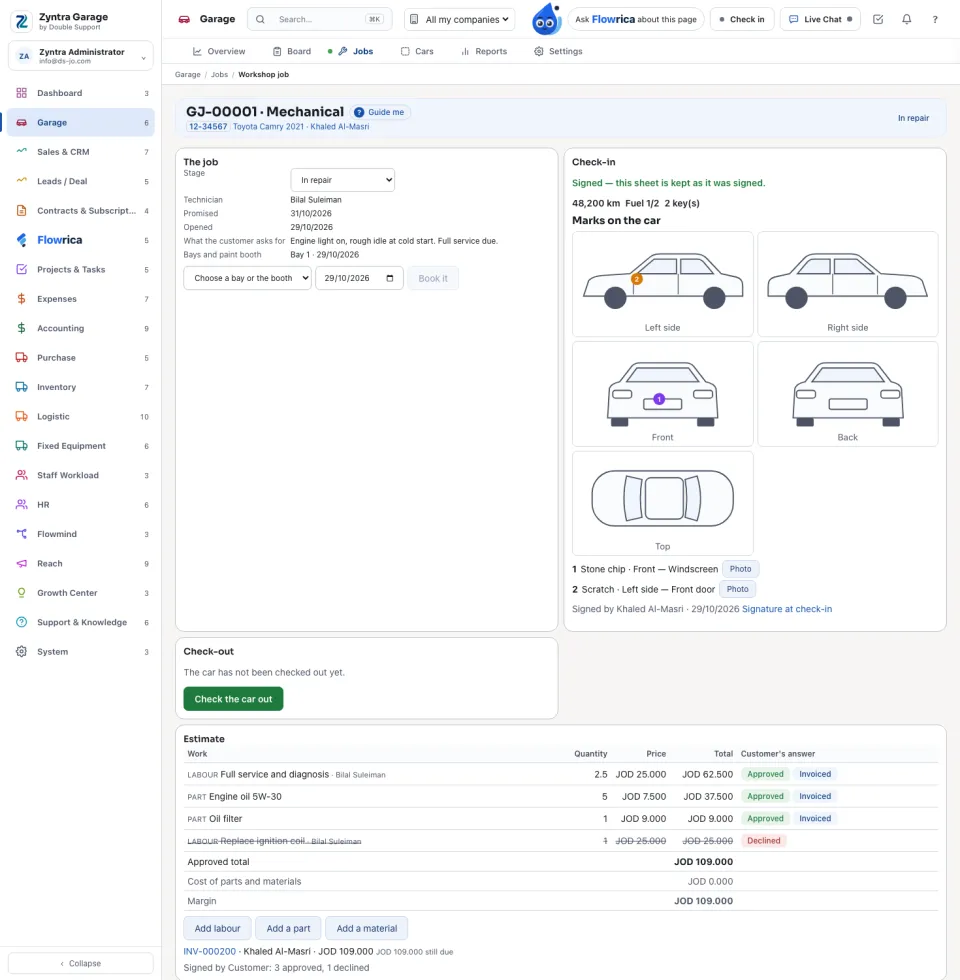
 Zyntra Garage · Next: Cars