

 Zyntra OS
 Zyntra Legal
 Zyntra Real Estate
 Zyntra Hotel
 Zyntra E-commerce
 Zyntra Appointments
 Zyntra Repair
 Zyntra Garage
 Zyntra Concierge
 Zyntra Contracting
 Zyntra Clinic
 Zyntra Call Center
 Zyntra OTA
Where
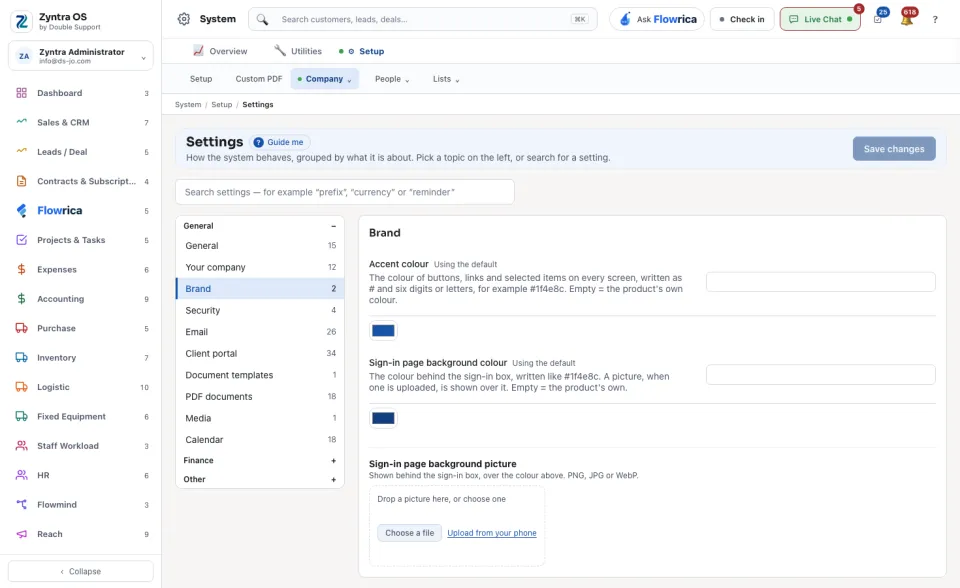
System › Setup › Settings › BrandWho
Anyone allowed to change the settings.A new system uses the product's own colours: each box reads Using the default.
1
Accent colour: type the colour as # and six digits or letters, for example #1f4e8c. It becomes the colour of buttons, links and selected items on every screen.
2
Sign-in page background colour: the colour behind the sign-in box, written the same way.
3
Sign-in page background picture (optional): drop a picture on the box, press Choose a file, or Upload from your phone. It may be a PNG, JPG or WebP, and it shows over the colour.
4
Press Save changes at the top of the screen.
Buttons, links and selected items take the new colour at once, and the sign-in page shows the new background.
If white writing is hard to read on your accent colour, a warning appears under the box. You can still save it.
Empty a box and save to go back to the product's own colour.