

 Zyntra Legal
 Zyntra Real Estate
 Zyntra Hotel
 Zyntra E-commerce
 Zyntra Appointments
 Zyntra Repair
 Zyntra Garage
 Zyntra Concierge
 Zyntra Contracting
 Zyntra Clinic
 Zyntra Dental
 Zyntra Call Center
 Zyntra OTA
Side by side
Zyntra OS vs Salesforce
Salesforce is a CRM platform for sales and service teams of every size: Sales Cloud, its contact center, Revenue Cloud for quotes and billing, and a marketplace of more than 5,000 apps. Zyntra OS is one system whose CRM, books, payroll, projects and call center already work as one — made in Amman, and it speaks your language, Arabic too.
Who each one is for
 Zyntra OS
Companies that want sales, accounting, HR and payroll, projects and the call center in one system that speaks your language — Arabic too — with e-invoicing built in for Jordan, Saudi Arabia and Peppol — for one company or several. Made by Double Support in Amman.
Salesforce
Sales and service teams of every size and industry; its Starter Suite is for lean businesses that want a CRM ready quickly.
Side by side, area by area
| Area | Zyntra OS | Salesforce | The difference |
|---|---|---|---|
| Customers and leads (CRM) | From the form on your website to a won deal; a won deal opens its project | Its centre: leads, the pipeline and deal stages, and forecasts in Sales Cloud | Both do this. In Zyntra OS a won deal opens its project and its invoice is in the same system |
| Sales: quotes and orders | Estimates and proposals your customer accepts from a link, sales orders, and the estimate turned into its invoice | Quotes in its Pro Suite; quote-to-cash, contracts and billing in Revenue Cloud | Both do quotes. In Zyntra OS quotes, sales orders and invoices come in every plan |
| Invoicing and accounting | Full accounting with the accountants' own chart, cheques and closed periods, in the same system as the sales | Revenue Cloud Billing makes invoices and keeps a sub-ledger — journal entries, closed periods — that syncs to your ERP; a general ledger is not described | Zyntra OS has full accounting in the same system; Salesforce's billing works as a sub-ledger beside an ERP |
| E-invoicing and sales tax | Built in: JoFotara for Jordan, ZATCA for Saudi Arabia and Peppol; US sales tax through your own Avalara AvaTax account | Revenue Cloud Billing connects to outside tax engines for each invoice line; ZATCA, JoFotara and Peppol are not named on the pages we read | Zyntra OS sends to JoFotara, ZATCA and Peppol, and works out US sales tax through Avalara AvaTax |
| HR and payroll | Payroll with income tax and social security, attendance, leave and staff records | HR Service is a help desk for staff requests that connects to HR systems such as Workday, SAP and ADP; payroll is not described | Zyntra OS runs payroll itself, with Jordan's income tax and social security |
| Projects and time | Projects with tasks, milestones and time; each hour keeps its rate, and each project shows its profit and loss | Not among the features on the pages we read | Zyntra OS runs projects with tasks, time and each project's profit and loss |
| Call center | Zyntra Call Center, an add-on: calls from the browser through your own Twilio Voice or RingCentral account, with a wallboard and reports | Its own contact center joins voice, digital channels and CRM data; or your existing provider, such as Amazon Connect | Both have one. Salesforce's is its own contact center; Zyntra Call Center runs on your Twilio Voice or RingCentral account |
| An assistant that does the work | Flowrica moves a deal, assigns tasks or moves an event: she shows the change, you confirm, and you can undo it. In the base price | Its own agents research prospects, prepare deals and help service teams | Both have agents that work. Flowrica is in Zyntra OS's base price and shows each change before it is made |
| Your language | Speaks your language — Arabic too, right to left on every screen and paper | Its languages are not listed on the pages we read | Zyntra OS draws every screen and paper in Arabic, right to left |
| Hosting and your data | Your own Zyntra on its own address with its own database, hosted in Europe and backed up every night | Hyperforce, on public clouds, with regions such as the US, the UK, Germany, India and Japan | Salesforce lets you choose among more regions; Zyntra OS gives each company its own database in Europe |
Read on each company's own public pages on 5 November 2026. Products change; their pages have today's details and prices.
Need a connection we don't have yet? We build it — free.
If your business needs a third-party service that Zyntra OS doesn't connect to yet, and it's a global service, we add it at no cost to you.
See Zyntra OS working
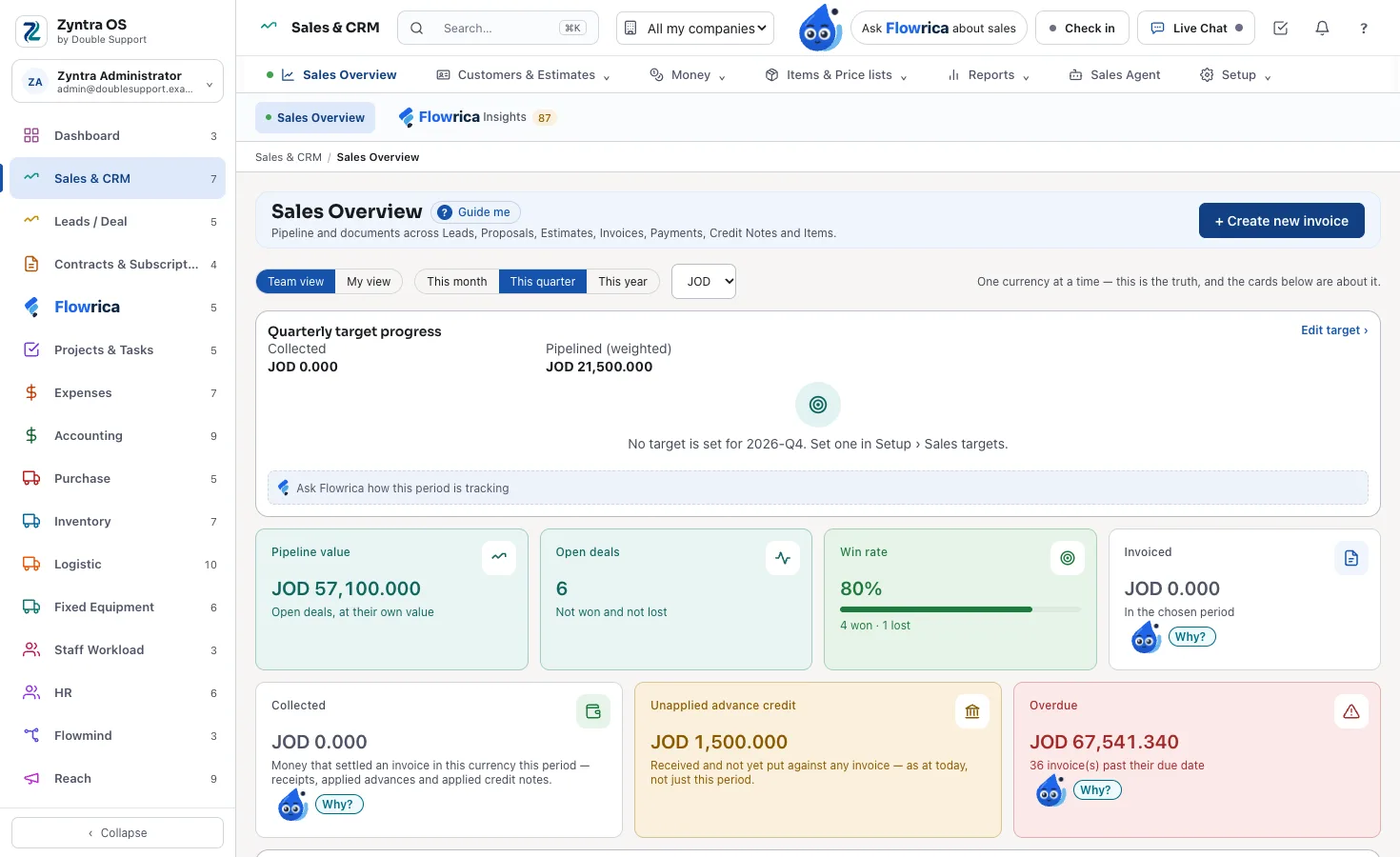
Real screens of a made-up company, taken from Zyntra OS itself.
Sales and CRM in one overview
The pipeline, the open deals, the win rate, what was invoiced and collected, and what is overdue — on one screen.
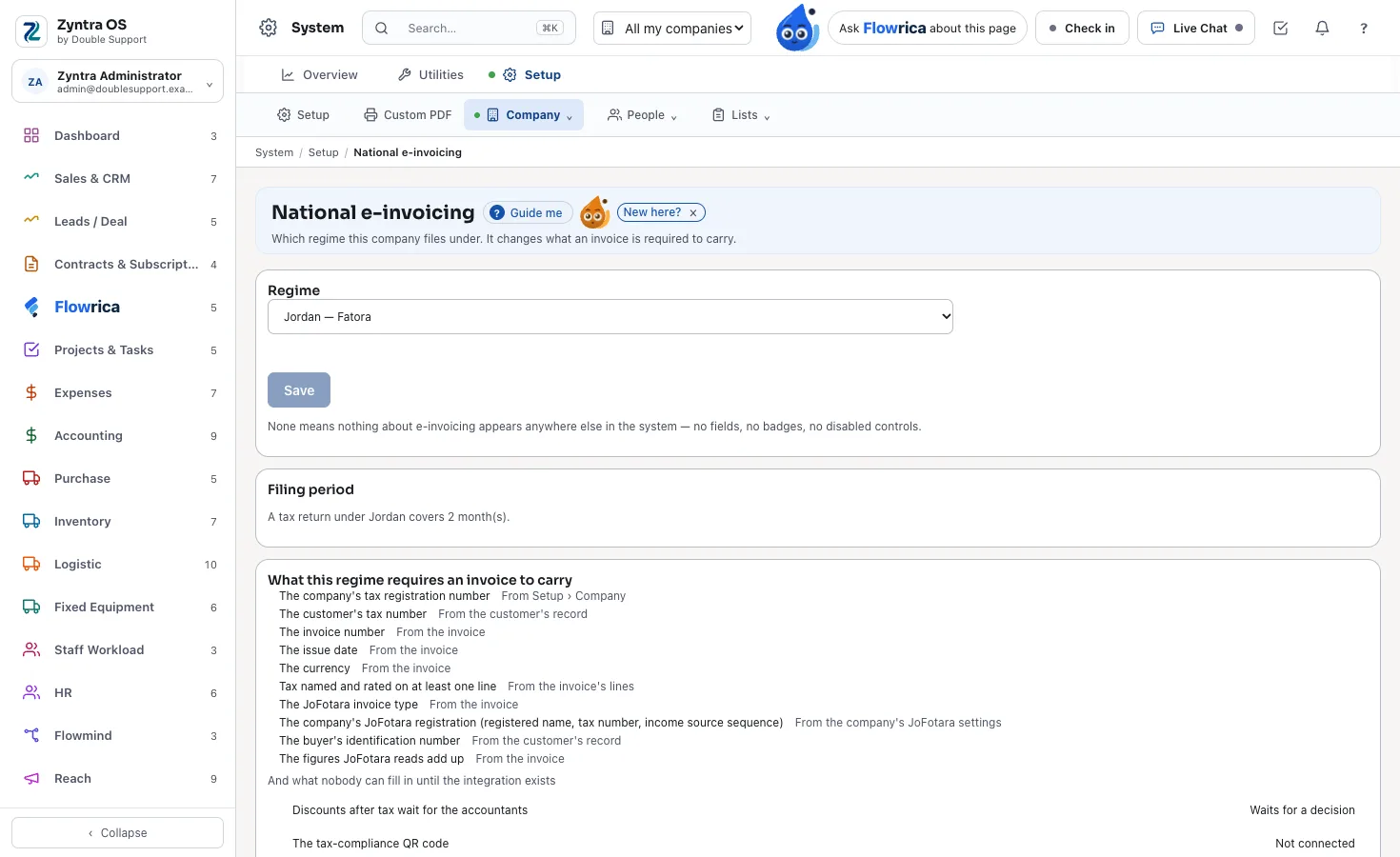
National e-invoicing, chosen once
Choose the company's regime once — Jordan or Saudi Arabia — and it changes what each invoice must carry.
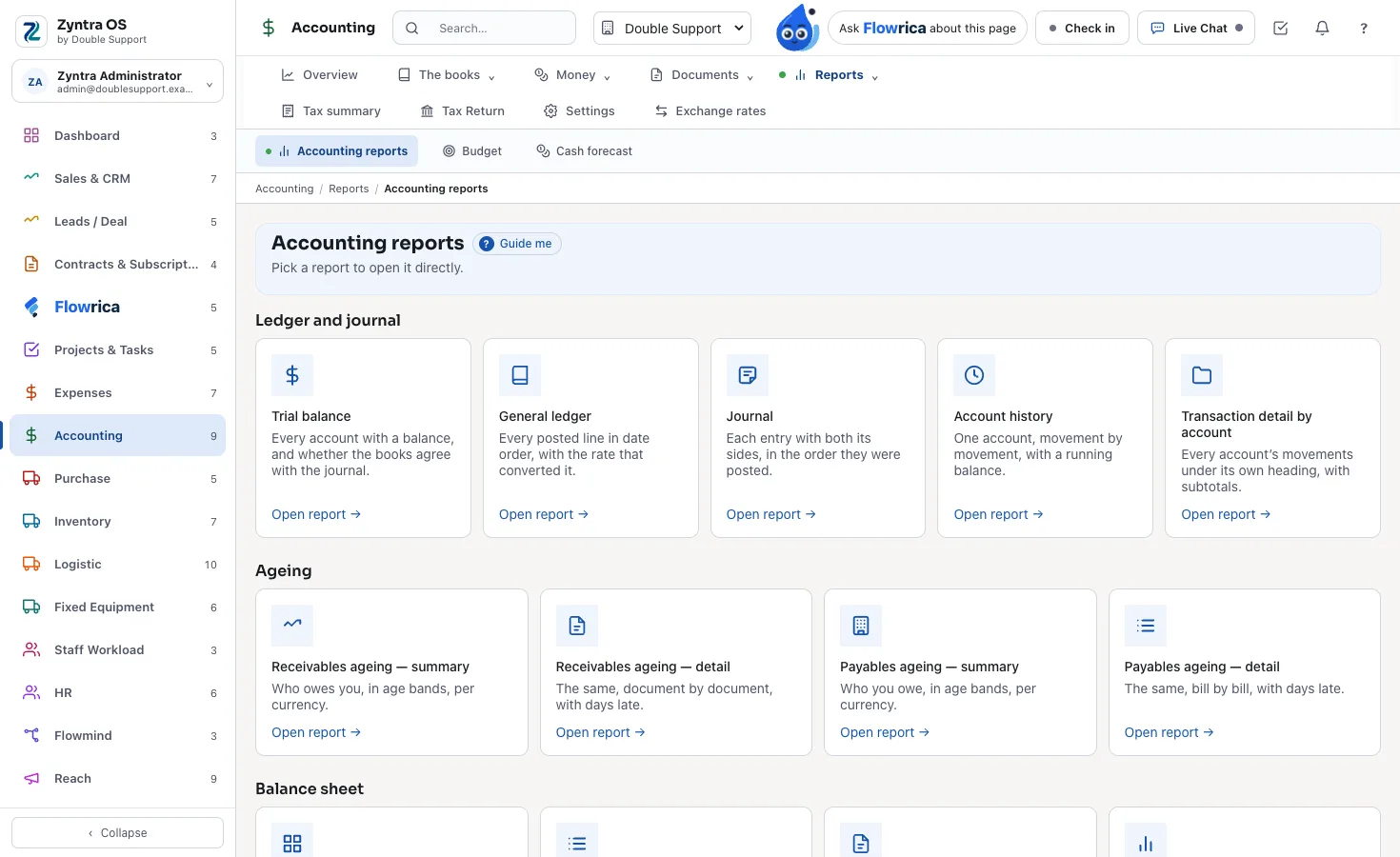
The accounting reports
Trial balance, general ledger, journal, ageing and the balance sheet, each one click away.
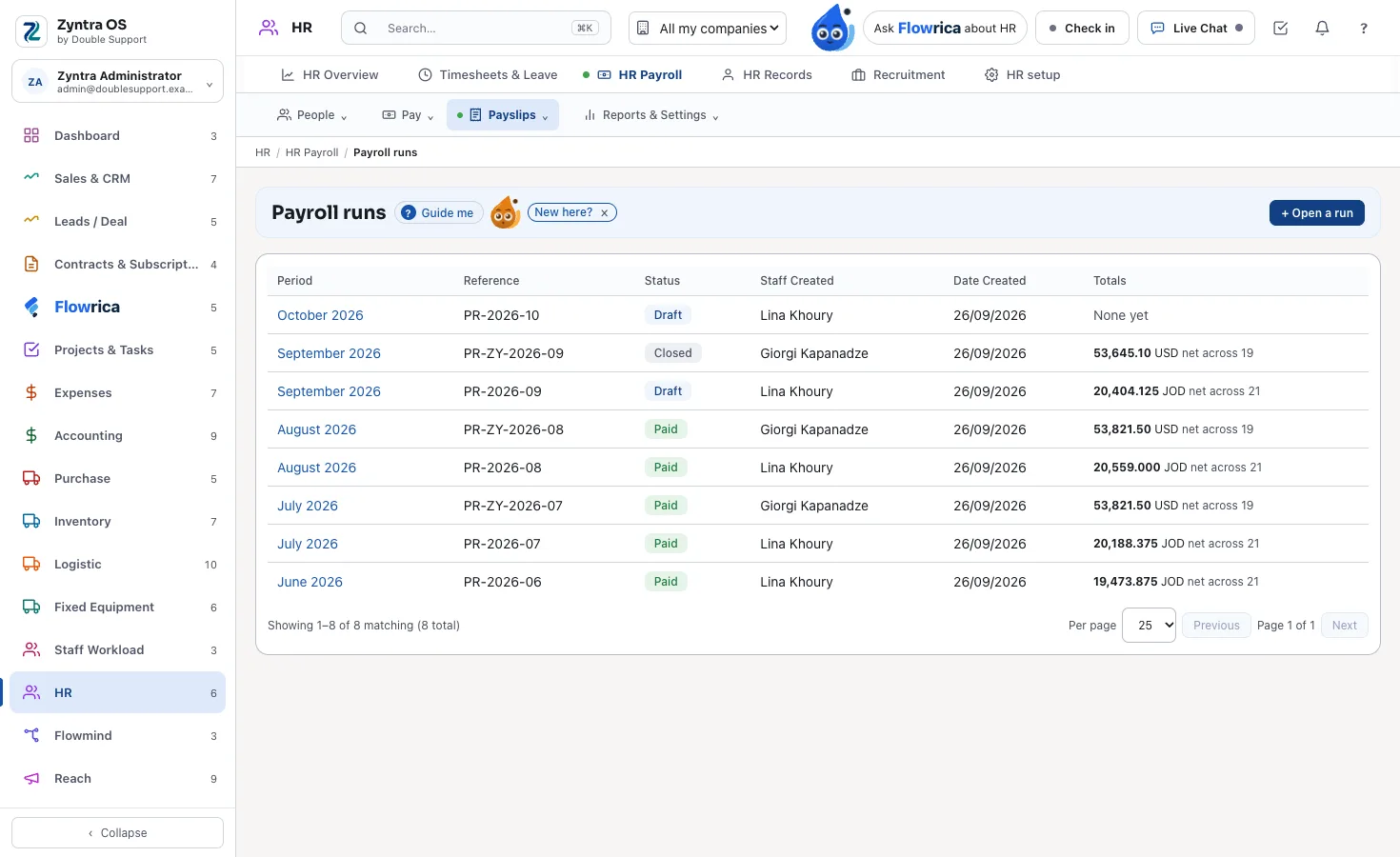
Payroll runs
Each month's run with its status and totals, in the same system as the books.
When Salesforce is the better choice
- You run a large contact center joining voice, digital channels and CRM data.
- Your data must stay in a country where Hyperforce runs, such as the UK, Germany, India or Japan.
- You keep your accounting in another ERP and want billing that syncs to it.
- You want its marketplace of more than 5,000 apps.
Moving from Salesforce to Zyntra OS
Zyntra OS brings your accounts, contacts, leads and deals from Salesforce, signed in on your own Salesforce account; each deal lands in the stage a person maps it to. It only reads Salesforce, shows you what will come before anything is written, and an import can be undone.
Your own installation is up and running within one day of your payment, and our team sets it up with you. There is no setup fee.
Questions
Is Zyntra OS an alternative to Salesforce?
For a company that wants its CRM together with its accounting, payroll, projects and call center in one system, yes. If you run a large contact center or keep your books in another ERP, Salesforce may suit you better.
Does Zyntra OS send invoices to JoFotara and ZATCA?
Yes. JoFotara for Jordan and ZATCA for Saudi Arabia are both built in, with Peppol and US sales tax through your Avalara AvaTax account.
Can I bring my data over from Salesforce?
Yes: your accounts, contacts, leads and deals, read only, each deal stage mapped by a person, and the import can be undone.
Is there a setup fee?
No. Your own installation is up and running within one day of your payment, and our team sets it up with you.
Does Zyntra OS speak my language?
Yes — Arabic too. Every screen and every document, from invoices to payslips and contracts, is right to left in Arabic, and each person chooses their language.
Where these facts come from
What this page says about the other product comes from its own public pages, read on 5 November 2026:
- salesforce.com
- salesforce.com — Sales Cloud
- salesforce.com — Starter Suite
- salesforce.com — Revenue Cloud
- salesforce.com — Revenue Cloud Billing
- salesforce.com — HR Service
- salesforce.com — service
- salesforce.com — contact center
- salesforce.com — call center integration
- salesforce.com — Hyperforce
- salesforce.com — infrastructure
- salesforce.com — marketplace
What it says about Zyntra OS is what the product does today; the user guide shows each part step by step.