

 Zyntra Legal
 Zyntra Real Estate
 Zyntra Hotel
 Zyntra E-commerce
 Zyntra Appointments
 Zyntra Repair
 Zyntra Garage
 Zyntra Concierge
 Zyntra Contracting
 Zyntra Clinic
 Zyntra Dental
 Zyntra School
 Zyntra University
 Zyntra Practice
 Zyntra Distribution
 Zyntra Social
 Zyntra Call Center
 Zyntra OTA
Side by side
Zyntra OS vs Odoo
Odoo is a large family of business apps that you choose and join together. Zyntra OS is one system whose parts already work as one — made in Amman, and it speaks your language, Arabic too.
What Zyntra OS is
Zyntra OS is a business operating system: it opens on what needs your attention today — the Overview's «Needs Attention» across the sections you can open — with Flowrica built into it.
Who each one is for
 Zyntra OS
Companies that want sales, projects, manufacturing, accounting, HR and support in one system that speaks your language — Arabic too — with Jordan's e-invoicing built in — for one company or several. Made by Double Support in Amman.
Odoo
Companies that want a wide range of apps — accounting, sales, inventory, shops and websites — on Odoo's own cloud, or on their own servers on its Custom plan.
Side by side, area by area
| Area | Zyntra OS | Odoo | The difference |
|---|---|---|---|
| Projects and tasks | Projects with tasks, milestones, time and money; your customers follow them in their portal | The Project and Planning apps | Both do this. In Zyntra OS it is part of the same system; in Odoo it is a separate app See it step by step: Start a project · Add a task · Members and milestones |
| Time and labour cost | Timers and timesheets; each hour keeps the rate it was logged at, so last year's cost does not change after a raise | The Timesheets app | Both do this. In Odoo timesheets are a separate app See it step by step: Add a task · Timesheet reports |
| Profit and loss per project | Each project's profit and loss: its invoices against its labour and its expenses; hours become invoices | A project dashboard shows profitability for billable projects, from the records linked to the project | Both show a project's profit. Zyntra OS keeps each hour at the rate it was logged at See it step by step: Projects & Tasks overview |
| Accounting, invoicing and Jordan e-invoicing | Full accounting with the accountants' own chart, cheques and closed periods; invoices sent to JoFotara | The Accounting and Invoicing apps; a Jordan localization with JoFotara e-invoicing | Both do this, JoFotara included See it step by step: Issue an invoice · Chart of accounts · Fiscal periods · National e-invoicing |
| Customers and sales (CRM) | From the form on your website to a won deal; a won deal opens its project | The CRM app, with Sales and Subscriptions | Both do this. In Odoo it is a separate app See it step by step: Add a lead · Convert a lead · Win or lose a deal |
| HR and payroll | Payroll with income tax and social security, attendance, leave and staff records | Employees, Payroll, Time Off and Appraisals; Jordan is in its list of payroll localizations | Both run payroll; Odoo lists Jordan among its payroll localizations See it step by step: Check in and attendance · Request and approve leave · Run the payroll |
| An assistant that does the work | Flowrica, built into Zyntra OS by Double Support — not an outside chatbot or plug-in, watches your records each morning, warns on the screen before you save and fills forms from one sentence; she moves a deal, assigns tasks, moves an event or sends an invoice by Peppol: she shows the change, you confirm, and you can undo it (a Peppol send is corrected by a credit note). In the base price | Its own assistant features, as an app and on the Custom plan | Both have an assistant. Flowrica is in Zyntra OS's base price; Odoo lists more of its own on the Custom plan See it step by step: Flowrica, your assistant in every section |
| Your language | Speaks your language — Arabic too, right to left on every screen and paper | Languages are added in Settings and each user picks one; its Saudi Arabia guide prints tax invoices in Arabic | Both let each user pick a language; in Zyntra OS Arabic is ready on every screen and document Read more: Companies, Rights & Platform |
| Hosting and your data | Your own Zyntra on its own address with its own database, hosted in Europe and backed up every night | Odoo Online on every plan; Odoo.sh or your own servers on the Custom plan | Odoo can also run on your own servers (Custom plan); Zyntra OS runs as a service we host Read more: How we protect your data |
| Manufacturing (bills of materials, MRP) | Bills of materials opened level by level, a material planning run netted level by level, production orders with routings and work centres, a tablet on each work centre, kanban bins that refill themselves, machine readings with OEE, stops and energy, engineering changes and quality | The Manufacturing app: bills of materials (multi-level), work centres, capacity planning, a master production schedule and a tablet view for the shop floor; PLM, Quality and Maintenance are apps of their own | Both do this. In Odoo, PLM and Quality are apps of their own; in Zyntra OS, engineering changes and quality are part of Manufacturing See it step by step: Bills of materials · Material planning · Shop floor tablet · Kanban board · Machine data |
| Inventory and warehouses | Several warehouses and moves between them, stock valued by FIFO or weighted average (each company chooses), lots with expiry dates — the soonest to expire leaves first and an expired lot is refused — serial numbers, barcode labels, and what a bill adds to the stock's cost | The Inventory app: several warehouses, routes with push and pull rules, dropshipping, a barcode scanner, lots, serial numbers and expiration dates, landed costs, and FIFO, average price, LIFO or standard price | Both do this. Odoo also has routes, dropshipping, LIFO and standard price; Zyntra OS values stock by FIFO or weighted average See it step by step: Warehouses and stock · Count the stock · Inventory settings · Inventory reports |
| Several companies | Several companies in one Zyntra, each with its own books; a group with no books of its own shows its companies' books together in its reports | Several companies in one database, records shared or kept to one company; one company can sell to or buy from another. Multi-Company is listed on the Custom plan | Both do this. Odoo also lets one company sell to or buy from another inside the database; in Zyntra OS several companies in one Zyntra are included See it step by step: Your companies, and adding one · Set up a company's books |
| Connections and apps | 117 ready connections, 21 payment gateways among them, all free: no setup fee and no hidden fees; a key for your own systems and signed calls when something happens; a missing worldwide service is built free More coming soon — we keep working to make our system ready for everything you use. | The Odoo Apps store, with hundreds of Odoo apps and apps by other publishers; the External API is listed on the Custom plan | Odoo's store is much larger. In Zyntra OS every ready connection is included at no extra charge See it step by step: Payment Gateways · Call a webhook: send a record to another system |
| Statement matching | Built in, an add-on module: Flowrica reads a vendor's statement — photo, PDF, CSV, Excel or Word — and compares it line by line with your books; a bill not in your books is entered with one Create, and Undo takes it back | Accounting reconciles bank transactions; matching a vendor's own statement with your books is offered by paid apps from other publishers on the Odoo Apps store | In Zyntra OS it is a module of the same system; in Odoo it is an app from another publisher See it step by step: Add a vendor |
Read on each company's own public pages on 29 October 2026. Products change; their pages have today's details and prices.
A full cycle, step by step
From a customer to the books, in one system: each step below is a screen published in the Zyntra OS user guide, taken on a working Zyntra OS filled with demo data of a sample company, with the guide topic that walks through it.
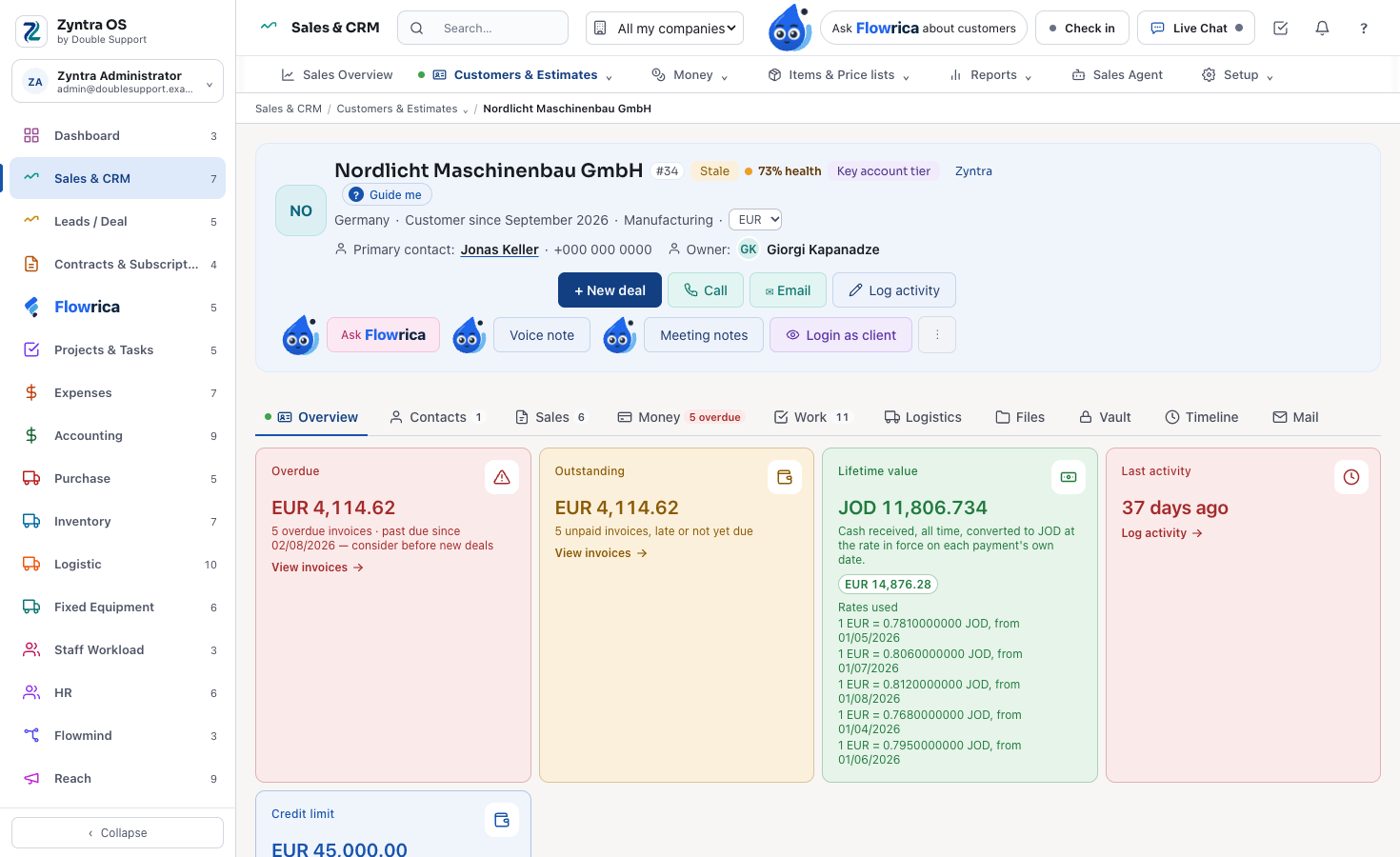
A customer
A customer is a company you bill; most come from a converted lead. Their page holds their contacts, their sales, their money and their work, each on its own tab.
See it step by step: Add a customer
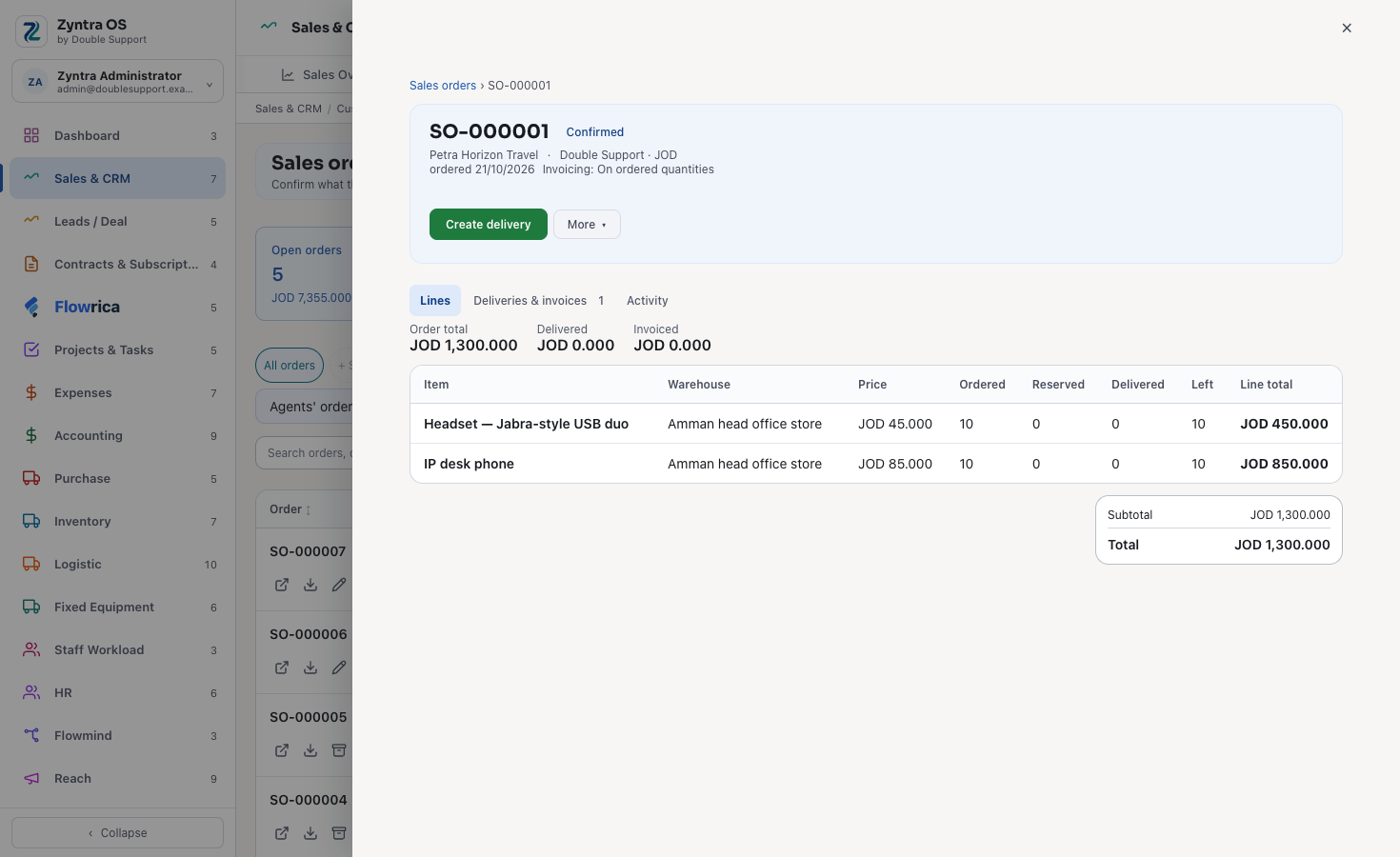
A sale
A sales order confirms what the customer ordered. Its deliveries and its invoices are made from it.
See it step by step: Sales orders
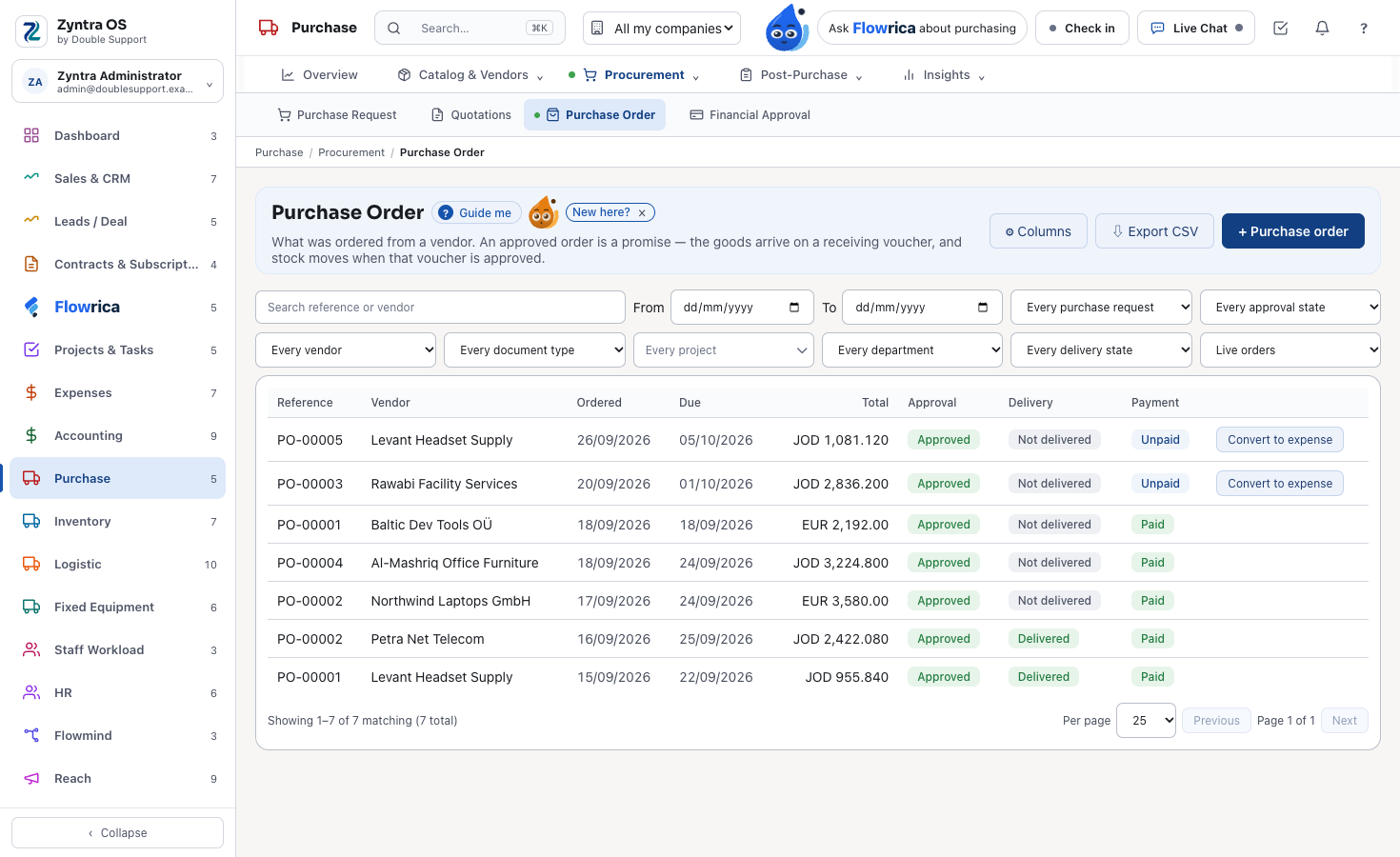
Purchasing
A purchase order tells a vendor what you are buying, at what price, and when it must arrive. Buyers raise it; approvers approve it.
See it step by step: Purchase orders
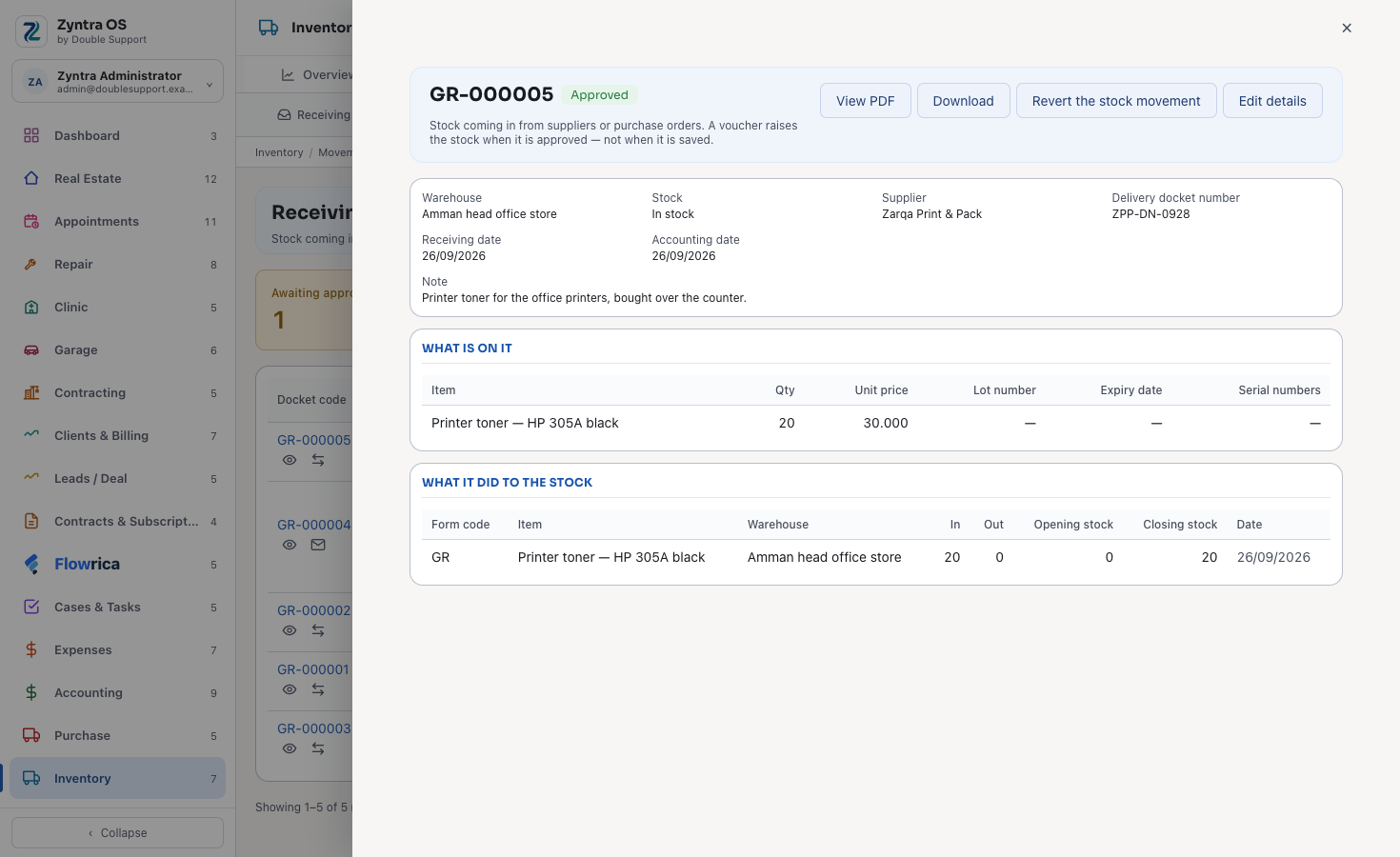
Receiving
The goods arrive on a receiving voucher, and the stock moves when that voucher is approved, not when it is saved.
See it step by step: Receive the goods, and other movements
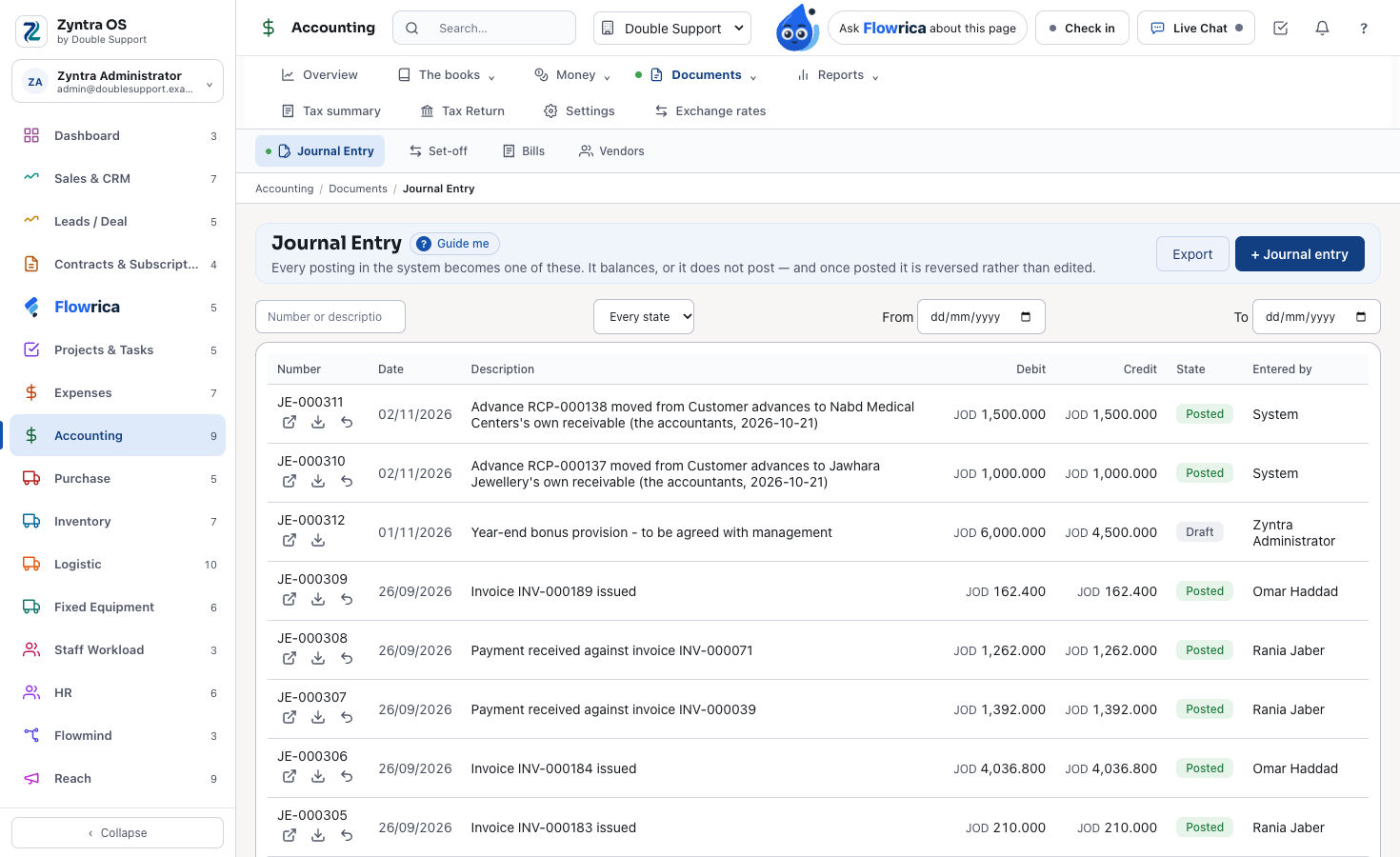
Accounting
Invoices, payments, payroll and stock post their own journal entries. An entry balances or it does not post; once posted, it is reversed, never edited.
See it step by step: Journal entries
When Odoo is the better choice
- You want to run the system on your own servers: Odoo's Custom plan allows it, while Zyntra OS runs as a service we host.
- You need only one app, for any number of users, at no cost: Odoo's One App Free plan.
- Your developers want to build their own apps on it, or you already work with an Odoo partner.
Moving from Odoo to Zyntra OS
Odoo exports any list to a CSV or Excel file. Your customers, leads, items and staff come in from CSV files — Zyntra OS gives you a sample file for each, and shows you what each row would do before anything is saved.
Your own installation is up and running within one day of your payment, and our team sets it up with you. There is no setup fee.
For a company in Jordan
Choosing for a company in Jordan? ERP system in Jordan shows Zyntra OS for companies in Jordan: sales and CRM, accounting, inventory, projects, HR and payroll, in Arabic and English, with JoFotara.
Worked examples: the hard cases
Three cases buyers ask about, each walked through step by step in the Zyntra OS user guide:
- Production in several stages, with scrap. A bill of materials lists each component with its scrap %, and a part that has a bill of its own is made first on its own order. On the production order you report the good units and the units scrapped, with why, and the order's cost shows the standard against the actual. Bills of materials · Production orders · Production cost
- A partial delivery, with freight and customs added to its cost. Each line of a purchase order shows what was ordered, received and is outstanding, and the order says Partly delivered until everything has arrived; each receiving voucher brings in what came. Freight or customs paid on goods already received are entered on the vendor invoice and added to the cost of that receipt. Purchase orders · Receive the goods · Enter and pay a vendor invoice
- A month close. Closing a period first lists what is still open in it: bank reconciliations not finished, expenses over the receipt threshold with no receipt, draft invoices, unposted journal entries and earlier periods still open, each line opening the place to fix it. Once it is closed nothing posts into it, and opening it again asks why and is recorded with your name. Fiscal periods
Questions
Is Zyntra OS an alternative to Odoo?
For a services or trading company — sales, projects, accounting, HR, payroll and support — yes, with every part already joined. If you need to run the system on your own servers, Odoo may suit you better.
Do both send invoices to JoFotara?
Yes. Odoo has a Jordan e-invoicing module for JoFotara, and Zyntra OS sends invoices to JoFotara as part of its base price.
Do I need a partner to set up Zyntra OS?
No. Double Support makes Zyntra OS and sets it up with you; your own installation is running within one day of your payment, with no setup fee.
Can several companies work in one Zyntra OS?
Yes. Several companies in one Zyntra are included, each with its own books.
Can we build our own modules?
You shape Zyntra OS without writing code: switch on only the modules you need, add your own fields to 18 kinds of records and print them on your documents, set the numbering of each kind of document, lay out your own PDFs and email templates, decide who sees and does what, and let Flowmind rules do the routine work. The modules themselves are written by our team; when your company needs a part Zyntra OS does not have, tell us.
See it step by step: Build a rule: when, where, then · Every trigger, by module · Approval steps: a rule that asks for sign-off · Import from your old system
Is there an API for our developers?
Yes, for connecting your other systems. A key made in Setup › Channels lets another system add leads, customers and tasks, and an address you choose can be told the moment something happens in Zyntra OS — each call signed, so your side knows it came from Zyntra. The key acts with the rights of the person who made it, in one company only. This is how Zapier and Make connect too. If your developers need a connection beyond this, tell us and we build it with you.
See it step by step: Call a webhook: send a record to another system
Does Zyntra OS connect to the other services we use?
All 117 ready connections are free: no setup fee and no hidden fees; the customer pays the provider only. If a worldwide third-party service is missing, we build the connection free. More coming soon — we keep working to make our system ready for everything you use.
Read more: Integrations
Does Zyntra OS do manufacturing?
Yes. Bills of materials, production orders with their routings and work centres, material planning, quality inspections, lots traced both ways and what each order really cost — the user guide shows them in 26 topics, step by step.
See it step by step: Bills of materials · Production orders · Material planning · Quality inspections · Traceability · Production cost
Read more: Manufacturing
What protects our data inside Zyntra OS?
Each person sees and does only what their own rights allow, on every screen and every record. Every change is written in an audit trail with who made it and when, and nobody can edit that trail. Every night an encrypted copy of the data is made and kept on a separate server. Passwords are kept only in a one-way scrambled form, and keys and the passwords of connected accounts are encrypted in the database. And security is checked from the inside all the time: automatic tests sign in as different people and knock on every door of the system.
See it step by step: Roles: what each person may do · Audit trail
Where these facts come from
What this page says about the other product comes from its own public pages, read on 29 October 2026:
- odoo.com/pricing
- odoo.com/page/all-apps
- odoo.com — Jordan localization
- odoo.com — payroll localizations
- odoo.com — project dashboard
- odoo.com — languages
- odoo.com — Saudi Arabia localization
- odoo.com — export and import data
What it says about Zyntra OS is what the product does today; the user guide shows each part step by step.
The rows on manufacturing, inventory, several companies, connections and statement matching were added on 19 November 2026, from these pages read that day: