

 Zyntra OS
 Zyntra Legal
 Zyntra Real Estate
 Zyntra Hotel
 Zyntra E-commerce
 Zyntra Appointments
 Zyntra Repair
 Zyntra Garage
 Zyntra Concierge
 Zyntra Contracting
 Zyntra Clinic
 Zyntra Call Center
 Zyntra OTA
Where
Flowmind › Rules › a rule › Then › Run an approvalWho
A rule's author who may manage approvals. The chains themselves are kept by someone who works in every company.Put an approval in a rule
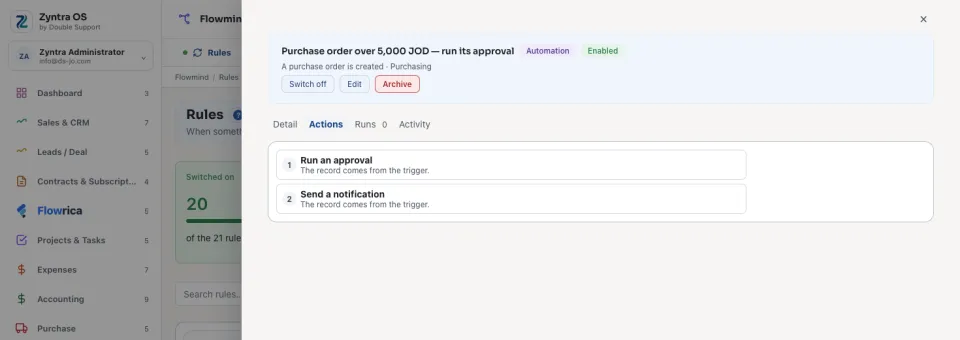
If the document's type has no approval chain switched on, the step is refused and the run says so: No approval chain is defined for …. If an approval is already open on the record, the run says An approval is already open on this record.
The approval chain and its steps
The chains are kept on Inventory › Settings › Approval Settings, one per document type: receiving and delivery vouchers and the other stock documents, purchase orders, purchase requests, quotation awards, payments to vendors, asset requests and asset audits, sales orders, staff loans, expense claims, and raise or bonus proposals. See Inventory settings.
When a step's signer is a role, How many must sign says how many of its holders decide it: with Any one of them, the first approval moves the document on; with All of them, it waits until every holder who may sign it has approved. A refusal by any one of them ends the step.
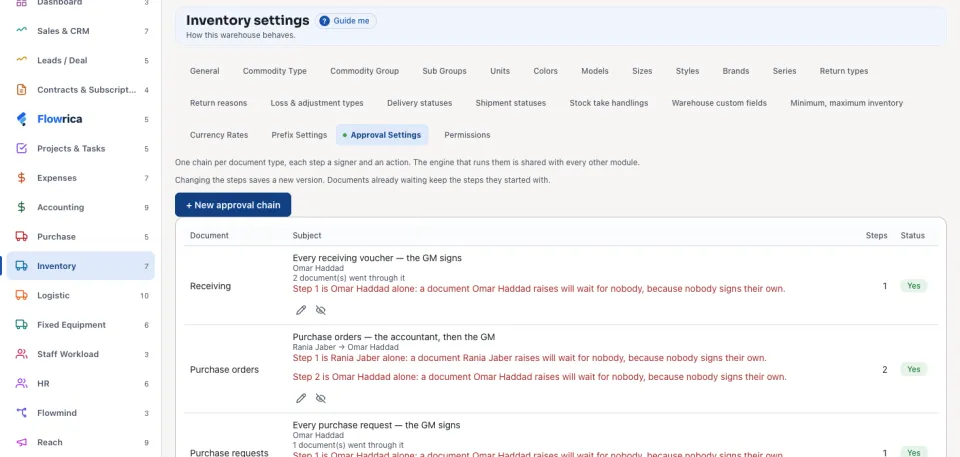
Nobody signs a document they raised themselves: a step held by one person alone would leave that person's own documents waiting for nobody, and the list says so in red under the chain. A refusal must say why; the person who raised the document is told, and when it is sent again it starts from step 1.
A rule after the decision
Documents with a chain also send events of their own, such as A purchase order is approved by its signers or A purchase request is refused by its signers. Use them on When to act once the signers have decided: see Every trigger, by module. The approving and refusing stay with the signers.
Questions
Where is “Approval steps: a rule that asks for sign-off” in Zyntra OS?
Flowmind › Rules › a rule › Then › Run an approval
Who can use “Approval steps: a rule that asks for sign-off”?
A rule's author who may manage approvals. The chains themselves are kept by someone who works in every company.