Zyntra OS
 Zyntra Legal
 Zyntra Real Estate
 Zyntra Hotel
 Zyntra E-commerce
 Zyntra Appointments
 Zyntra Repair
 Zyntra Garage
 Zyntra Concierge
 Zyntra Contracting
 Zyntra Clinic
 Zyntra Call Center
 Zyntra OTA
Where
System › Setup › SettingsWho
Anyone allowed to see this screen; changing a setting needs the right to edit settings.1
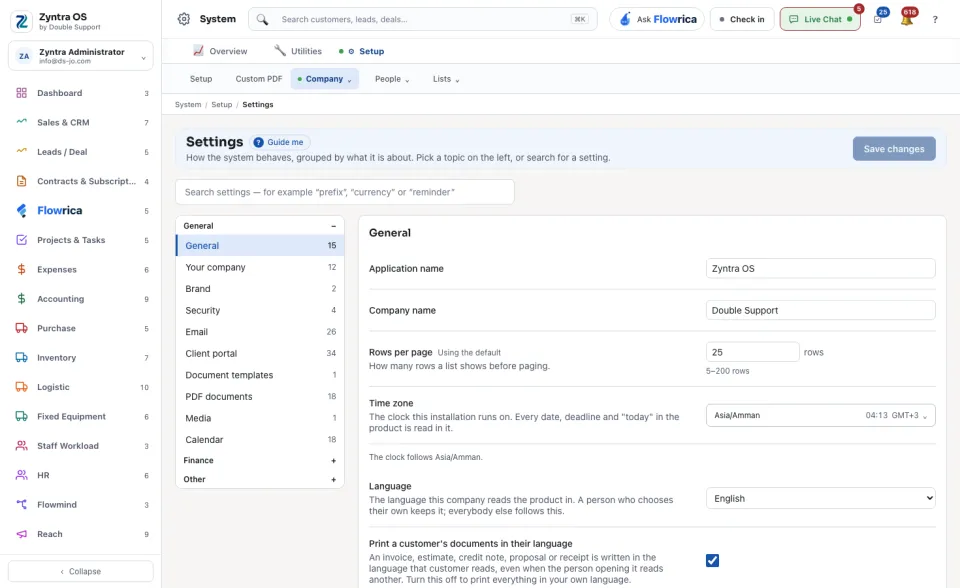
Pick a topic on the left. The topics stand in three groups: General (among them Your company, Brand, Security, Email, Client portal, PDF documents and Calendar), Finance and Other. The number beside a topic is how many settings it holds. Or search for a setting by its name.
2
Change what you need. Under each setting one line says what it does. A setting you have not changed reads Using the default.
3
Press Save changes at the top of the screen.
On General you set, among others, the Time zone, the Language the company reads the product in, the Date format and the Time format. A person who chose their own language keeps it.
See also Your brand colour and sign-in page and What a company prints.