

 Zyntra OS
 Zyntra Legal
 Zyntra Real Estate
 Zyntra Hotel
 Zyntra E-commerce
 Zyntra Appointments
 Zyntra Repair
 Zyntra Garage
 Zyntra Concierge
 Zyntra Contracting
 Zyntra Clinic
 Zyntra Call Center
 Zyntra OTA
Where
Call Center › OverviewWho
Anyone who holds a Call Center right. Each screen below names the right it needs.Switch it on
Switching it off later deletes nothing: the calls, callbacks and reviews stay and come back when it is switched on again.
Test mode
A new Call Center starts in Test mode. The yellow Test mode pill sits beside the screen titles, and nothing reaches the phone network: you try a call from the desk's Try a call box and it rings your agents exactly as a real one would. For real calls, the voice provider (Twilio or RingCentral), its keys and the caller ID are filled in Set-up › Voice provider under Zyntra's own settings, and test mode is switched off there. Where things stand on that tab says Ready for real calls and lists what is Still missing.
The overview
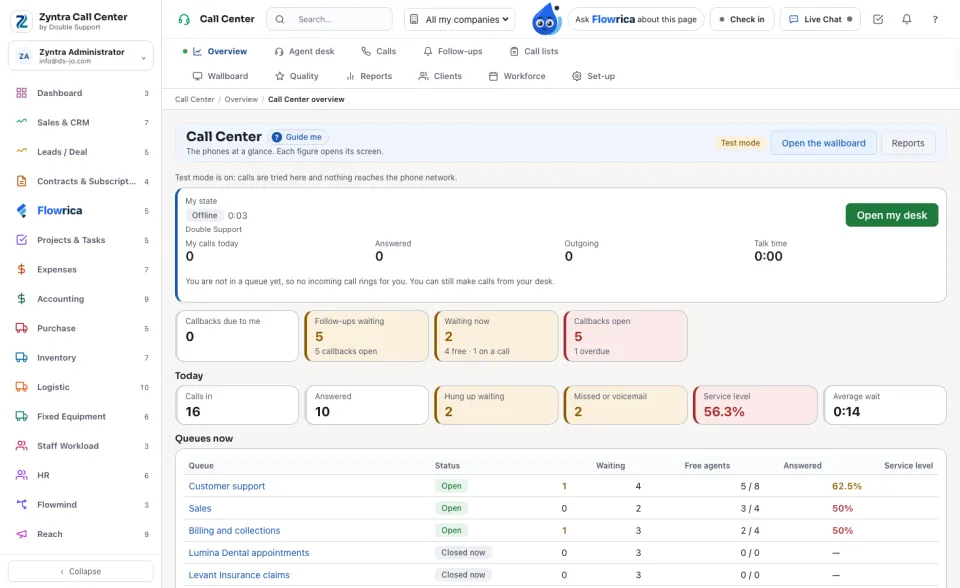
The phones at a glance. Each figure opens its own screen.
| Part | What it shows |
|---|---|
| My state and My calls today | Your own state at the desk and your calls of the day. Open my desk takes you to the Agent desk. |
| Callbacks due to me, Follow-ups waiting, Waiting now | What waits for you and for the team. |
| Today | Calls in, Answered, Hung up waiting, Missed or voicemail, Service level and Average wait. A figure under its target is red. |
| Queues now | Each queue with its Status, who is Waiting, the Free agents and its service level. |
Open the wallboard and Reports are at the top right.
Who may do what
The rights are in Setup › Roles, under Call Center. The top role holds all of them except the two narrower call views.
| Right | What it lets a person do |
|---|---|
| Desk — Answer and make calls | The agent desk, callbacks, follow-ups and working a call list. |
| Calls — View own | Only the calls they answered or made. |
| Calls — View team | The calls of their departments, and the unanswered calls of the team's queues. |
| Calls — View all | Every call of the company. |
| Recordings — Listen | Listen to recordings and voicemails. Without it the call page says listening is a right of its own. |
| Supervise — View | The live wallboard, every agent's state, and listen, whisper or join a call. |
| Quality — Review | Review and score calls. Nobody reviews their own call. |
| Reports — View | The reports and the client report. |
| Queues — Manage | Set-up: queues, numbers, phone menus, outcomes, scripts and blocked numbers. |
| Settings — View / Edit | The voice provider and its keys. |
| Clients — Manage | The clients your agents answer for, their price and targets, and their draft invoices. |
| Campaigns — Manage | Fill call lists from Reach campaigns. |
| Workforce — View | The workforce plan. |
Flowrica in Call Center
Ask Flowrica on any Call Center screen. She answers from your own rights:
On the agent desk, Flowrica on this call shows who is calling, articles that may help, a suggested outcome and the next step. Use it only picks the outcome for you; the agent still saves the wrap-up. In a quality review she fills the lines she can read from the call itself, and the reviewer confirms them.
Questions
Where is “Zyntra Call Center” in Zyntra OS?
Call Center › Overview
Who can use “Zyntra Call Center”?
Anyone who holds a Call Center right. Each screen below names the right it needs.