

 Zyntra OS
 Zyntra Legal
 Zyntra Real Estate
 Zyntra Hotel
 Zyntra E-commerce
 Zyntra Appointments
 Zyntra Repair
 Zyntra Garage
 Zyntra Concierge
 Zyntra Contracting
 Zyntra Clinic
 Zyntra Call Center
 Zyntra OTA
Where
Flowmind › Rules › a rule › Edit › Then › Call a webhookWho
Only someone whose role holds Allow the webhook action, because it is the one step that sends a record out of the system.1
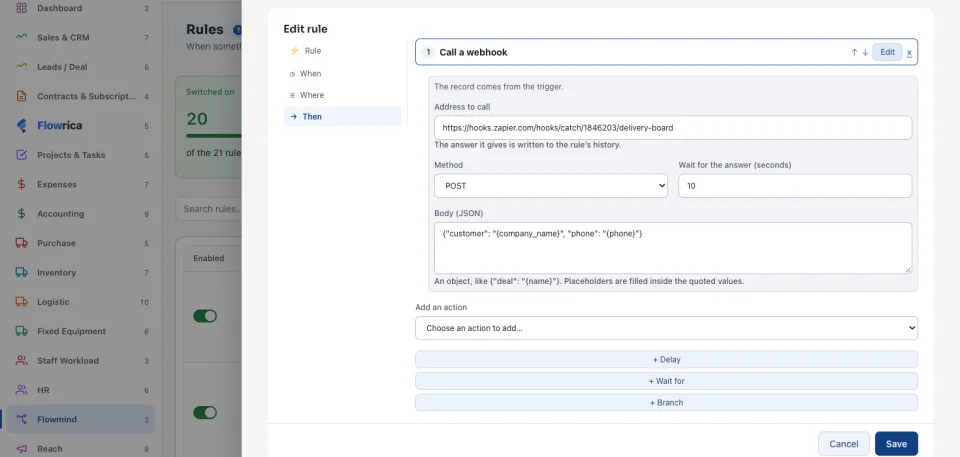
On Then, choose Call a webhook from Add an action.
2
Type the Address to call: the full address, starting with https:// or http://, that the other system gave you.
3
Choose the Method (POST, PUT, PATCH or GET) and how long to Wait for the answer (seconds), from 1 to 30.
4
Write the Body (JSON): an object like {"customer": "{company_name}", "phone": "{phone}"}. A field of the record written in braces inside the quoted values is filled in when the rule runs.
5
Press Save (or Create rule).
What happens when it runs
The answer is written to the run's history: the status the other system answered, or why the call did not succeed, such as no answer within the time you gave. See Flowmind histories.
A webhook never calls the system itself or its own network: such an address is refused when you save, and again before every call. It does not follow a redirect to another address. A field of a record the rule's author may not read is sent empty.
Questions
Where is “Call a webhook: send a record to another system” in Zyntra OS?
Flowmind › Rules › a rule › Edit › Then › Call a webhook
Who can use “Call a webhook: send a record to another system”?
Only someone whose role holds Allow the webhook action, because it is the one step that sends a record out of the system.