

 Zyntra OS
 Zyntra Legal
 Zyntra Real Estate
 Zyntra Hotel
 Zyntra E-commerce
 Zyntra Appointments
 Zyntra Repair
 Zyntra Garage
 Zyntra Concierge
 Zyntra Contracting
 Zyntra Clinic
 Zyntra OTA
Where
Call Center › Agent deskWho
People who hold Call Center Desk — Answer and make calls and are a member of a queue.Be ready for calls
1
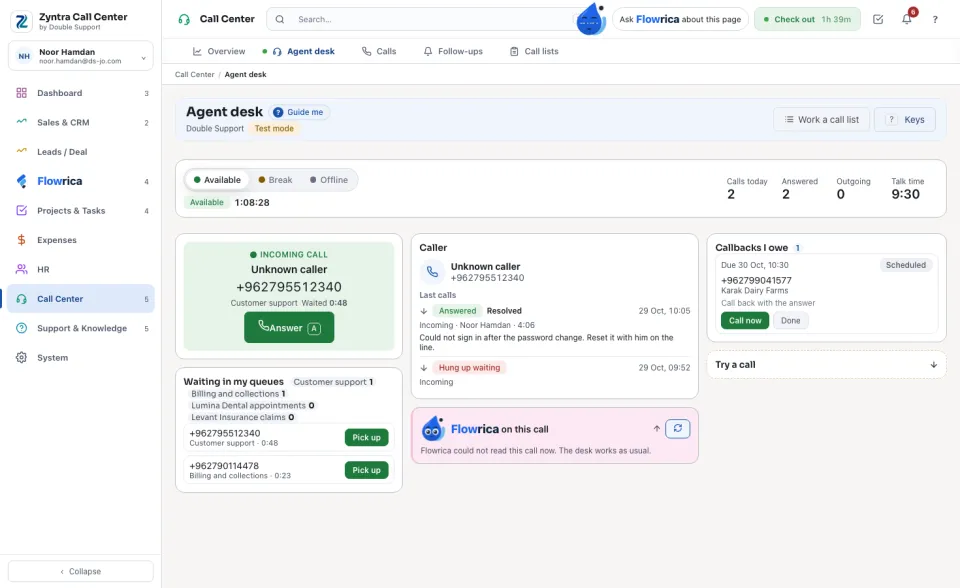
Check in from the top bar first (Check in). A person who checks in at work can only be Available while checked in; checking out sets them Offline.
2
Under My state choose Available. Calls of your queues now ring you. Choose Break and a reason (Lunch, Prayer, Meeting, Training or Other) when you step away, and Offline when you stop.
3
The figures on the right count your day: Calls today, Answered, Outgoing and Talk time.
Take a call
1
A ringing call shows its number, its queue and the Caller card. Press Answer. Someone already waiting in your queues is listed under Waiting in my queues: press Pick up.
2
The Caller card shows who it is when Zyntra knows the number: the customer, contact or lead, and their last calls. For a new number press Find a customer and choose This one, or Add as a lead.
3
While on the line: Pause recording and Transfer; with the phone in the browser also Mute and Keypad. A transfer can be Transfer now, or Talk to them first and then Hand the call over or Take the call back. The queue's Script is open below the caller.
4
Press Hang up when the call ends.
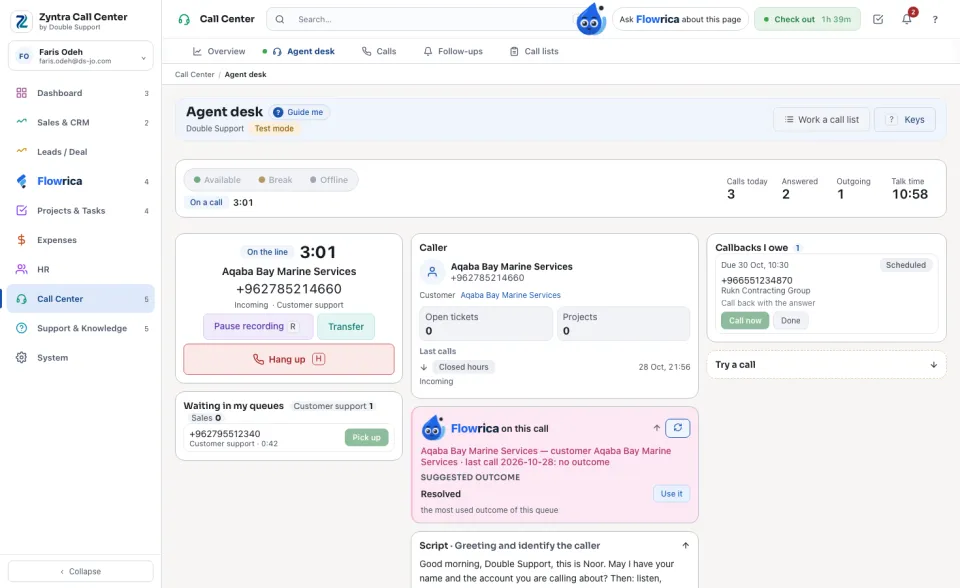
Flowrica on this call sits beside the caller: who is calling, articles that may help, a Suggested outcome with Use it, and the Next step. She writes nothing herself.
Wrap up the call
1
Under How did the call end? choose the outcome, for example Resolved, Follow-up needed, Sale or Promise to pay. A queue can make the outcome required.
2
Write the Notes. To call back later, fill Call back: when, Who calls back and a note for the callback.
3
Under Make from this call you can open a Ticket, a Lead or a Task that keeps the call linked.
4
Press Save, or Save and take a break.
Make a call
1
Type the number under Number to call and press Call. If you answer for several clients, choose who you are Calling for, or Our own line.
2
Callbacks I owe lists the calls you promised: Call now dials it, Done closes it.
3
Work a call list takes you through a list person by person: Work this list, then Skip or Next person, and Leave the list when you stop. Lists are filled from Reach campaigns.
Try a call (test mode)
While Call Center is in test mode, the Try a call box rings one of the company's numbers as a caller would. Choose The number called, type Calling from and, for a number with a phone menu, the Key pressed in the menu, then press Ring it. The call reaches your queue and rings the agents like a real one; nothing reaches the phone network.
Before:  Zyntra Call Center · Next: Calls and follow-ups
Zyntra Call Center · Next: Calls and follow-upsQuestions
Where is “The agent desk” in Zyntra OS?
Call Center › Agent desk
Who can use “The agent desk”?
People who hold Call Center Desk — Answer and make calls and are a member of a queue.