

 Zyntra OS
 Zyntra Legal
 Zyntra Real Estate
 Zyntra Hotel
 Zyntra E-commerce
 Zyntra Appointments
 Zyntra Repair
 Zyntra Garage
 Zyntra Concierge
 Zyntra Contracting
 Zyntra Clinic
 Zyntra Call Center
 Zyntra OTA
Where
Repair › Catalogue · Setup › Settings · Statuses · ChecksWho
Repair Catalogue for the catalogue; Repair Settings for settings, statuses and checks.Catalogue
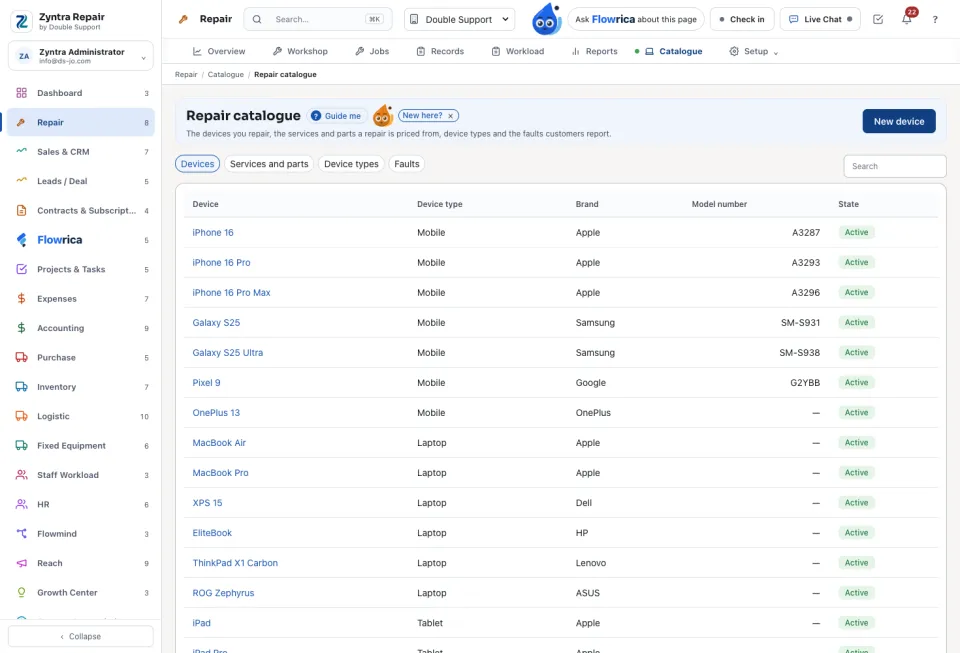
Four tabs, each with its own new button: Devices (New device), Services and parts (New service or part), Device types and Faults. A service is a Fixed price, By the hour or Priced per job, with its warranty in months. An empty catalogue offers Add the starter catalogue.
Checks and statuses
Checks: New check makes a checklist of kind Diagnostic, Intake or Quality check; Add an item for each line, and mark the ones that are Required. Statuses holds The workflow, Other statuses and Priorities; Reset the workflow brings back the seven steps.
Settings
Set the Ways a device comes in and their charge, the Branches, the Opening hours, the Deposit at intake, the Repair number prefix, and after how many days an uncollected device is reminded. Under Booking and tracking pages, Customers may book online and Customers may track their repair online open the shop's public pages. Customer messages holds the mail, text and WhatsApp message for each moment; Coupons holds the shop's coupons.
A customer tracks a repair with its number and the last four digits of the phone, or straight from the link in every message and on the printed ticket. In the client portal, My repairs lets the customer answer estimates and ask to cancel.
The lists every company shares (statuses, checklists, the catalogue's shared items) are changed only by someone who works in every company; a manager of one company is refused. Taking an item that is already sold elsewhere into the repair catalogue needs the right to edit items, and a price saved here changes only this company's price, never the item's other currencies.
Questions
Where is “Repair catalogue and setup” in Zyntra OS?
Repair › Catalogue · Setup › Settings · Statuses · Checks
Who can use “Repair catalogue and setup”?
Repair Catalogue for the catalogue; Repair Settings for settings, statuses and checks.