

 Zyntra OS
 Zyntra Legal
 Zyntra Real Estate
 Zyntra Hotel
 Zyntra E-commerce
 Zyntra Appointments
 Zyntra Repair
 Zyntra Garage
 Zyntra Concierge
 Zyntra Contracting
 Zyntra Clinic
 Zyntra Dental
 Zyntra School
 Zyntra University
 Zyntra Call Center
 Zyntra OTA
Where
University › Faculties and majorsWho
University — View reads it; University — Manage faculties, majors and courses makes and changes it.Switch it on
1
The super administrator opens Setup › Modules and switches School on, then University. University needs School: it uses School's students, admissions and years.
2
While it is on, the product's name is Zyntra University and the School menu reads University. A grade is a level (First year, Second year …) and a term is a semester.
3
Give the people their rights in Setup › Roles: View, Manage faculties, majors and courses and Manage study plans.
The page
Each faculty shows its departments; each department shows how many courses it teaches and its majors. A major shows its Degree, the Credit hours to graduate, the Years of study, how many Study plans it has and how many Students study it. Its plans opens the major's study plans.
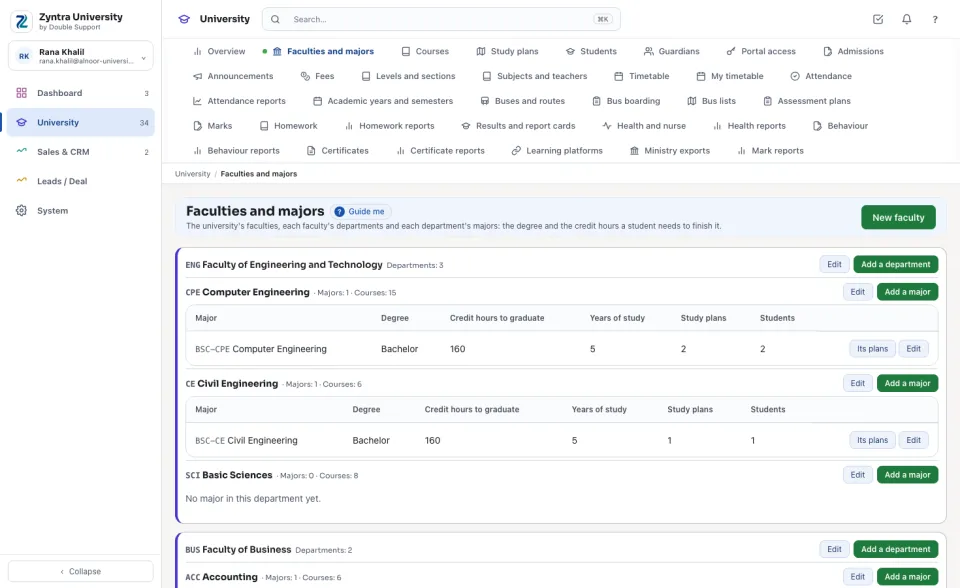
Add a faculty, a department or a major
1
Press New faculty, or Add a department on a faculty, or Add a major on a department.
2
Type the Name, the Name in Arabic and a Code. For a major choose the Degree (diploma, bachelor or master) and type the Credit hours to graduate and the Years of study.
3
Press Save.
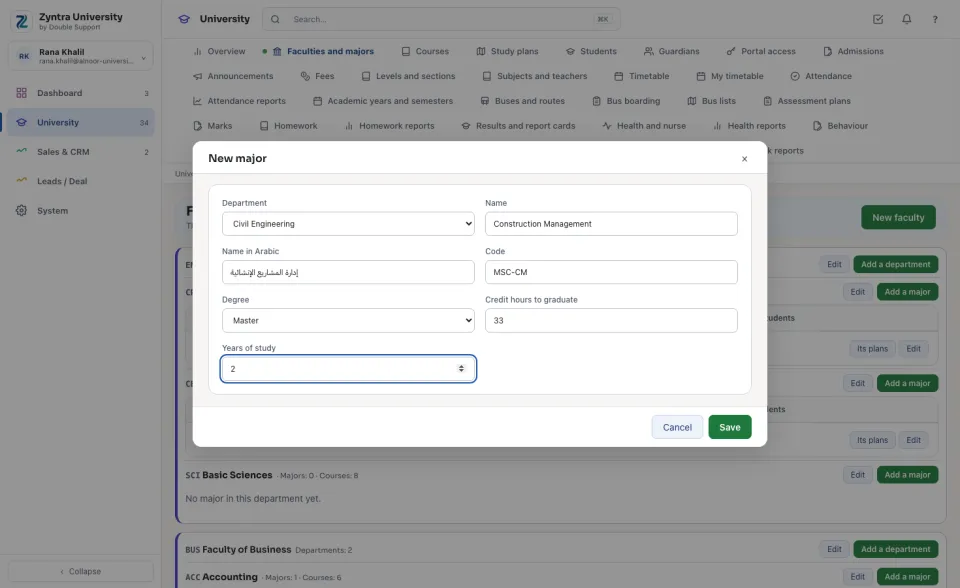
A name is never used twice in the same place. A faculty with departments, a department with majors or courses, and a major with a plan, an application or a student are put away (untick Active), never deleted.
Next: Courses
Questions
Where is “Faculties and majors” in Zyntra OS?
University › Faculties and majors
Who can use “Faculties and majors”?
University — View reads it; University — Manage faculties, majors and courses makes and changes it.