

 Zyntra OS
 Zyntra Legal
 Zyntra Real Estate
 Zyntra Hotel
 Zyntra E-commerce
 Zyntra Appointments
 Zyntra Repair
 Zyntra Garage
 Zyntra Concierge
 Zyntra Contracting
 Zyntra Clinic
 Zyntra Call Center
 Zyntra OTA
Where
Repair › Jobs › a repairWho
Repair Jobs to see it; Assign to give a technician; Repair Billing for estimates and invoices; Cancel to cancel.Move a device on
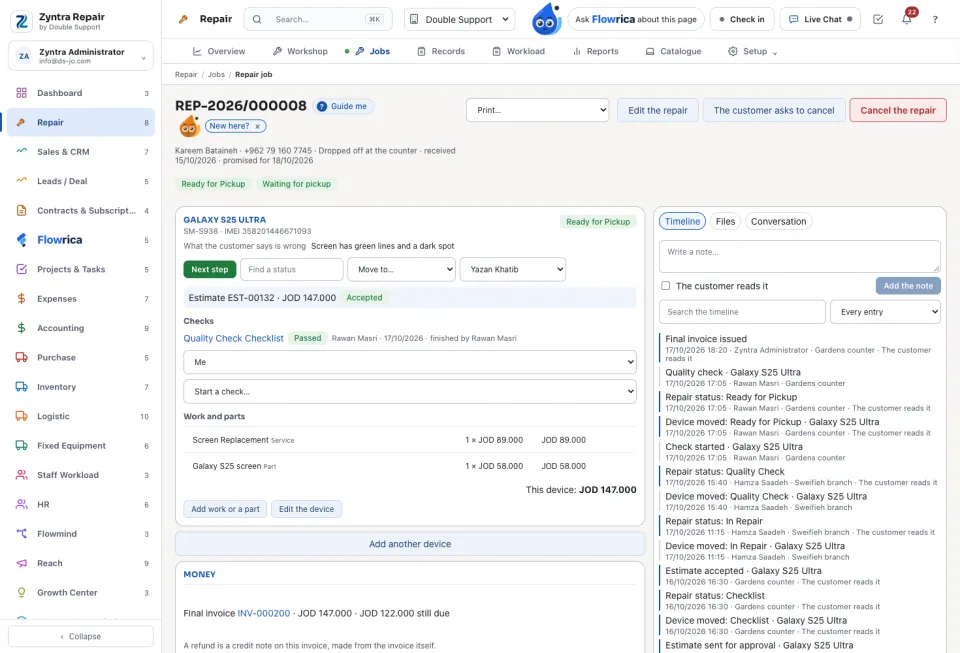
The customer's approval and the money
The parts on an estimate are held in their warehouse. Ask for the short parts makes a purchase request for what is missing.
Talk to the customer and hand back
The Conversation tab keeps the messages: send Inside the shop or To the customer, and see when the customer read them. Tell the customer sends the shop's message for the moment by mail, text or WhatsApp. Print… prints the job card, device tags or the intake ticket, each with the tracking link and its QR code.
A device that comes back is opened as Back under warranty, a new repair linked to the first.
A technician who sees only their own devices sees, under the job's files, the files of the job as a whole and of their own devices; a colleague's device's files are not listed and do not open. In the device's status menu a technician moves it only as far as their rights reach: cancelling, marking it declined by the customer, or passing it out of its quality check needs the right those steps ask. On the client portal, a repair's estimates and invoice are shown only to a contact given the Estimates and Invoices areas. A cancellation asked by a staff member inside the customer's portal is recorded under that staff member's name.
Questions
Where is “Work a repair through” in Zyntra OS?
Repair › Jobs › a repair
Who can use “Work a repair through”?
Repair Jobs to see it; Assign to give a technician; Repair Billing for estimates and invoices; Cancel to cancel.