

 Zyntra OS
 Zyntra Legal
 Zyntra Real Estate
 Zyntra Hotel
 Zyntra E-commerce
 Zyntra Appointments
 Zyntra Repair
 Zyntra Garage
 Zyntra Concierge
 Zyntra Contracting
 Zyntra Clinic
 Zyntra Call Center
 Zyntra OTA
Where
Repair › OverviewWho
Anyone with Repair Jobs — View or View own.Switch it on
With the module off, nobody holds a Repair right, its menu is gone and the public booking and tracking pages answer "not found". Nothing is deleted.
Read the overview
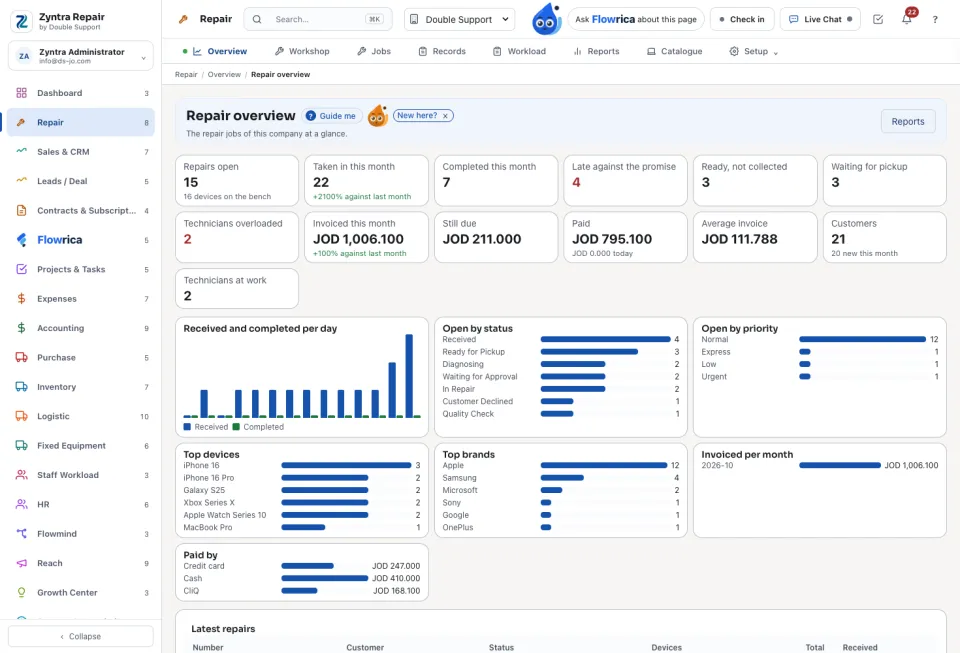
The tiles count Repairs open, Taken in this month, Completed this month, Late against the promise, Ready, not collected, Invoiced this month, Still due, Paid and Technicians overloaded. Below them: Received and completed per day, Open by status, Open by priority, Top devices, Top brands and Latest repairs.
Who may do what
| Right | What it allows |
|---|---|
| Repair Jobs | View every repair, or View own (the repairs with a device given to you); Create takes a device in; Edit; Assign gives devices to technicians; Cancel. |
| Repair Workshop | Work on the devices assigned to you. |
| Repair Billing | Raise estimates and invoices. |
| Repair Catalogue | The devices, services and parts. |
| Repair Reports | The Repair reports. |
| Repair Settings | Settings, statuses and checks. |
| Repair Quality Check | Pass or fail a device at the quality check. |
What Flowrica does here
Ask Flowrica Which repairs are late?, Which repairs are ready to collect?, What came in today?, What is on my bench?, Which repairs are waiting for parts? or Which technician is overloaded? A technician sees only his own devices. Her Take a repair in asks whose device it is, the phone number, which device and what the customer says is wrong, then fills the counter's form; only Take it in saves it. On a job, Draft from the diagnosis proposes the work and parts from the faults and checks; nothing is added until you press Add these lines.
Questions
Where is “Repair overview” in Zyntra OS?
Repair › Overview
Who can use “Repair overview”?
Anyone with Repair Jobs — View or View own.