

 Zyntra OS
 Zyntra Legal
 Zyntra Real Estate
 Zyntra Hotel
 Zyntra E-commerce
 Zyntra Appointments
 Zyntra Repair
 Zyntra Garage
 Zyntra Concierge
 Zyntra Contracting
 Zyntra Clinic
 Zyntra Call Center
 Zyntra OTA
Where
E-commerce › Marketing · Promotions · Affiliates · Auctions · Classifieds · SellersWho
E-commerce Marketing (view or manage); E-commerce Sellers for sellers.Marketing
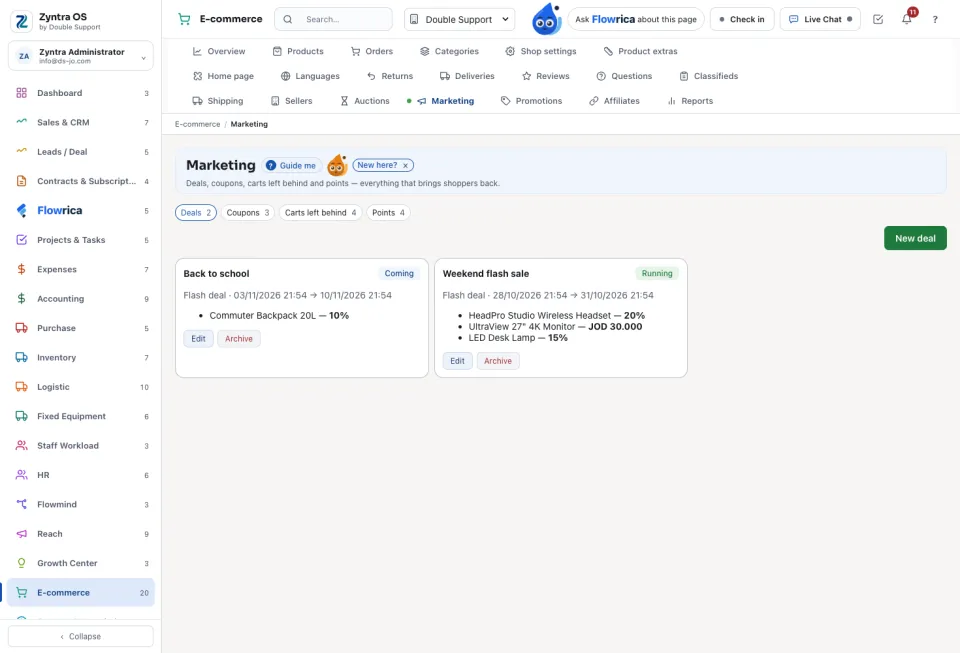
Four tabs. Deals: New deal makes a Flash deal or Today's deal with its dates; it is Coming, Running or Ended. Coupons: New coupon On the cart, On products, or Welcome (first order). Carts left behind: a shopper who did not finish; Make it a lead now hands him to the sales team. Points: Add or take points on a shopper's account.
Promotions, affiliates, auctions and classifieds
Promotions holds Category discounts, Campaigns (New campaign) and the Newsletter. Affiliates are people who send shoppers for a share: Approve or Refuse those asking, and save each one's share. Auctions: New auction, then Start the auction; the winner gets a sales order and an invoice. Classifieds: New package sells listing packages, and Put on the shop approves a listing.
Sellers
Turn it on in Shop settings with Sellers can sell on this shop. Each seller is a Zyntra vendor. Press New seller, or answer those who apply: Approve, Suspend or Refuse. A seller's page shows Its products, Payouts and Earnings; pay what is due with Pay. Log in as this seller shows his side as he sees it.
Questions
Where is “Shop marketing and sellers” in Zyntra OS?
E-commerce › Marketing · Promotions · Affiliates · Auctions · Classifieds · Sellers
Who can use “Shop marketing and sellers”?
E-commerce Marketing (view or manage); E-commerce Sellers for sellers.