

 Zyntra OS
 Zyntra Legal
 Zyntra Real Estate
 Zyntra Hotel
 Zyntra E-commerce
 Zyntra Appointments
 Zyntra Repair
 Zyntra Garage
 Zyntra Concierge
 Zyntra Contracting
 Zyntra Clinic
 Zyntra Call Center
 Zyntra OTA
Where
E-commerce › OverviewWho
E-commerce Reports — View for the dashboard.Switch it on and open the shop
1
The super administrator opens Setup › Modules and presses Switch on on the E-commerce row. The product is then named Zyntra E-commerce.
2
Open Shop settings. Under Your shop on the web give the Address on this server, then fill the Shop name, Currency and whether Cash on delivery is offered.
3
Add at least one shipping zone (see Shop setup and reports) and publish your products.
4
Tick The shop is open to shoppers and press Save settings. Until then, shoppers read that the shop is closed for now.
To use the company's own domain, write it under Your domain and point it at the address shown, at the domain's provider.
Read the dashboard
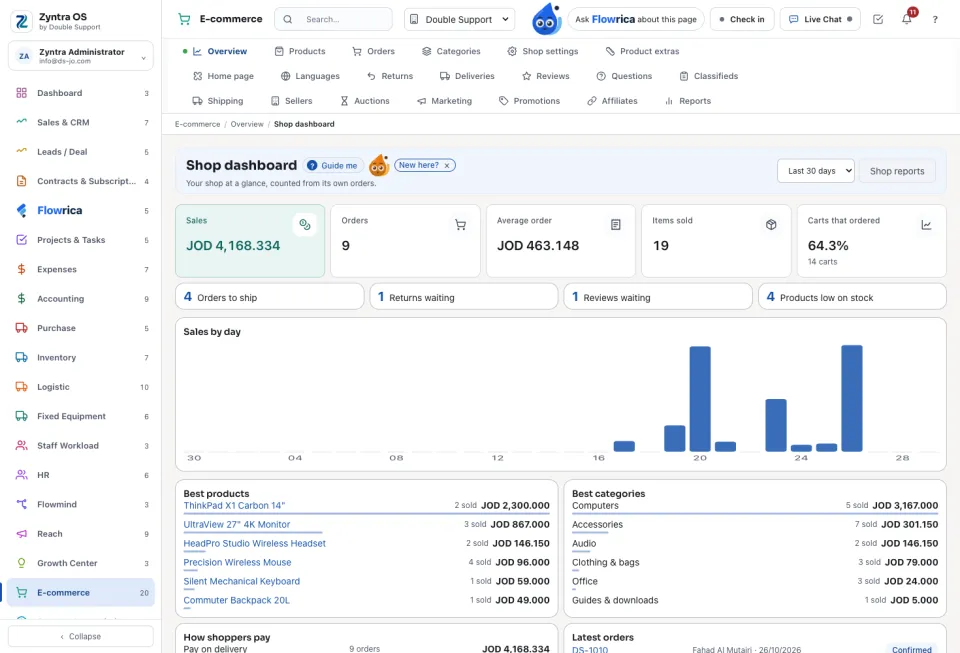
Choose the Period. The figures count Sales, Orders, Average order, Items sold, Carts that ordered, Orders to ship, Returns waiting, Reviews waiting and Products low on stock. Below them: Sales by day, Best products, Best categories, How shoppers pay, Orders by status and Latest orders. Each figure opens its own list.
Who may do what
| Right | What it allows |
|---|---|
| E-commerce Products | View, create, edit and delete products, categories, extras, reviews and questions. |
| E-commerce Orders | View and edit orders and returns; Refund to refund. |
| E-commerce Marketing | View or manage deals, coupons, campaigns, affiliates and auctions. |
| E-commerce Sellers | View, manage and pay the sellers of a marketplace. |
| E-commerce Deliveries | View, deliver and assign deliveries. |
| E-commerce Reports | The dashboard and the reports. |
| E-commerce Settings | Manage: shop settings, shipping, home page and languages. |
What Flowrica does here
Ask Flowrica for Today's shop orders or Which shop products are low on stock? Her Refund a shop order asks which order and why, then fills the refund: the whole order is credited by a credit note. You can undo it for a minute.
Questions
Where is “Your online shop” in Zyntra OS?
E-commerce › Overview
Who can use “Your online shop”?
E-commerce Reports — View for the dashboard.