

 Zyntra OS
 Zyntra Legal
 Zyntra Real Estate
 Zyntra Hotel
 Zyntra E-commerce
 Zyntra Appointments
 Zyntra Repair
 Zyntra Garage
 Zyntra Concierge
 Zyntra Contracting
 Zyntra Clinic
 Zyntra Call Center
 Zyntra OTA
Where
Dashboard › OverviewWho
Everyone; each card shows only what you may see.Read it from the top down:
| Part | What you do with it |
|---|---|
| The morning card | Flowrica greets you and lists what needs you today, for example invoices or tasks past their due date. Each line has its own button: See them opens the list, Open it opens the record, and a button such as Send the reminders or Raise follow-up tasks starts the work with her. Hide for today puts the card away until tomorrow. |
| The approvals card | Requests waiting for your decision, such as a leave request or additional hours. Read the line and press Approve or Reject without leaving the dashboard. |
| The four figures | Converted Leads, Projects In Progress, Tasks Not Finished and Invoices Awaiting Payment. Press a figure to open its list. |
| Quick actions | Start a record in one press: New Lead, New Invoice, New Task, New Project, New Expense, New Goal. |
| The part cards | One card for each part of the system you use, such as Sales & CRM, Contracts & Subscriptions, Projects & Tasks, Expenses and Staff Workload. Beside a money figure, Why? lets Flowrica explain what the figure is made of. |
| Everything else you can open | Links to the other screens you are allowed to open. |
| Needs Attention | The top risks from every part, most urgent first. Press a line to open what is behind it. |
| My goals, Live Activity | Your goals with how far each has come, and what customers did with the documents you sent them, newest first. |
| Manager’s Daily Digest | Choose an hour and press Save to get a short email each morning; Preview email shows it first. |
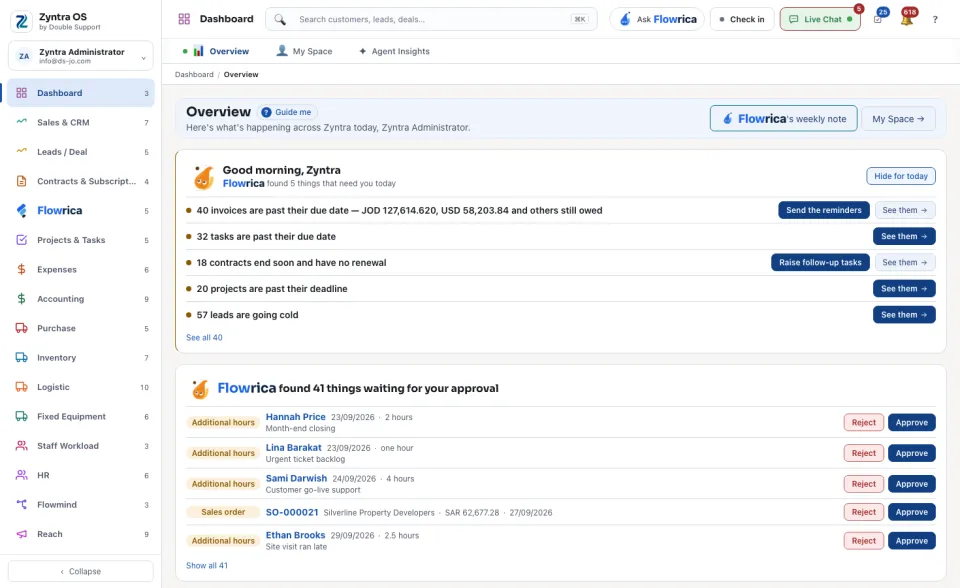
At the top of the screen, Flowrica's weekly note opens her summary of the week, and My Space → opens your own work: see My Space.