

 Zyntra OS
 Zyntra Legal
 Zyntra Real Estate
 Zyntra Hotel
 Zyntra E-commerce
 Zyntra Appointments
 Zyntra Repair
 Zyntra Garage
 Zyntra Concierge
 Zyntra Contracting
 Zyntra Clinic
 Zyntra Call Center
 Zyntra OTA
Where
Flowmind › Rules › + Add ruleWho
Anyone allowed to create rules, for the actions they could do themselves.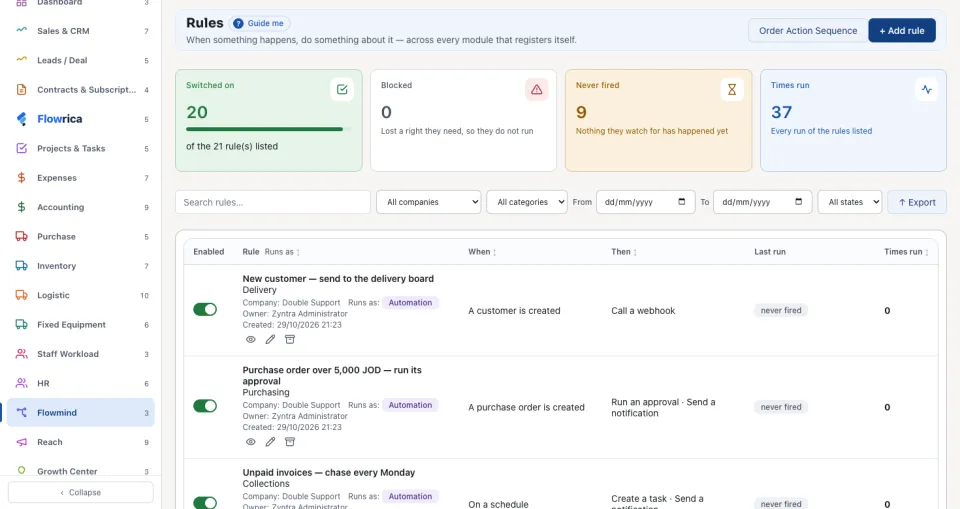
Sales
| Rule | When | Where | Then |
|---|---|---|---|
| Deal won — welcome the customer and brief delivery | Deals · Deal: A deal is won | Value is greater than or equal to 1000 | Create a task Book the kick-off call with the customer · Send a notification to the deal's owner, and also the general manager, the project manager and the accountant · Create a reminder in 7 days: Ask the customer how the first week went |
| New lead — tell sales | Leads · Lead: A lead is created | — | Send a notification to a salesperson by name; tick more under Also notify to tell the whole team |
HR
| Rule | When | Where | Then |
|---|---|---|---|
| Leave request — remind the approver after one day | Timesheets & Leave · Leave request: Leave is requested | — | Send a notification to the HR officer · Wait for Leave is approved, up to 1440 minutes · if Timed out: Remind the approver of a waiting leave request |
| New candidate — screen the CV within two days | Recruitment · Candidate: A candidate is added | — | Create a task Screen this candidate's CV within two working days |
Support
| Rule | When | Where | Then |
|---|---|---|---|
| New ticket — escalate when nobody replies within an hour | Support · Ticket: A ticket is opened | — | Assign somebody: the support team lead · Wait for A ticket is replied to, up to 60 minutes · if Timed out: Send a notification to the support lead, the general manager and one agent, and Create a note or comment on the ticket |
| Ticket missed its promise — tell the support lead | Support · Ticket: A ticket misses its response or resolution time | — | Send a notification to the support lead |
Accounting and purchasing
| Rule | When | Where | Then |
|---|---|---|---|
| Unpaid invoices — chase every Monday | Invoices · Invoice: On a schedule, Every week, Monday, at 9 | Amount due is greater than 0 | Create a task Call the customer about this unpaid invoice · Send a notification to the two accountants |
| Purchase order over 5,000 JOD — run its approval | Purchase · Purchase order: A purchase order is created | Total is greater than 5000 | Run an approval · Send a notification to the accountant and the general manager |
| New customer — send to the delivery board | Customers · Customer: A customer is created | — | Call a webhook with the customer's name and phone |
Each of these is saved switched off; try it first as in Try a rule, then switch it on.
Questions
Where is “Example rules for each department” in Zyntra OS?
Flowmind › Rules › + Add rule
Who can use “Example rules for each department”?
Anyone allowed to create rules, for the actions they could do themselves.