

 Zyntra OS
 Zyntra Legal
 Zyntra Real Estate
 Zyntra Hotel
 Zyntra E-commerce
 Zyntra Appointments
 Zyntra Repair
 Zyntra Garage
 Zyntra Concierge
 Zyntra Contracting
 Zyntra Clinic
 Zyntra Dental
 Zyntra School
 Zyntra University
 Zyntra Social
 Zyntra Call Center
 Zyntra OTA
Where
Statement matching › Compare two filesWho
People whose role holds Statement matching — Compare two files, while your company has the module Statement matching (System › Setup › Modules).This page is for books kept in another program. Inside Zyntra the same comparison sits on a vendor’s page (Vendors), a customer’s Statement (Customers) and an account’s register (Registers), against the books themselves.
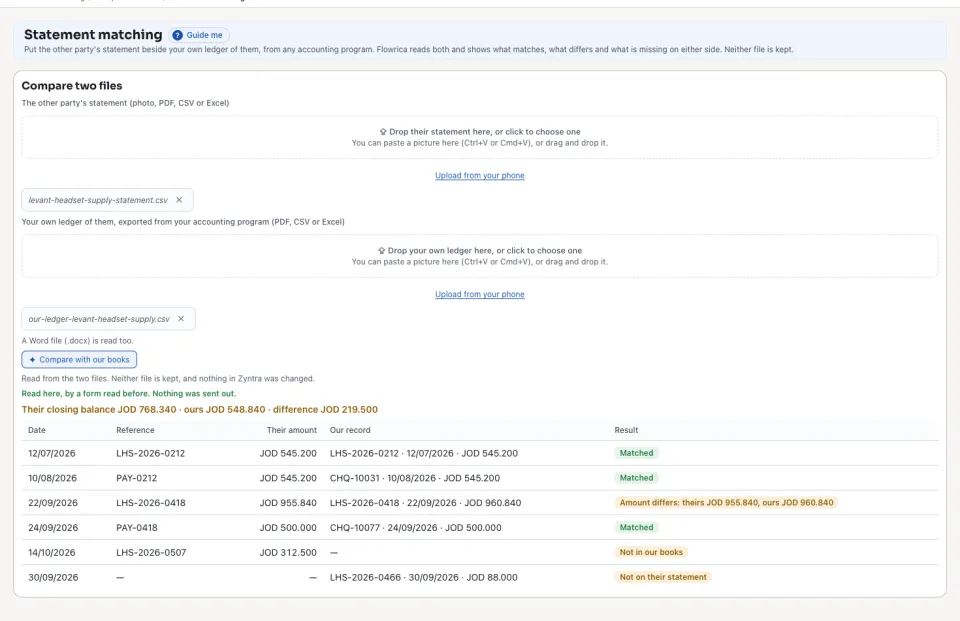
It does not matter which side each file prints a line on: their statement is read both ways round and the way that meets more of your lines is kept. Each row shows the same results as a vendor’s comparison: Matched, Amount differs, Not in our books, Not on their statement and Twice on their statement. A payment of theirs and one of yours within 7 days with different amounts show as one row, Amount differs.
Questions
Where is “Statement matching” in Zyntra OS?
Statement matching › Compare two files
Who can use “Statement matching”?
People whose role holds Statement matching — Compare two files, while your company has the module Statement matching (System › Setup › Modules).