

 Zyntra OS
 Zyntra Legal
 Zyntra Real Estate
 Zyntra Hotel
 Zyntra E-commerce
 Zyntra Appointments
 Zyntra Repair
 Zyntra Garage
 Zyntra Concierge
 Zyntra Contracting
 Zyntra Clinic
 Zyntra Call Center
 Zyntra OTA
Where
Fixed Equipment › Items › DepreciationsWho
Anyone allowed to see depreciation; preparing and confirming need their own rights.1
The screen lists the months that are due and not confirmed yet. Press Prepare with the month’s name beside it: it is always the oldest month still due.
2
The run appears in the list with its Period, its State and its Total. Press Open under Run sheet.
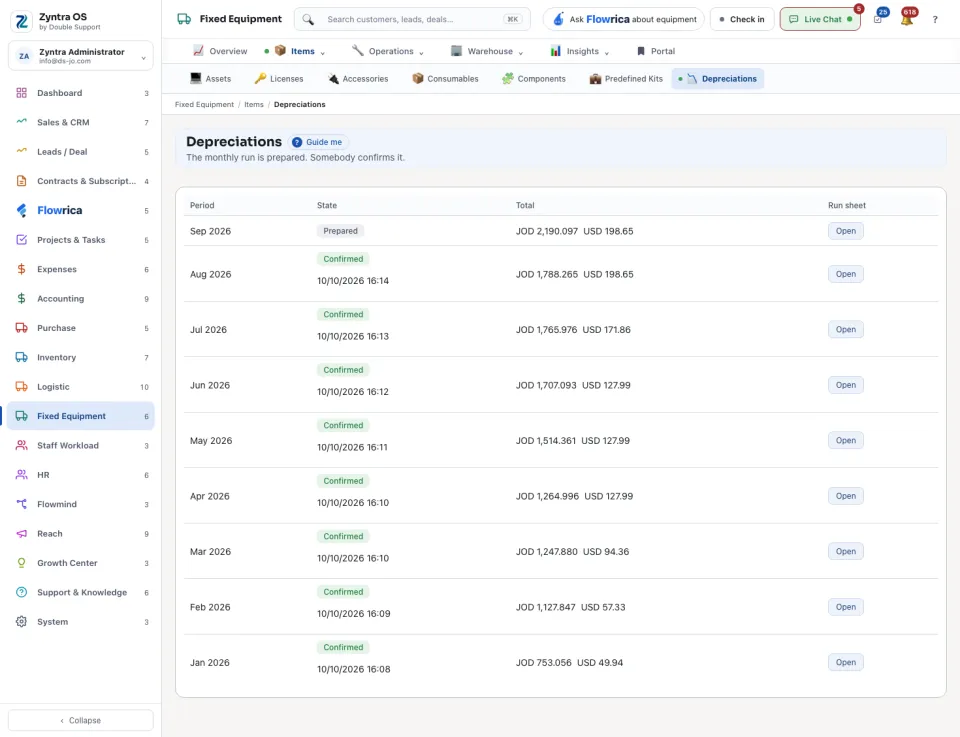
3
Check the sheet: each item with its Method, its Amount and How it was worked out, and a total per currency. If something on an asset was wrong, correct the asset and press Prepare again.
4
Press Confirm. Nothing is posted before that.
Months are prepared and confirmed in order, oldest first. An asset joins a run only when it has a purchase cost, a depreciation method and a useful life: its Depreciation tab says what is missing. Amounts in different currencies are never added together.