

 Zyntra OS
 Zyntra Legal
 Zyntra Real Estate
 Zyntra Hotel
 Zyntra E-commerce
 Zyntra Appointments
 Zyntra Repair
 Zyntra Garage
 Zyntra Concierge
 Zyntra Contracting
 Zyntra Clinic
 Zyntra Call Center
 Zyntra OTA
Where
Flowmind › Rules and Flowmind › HistoriesWho
Anyone allowed to create rules and switch them on.1
Build the rule with Private ticked on its Rule tab. Only you see it, and only what you do starts it, so nobody else's work sets it off while you try it.
2
Press Create rule; a new rule is saved switched off. Switch it on with the switch at the start of its row.
3
Do the thing it watches for yourself, on a record of the rule's company: open a ticket, win a deal, request a leave.
4
Open the rule and its Runs tab: each run and how it ended, such as Done, Conditions not met, Refused or Waiting.
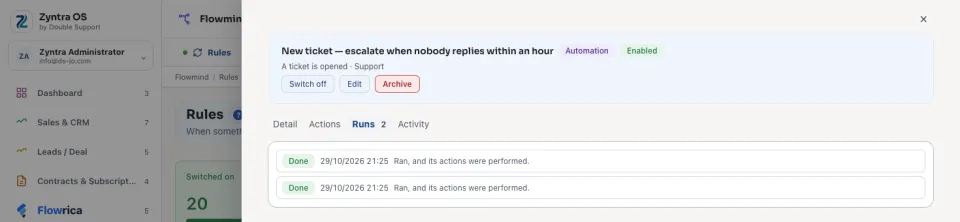
5
For the detail, open Flowmind › Histories, choose the rule, and press Show the steps on the run: each condition with the value it found and whether it was met, and each action with what it did or why it stopped. Tick Show checks that did nothing to see also the times the rule looked and found nothing to do.
6
Change what needs changing with Edit, and try again.
7
When it does what you meant, press Edit, untick Private and press Save. From now on it acts on what everyone in the company does.
A rule with a Delay or a Wait for shows its run as Waiting, with the time it will carry on. To try such a rule quickly, give the delay or the wait a few minutes while you try it, then set the real time.
A private rule on a schedule runs for its owner. Whatever a rule writes on a record says which rule wrote it, so a change made while trying is easy to find.
Questions
Where is “Try a rule before your team relies on it” in Zyntra OS?
Flowmind › Rules and Flowmind › Histories
Who can use “Try a rule before your team relies on it”?
Anyone allowed to create rules and switch them on.