

 Zyntra OS
 Zyntra Legal
 Zyntra Real Estate
 Zyntra Hotel
 Zyntra E-commerce
 Zyntra Appointments
 Zyntra Repair
 Zyntra Garage
 Zyntra Concierge
 Zyntra Contracting
 Zyntra Clinic
 Zyntra Call Center
 Zyntra OTA
Who
Whoever changes roles.On the Roles screen, choose the role and type Flowmind in the filter. The Flowmind row has the columns View all, View, Create and Edit, and under More the rights of its own:
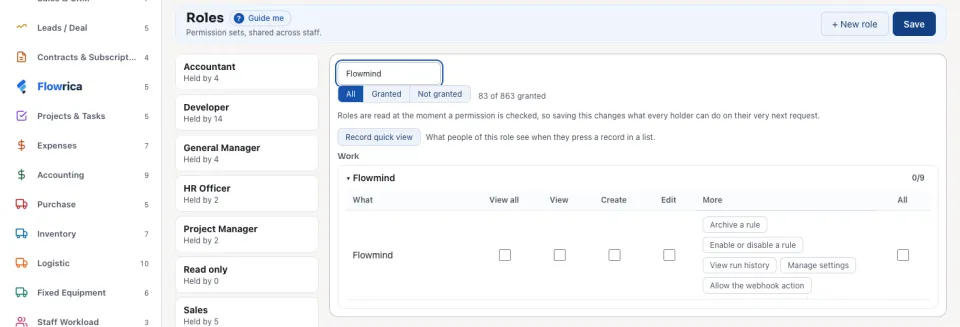
| Right | What it lets a person do |
|---|---|
| View | See the Rules list, a rule, and its runs. |
| View all | See also the private rules of other people. |
| View run history | Open Flowmind › Histories, every rule's runs in one list. |
| Create | Press + Add rule, and save a new rule (always switched off). |
| Edit | Change a rule, and set Order Action Sequence. The categories are shared by every company, so adding or changing one also needs someone who works in every company. |
| Enable or disable a rule | Switch a rule on or off. |
| Archive a rule | Archive a rule and bring it back. Its history is kept. |
| Manage settings | Change the task templates and the safety limits in Flowmind settings. |
| Allow the webhook action | Write a Call a webhook step. |
A rule runs as Automation, inside its author's rights
Every rule runs as Automation, and whatever it writes says which rule wrote it. When a rule is saved, it is refused if it would do something its author cannot do, with the right that is missing. An edited rule acts no wider than the person who last edited it.
When it runs, a rule acts only on records of its own company that its author may see, and changes only those its author may change. A step that would reach further is refused, and the run says why.
Blocked rules
If the author later loses a right the rule needs, or no longer works in the rule's company, the rule is Blocked: it stops before it acts, and its row names what it lost. It does not run with less, and it does not fail in silence. It runs again once somebody who holds that right saves it. The Blocked card on the Rules list counts these rules.
The module itself
Flowmind is a module: the super administrator switches it on or off for the system on Modules.
Questions
Where is “Who may do what in Flowmind” in Zyntra OS?
System › Setup › People › Roles, under Flowmind (see Roles)
Who can use “Who may do what in Flowmind”?
Whoever changes roles.