

 Zyntra OS
 Zyntra Legal
 Zyntra Real Estate
 Zyntra Hotel
 Zyntra E-commerce
 Zyntra Appointments
 Zyntra Repair
 Zyntra Garage
 Zyntra Concierge
 Zyntra Contracting
 Zyntra Clinic
 Zyntra Call Center
 Zyntra OTA
Where
Flowmind › Rules › a rule › Edit › ThenWho
Anyone allowed to create or edit rules, on a record they may see.Send a notification
1
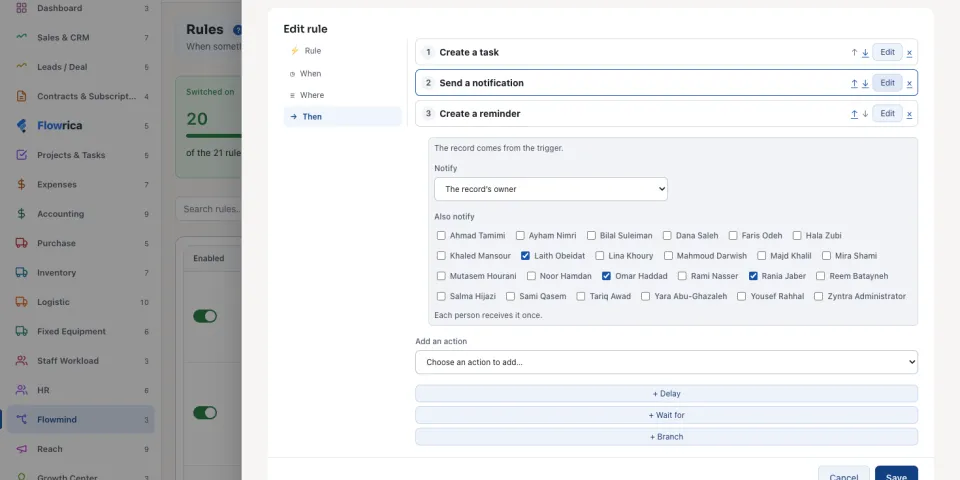
On Then, choose Send a notification from Add an action, or press Edit on the step.
2
Under Notify, choose who receives it: The record’s owner, one colleague by name, or Only the people chosen below.
3
Under Also notify, tick everyone else who should know. Each person receives it once, even when the owner is ticked too.
Send an email
1
Choose Send an email. Pick the Email template; a new rule's email starts on Flowmind's own notice. If you may edit email templates, New email template adds one here, and System › Setup › Email templates lists it with the others, where it can also be written in Arabic.
2
Under Send to, choose The record’s customer contact, The candidate (on a candidate), The record’s owner, a colleague by name, or An address that you type.
3
Write a Message (optional). It is carried inside the email, and a field of the record can be written in braces, such as {name}.
4
Under Also send to, tick the colleagues who should have a copy. Each person receives it once.
Who can be chosen, and what they read
The people offered are the people of the rule's company. When a notification goes to several people, the run names everyone it reached and, apart, anyone it did not: a person who no longer works in that company, or who has switched this notification off. An email typed to the address of a colleague who no longer works in the company is not sent, and the run says why.
An email carries only what each person may read: a figure that a colleague has no right to see (an amount, a salary) is left empty in their copy. Every notice and email the rule sends is written in the run's history, with the names it reached: see Flowmind histories.
Questions
Where is “Tell several people: notifications and emails” in Zyntra OS?
Flowmind › Rules › a rule › Edit › Then
Who can use “Tell several people: notifications and emails”?
Anyone allowed to create or edit rules, on a record they may see.