Zyntra OS
 Zyntra Legal
 Zyntra Real Estate
 Zyntra Hotel
 Zyntra E-commerce
 Zyntra Appointments
 Zyntra Repair
 Zyntra Garage
 Zyntra Concierge
 Zyntra Contracting
 Zyntra Clinic
 Zyntra Call Center
 Zyntra OTA
Where
Flowmind › HistoriesWho
Anyone allowed to manage automations.1
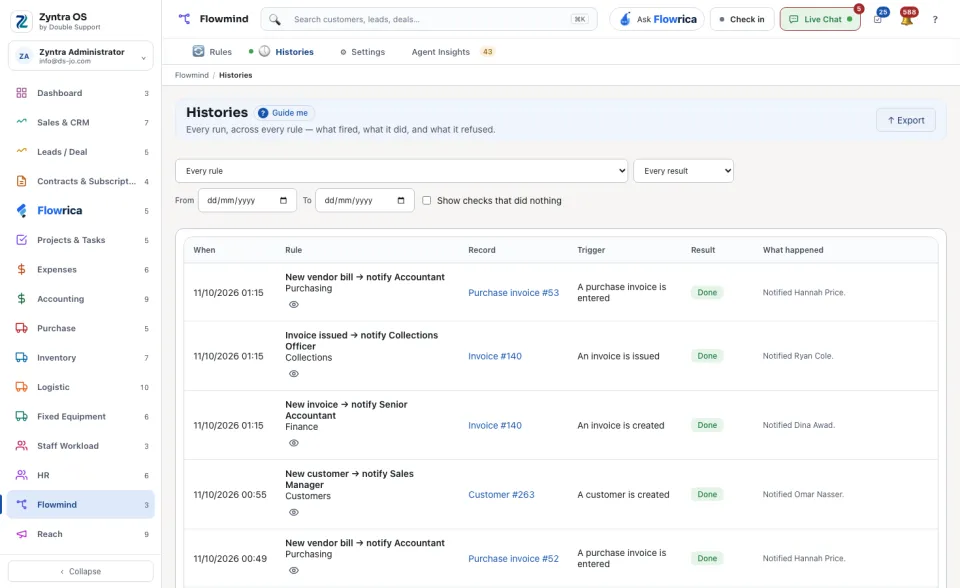
Narrow the list: choose one rule in place of Every rule, one result in place of Every result, and the dates From and To. Tick Show checks that did nothing to see also the times a rule looked and found nothing to do.
2
Read a row: When it ran, the Rule, the Record it ran on, the Trigger that set it off, and the Result, such as Conditions not met, Refused or Failed, with What happened in words.
3
Press Show the steps on a row to see each step of the rule and how it ended. Export saves the rows shown.
Until a rule has run, the screen says that no rule has run yet.