

 Zyntra OS
 Zyntra Legal
 Zyntra Real Estate
 Zyntra Hotel
 Zyntra E-commerce
 Zyntra Appointments
 Zyntra Repair
 Zyntra Garage
 Zyntra Concierge
 Zyntra Contracting
 Zyntra Clinic
 Zyntra Call Center
 Zyntra OTA
Where
Reach › Campaigns › a campaign › WorkflowWho
Anyone allowed to edit Reach campaigns. Opening the builder needs the right to view automations.1
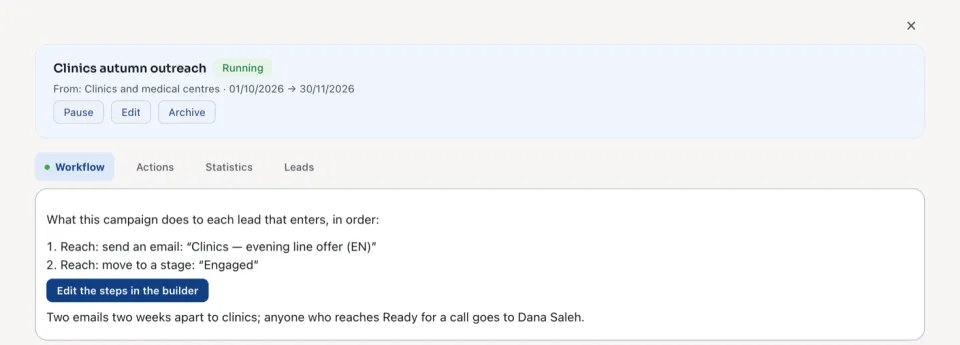
Open the campaign. Its Workflow tab says what the campaign does to each lead that enters, in order.
2
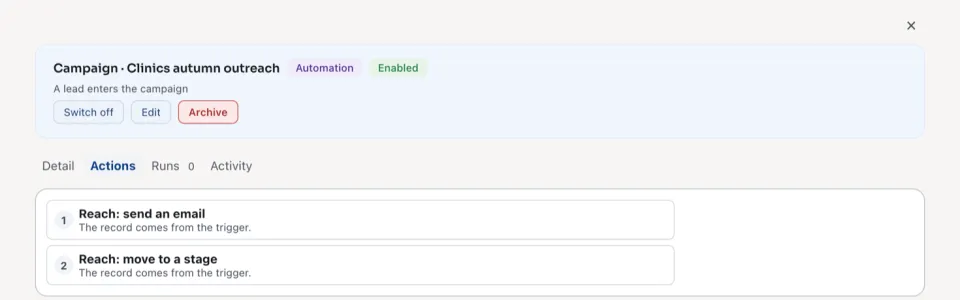
Press Edit the steps in the builder. The campaign's rule opens in Flowmind. Its trigger is A lead enters the campaign, and its condition keeps it to this campaign.
3
Press Edit, add the steps the campaign takes, and save the rule. See Flowmind for the builder itself.
4
Back in Reach, the Workflow tab lists the new steps.
| Step | What it does to the lead |
|---|---|
| Reach: send an email | Sends one of your Reach emails. See Write a Reach email. |
| Reach: send an SMS | Sends one of your text messages. |
| Reach: send a WhatsApp message | Sends one of your WhatsApp messages. |
| Reach: put on the call list | Puts the lead on the call list with one of your calls. |
| Reach: award points | Gives the points of a point action, or a number of points (a negative number takes them away), with a note. With Only when the lead earned no points for this many days it takes points from leads that have gone quiet. |
| Reach: move to a stage | Moves the lead to one of your stages. |
| A wait | Shown as Wait 2 days, or Wait for “…”, up to 3 days: then It happened or Timed out. |
| A check | Shown as Check 1 condition(s), then Yes or No. |
Publish, pause and archive
Publish asks Publish this campaign? and says how many leads now in the segment will enter it. Pause stops it taking leads; Enable again starts it again. Archive stops it at once and keeps every run, send and point it wrote; restoring it brings it back paused.
| State | What it means |
|---|---|
| Running | Leads that enter the segment go through it. |
| Scheduled | Its start date has not come yet. |
| Paused | It takes nobody until someone presses Enable again. |
| Ended | Its end date has passed. |
| Blocked | Nothing runs: its author no longer has a right it needs. It takes nobody until the author has that right back and someone presses Enable again. |
| Archived | Kept, with everything it did. |
What happened
| Tab | What it shows |
|---|---|
| Actions | What each step did, for this campaign only: Done, Refused, Nothing to change, Blocked, Waiting or Skipped. See every run opens the runs in Flowmind. See Flowmind histories. |
| Statistics | Leads entered, Sent, Not sent, Delivered, Read, Clicked and Reach points given. |
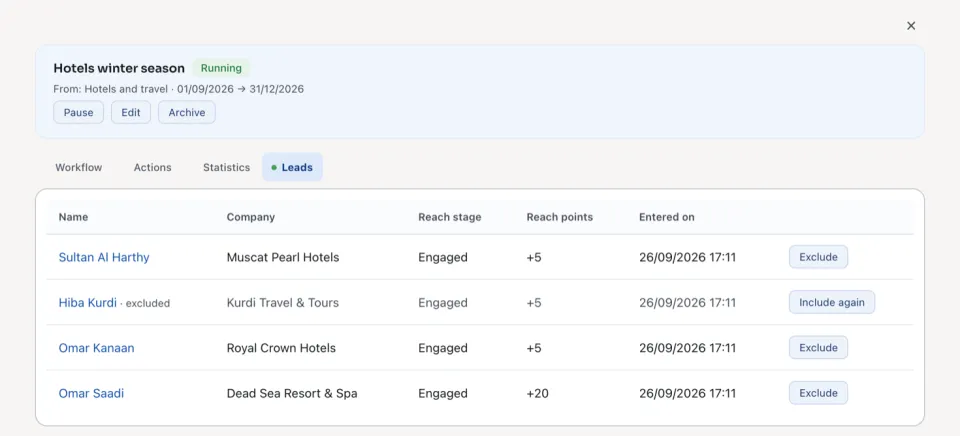
| Leads | Each lead that entered, with its Reach stage and points. Exclude takes a lead out; Include again brings it back. |
Questions
Where is “Build a campaign's steps” in Zyntra OS?
Reach › Campaigns › a campaign › Workflow
Who can use “Build a campaign's steps”?
Anyone allowed to edit Reach campaigns. Opening the builder needs the right to view automations.