Zyntra OS
 Zyntra Legal
 Zyntra Real Estate
 Zyntra Hotel
 Zyntra E-commerce
 Zyntra Appointments
 Zyntra Repair
 Zyntra Garage
 Zyntra Concierge
 Zyntra Contracting
 Zyntra Clinic
 Zyntra Call Center
 Zyntra OTA
Where
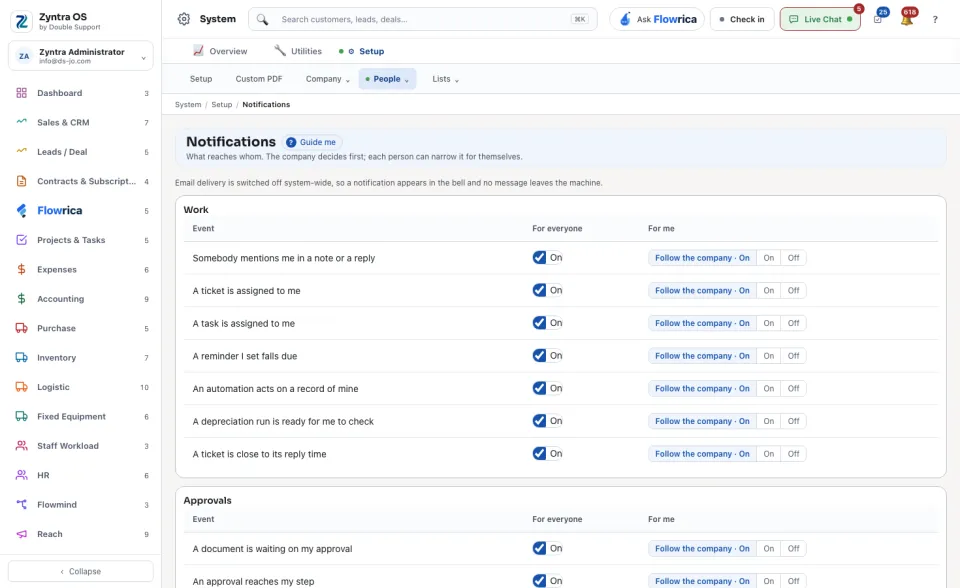
System › Setup › NotificationsWho
Everyone for their own column; the company column needs permission to edit settings.1
Find the event. Events stand in groups: Work, Approvals, Leave, Money, Mail and Other. An Event is one sentence, for example A task is assigned to me.
2
Under For everyone, an administrator switches the event on or off for the whole company.
3
Under For me, choose your own: On, Off, or Follow the company, which goes with whatever the company decides.
A notification appears in the bell at the top of the screen. The line at the top of this screen says whether notifications also go out by email.