

 Zyntra OS
 Zyntra Legal
 Zyntra Real Estate
 Zyntra Hotel
 Zyntra E-commerce
 Zyntra Appointments
 Zyntra Repair
 Zyntra Garage
 Zyntra Concierge
 Zyntra Contracting
 Zyntra Clinic
 Zyntra Call Center
 Zyntra OTA
Where
System › Setup › People › Roles › a roleWho
Anyone allowed to manage roles.| Part | Its rights |
|---|---|
| Reach Overview and Reports | View |
| Reach Segments | View · Create · Edit · Archive |
| Reach Components | View · Create · Edit · Archive |
| Reach Campaigns | View · Create · Edit · Publish · Archive |
| Reach Channels | View · Create · Edit · Archive · Send a test · Send to leads |
| Reach Points | View · Create · Edit · Archive |
| Reach Stages | View · Create · Edit · Archive |
| Reach Settings | View · Edit |
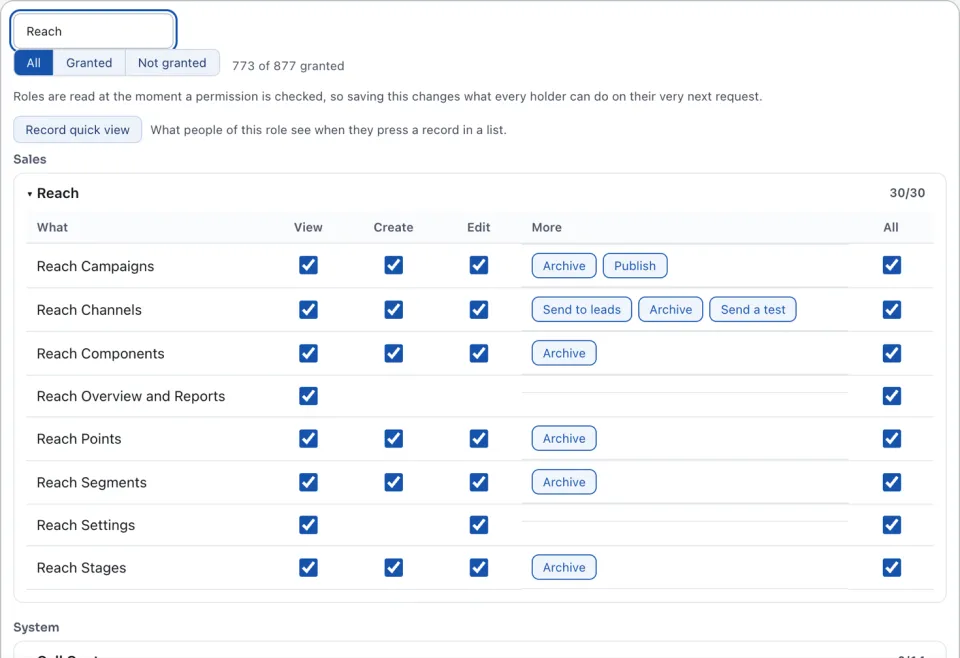
Opening a campaign's builder also needs the right to view automations. A campaign works as its author: when the author loses a right it needs, the campaign is Blocked until the right is back. See Build a campaign's steps.
Reach's counts and lists hold only the leads the reader can see: for example Counted over the leads you can see. See Roles for giving a role its rights.
Questions
Where is “Who may do what in Reach” in Zyntra OS?
System › Setup › People › Roles › a role
Who can use “Who may do what in Reach”?
Anyone allowed to manage roles.