

 Zyntra OS
 Zyntra Legal
 Zyntra Real Estate
 Zyntra Hotel
 Zyntra E-commerce
 Zyntra Appointments
 Zyntra Repair
 Zyntra Garage
 Zyntra Concierge
 Zyntra Contracting
 Zyntra Clinic
 Zyntra Dental
 Zyntra School
 Zyntra University
 Zyntra Call Center
 Zyntra OTA
Where
Flowrica › Collection autopilotWho
Whoever may send invoices and use Flowrica. The reminders go in the name of the person who saved the rule, to the invoices that person may see.1
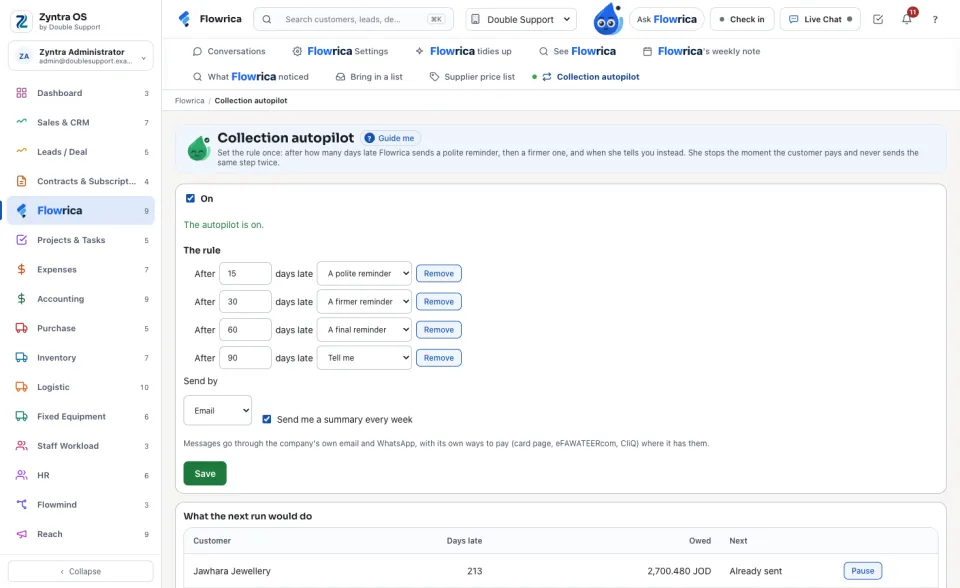
Open Collection autopilot. Under The rule, give each step its days late and what to do: A polite reminder, A firmer reminder, A final reminder or Tell me.
2
Choose Send by, email or WhatsApp, tick On and press Save. Each reminder carries the company's own ways to pay where it has them: the card pay page, the eFAWATEERcom bill and the CliQ alias.
3
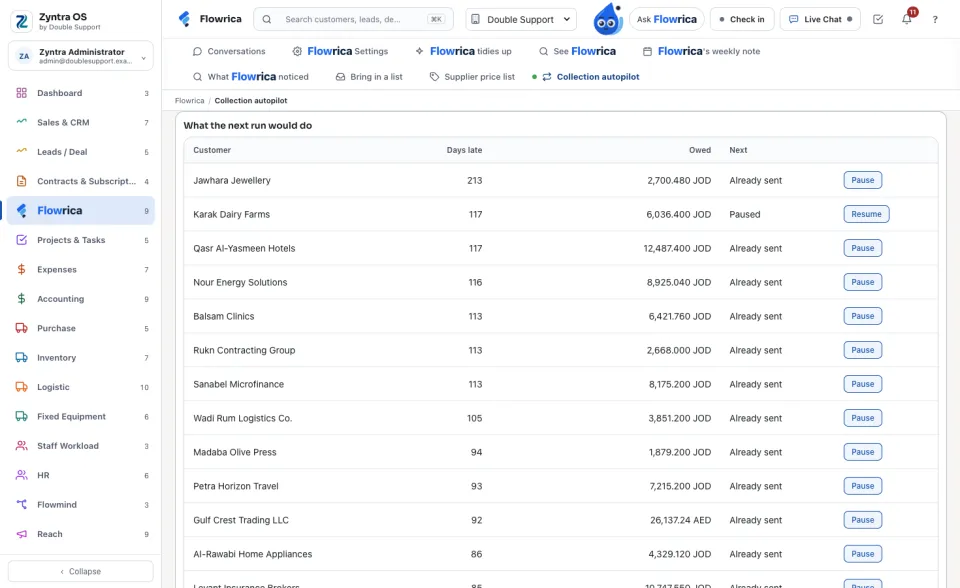
What the next run would do lists each late customer, its days late and its next step. Press Pause beside a customer you are already talking to; Resume puts it back.
4
The last messages shows what was sent, to whom and by what. Once a week the bell brings you a summary: how many reminders went, how many were left to you and how many customers paid.
A WhatsApp message reaches a customer only when that customer wrote to the company on WhatsApp in the last 24 hours; otherwise it is kept as not sent, with the reason.
Questions
Where is “Collection autopilot” in Zyntra OS?
Flowrica › Collection autopilot
Who can use “Collection autopilot”?
Whoever may send invoices and use Flowrica. The reminders go in the name of the person who saved the rule, to the invoices that person may see.