

 Zyntra OS
 Zyntra Legal
 Zyntra Real Estate
 Zyntra Hotel
 Zyntra E-commerce
 Zyntra Appointments
 Zyntra Repair
 Zyntra Garage
 Zyntra Concierge
 Zyntra Contracting
 Zyntra Clinic
 Zyntra Dental
 Zyntra School
 Zyntra University
 Zyntra Call Center
 Zyntra OTA
Where
Waiting for my approval · the card on the Dashboard and My Space · Waiting for my approval in the Flowrica app1
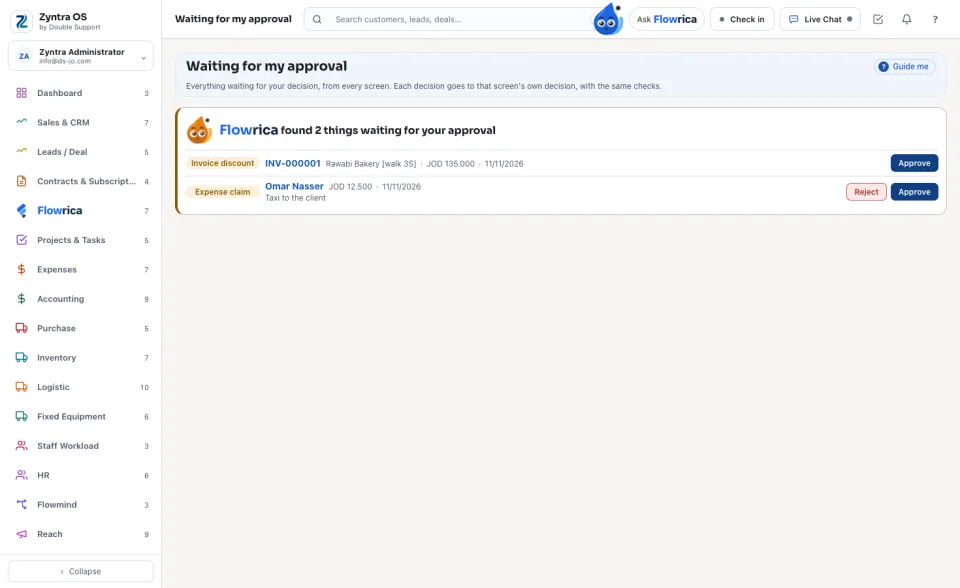
Open Waiting for my approval. Each row says its kind, who or what it is, the amount and the days. Press its name to open the record.
2
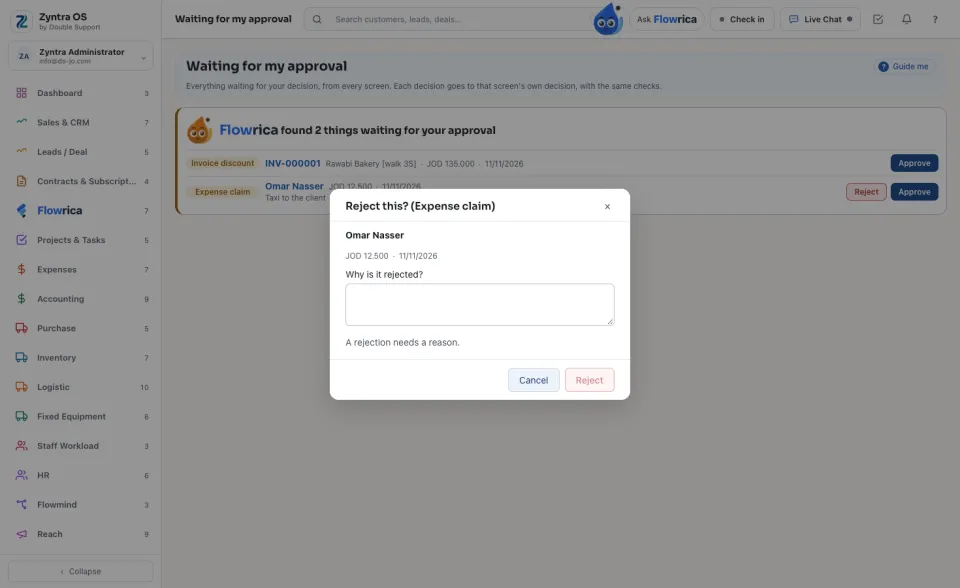
Press Approve, or Reject. Where the screen asks why, a rejection asks for the reason; the person reads it. An invoice's discount has no Reject: open the invoice and change it instead.
3
In the Flowrica app, swipe a row toward the end of the line to approve it and back toward its start to refuse it, or press its buttons. A step that needs your drawn signature opens on its own screen.
Your own requests are never in your list. A decision has no Undo: it is the screen's own decision.