Zyntra OS
 Zyntra Legal
 Zyntra Real Estate
 Zyntra Hotel
 Zyntra E-commerce
 Zyntra Appointments
 Zyntra Repair
 Zyntra Garage
 Zyntra Concierge
 Zyntra Contracting
 Zyntra Clinic
 Zyntra Call Center
 Zyntra OTA
Where
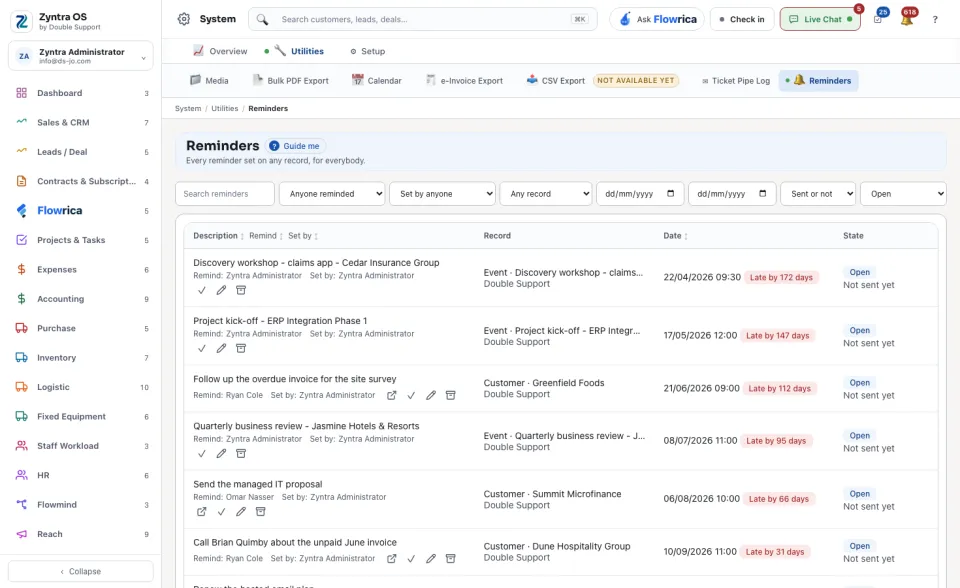
System › Utilities › RemindersWho
Anyone allowed to see this screen.1
Narrow the list with the two choices at the top: who is reminded, in place of Anyone reminded, and who set it, in place of Set by anyone.
2
Read a row: the Description, the Record it is set on, the Date, who it will Remind, who it was Set by, and its State. Press a column name to sort by it. Press the record to open it.
3
When the matter is dealt with, press the tick at the end of the row to mark the reminder done.
A reminder is set on the record itself, for example on a customer, an invoice or a lead. This screen is where you find them all again.