Zyntra OS
 Zyntra Legal
 Zyntra Real Estate
 Zyntra Hotel
 Zyntra E-commerce
 Zyntra Appointments
 Zyntra Repair
 Zyntra Garage
 Zyntra Concierge
 Zyntra Contracting
 Zyntra Clinic
 Zyntra Call Center
 Zyntra OTA
Where
Leads / Deal › Setup › Deal Conversion SettingsWho
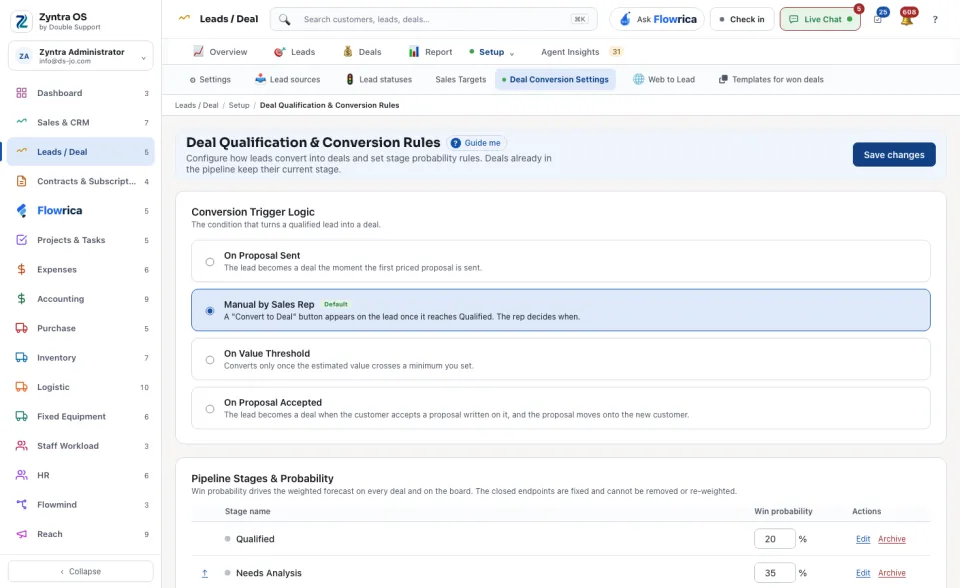
Anyone allowed to see this screen.Under Conversion Trigger Logic, choose the condition that turns a qualified lead into a deal. Under Pipeline Stages & Probability, set each stage’s win probability, Edit or Archive a stage, or + Add custom pipeline stage. Press Save changes. Deals already in the pipeline keep their current stage.
One trigger is in force at a time.
| Trigger | What it does |
|---|---|
| Manual by Sales Rep (the default) | Nothing converts by itself. A Convert to Deal button appears on the lead once it is qualified, and the person decides when. |
| On Proposal Sent | The lead becomes a deal the moment the first priced proposal written on it is sent. |
| On Proposal Accepted | The lead becomes a deal when the customer accepts a proposal written on it, and the proposal moves onto the new customer. |
| On Value Threshold | The lead converts only once its estimated value reaches a minimum you set, in the same currency as the minimum. |
What qualified means. A lead is qualified when its status is one that your lead statuses mark as qualified. With the three automatic triggers the lead converts whatever its status, and the lead’s activity says a rule converted it.
What a conversion makes. One deal, linked to a customer: a customer with the same company name is used if there is one, otherwise one is created. The lead is kept for history, marked as converted, with a link to its deal; it cannot be converted twice. The new deal enters the first stage of the pipeline and takes the lead’s estimated value.
What win probability does. Each stage’s percentage weights the deal’s value in the forecast: a 10,000 deal in a 40% stage counts 4,000. The weighted figures are on each deal and on the board. The two closed stages are Fixed: they cannot be removed or given another weight.