

 Zyntra OS
 Zyntra Legal
 Zyntra Real Estate
 Zyntra Hotel
 Zyntra E-commerce
 Zyntra Appointments
 Zyntra Repair
 Zyntra Garage
 Zyntra Concierge
 Zyntra Contracting
 Zyntra Clinic
 Zyntra Call Center
 Zyntra OTA
Where
Expenses › SettingsWho
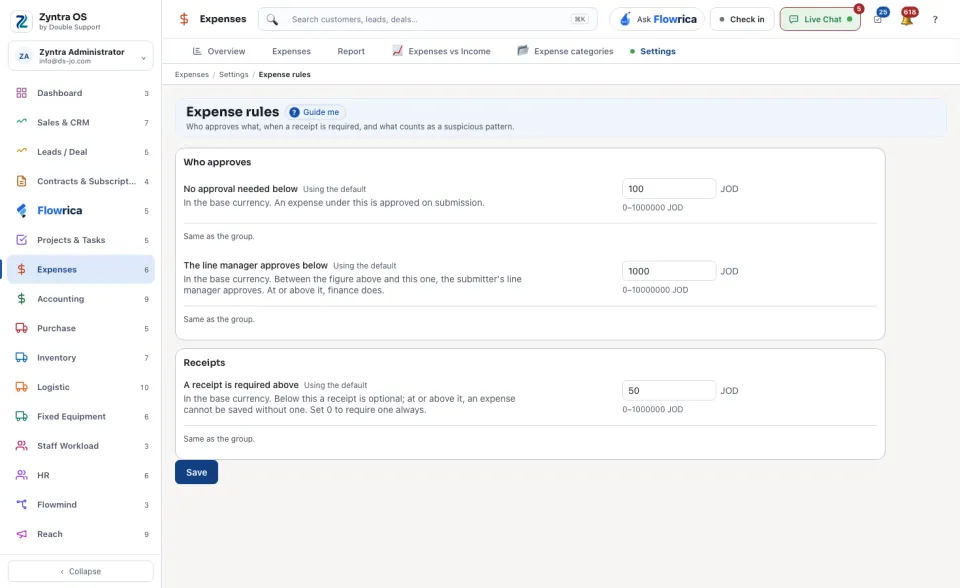
People whose role may see the settings.The values belong to every company, or to one: press Change company to give one company its own. Every other company keeps the group's values. While the screen shows one company's values it draws only the amounts a company may keep as its own, Who approves and Receipts, and says under each one whether it is the company's own or the same as the group's; the repeated-expenses rules are one for every company.
| Part | What you set |
|---|---|
| Repeated expenses | Switch on Watch for repeated expenses, then set Repeated expenses before blocking (how many in the same category, by the same person) and the Window for repeated expenses in days. The warning comes one before the limit. Categories exempt from the repeat rule and Roles exempt from the repeat rule leave out what is meant to be entered every day. |
| Who approves | No approval needed below an amount, and The line manager approves below a higher one. |
| Receipts | A receipt is required above an amount. |
| Other expense settings | The Hour of day to perform automatic operations, such as making the next copy of a repeating expense. |
Press Save.
When somebody reaches the repeated-expenses limit, the Expenses overview lists them under what needs attention, as warned or blocked. A blocked person cannot add any expense until their manager restores them there and gives a reason; the reason stays with it.